OAuth is Like a Power of Attorney: How Application Access Permissions, Scope, Access Token, and Refresh Token Work
By Tim APIPedia, Tim Engineering APIPedia · Published · Updated · 10 min read
OAuth is like a power of attorney: the app gets limited permissions to your account without holding the password. Understand scope, access tokens, and PKCE.
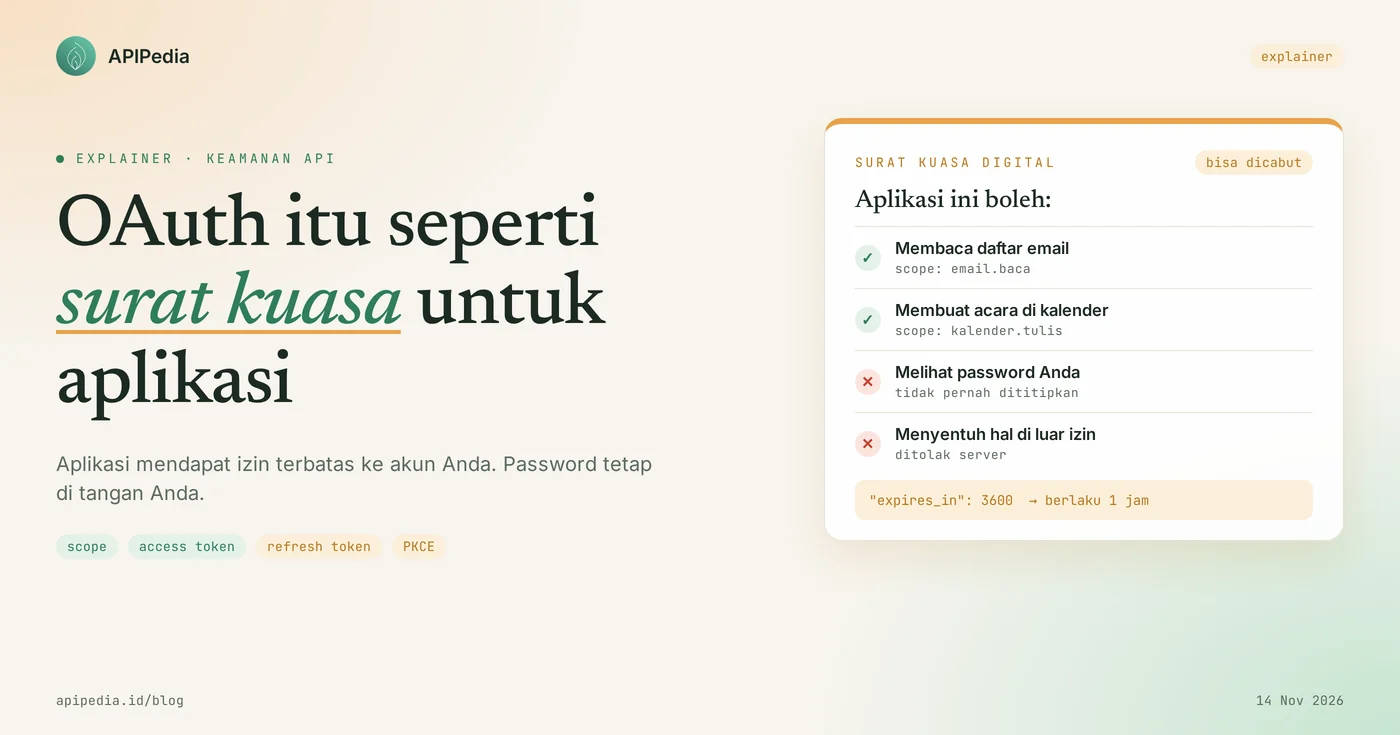
OAuth 2.0 is an authorization standard that allows an application to access your accounts on other services on a limited basis, without ever holding your password. The easiest analogy: OAuth is like a power of attorney. When you ask someone else to take care of the documents at the service office, you don't hand over your KTP, house key and ATM PIN at the same time. You write a power of attorney that states one matter, is valid until a certain date, and can be revoked.
Every time you press the “Continue with Google” or “Connect GitHub account” button, what's working behind it is OAuth. This article discusses who is involved, the six steps in the flow, the difference between access tokens and refresh tokens, the function of PKCE, as well as some misunderstandings that often arise among beginners.
Quick summary: what terms do you need to know?
There are eight terms that almost always come up when discussing OAuth, and all of them can be explained with a power of attorney.
| Term | It means | Power of attorney analogy |
|---|---|---|
| Resource owner | The account owner, namely you | Principal |
| Clients | Application requesting access | Endorsee |
| Authorization servers | The server that asks for your approval and issues the token | The official counter that validates the letter |
| Server resources | API where your data is stored | Officers who check letters before serving |
| Scope | List of requested permissions, for example only reading email | The sentence "specially to take care of..." |
| Authorization code | One-time temporary code to exchange for tokens | Queue number at the counter |
| Access tokens | Credentials sent in each request to the API | Power of attorney shown to the officer |
| Refresh tokens | Credentials to request a new access token | The right to extend the letter without calling you |
The four roles in the first row come directly from RFC 6749, the OAuth 2.0 standards document published in October 2012.
What is OAuth and what problems does it solve?
OAuth solves a long-standing problem: how to grant access to third-party applications without sharing passwords. Before OAuth became commonplace, applications that wanted to read your email contacts usually asked for your email address and password, then logged in as you.
The old method had three weaknesses. First, the application has full access, even though it only needs a contact list. Second, the only way to revoke access is to change the password, and that cuts off all other applications at once. Third, if the application is hacked, your original password will also be leaked.
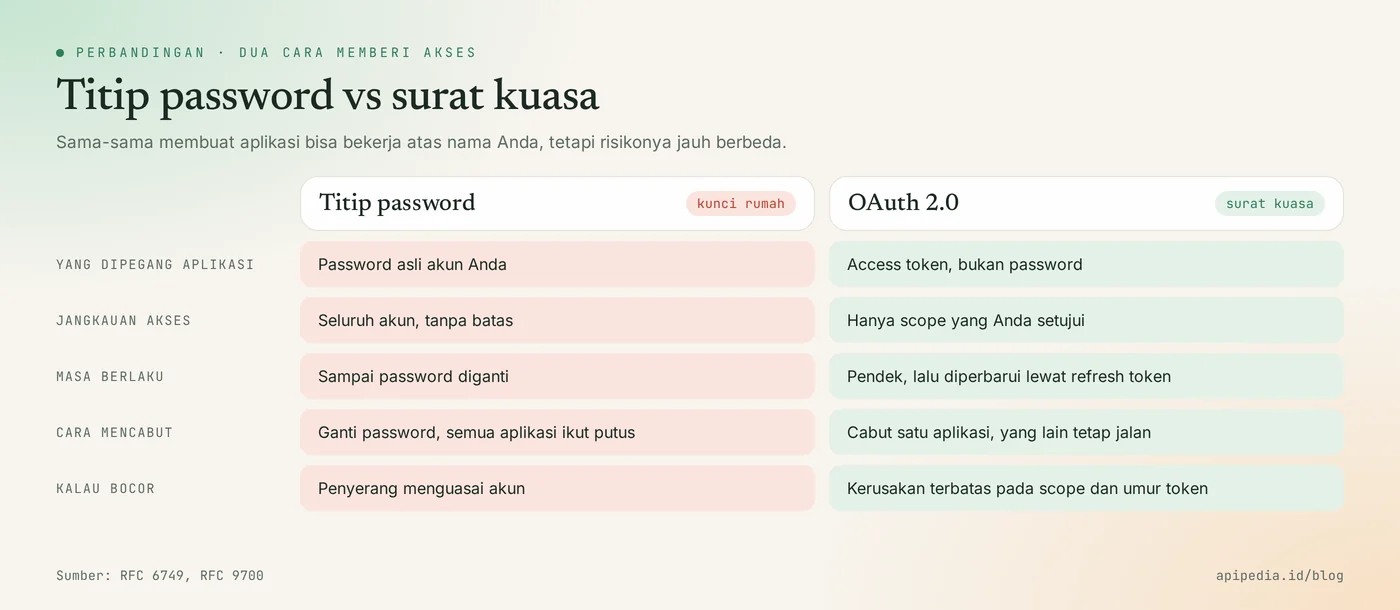
RFC 6749 formulates its purpose succinctly: OAuth allows third-party applications to gain limited access to an HTTP service. The key word is "limited".
How does OAuth work step by step?
The most common flow is called authorization code, and it consists of six steps: the application redirects you to an authorization server, you log in and agree there, and then the application exchanges the code it receives for an access token.
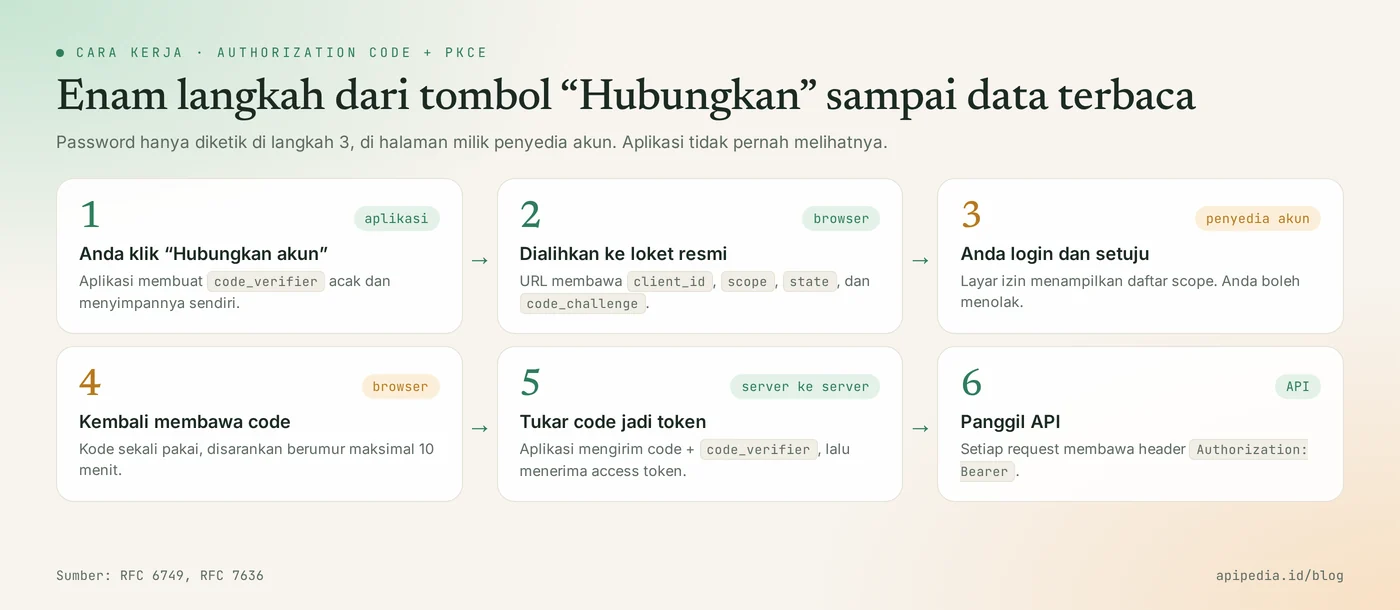
- You press the connect button. The application prepares a permission request.
- The browser is redirected to the authorization server. The URL contains
client_id(application identity),scope(requested permission),redirect_uri(return address), andstate(request forgery prevention random value). - You log in and agree. The password is typed on the account provider's page, not in the application. The permissions screen shows what is requested, and you can refuse.
- The browser returns to the application with an authorization code. This code must be short-lived. RFC 6749 recommends a maximum of 10 minutes and prohibits use more than once.
- The application exchanges codes for tokens. The exchange occurs directly between the application server and the authorization server, not via the browser.
- The application calls the API. Each request carries header
Authorization: Bearer <access_token>.
What does the URL look like in step 2?
A permission URL is just a regular address with a few parameters. The following Python script creates it, complete with the PKCE pairs discussed below. We have run this script in Python 3 without additional libraries, and function buat_pkce produces the same values as the official example in Appendix B of RFC 7636. The domain name and scope are just examples.
import base64, hashlib, secrets
from urllib.parse import urlencode

def buat_pkce():
    verifier = base64.urlsafe_b64encode(secrets.token_bytes(32)).rstrip(b"=").decode()
    digest = hashlib.sha256(verifier.encode("ascii")).digest()
    challenge = base64.urlsafe_b64encode(digest).rstrip(b"=").decode()
    return verifier, challenge

verifier, challenge = buat_pkce()   # verifier disimpan aplikasi, jangan dikirim dulu
state = secrets.token_urlsafe(16)   # dicocokkan lagi saat browser kembali

url = "https://auth.contoh.id/authorize?" + urlencode({
    "response_type": "code",
    "client_id": "aplikasi-saya",
    "redirect_uri": "https://aplikasi.contoh.id/callback",
    "scope": "email.baca kalender.tulis",
    "state": state,
    "code_challenge": challenge,
    "code_challenge_method": "S256",
})
print(url)
What is the difference between authorization code, access token, and refresh token?
The three have different tasks and different ages: the authorization code is only a one-time exchanger, the access token is used for every request, and the refresh token is used to request a new access token.
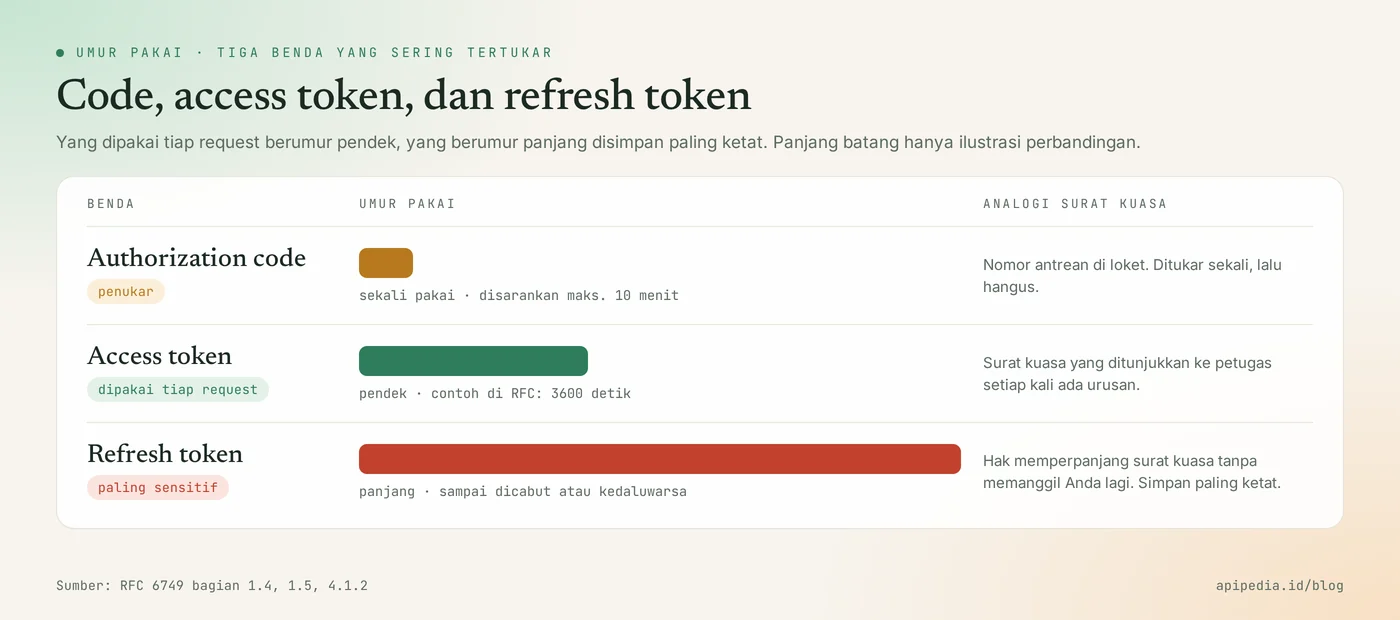
| Object | Sent to where | Age | If it leaks |
|---|---|---|---|
| Authorization code | Authorization server, one time | Very short, recommended maximum 10 minutes | Useless without code_verifier if PKCE is used |
| Access tokens | API, on every request | Short, provider determined | Can be used until it expires, limited to its scope |
| Refresh tokens | Authorization server only | Long, until revoked or expired | The most dangerous, because it can print new access tokens |
The lifetime of an access token is not specified by the standard. The example response in RFC 6749 uses "expires_in": 3600, meaning one hour, but each provider is free to choose the number. Therefore, read the value expires_in from the response and do not write a fixed number in the code.
What is the scope function in OAuth?
A scope is a list of permissions that limits what an application can do with its token. Tokens with the scope "read email" will be rejected by the API when used to send emails or delete files.
A good practice is to request as little scope as possible and request it when it is really needed. A cashier app that only needs to create an event on a calendar has no reason to ask for permission to read the entire inbox. For users, short permission screens are also easier to trust.
What is PKCE and why is it mandatory now?
PKCE (pronounced "pixy") is an additional security that ensures that only the application that initiated the request can exchange the authorization code for a token. PKCE is defined in RFC 7636 which was published in September 2015.
The way it works is similar to a helmet storage ticket that is torn in half. In step 1, the application creates a random string named code_verifier and saves it. What is sent to the authorization server is only the fingerprint, namely code_challenge, the SHA-256 result from the verifier. In step 5, the application submits the original code_verifier. The server matches both rips. Thieves who managed to intercept the authorization code midway didn't have the other piece, so the code couldn't be exchanged.
RFC 9700, the OAuth 2.0 security practices guide published in January 2025, requires PKCE for public clients such as mobile applications and single-page web applications, and recommends it for applications running on servers.
What is often misunderstood about OAuth?
The most common misconception is to think of OAuth as a login system, but OAuth manages access permissions, not identity. Here are the five we see most often.
- "OAuth is login." OAuth answers the question "what can this application do", not "who is this user". The "Continue with Google" button uses OpenID Connect, an identity layer that builds on OAuth 2.0 and adds an ID token containing user login data.
- "Access token is the same as API key." API keys represent applications or developer accounts and are usually long-lived. Access tokens represent permission from a single user, are limited in scope, and expire quickly.
- "The app still knows my password." No, as long as you type it on the account provider's official page. Get in the habit of checking the address in the browser bar before typing a password.
- "Once approved, it's valid forever." Permissions can be revoked at any time from your account security page, and refresh tokens can stop working for various reasons, such as not being used for a long time.
- "All OAuth flows are equally secure." RFC 9700 prohibits flows that require applications to collect user passwords directly, and recommends that implicit flows be deprecated. For new applications, select authorization code with PKCE.
Where is OAuth used in APIPedia?
APIPedia uses OAuth in the Connection feature, which is when you connect a Gmail, Google Calendar, Google Workspace, LinkedIn, or GitHub account so that it can be used via the API and MCP server. You do not submit the passwords of those accounts to APIPedia.
The flow follows the six steps above, and the complicated part is taken care of by the gateway:
- Call
POST /v1/connections/{toolkit}/initiatewith your APIPedia API key. The response contains a consent link. - Open the link in a browser, log in on the account provider page, then agree to the permissions.
- Check the results via
GET /v1/connections/{toolkit}/status, or view all connections viaGET /v1/connections. - When not in use, unplug it with
DELETE /v1/connections/{toolkit}.
Here the division of duties between the two types of credentials is clearly visible. APIPedia's API key identifies who you are as a developer. The OAuth token, stored on the gateway side, represents permissions for the account you are connecting to.
Practical tips for using OAuth safely
The following five habits close most of the gaps that commonly arise in beginner-made OAuth integrations.
- Ask for scope as needed. Add new permissions only when the feature is actually used by the user.
- Always use and check
state. Reject replies whosestatevalues don't match the ones you sent. - List
redirect_uriexactly. RFC 9700 requires that authorization servers match these addresses character for character, so avoid loose patterns. - Store the refresh token on the server. Don't put it in frontend code, Git repositories, or application logs.
- Set up a "token rejected" path. When the API answers 401, try updating the access token once. If that fails, ask the user to reconnect their account with a clear message.
Frequently asked questions
Is OAuth the same as Google login?
Not exactly. Google login uses OpenID Connect, which runs on top of OAuth 2.0. OAuth itself only sets access permissions to data, while OpenID Connect adds information about who the user is.
What is the difference between OAuth and API keys?
An API key is a developer's permanent key to access services on his own behalf. OAuth is used when the application needs to act on someone else's account, with permissions that are limited in scope and can be revoked by the account owner.
How long is the access token valid?
It depends on the service provider, because the OAuth standard does not specify a number. Generally a matter of minutes to hours. The exact value is in field expires_in in the token response.
Is OAuth 2.0 still safe to use?
Yes, as long as you follow the latest practices in RFC 9700: use authorization code flows with PKCE, match redirect_uri exactly, and avoid implicit flows or flows that collect user passwords.
How do I revoke access to an application that I have approved?
Go to the security or "third party apps" page in your service provider account, then delete the app in question. Access to the application stops without you needing to change the password.
Want to see OAuth used to connect tools to AI agents? Read what MCP is and how it differs from regular APIs as well as a guide to connecting APIPedia to Claude via MCP. To understand the risks when credentials are leaked, also read LLMjacking: AI API keys stolen.
Source
Topics: #oauth #api #explainer #keamanan api #access token #pkce
About the author
Tim APIPedia — Tim Engineering APIPedia
Tim engineering di balik APIPedia yang membangun dan memelihara API data Indonesia - ongkir, OCR KTP, data wilayah, BMKG, hingga server MCP - dan menulis panduan integrasinya dari pengalaman langsung.