Rate Limit is Like a Toll Gate: Meaning of Error 429, Difference from Daily Quota, and How to Deal with It
By Tim APIPedia, Tim Engineering APIPedia · Published · 10 min read
Rate limits are like toll gates: they limit how quickly requests can pass through. Understand error 429, Retry-After, and how it differs from daily quota.
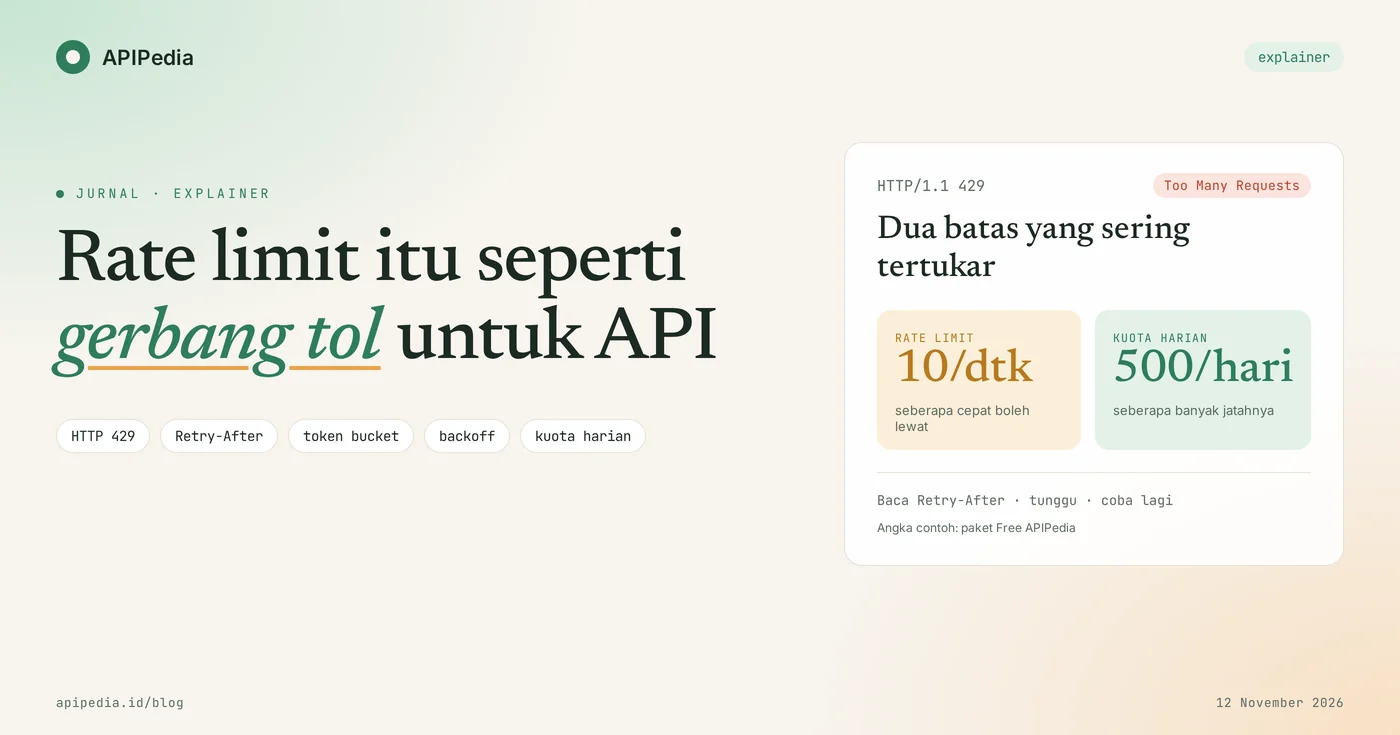
Rate limit is a limit on the number of requests that can be sent to an API within a certain time period, for example 10 requests per second. The easiest analogy: rate limits are like toll gates. Cars are passed one by one at a certain speed so that the road ahead is not congested. If you come too close, the bar goes down for a moment and the server responds with status 429.
For beginners, error 429 often feels like a punishment. Even though it was just a "wait a moment" sign. This article discusses what 429 means, the difference between a rate limit and a daily quota, how the server calculates the limit, and how to write patient code so that no requests are lost.
Quick summary: what terms do you need to know?
There are seven terms that almost always come up when discussing rate limits, and they can all be explained by toll gates.
| Term | It means | Toll gate analogy |
|---|---|---|
| Rate limits | Limit requests per short time span, for example per second | How many cars can pass every second? |
| Quota | Total usage limit per long period, for example per day | Today's travel schedule |
| 429 Too Many Requests | HTTP status when limit is exceeded | The crossbar goes down |
| Retry-After | A header that tells how long to wait | "open again 5 seconds" board |
| Burst | Short spikes that are tolerable | Small group that still fits |
| Backoff | The wait gets longer with each retry | Back off, put some distance, try again |
| Jitter | Small random pauses so that clients are not in sync | Not all cars step on the gas at the same time |
What is a rate limit and why does the API need it?
Rate limit is a speed rule that the server sets for each user, usually identified by an API key. API keys act like license plates: the gateway knows which cars pass and how often.
There are three reasons the API installed it. First, fairness: one user sending thousands of requests at once should not slow down other users. Second, protection: incorrect code, for example endless loops, does not bring down the server. Third, costs: each request uses CPU and bandwidth which someone has to pay for.
What does error 429 Too Many Requests mean?
Status 429 means you sent too many requests in a certain time, it doesn't mean the server is down or your account is blocked. This definition comes from RFC 6585. The same document states that servers may include header Retry-After to indicate the length of wait, but it is not mandatory.
An example of a complete 429 response looks like this:
HTTP/1.1 429 Too Many Requests
Retry-After: 5
Content-Type: application/json

{ "is_success": false, "message": "Terlalu banyak request, coba lagi sebentar." }
The value Retry-After can be the number of seconds as above, or the date and time. RFC 6585 also deliberately does not regulate how servers recognize users and count requests, so each service has its own rules.
What is the difference between rate limit and daily quota?
The rate limit regulates how fast you can pass, while the quota regulates how much your quota is. The two are often confused because they both limit things, even though the way to deal with them is different.
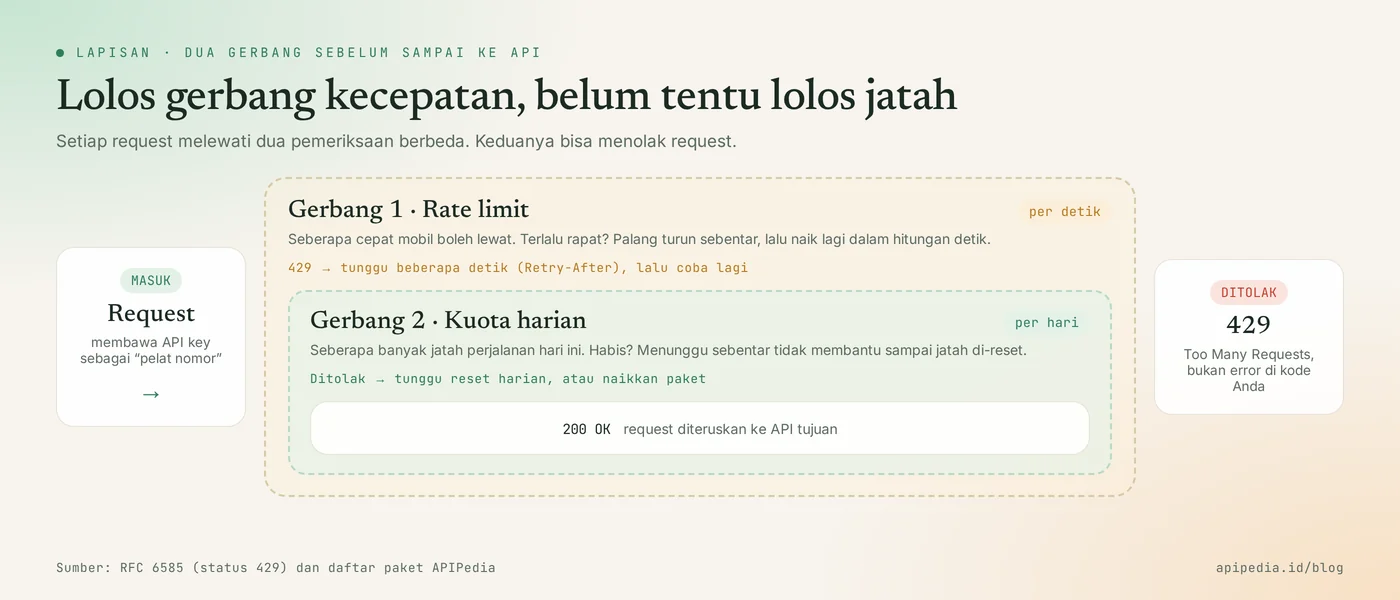
| Aspect | Rate limits | Daily quota |
|---|---|---|
| What is measured | Speed | Total usage |
| Time span | Seconds or minutes | Day or month |
| Recover when | In seconds | During the reset period |
| Solution | Wait a moment, try again | Save requests, or increase packages |
| Another analogy | Internet speed | Daily data package quota |
What is the limit on APIPedia?
APIPedia uses these two limits at once on each package. We took the following figures from the package list ( GET /v1/plans) on November 12, 2026.
| Package | Rate limits | Daily quota |
|---|---|---|
| Free | 10 requests per second | 500 requests per day |
| Pro | 60 requests per second | 25,000 requests per day |
| Enterprise | 300 requests per second | 250,000 requests per day |
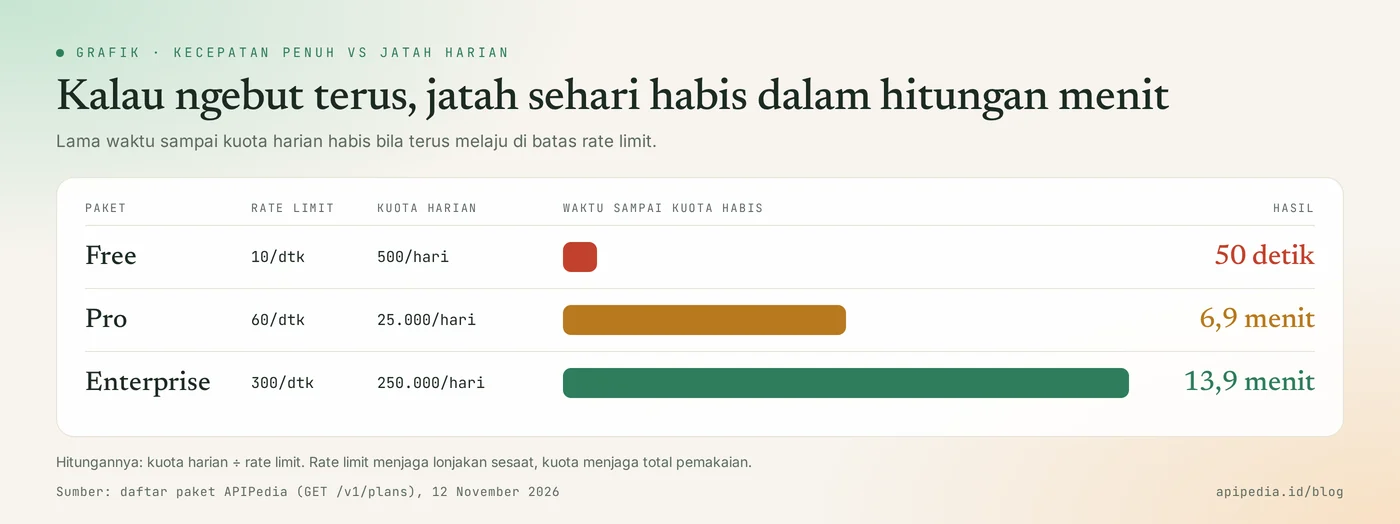
The graph above shows why both are needed. If a script continues to run at maximum speed, the Free quota runs out in 50 seconds, Pro in 6.9 minutes, and Enterprise in 13.9 minutes. Rate limits keep temporary spikes in check, quotas keep total usage in check. The remaining quota and reset time can be checked via GET /v1/me/quota. On our test account, resetAt points to 00.00 WIB.
How does the server calculate the rate limit?
The server calculates the rate limit with one of four common algorithms, and the choice of algorithm determines how friendly it is to spikes.
| Algorithm | Ways of working | Analogy |
|---|---|---|
| Fixed window | Count requests per fixed time window, then reset to zero | The hourly allowance is replenished exactly at 00 minutes |
| Sliding windows | Count requests in a continuously shifting time range | The officer looks at the last 60 seconds, whenever you arrive |
| Bucket tokens | Each request takes one coin from a bucket that is slowly refilled | Bucket of coins at the counter |
| Leaky bucket | Requests are queued and served at a fixed speed | Funnel: poured heavily, it still drips out |
Bucket token: coin bucket
Bucket tokens work like buckets filled with coins. Each request takes one coin. The bucket is refilled at a fixed rate and cannot exceed its capacity. As long as there are coins, requests pass, so short spikes are still served.
class TokenBucket:
    """Ember koin: tiap request mengambil 1 koin, koin diisi ulang terus-menerus."""
    def __init__(self, kapasitas: int, isi_per_detik: float):
        self.kapasitas, self.laju = kapasitas, isi_per_detik
        self.koin, self.terakhir = float(kapasitas), 0.0

    def izinkan(self, sekarang: float):
        # isi ulang sesuai waktu yang berlalu, tapi tidak melebihi kapasitas
        self.koin = min(self.kapasitas, self.koin + (sekarang - self.terakhir) * self.laju)
        self.terakhir = sekarang
        if self.koin >= 1:
            self.koin -= 1
            return True, 0.0                       # 200 OK
        return False, (1 - self.koin) / self.laju  # 429 + Retry-After (detik)
We ran the simulation with a 10 coin capacity bucket filled at 10 coins per second, then sending 30 requests in 1 second. This is a concept illustration, not a depiction of the internal implementation of any service.
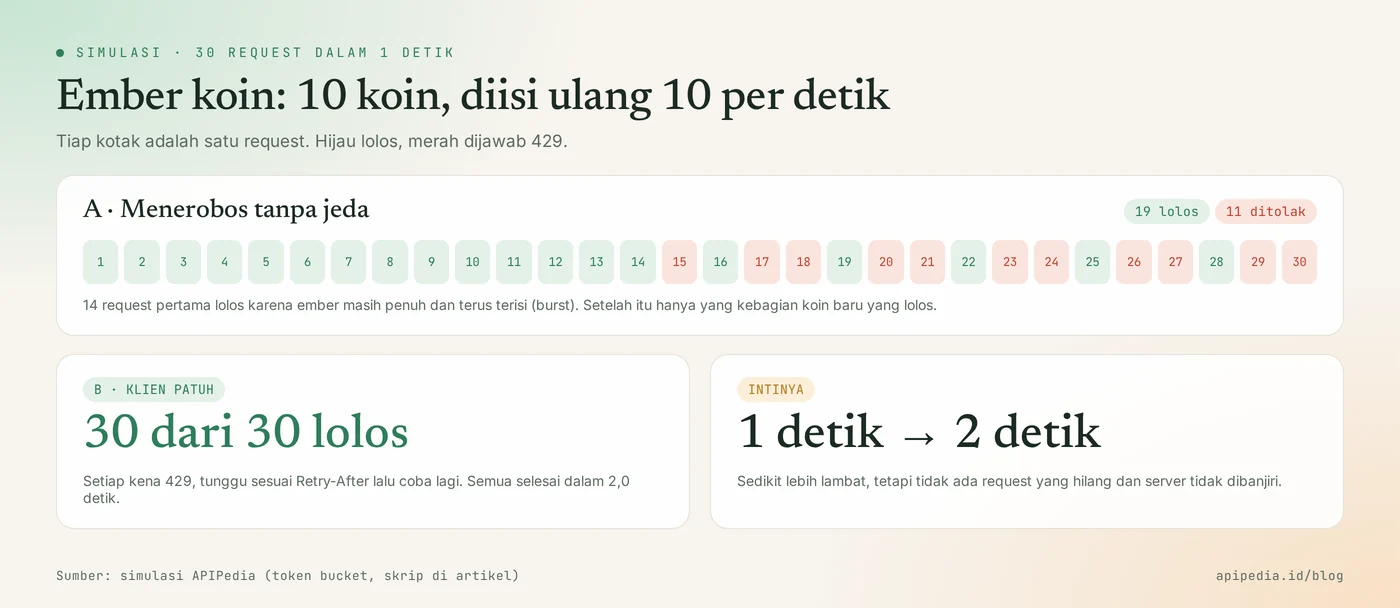
A tanpa jeda : ##############x#xx#xx#xx#xx#xx | lolos 19 ditolak 11
B patuh      : lolos 30 dari 30, kena 429 16 kali, selesai dalam 2.0 detik
In scenario A, the first 14 requests pass because the bucket is still full and continues to fill. After that, only requests that received new coins passed, and 11 requests were lost. In scenario B, the client waits every time it is rejected. As a result, 30 requests were completed all in 2 seconds.
What is often misunderstood about rate limits?
There are six common misconceptions that arise most often, and most of them stem from panic when you first see 429.
- "429 means the server is down." No. A 4xx code means the problem is on the sender's side, in this case the sending speed. The server is actually working according to the rules.
- "429 means my account is blocked." No. The speed limit recovers itself within seconds.
- "Rate limit is the same as quota." Different. Waiting five seconds completes the rate limit, but does not increase the daily quota that has already been used up.
- "If it is rejected, immediately resend it as soon as possible." This makes things worse. Repeat requests that are too fast are also counted and rejected.
- "The Retry-After header is definitely there." Not always. The default only says "allow", so your code needs a backup plan in the form of backoff.
- "Remaining limit headers are standardized." Not yet. Headers
RateLimitandRateLimit-Policystill have Internet-Draft status in the IETF (version 11, May 2026). Many services still use their own header names, so always read the documentation.
How to deal with error 429 in code?
The correct way is to stop for a moment, wait according to the server instructions, then try again with a longer pause. The following Python function uses a built-in library and we tested it on a local server which answered 429 twice before 200.
import random, time, urllib.request, urllib.error

def panggil(url: str, maks_coba: int = 5) -> bytes:
    for percobaan in range(maks_coba):
        try:
            with urllib.request.urlopen(url, timeout=10) as r:
                return r.read()
        except urllib.error.HTTPError as e:
            if e.code != 429:
                raise                                   # error lain: jangan diulang membabi buta
            retry_after = e.headers.get("Retry-After")
            if retry_after and retry_after.isdigit():
                tunggu = int(retry_after)               # patuhi papan pengumuman server
            else:
                tunggu = min(30, 2 ** percobaan)        # backoff: 1, 2, 4, 8 ... detik
            tunggu += random.uniform(0, 0.5)            # jitter: supaya klien tidak serempak
            print(f"429, tunggu {tunggu:.1f} detik (percobaan {percobaan + 1})")
            time.sleep(tunggu)
    raise RuntimeError("Masih 429 setelah beberapa percobaan")
The test results:
429, tunggu 1.3 detik (percobaan 1)
429, tunggu 1.5 detik (percobaan 2)
b'{"ok":true}'
Three important things in that code. First, only 429 are repeated. Second, Retry-After takes precedence, and backoff is used if that header is missing. Third, there is a trial limit so the code doesn't wait forever. This example only reads Retry-After seconds. If your service sends a date format, add date parsing.
Practical tips so that you rarely hit the rate limit
The following seven habits will ensure that your application rarely hits the limits, both speed limits and quotas.
- Save results that rarely change. The list of provinces, holidays or daily exchange rates does not need to be requested again every time the page is opened. Cache saves the biggest quota.
- Limit the speed on your own side. Allow a delay between requests in bulk scripts, slightly below the packet limit.
- Use queues for large jobs. Thousands of data are safer to process in stages rather than all at once.
- Handle 429 with backoff and jitter as in the example above.
- Monitor usage. Check remaining quota regularly. At APIPedia, the Pro package and above provides quota alerts.
- Don't share one API key across multiple applications. Those apps will all be fighting for the same limit, and the source of the spike is hard to trace.
- Increase the package if necessary. If after saving the quota it still runs out every day, that's a sign that your application is growing.
Frequently asked questions
How long do you have to wait after getting 429?
Follow header value Retry-After if present. If there is none, start from 1 second and then double it on each trial (1, 2, 4, 8 seconds) with an upper limit, for example 30 seconds.
Does rejected request 429 reduce the daily quota?
It depends on the service, because the HTTP standard does not specify how to calculate. The safest way is to check the usage figures before and after, then design the code so that it is rarely rejected in the first place.
Why did I get a 429 even though I only sent a few requests?
Usually because the requests are sent simultaneously. Ten parallel requests in one blink has already touched the limit of 10 per second. Other causes: The same API key is used by another application or partner, or the daily quota has run out.
Does the rate limit apply per API key or per IP address?
Both are possible. Services that use API keys generally calculate per key or per account, while public endpoints without keys often calculate per IP address. Documentation of each defining service.
Does the AI model also have a rate limit?
Yes. AI model APIs usually limit the number of requests and the number of tokens per minute. At APIPedia's AI Gateway, the free model can be used without credit with a limit on the number of daily requests per user.
Want to try a free model that has a daily limit? Read how to use the social assistance AI model on APIPedia. The usage limit also acts as an emergency brake when the key is leaked, as discussed in the article LLMjacking: AI API key stolen.
Source
Topics: #rate limit #api #explainer #error 429 #kuota api #backoff
${c.about}
Tim APIPedia — Tim Engineering APIPedia
Tim engineering di balik APIPedia yang membangun dan memelihara API data Indonesia - ongkir, OCR KTP, data wilayah, BMKG, hingga server MCP - dan menulis panduan integrasinya dari pengalaman langsung.