Webhooks Are Like a Courier Knocking on the Door: How They Work, How They're Different from Polls, and How to Secure Them
By Tim APIPedia, Tim Engineering APIPedia · Published · 11 min read
Webhooks are like a messenger knocking on the door: another server notifies your application when something happens. Here's how it works and how to secure it.

Webhooks are a way for a server to notify your application automatically, via HTTP POST to the URL you registered, right when an event occurs. The easiest analogy: a webhook is like a package courier knocking on your door. You don't need to go back and forth to the security post to ask "has my package arrived yet?", because the courier himself will come with the news.
This concept is used in almost all modern services: notifications of payment in full, delivery status changed, email opened, or new code entered into the repository. This article discusses how webhooks work step by step, how they differ from polls, why posts can come twice, and the four checks that must be in place so that "fake couriers" can't get through.
Quick summary: what terms do you need to know?
There are eight terms that come up most often when discussing webhooks, and they all have equivalents in the world of sending packets.
| Term | It means | Courier analogy |
|---|---|---|
| Events | The event that triggers the shipment, for example payment in full | There's a package for you |
| Endpoints | The HTTPS URL on your server that received the post | Home address |
| Payloads | The content of the post, generally JSON | Package contents |
| 2xx response | A sign that the shipment has been received | Signature accept |
| Retry | Retry if no 2xx response | The courier will come again tomorrow |
| Signature | HMAC signature that proves the sender and the integrity of the contents | Seal the package |
| Timestamp | Delivery time which is also signed | Date on receipt |
| Idempotent | The same shipment is processed twice, the result remains one | Check the receipt number before opening |
What are webhooks?
A webhook is a regular HTTP request whose direction is reversed. In a typical API call, your application asks another server. On a webhook, another server calls your application. Because of this webhooks are sometimes nicknamed "reverse APIs".
There is no special protocol behind it. You simply set up one URL, for example https://tokoanda.id/webhook/pembayaran, and then register it with the sending service. Every time the event you choose occurs, the sender sends a POST containing JSON to that URL, something like this:
{
  "type": "pembayaran.berhasil",
  "data": { "order_id": "INV-1042", "jumlah": 150000 }
}
What is the difference between a webhook and a poll?
Polling means your app asking repeatedly, while webhook means the sender notifying you once when something happens. Polling is like going back and forth to the security guard post every ten minutes. Most of the answers are "not yet", but the energy is still used.
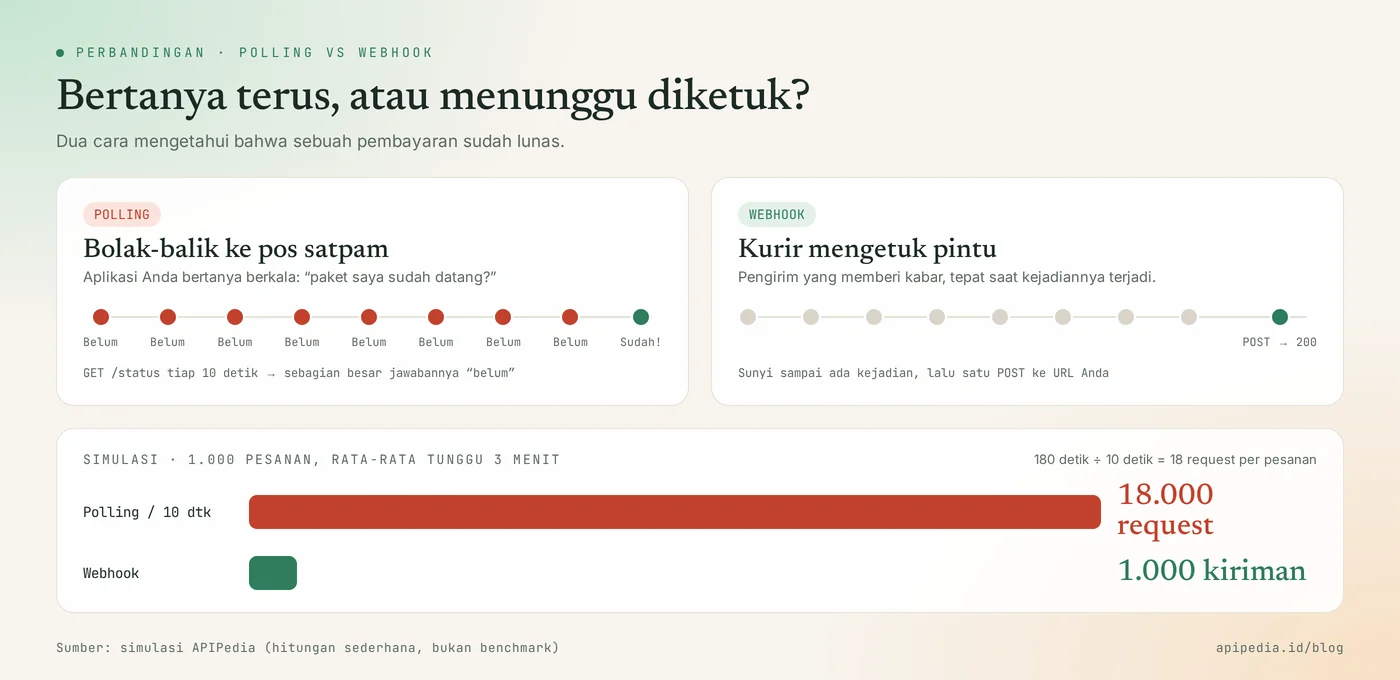
The simple calculation is like this. Let's say your store receives 1,000 orders a day and the average buyer takes 3 minutes to pay. If the application checks the status every 10 seconds, one order requires 180 ÷ 10 = 18 requests, so a total of 18,000 requests. With webhooks, just 1,000 posts, one per checkout. This is a count simulation, not a benchmark, but the pattern is always the same: polls pay for "not yet" answers.
| Aspect | Poll | Webhooks |
|---|---|---|
| Who started | Your application | Sending server |
| Speed of news | Depends on the check interval | Shortly after the incident |
| Request load | High, many are in vain | In proportion to the number of incidents |
| What needs to be prepared | Just caller code | HTTPS public URL and verify |
| Suitable for | Simple script, backup, reconciliation | Notification of events in production |
How does a webhook work from start to finish?
A single webhook goes through five steps: event, delivery, inspection, receipt, then processing.
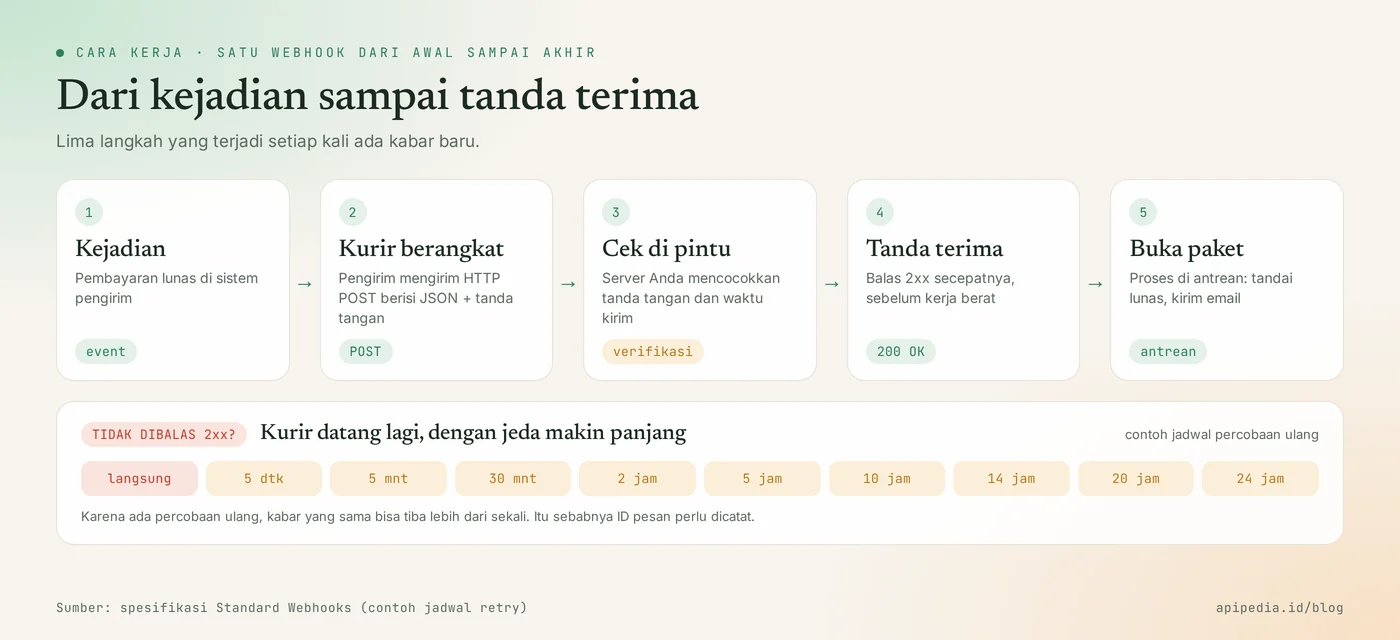
- Incident. Something happened in the sender's system, for example the payment was successful.
- The courier leaves. The sender creates a JSON payload, signs it, then sends a POST to your URL.
- Check at the door. Your server checks the signature and send time before trusting the content.
- Receipt. Your server replies to 2xx statuses as quickly as possible.
- Open the package. Heavy work, such as marking orders paid and sending emails, is done in the queue at the back.
Why do you have to reply quickly?
The sender just waits a moment, then considers the delivery failed. The limits vary by service: some platforms terminate the connection if there is no 2xx reply within 10 seconds, while the Standard Webhooks specification suggests a timeout of 15 to 30 seconds. That's why the official documentation of various providers gives the same advice: reply 2xx first, then do the long logic through the queue.
What happens if your server is down?
The sender will try again with increasingly longer delays, similar to a courier who returns tomorrow when the house is empty. An example of a schedule in the Standard Webhooks specification starts from immediate, 5 seconds, 5 minutes, 30 minutes, then continues up to 24 hours. There are also providers that retry up to three days. The consequence is important to understand: the same news can arrive more than once.
What is often misunderstood about webhooks?
There are five common misconceptions we encounter, and all of them are normal for beginners.
- "Webhooks are a special technology." No. A webhook is just a regular HTTP POST. The only difference is the direction.
- "The webhook must come exactly once." No. Because there are retries, the same post can arrive twice. The order is not guaranteed: the news "invoice paid" may arrive before "invoice created".
- "URLs that are hard to guess are safe enough." Not yet. URLs can be leaked via logs or screenshots. Anyone who knows the URL could post a fake "payment in full" message if you don't check the signature.
- "Webhook is the same as WebSocket." Different. A WebSocket is a continuously open connection, usually to a browser. A webhook is an inter-server request that is completed immediately.
- "If you use webhooks, polling is no longer necessary." Not always. Polling is still useful as a backup, for example re-checking an order whose status has been hanging around for too long.
How to secure webhooks?
Webhooks are secure when your server performs four checks: signature, send time, message ID, and fast reply.
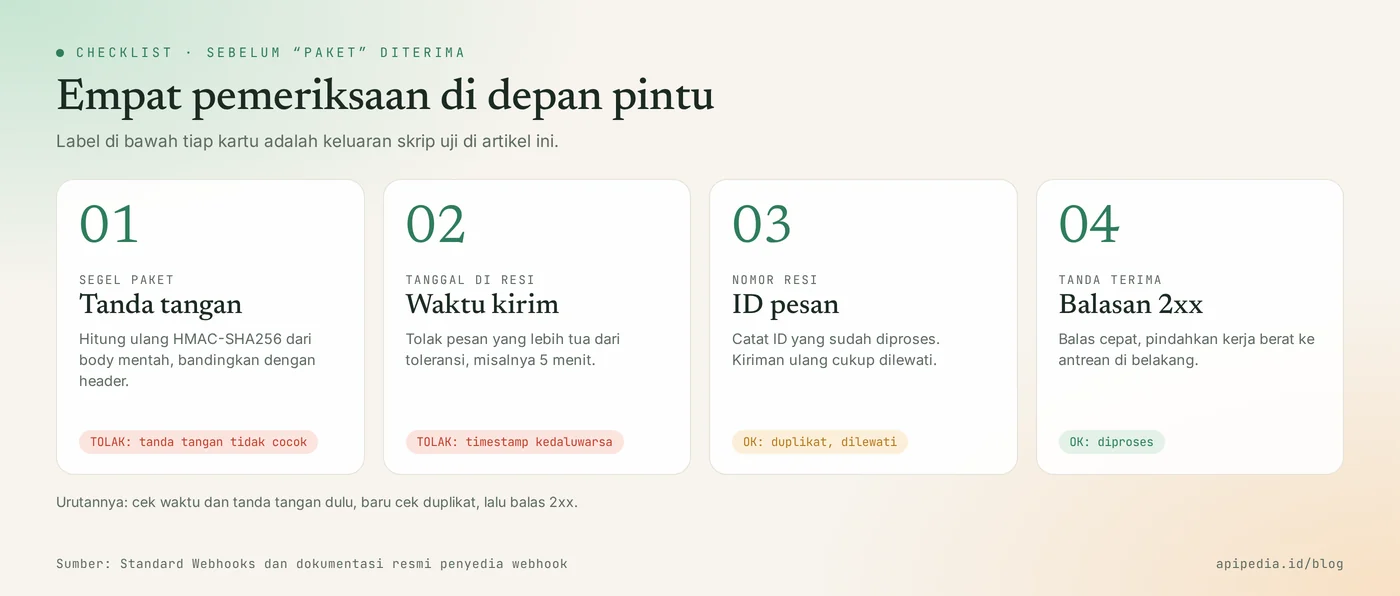
Signature: package seal
Webhook signatures are created with HMAC, which is a hash calculated from the message content and a secret key that only the sender and you know. Your server recalculates that hash from the received body. If the result is the same as in the header, the message is genuine and its contents were not changed along the way. Calculate from the raw body, not from JSON that has been parsed and then reassembled, because even one different space changes the result.
Delivery time: date on receipt
The timestamp is also signed so that attackers cannot record the original post and then play it back next week. This attack is called replay. Your server simply rejects messages whose lifespan exceeds tolerance. Five minutes is the default value commonly used by official libraries.
Message ID: receipt number
Each post carries a unique ID, and retries use the same ID. Save the processed ID, then skip it if it appears again. That way the order is not marked as paid twice and the buyer does not receive two emails.
Example of verification code
The following Python function performs the first three checks using the built-in library. The format follows the Standard Webhooks specification: headers webhook-id, webhook-timestamp, and webhook-signature, with signed body in the form id.timestamp.body. We tested the results against the official library standardwebhooks and the signatures matched.
import base64, hashlib, hmac, time

TOLERANSI = 5 * 60          # detik; pesan lebih tua dari ini ditolak
sudah_diproses = set()      # di produksi: tabel database atau Redis

def verifikasi(secret: str, headers: dict, body: bytes) -> str:
    msg_id = headers["webhook-id"]
    ts = headers["webhook-timestamp"]

    # 1) Tolak kiriman yang terlalu lama (mencegah replay)
    if abs(time.time() - int(ts)) > TOLERANSI:
        return "TOLAK: timestamp kedaluwarsa"

    # 2) Hitung ulang tanda tangan dari body MENTAH, lalu bandingkan
    kunci = base64.b64decode(secret.removeprefix("whsec_"))
    isi = msg_id.encode() + b"." + ts.encode() + b"." + body
    harapan = base64.b64encode(hmac.new(kunci, isi, hashlib.sha256).digest()).decode()
    kiriman = [s.split(",", 1)[1] for s in headers["webhook-signature"].split() if s.startswith("v1,")]
    if not any(hmac.compare_digest(harapan, s) for s in kiriman):
        return "TOLAK: tanda tangan tidak cocok"

    # 3) Abaikan kiriman ganda (idempoten)
    if msg_id in sudah_diproses:
        return "OK: duplikat, dilewati"
    sudah_diproses.add(msg_id)
    return "OK: diproses"
We sent five scenarios to that function: the original post, the same post repeated, content changed on the way, a post dated yesterday, and a post signed with a guessed key. The result:
asli        -> OK: diproses
kirim ulang -> OK: duplikat, dilewati
isi diubah  -> TOLAK: tanda tangan tidak cocok
kemarin     -> TOLAK: timestamp kedaluwarsa
kunci palsu -> TOLAK: tanda tangan tidak cocok
Note hmac.compare_digest. This function compares two values in constant time, so an attacker cannot guess the signature from the difference in response times. One note: header names and signature formats vary by provider, so always follow the documentation of the service you are using, or use its official library if available.
Where are webhooks used in APIPedia?
In APIPedia, webhooks are used in the Email Tracking feature, and this feature is also a good example because it provides two methods at once. When creating an email open tracker, you can fill in webhookUrl HTTPS URLs. Once the email is opened, APIPedia sends a POST email.opened to that URL with an HMAC-SHA256 signature. The value webhookSecret is only displayed once when the tracker is created, so store it directly in your server environment.
You can also choose via webhookEvents: first for news when the email is first opened, or every for each time it is opened. If you don't have a public server, the polling method is still available via the tracker status endpoint. The same pattern applies to balance top-ups: payment status can be checked via the balance top-up status endpoint.
There is also an inbox webhook in the Email feature, which is an inbox that receives emails via HTTP POST JSON to a secret URL. The URL only appears once, so treat it like an API key.
Practical tips before your webhook goes into production
The following seven habits prevent most webhook problems in production.
- Use HTTPS with a valid certificate. Many senders reject regular HTTP URLs.
- Store secrets in environment variables, not in code or the repository. Replace regularly or immediately if leaking is suspected.
- Reply 2xx first, process later. Put messages in a queue and work on them in the back end.
- Record message IDs in the database with a unique constraint so that duplicates are automatically rejected.
- Don't rely on the order. When in doubt, retrieve the latest data via the sender's API.
- Only subscribe to the events you need so the server isn't busy receiving unused news.
- Have backup ready. Run regular checks for transactions with hanging status, as the webhook may not arrive.
Frequently asked questions
Are webhooks the same as APIs?
Webhooks are part of how APIs work, not a replacement for them. The API used to answer when you asked. Webhooks provide news without being asked. The two are often used together: a webhook notifies you that there's been a change, then your app calls an API to retrieve the details.
Do I need my own server to receive webhooks?
Yes, you need a public URL that the sender can access. The form does not have to be a large server. Serverless functions or codeless automation services can also accept webhooks. For experiments on a laptop, use a tunnel tool that provides a temporary HTTPS URL.
Why does my webhook come twice?
Most likely due to retries. If your server is late in replying or replies with a status other than 2xx, the sender considers the delivery failed and sends it again. The solution is not to turn off retry, but rather to record message IDs and skip those that have already been processed.
What HTTP status to reply to?
Reply with a 2xx status, for example 200 or 204, for valid posts. Other states, including 3xx redirects, are generally considered failed and trigger a retry. For signatures that don't match, reply 400 or 401 and don't process the contents.
Can webhooks be used without coding?
Can. Many automation tools provide a ready-to-use webhook recipient URL, then forward its contents to a spreadsheet, chat, or email. However, for matters involving money, still make sure the tool checks the signature.
Since secret webhooks are as valuable as access keys, also read the story of AI API keys stolen in LLMjacking cases. If you want AI agents to use Indonesian data and tools, see the guide to connecting APIPedia to Claude via MCP.
Source
Topics: #webhook #api #explainer #keamanan api #hmac #idempotency
${c.about}
Tim APIPedia — Tim Engineering APIPedia
Tim engineering di balik APIPedia yang membangun dan memelihara API data Indonesia - ongkir, OCR KTP, data wilayah, BMKG, hingga server MCP - dan menulis panduan integrasinya dari pengalaman langsung.