QRIS Parser API: How to Read and Validate Store QRIS from Images Before Printing
By Tim APIPedia, Tim Engineering APIPedia · Published · Updated · 11 min read
APIPedia's QRIS Parser API reads the QRIS from the image, parses the merchant name, NMID, and amount, then checks the CRC via two POST endpoints.
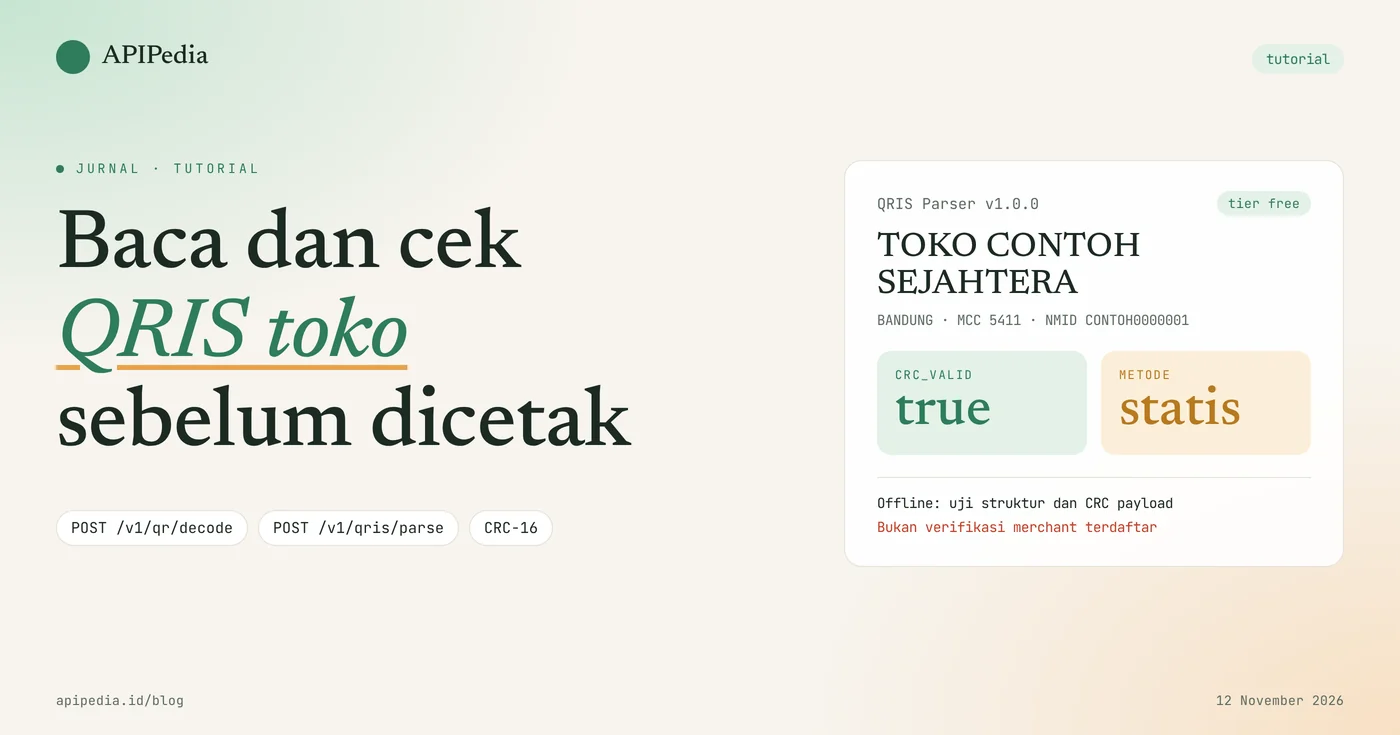
APIPedia's QRIS Parser API parses the QRIS string into merchant name, city, MCC, NMID, and amount, then recalculates the CRC to ensure the payload is intact. You send a payload to POST /v1/qris/parse, or send a QR image to POST /v1/qr/decode and receive the QRIS parse result in the same response.
This tutorial uses a real case: a merchant uploads a static QRIS image to your cashier or marketplace application, then the backend checks it before the image is printed as a sticker or displayed on the payment page. All examples use key apk_xxx and fictitious merchant data. One thing needs to be clear from the start: this check runs offline on the payload structure, not a verification that the merchant is registered.
Quick summary: what do you need to know?
This flow uses two POST endpoints from two products in the catalog: QR Code Generator to read the image and QRIS Parser to parse the payload. The following table summarizes the essence.
| Items | Details |
|---|---|
| Read QR images | POST https://api.apipedia.id/v1/qr/decode (PNG, JPEG, WebP, GIF, BMP; max. 8 MB) |
| Parse the payload | POST https://api.apipedia.id/v1/qris/parse with body {"payload": "000201..."} |
| Authentication | Header Authorization: Bearer apk_xxx |
| Which is parsed | Name, city, postal code, country, MCC, NMID, merchant criteria, currency, nominal, additional tag data 62 |
| Integrity check | CRC-16/CCITT-FALSE recalculated, result in crc_valid |
| Types of QRIS | metode.keterangan: statis (code 11) or dinamis (code 12) |
| Which is not checked | Is the merchant registered or active with a payment service provider? |
| Tiers | Free in the catalog, version QRIS Parser 1.0.0 |
What problems does the QRIS Parser API solve?
This API captures QRIS images that are damaged, of the wrong type, or do not belong to the relevant merchant before the image is used to receive payments. Without inspection, the operational team only finds out there is a problem when the buyer fails to scan or the money goes to another merchant.
The three most common errors that appear when merchants upload their own QRIS:
- Image is not QRIS. What was uploaded turned out to be a shop link QR or contact QR.
- Dynamic QRIS is used as a sticker. Dynamic QRIS is made for one bill with a certain denomination, so it is not suitable for permanent display.
- Merchant name does not match. Another shop's QRIS was uploaded, intentionally or not.
With two requests, your backend can reject all three automatically and save the structured merchant data.
How is the QRIS payload structure read?
The QRIS payload is a sequence of TLV (tag, length, value) chunks following the EMVCo standard: two tag digits, two length digits, then the value. For example, 5921TOKO CONTOH SEJAHTERA means tag 59 (merchant name), 21 characters long, with the value "STORE EXAMPLE PROSPEROUS".
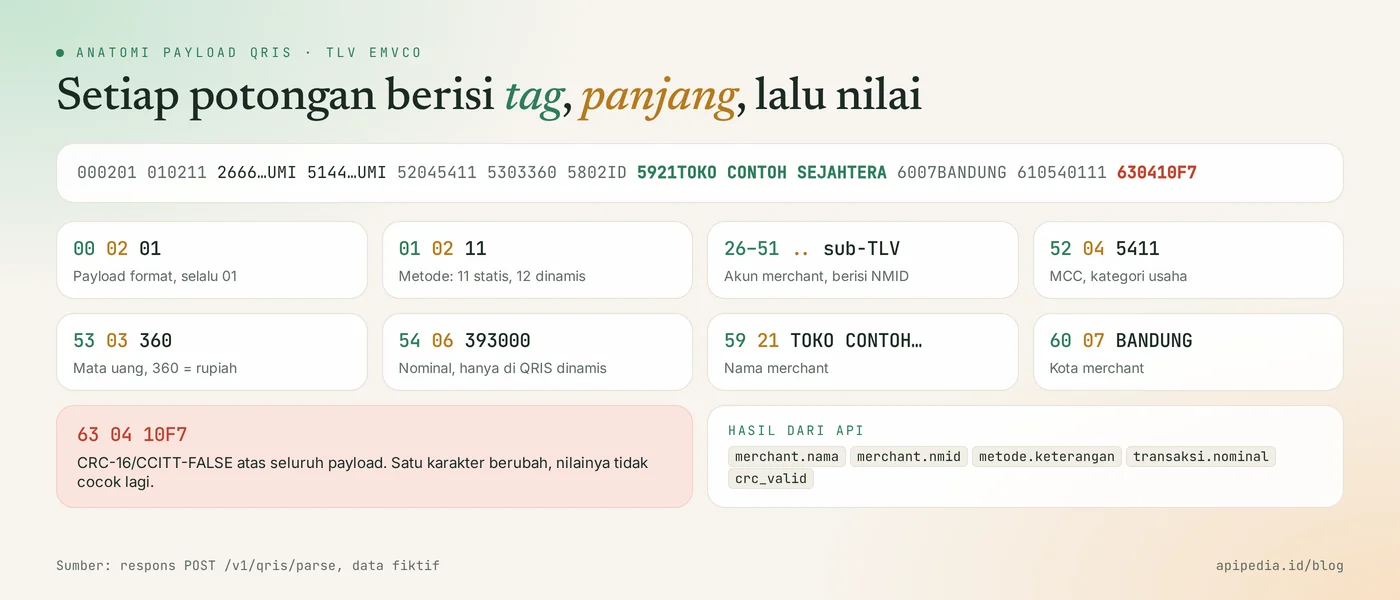
The last tag, 63, contains CRC-16/CCITT-FALSE calculated from all previous payloads. If even one character changes, the CRC displayed is no longer the same as the CRC resulting from the recalculation. The API reports both passes crc_tertera and crc_dihitung.
What do you need to prepare before starting?
You only need one APIPedia API key. Register or log in at console.apipedia.id, open the API Token menu, then create a new key. The key starts with apk_ and is sent via header Authorization: Bearer apk_xxx.
Store the key in a server environment variable, for example APIPEDIA_KEY, and call the API from the backend, not from the browser.
Step 1: how to parse QRIS payload with curl?
Send the complete QRIS string, starting with 000201, as fields payload to POST /v1/qris/parse. The payload below is a fictitious dynamic QRIS worth IDR 393,000.
curl -s -X POST https://api.apipedia.id/v1/qris/parse \
  -H "Authorization: Bearer apk_xxx" \
  -H "Content-Type: application/json" \
  -d '{"payload": "00020101021226660016ID.CO.CONTOH.WWW01189360000000000000010213CONTOH00000010303UMI51440014ID.CO.QRIS.WWW0215ID10200000000010303UMI52045411530336054063930005802ID5921TOKO CONTOH SEJAHTERA6007BANDUNG61054011162220111INV202600420703K016304A7D0"}'
What does an example QRIS Parser API response look like?
Responses use a standard APIPedia envelope { is_success, message, data }, with a merchant and transaction summary at the top and a raw tag list at tags. Here's the real response to the payload above, with body tags shortened:
{
  "is_success": true,
  "message": "Payload QRIS berhasil diuraikan",
  "data": {
    "valid_tlv": true,
    "crc_valid": true,
    "crc_tertera": "A7D0",
    "crc_dihitung": "A7D0",
    "payload_format": "01",
    "metode": { "kode": "12", "keterangan": "dinamis" },
    "merchant": {
      "nama": "TOKO CONTOH SEJAHTERA",
      "kota": "BANDUNG",
      "kode_pos": "40111",
      "negara": "ID",
      "mcc": "5411",
      "nmid": "CONTOH0000001",
      "kriteria": "UMI"
    },
    "transaksi": { "mata_uang": "360", "nominal": 393000 },
    "tags": [
      { "tag": "00", "nama": "Payload Format Indicator", "panjang": 2, "nilai": "01" },
      { "tag": "62", "nama": "Additional Data Field Template", "panjang": 22,
        "nilai": "0111INV202600420703K01",
        "sub": [
          { "tag": "01", "nama": "Bill Number", "panjang": 11, "nilai": "INV20260042" },
          { "tag": "07", "nama": "Terminal Label", "panjang": 3, "nilai": "K01" }
        ] },
      { "tag": "63", "nama": "CRC", "panjang": 4, "nilai": "A7D0" }
    ],
    "catatan": "Hasil ini adalah analisis struktur payload secara offline, bukan verifikasi merchant ke ASPI atau penyelenggara jasa pembayaran. crc_valid hanya menandakan payload utuh, bukan bahwa merchant terdaftar atau aktif."
  }
}| Fields | Meaning |
|---|---|
valid_tlv | true if the entire payload can be read as a TLV. |
crc_valid | true if crc_tertera is the same as crc_dihitung. |
metode | Code 11 means static, code 12 means dynamic. |
merchant | Name, city, zip code, country, MCC, NMID, and merchant criteria. |
transaksi.nominal | Nominal number on dynamic QRIS, or null on static QRIS. |
tags | All raw tags along with sub-TLVs, useful for auditing or debugging. |
Step 2: how to read QRIS directly from the image?
Send the image as base64 to POST /v1/qr/decode, and you don't need to call the parser separately. If the QR content is recognized as QRIS, this endpoint immediately includes the parsing result in symbols[].parsed with type: "qris".
jq -n --arg img "$(base64 -w0 qris-toko.png)" '{image_base64: $img}' \
  | curl -s -X POST https://api.apipedia.id/v1/qr/decode \
      -H "Authorization: Bearer apk_xxx" \
      -H "Content-Type: application/json" \
      -d @-
We tested this endpoint with a fictitious 160 pixel static QRIS image. The actual response, shortened:
{
  "is_success": true,
  "message": "1 barcode berhasil dibaca",
  "data": {
    "count": 1,
    "symbols": [
      {
        "format": "QRCode",
        "text": "00020101021126660016ID.CO.CONTOH.WWW...5921TOKO CONTOH SEJAHTERA6007BANDUNG610540111630410F7",
        "encoding": "ascii",
        "parsed": {
          "type": "qris",
          "valid_tlv": true,
          "crc_valid": true,
          "metode": { "kode": "11", "keterangan": "statis" },
          "merchant": { "nama": "TOKO CONTOH SEJAHTERA", "kota": "BANDUNG", "mcc": "5411", "nmid": "CONTOH0000001" },
          "transaksi": { "mata_uang": "360", "nominal": null }
        }
      }
    ],
    "image": { "mime": "image/png", "bytes": 2206 }
  }
}
Images without QR are not errors. The response remains successful with count: 0, so check count before reading symbols[0]. The name of the body field can be double-checked in the OpenAPI specification for the QR Code Generator product on the console.
Step 3: how to install it in Node.js backend?
Create a function that accepts an image file and a registered merchant name, then returns an accept or reject decision. This example runs on Node.js 18 and above without any additional dependencies.
import { readFile } from "node:fs/promises";

const BASE = "https://api.apipedia.id/v1";
const headers = {
  Authorization: `Bearer ${process.env.APIPEDIA_KEY}`, // apk_xxx
  "Content-Type": "application/json",
};

const rapikan = (s) => String(s ?? "").toUpperCase().replace(/[^A-Z0-9]/g, "");

export async function periksaQrisToko(pathGambar, namaTerdaftar) {
  const image_base64 = (await readFile(pathGambar)).toString("base64");
  const res = await fetch(`${BASE}/qr/decode`, {
    method: "POST",
    headers,
    body: JSON.stringify({ image_base64, max_symbols: 1 }),
  });
  const body = await res.json();
  if (!body.is_success) throw new Error(`HTTP ${res.status}: ${body.message}`);

  if (body.data.count === 0) return { ok: false, alasan: "Tidak ada QR pada gambar." };

  const q = body.data.symbols[0].parsed;
  if (q?.type !== "qris") return { ok: false, alasan: "QR terbaca, tetapi isinya bukan QRIS." };
  if (!q.crc_valid) return { ok: false, alasan: "Payload QRIS tidak utuh (CRC tidak cocok)." };
  if (q.metode.keterangan !== "statis") {
    return { ok: false, alasan: "Ini QRIS dinamis untuk satu tagihan. Unggah QRIS statis." };
  }
  if (rapikan(q.merchant.nama) !== rapikan(namaTerdaftar)) {
    return { ok: false, alasan: `Nama di QRIS "${q.merchant.nama}" berbeda dari data pendaftaran.` };
  }

  // Simpan data terstruktur dan payload aslinya, bukan hanya gambarnya.
  return {
    ok: true,
    merchant: q.merchant,
    payload: body.data.symbols[0].text,
  };
}

console.log(await periksaQrisToko("qris-toko.png", "Toko Contoh Sejahtera"));
This function checks five things in sequence: there is a QR, the contents are QRIS, the CRC matches, the type is static, and the name is the same as the registration data. Name comparison ignores case, spaces, and punctuation. For abbreviated names in QRIS, direct them to manual review, do not immediately reject them.
Step 4: how to parse payload in Python?
In Python, send the payload with requests to /qris/parse then read crc_valid and metode. This pattern is suitable if you have got the payload from the scanner in the mobile application.
import os

import requests  # pip install requests

BASE = "https://api.apipedia.id/v1"
HEADERS = {"Authorization": f"Bearer {os.environ['APIPEDIA_KEY']}"}  # apk_xxx


def urai_qris(payload):
    res = requests.post(f"{BASE}/qris/parse", headers=HEADERS, json={"payload": payload}, timeout=10)
    body = res.json()

    if res.status_code == 400:
        return {"ok": False, "alasan": body.get("message")}
    if not body.get("is_success"):
        raise RuntimeError(f"HTTP {res.status_code}: {body.get('message')}")

    data = body["data"]
    if not data["crc_valid"]:
        return {"ok": False, "alasan": "CRC tidak cocok, payload tidak utuh."}
    return {
        "ok": True,
        "nama": data["merchant"]["nama"],
        "nmid": data["merchant"]["nmid"],
        "jenis": data["metode"]["keterangan"],
        "nominal": data["transaksi"]["nominal"],
    }


if __name__ == "__main__":
    contoh = (
        "00020101021126660016ID.CO.CONTOH.WWW01189360000000000000010213CONTOH0000001"
        "0303UMI51440014ID.CO.QRIS.WWW0215ID10200000000010303UMI5204541153033605802ID"
        "5921TOKO CONTOH SEJAHTERA6007BANDUNG610540111630410F7"
    )
    print(urai_qris(contoh))
    print(urai_qris("https://contoh.co.id/bayar"))
What is the response like for a QRIS that is damaged or not a QRIS?
The changed payload still answers status 200 with crc_valid: false, while non-TLV text answers 400. We tested four inputs against POST /v1/qris/parse on November 12, 2026.
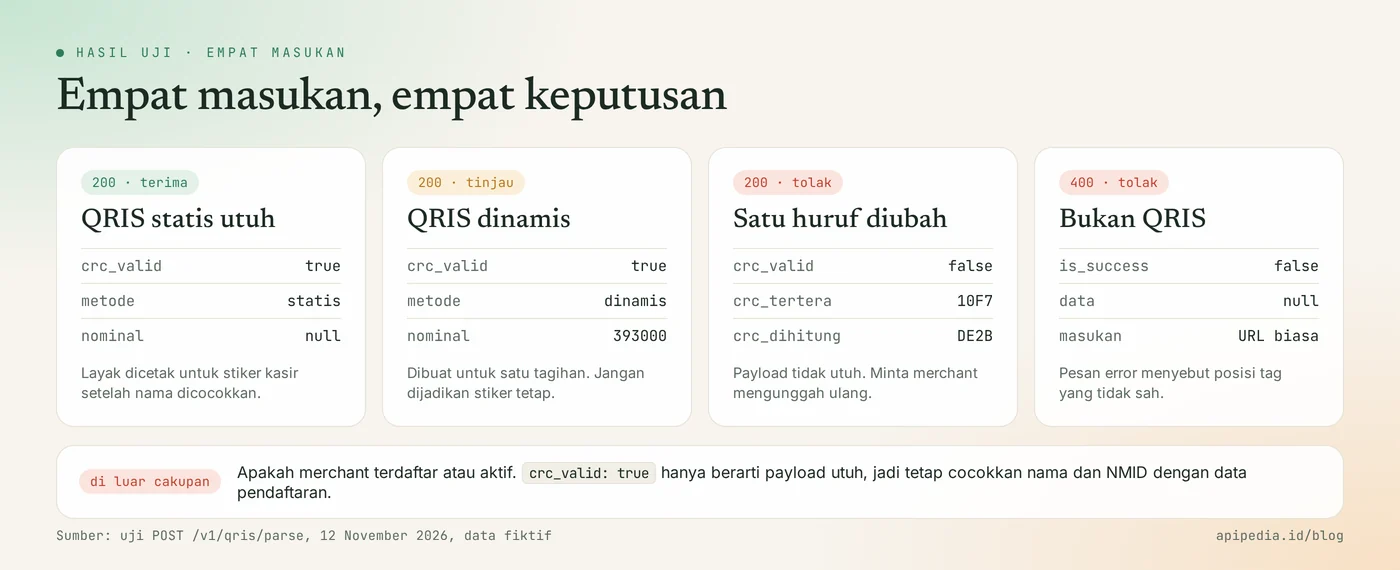
| Input | Status | crc_valid | Notes |
|---|---|---|---|
| Static QRIS intact | 200 | true | metode static, nominal null |
| Dynamic QRIS | 200 | true | metode dynamic, nominal 393000 |
| One letter of the name changed | 200 | false | crc_tertera 10F7, crc_dihitung DE2B |
| Regular URL | 400 | - | Not TLV EMVCo |
The 400 response for non-QRIS input looks like this:
{
  "is_success": false,
  "message": "Payload QRIS bukan TLV EMVCo yang sah: tag \"ht\" atau panjang \"tp\" pada posisi 0 bukan dua digit angka.",
  "data": null
}
What is the limit of this check?
This check only answers "is the payload intact and what is in it", not "is this merchant registered and active". All work is carried out offline and does not call any party, including ASPI or payment service providers.
That is, crc_valid: true does not prove authenticity. Anyone who constructs the payload correctly can calculate the matching CRC. Therefore, use the results as a first filter, match the name and NMID with the merchant's registration documents, and carry out test transactions with small amounts before QRIS is widely used.
What common mistakes should you avoid?
The most common mistake is to consider is_success: true as a sign that QRIS has passed. Also check the following things.
- Only read
is_success. The value istrueeven though the CRC does not match. The decision is atcrc_valid. - Assuming the CRC matches means the merchant is genuine. CRC only indicates the payload is intact.
- Does not differentiate between static and dynamic. Read
metode.keteranganbefore making QRIS a permanent sticker. - Sends a truncated payload. Spaces in the merchant name are part of the payload. Do not trim or change the letters.
- Didn't check
count. Images without QR were answered successfully withcount: 0. - Uploading blurry photos. Request an original image from the merchant's application, not a photo of a sticker from a distance.
- Calling from a browser. Key
apk_xxxwill be read by anyone. Call from backend.
Status code that needs to be addressed
| Status | Meaning | Action |
|---|---|---|
| 200 | Payload successfully parsed | Read crc_valid and metode |
| 400 | The payload is not a valid EMVCo TLV | Show the message "this is not QRIS" to the user |
| 401 | Token is missing, unknown, or expired | Check header Authorization |
Frequently asked questions
Can this API ensure that QRIS merchants are registered?
No. This API analyzes the payload structure offline. He did not contact ASPI or the payment service provider, so he does not know whether the merchant is registered or active.
What is the difference between static and dynamic QRIS in response?
Static QRIS has metode.kode 11 and transaksi.nominal is worth null, because the buyer types in his own nominal value. Dynamic QRIS has code 12 and usually carries the nominal value and bill number on tag 62.
What does crc_valid: false mean?
This means that the CRC listed in tag 63 is different from the results of the recalculation of the payload. The payload is truncated, copied incorrectly, or has been modified. Ask the merchant to re-upload the original image.
Do I have to call two endpoints for a QRIS image?
No. POST /v1/qr/decode has returned the QRIS parsing result at symbols[].parsed. Endpoint /v1/qris/parse is used if you already have the payload string.
Can an AI assistant check QRIS via this API?
Can. The APIPedia MCP server provides tools parse_qris and qr_decode that call the same endpoint. How to connect is in the guide for connecting APIPedia to Claude via MCP.
Next step: try it on the console
Checking a shop's QRIS only requires one request POST /v1/qr/decode and five checks on the backend. Create a key at console.apipedia.id, run the curl example above with your own QRIS image, then install function periksaQrisToko in the upload handler.
To complete the merchant registration flow, read the KTP OCR API to read e-KTP and check NIK. Once payment is received, send proof with an automatic PDF invoice from an HTML template.
Topics: #qris parser #qris #qr code #tutorial #nodejs #python
About the author
Tim APIPedia — Tim Engineering APIPedia
Tim engineering di balik APIPedia yang membangun dan memelihara API data Indonesia - ongkir, OCR KTP, data wilayah, BMKG, hingga server MCP - dan menulis panduan integrasinya dari pengalaman langsung.