Text to Speech API: How to Create an Automated Queue Call Voice (curl, Node.js, Python)
By Tim APIPedia, Tim Engineering APIPedia · Published · 11 min read
APIPedia's Text to Speech API converts text to MP3 via POST /v1/tts. Voice call queue tutorial with curl, Node.js, and Python.
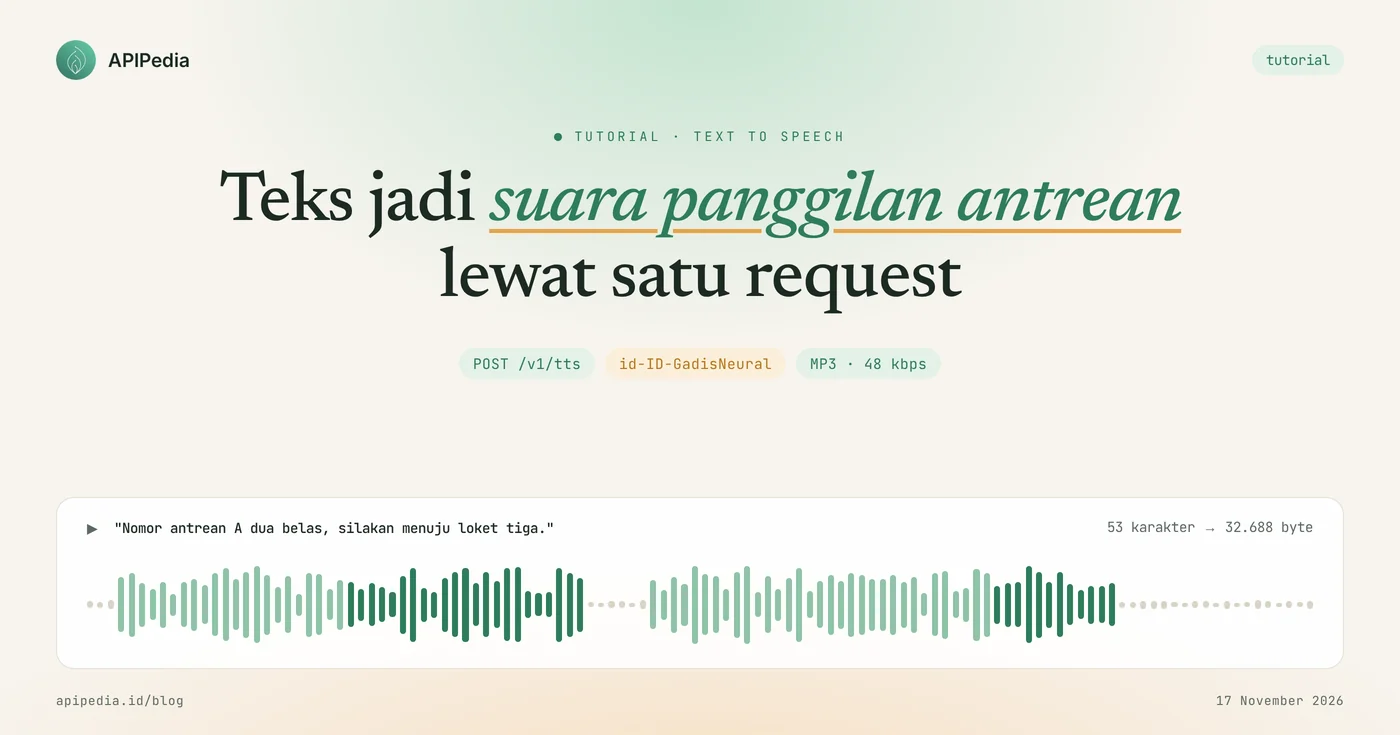
APIPedia's Text to Speech API converts text into MP3 files via a single request POST /v1/tts, with default voices id-ID-GadisNeural for Indonesian. Send a sentence like "Queue number A is twelve, please go to counter three," and the API returns audio ready to play on the speaker.
This tutorial uses a case that is often encountered in clinics, pharmacies, workshops and service offices: automatic queue call sounds. You'll see curl, Node.js, and Python examples, real-world responses from our test on November 17, 2026, how to save audio to save data, and limits you need to know before installing.
Quick summary: what do you need to know?
The Text to Speech product has three endpoints: one for creating audio, one for voice lists, and one for server status. The following table summarizes the essence.
| Items | Details |
|---|---|
| Create audio | POST https://api.apipedia.id/v1/tts |
| Sound list | GET https://api.apipedia.id/v1/tts/voices (filters locale, gender, q) |
| Server status | GET https://api.apipedia.id/v1/tts/servers |
| Mandatory body | text, maximum 5,000 characters |
| Body optional | voice, rate (-50 to 100), pitch (-50 to 50), volume (-50 to 50), bitrate (48 or 96), server (1 or 2), output, subtitles |
| Result form | File audio/mpeg (default), or JSON containing base64 through output: "base64" |
| Indonesian Voice | id-ID-GadisNeural (female, congenital) and id-ID-ArdiNeural (male) |
| Number of votes | 318 votes on November 17, 2026 test |
| Authentication | Header Authorization: Bearer apk_xxx |
| Tiers | Free in the catalog, version 1.0.0 |
What problems does the Text to Speech API solve?
This API eliminates the work of recording voices one by one for each arbitrary sentence. Queue calls are the clearest example: numbers and counters keep changing, so recordings are still insufficient and officers end up calling in their own voice.
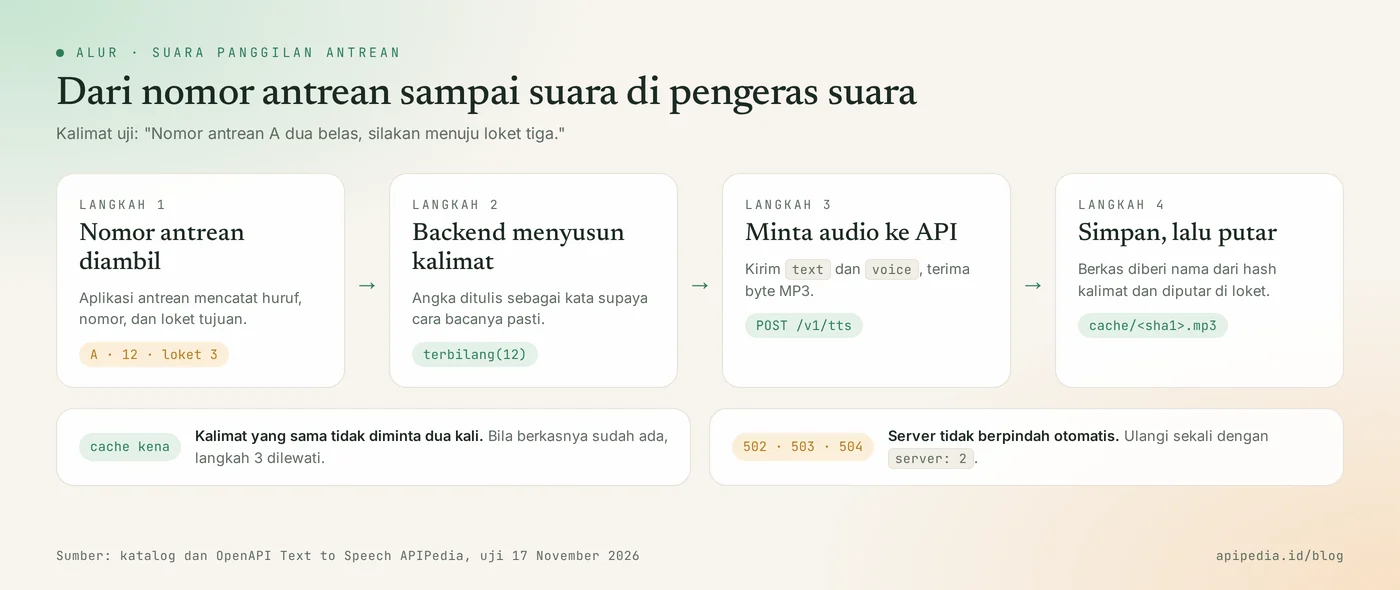
With one endpoint in the backend, the queuing application simply constructs a sentence from the number and counter, then requests the audio. The same pattern applies to other needs:
- Repeated announcements. Closing hours, medication pick-up calls, or waiting room notifications.
- Audio version of content. Articles, study materials, or product descriptions that you want to be able to listen to.
- Short video narration. Audio plus SRT subtitles of the same text.
What do you need to prepare before starting?
You only need one APIPedia API key. Register or log in at console.apipedia.id, open the API Token menu, then create a new key. The key starts with apk_ and is sent via header Authorization: Bearer apk_xxx.
Store the key in a server environment variable, for example APIPEDIA_KEY, and call the API from the backend, not from the browser or tablet app on the counter. The device at the counter simply accepts MP3 files from your server.
Step 1: how to create the first audio with curl?
Send text and voice to POST /v1/tts, then save the answer as an MP3 file with option -o. By default, the answer is raw audio of type audio/mpeg, not JSON.
curl -s -X POST https://api.apipedia.id/v1/tts \
  -H "Authorization: Bearer apk_xxx" \
  -H "Content-Type: application/json" \
  -d '{
    "text": "Nomor antrean A dua belas, silakan menuju loket tiga.",
    "voice": "id-ID-GadisNeural"
  }' \
  -o antrean-a12.mp3
File antrean-a12.mp3 can be played directly. According to the product's OpenAPI documentation, audio responses carry headers X-TTS-Voice and X-TTS-Server that indicate the sound and server used.
How to choose a sound?
The sound list is taken from GET /v1/tts/voices with a filter of locale, gender, or q. In our test, locale=id returned two votes: id-ID-GadisNeural and id-ID-ArdiNeural.
curl -s "https://api.apipedia.id/v1/tts/voices?locale=id" \
  -H "Authorization: Bearer apk_xxx"
The same response contains total (318 sounds in all languages), defaultVoice, and object limits contains boundaries rate, pitch, volume, and bitrate.
Step 2: how to get JSON, time per word, and subtitle?
Add "output": "base64" so that the answer is in JSON, and "subtitles": true so that the time of each word and the SRT text are sent. Option subtitles only applies to base64 output.
curl -s -X POST https://api.apipedia.id/v1/tts \
  -H "Authorization: Bearer apk_xxx" \
  -H "Content-Type: application/json" \
  -d '{
    "text": "Nomor antrean A dua belas, silakan menuju loket tiga.",
    "voice": "id-ID-GadisNeural",
    "output": "base64",
    "subtitles": true
  }'
Real responses from our test, with base64 contents shortened:
{
  "is_success": true,
  "message": "Audio created.",
  "data": {
    "server": 1,
    "voice": "id-ID-GadisNeural",
    "format": "mp3",
    "contentType": "audio/mpeg",
    "bitrate": 48,
    "size": 32688,
    "characters": 53,
    "base64": "SUQzBAAAAAAA...",
    "words": [
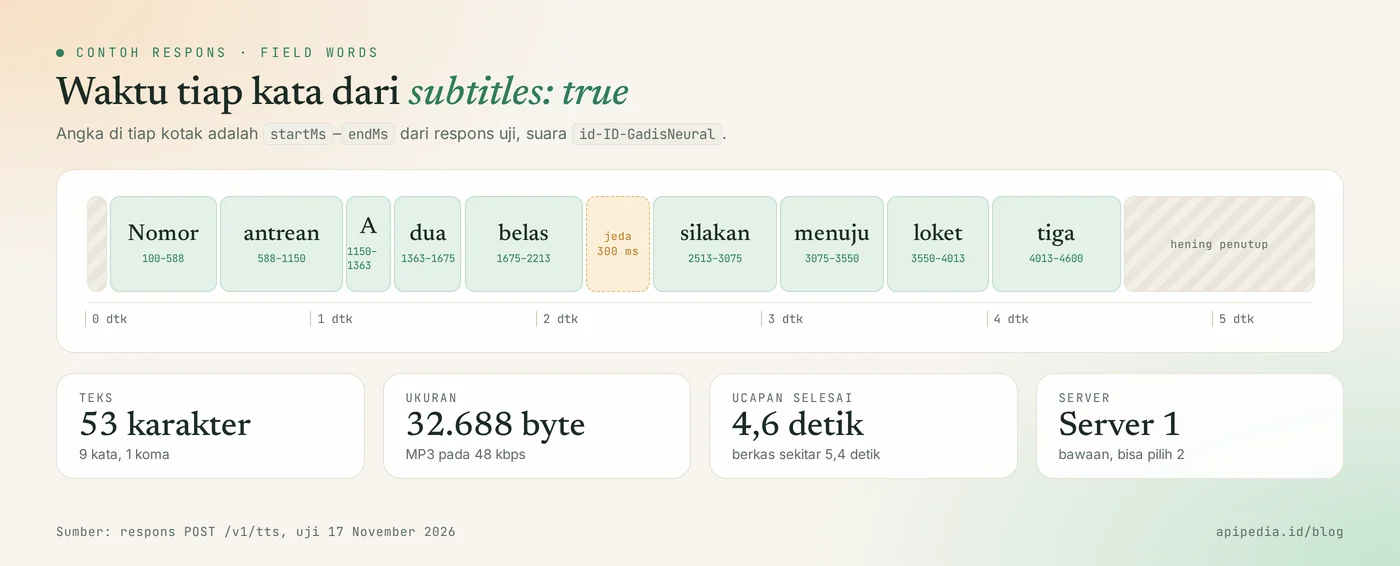
      { "text": "Nomor", "startMs": 100, "endMs": 588 },
      { "text": "antrean", "startMs": 588, "endMs": 1150 },
      { "text": "A", "startMs": 1150, "endMs": 1363 },
      { "text": "dua", "startMs": 1363, "endMs": 1675 },
      { "text": "belas", "startMs": 1675, "endMs": 2213 },
      { "text": "silakan", "startMs": 2513, "endMs": 3075 },
      { "text": "menuju", "startMs": 3075, "endMs": 3550 },
      { "text": "loket", "startMs": 3550, "endMs": 4013 },
      { "text": "tiga", "startMs": 4013, "endMs": 4600 }
    ],
    "srt": "1\n00:00:00,100 --> 00:00:04,600\nNomor antrean A dua belas silakan menuju loket tiga\n"
  }
}| Fields | Meaning |
|---|---|
server | Servers working on requests, 1 or 2. |
size | Audio size in bytes. A 53 character sentence yields 32,688 bytes at 48 kbps. |
characters | The number of text characters read aloud. |
base64 | Fill MP3 files in base64. Decode then save as .mp3. |
words | Start and end times of each word in milliseconds. |
srt | Ready-to-use subtitles in SRT format. |
From data words it can be seen that the last word was finished in 4.6 seconds and there was a 300 millisecond pause at the comma position. The MP3 file itself is around 5.4 seconds long because there is a closing silence. These numbers are useful for allowing time between calls or highlighting a number on the screen just as it is spoken.
Step 3: how to make queue call sound in Node.js?
Compose a sentence from letters, numbers, and counters, query the audio once, then save the file with the name of the sentence hash. The same sentence the next day is read from disk without calling the API again. The following example runs on Node.js 18 and above without any additional dependencies.
// antrean.mjs - Node.js 18+, tanpa dependensi tambahan
import { createHash } from "node:crypto";
import { existsSync } from "node:fs";
import { mkdir, writeFile } from "node:fs/promises";

const URL_TTS = "https://api.apipedia.id/v1/tts";
const KEY = process.env.APIPEDIA_KEY; // apk_xxx
const DASAR = ["nol", "satu", "dua", "tiga", "empat", "lima", "enam",
  "tujuh", "delapan", "sembilan", "sepuluh", "sebelas"];

// Angka 0-999 menjadi kata, supaya cara bacanya bisa Anda kendalikan.
export function terbilang(n) {
  if (n < 12) return DASAR[n];
  if (n < 20) return `${DASAR[n - 10]} belas`;
  if (n < 100) return `${DASAR[Math.floor(n / 10)]} puluh${n % 10 ? ` ${DASAR[n % 10]}` : ""}`;
  if (n < 200) return `seratus${n % 100 ? ` ${terbilang(n % 100)}` : ""}`;
  if (n < 1000) return `${DASAR[Math.floor(n / 100)]} ratus${n % 100 ? ` ${terbilang(n % 100)}` : ""}`;
  throw new RangeError("Hanya mendukung 0 sampai 999");
}

export function kalimatPanggilan(huruf, nomor, loket) {
  return `Nomor antrean ${huruf} ${terbilang(nomor)}, silakan menuju loket ${terbilang(loket)}.`;
}

async function minta(text, server) {
  return fetch(URL_TTS, {
    method: "POST",
    headers: { Authorization: `Bearer ${KEY}`, "Content-Type": "application/json" },
    body: JSON.stringify({ text, voice: "id-ID-GadisNeural", rate: -5, server }),
  });
}

export async function suaraPanggilan(huruf, nomor, loket) {
  const text = kalimatPanggilan(huruf, nomor, loket);
  const berkas = `cache/${createHash("sha1").update(text).digest("hex")}.mp3`;
  if (existsSync(berkas)) return berkas; // kalimat sama, tidak perlu memanggil API lagi

  let res = await minta(text, 1);
  if ([502, 503, 504].includes(res.status)) res = await minta(text, 2); // pindah server manual
  if (!res.ok) {
    const body = await res.json().catch(() => ({}));
    throw new Error(`HTTP ${res.status}: ${body.message ?? "gagal membuat audio"}`);
  }
  await mkdir("cache", { recursive: true });
  await writeFile(berkas, Buffer.from(await res.arrayBuffer()));
  return berkas;
}

if (process.argv[1]?.endsWith("antrean.mjs")) {
  console.log(kalimatPanggilan("A", 12, 3));
  if (KEY) console.log(await suaraPanggilan("A", 12, 3));
}
Three decisions in this code are worth noting:
- Numbers are converted into words. Function
terbilangwrites 12 as "twelve", so it's up to you how you read it. Our test sentences use this tense. - Speed reduced slightly.
rate: -5makes speech 5 percent slower, which is more comfortable in busy waiting rooms. - Switching servers is done by yourself. Servers never change automatically. If Server 1 answers 502, 503, or 504, the code repeats once to Server 2.
Step 4: what is the example in Python?
In Python, output base64 with requests, decode it into MP3 bytes, then use words to know when the utterance is finished. This example uses a male voice id-ID-ArdiNeural.
import base64
import os

import requests  # pip install requests

URL_TTS = "https://api.apipedia.id/v1/tts"
HEADERS = {"Authorization": f"Bearer {os.environ.get('APIPEDIA_KEY', '')}"}  # apk_xxx


def buat_audio(teks, voice="id-ID-ArdiNeural"):
    """Mengembalikan (bytes MP3, daftar waktu per kata)."""
    for server in (1, 2):  # server tidak pernah berpindah otomatis
        res = requests.post(
            URL_TTS,
            headers=HEADERS,
            json={
                "text": teks,
                "voice": voice,
                "server": server,
                "output": "base64",
                "subtitles": True,
            },
            timeout=60,
        )
        if res.status_code in (502, 503, 504) and server == 1:
            continue
        body = res.json()
        if not body.get("is_success"):
            raise RuntimeError(f"HTTP {res.status_code}: {body.get('message')}")
        data = body["data"]
        return base64.b64decode(data["base64"]), data.get("words", [])
    raise RuntimeError("Kedua server gagal")


if __name__ == "__main__":
    mp3, kata = buat_audio("Nomor antrean B tujuh, silakan menuju loket satu.")
    with open("antrean-b7.mp3", "wb") as f:
        f.write(mp3)
    durasi = kata[-1]["endMs"] / 1000 if kata else 0
    print(f"{len(mp3)} byte, sekitar {durasi:.1f} detik")
What are the Text to Speech limits you need to know?
The main limit is 5,000 characters per request and two bitrate options, 48 or 96 kbps. Other things to take into account:
- Non-zero latency. The catalog clocks an average of about 1.8 seconds per request. For queues, create audio when the number is drawn, not when the call button is pressed.
- The response is not cached by the gateway. The documentation calls header
Cache-Control: no-store, so storing audio is your application's job. - Two servers, same sound. Server 1 and Server 2 produce the same sound. Check availability via
GET /v1/tts/servers. - Long texts are broken down by sentence. According to the catalogue, the audio of each sentence is spliced back into one file.
- Pronunciation needs to be tested. Abbreviations, people's names, and foreign terms may read differently than expected. Listen to the results before using it in front of customers.
What common mistakes should you avoid?
The most frequent mistake is calling the API every time the call button is pressed, even though the call sentence repeats every day. Save the file as in Step 3. Also check the following things.
- Sending
subtitleswithoutoutput: "base64". This combination is rejected with status 400. - Parses audio as JSON. The default output is MP3 bytes. Use
arrayBuffer()orres.content, notjson(). - Typo in voice name. The name of the sound must be exact, for example
id-ID-GadisNeural. Take it from/v1/tts/voices, don't type it from memory. - Value out of range.
rate150 orbitrate128 rejected with 400. - Write raw numbers for important numbers. Write as words so that the pronunciation is certain.
- Calling from a browser. Key
apk_xxxwill be read by anyone. Call from backend.
Status code that needs to be addressed
| Status | Meaning | Action |
|---|---|---|
| 200 | Audio created successfully | Save or play the file |
| 400 | Invalid input: empty or too long text, unknown voice, value out of range | Read message and repair the body |
| 401 | Token is missing, unknown, or expired | Check header Authorization |
| 502 | The selected server failed to render audio | Repeat with other servers |
| 503 | The selected server is busy or unavailable, accompanied by Retry-After: 60 | Switch servers or wait |
| 504 | The request is past the time limit | Shorten text or repeat it |
Frequently asked questions
Is APIPedia's Text to Speech API free?
Text to Speech products are listed in the Free tier in the APIPedia catalog. Each call still counts towards your account's request quota.
What Indonesian voices are available?
There are two: id-ID-GadisNeural (female, congenital) and id-ID-ArdiNeural (male). The catalog also mentions Javanese and Sundanese sounds, which can be searched via /v1/tts/voices?locale=jv or locale=su.
What is the maximum text length?
Maximum 5,000 characters per request. Long text is broken down sentence by sentence and the audio is spliced back into one file.
Can I get subtitles from the same audio?
Can. Send output: "base64" and subtitles: true, then retrieve fields srt and words from the response.
What to do if one server fails?
Repeat the request with the other server. The server never auto-switches, so the loop logic is in your code.
Can AI assistants use this API?
Can. The APIPedia MCP server provides tools tts_speak, tts_voices, and tts_servers that call the same endpoint. How to connect is in the guide for connecting APIPedia to Claude via MCP.
Next step: try it on the console
Voice calling queues only need one POST /v1/tts request and one cache folder in the backend. Create a key at console.apipedia.id, run the curl example above with your own sentences, then install function suaraPanggilan in the queue app.
To complete the flow, read the QR code API for tickets and queue numbers, the Translator API for dual language announcements, and how Edge TTS works if you want to understand the neural voice technology behind it.
Topics: #text to speech #tts #api suara #tutorial #nodejs #python
About the author
Tim APIPedia — Tim Engineering APIPedia
Tim engineering di balik APIPedia yang membangun dan memelihara API data Indonesia - ongkir, OCR KTP, data wilayah, BMKG, hingga server MCP - dan menulis panduan integrasinya dari pengalaman langsung.