TOTP 2FA API: How to Install Google Authenticator in Your Application (Node.js and Python)
By Tim APIPedia, Tim Engineering APIPedia · Published · Updated · 10 min read
Install 2FA Google Authenticator via APIPedia TOTP API: create secret and QR, verify 6-digit code, prevent replay, and issue backup code.
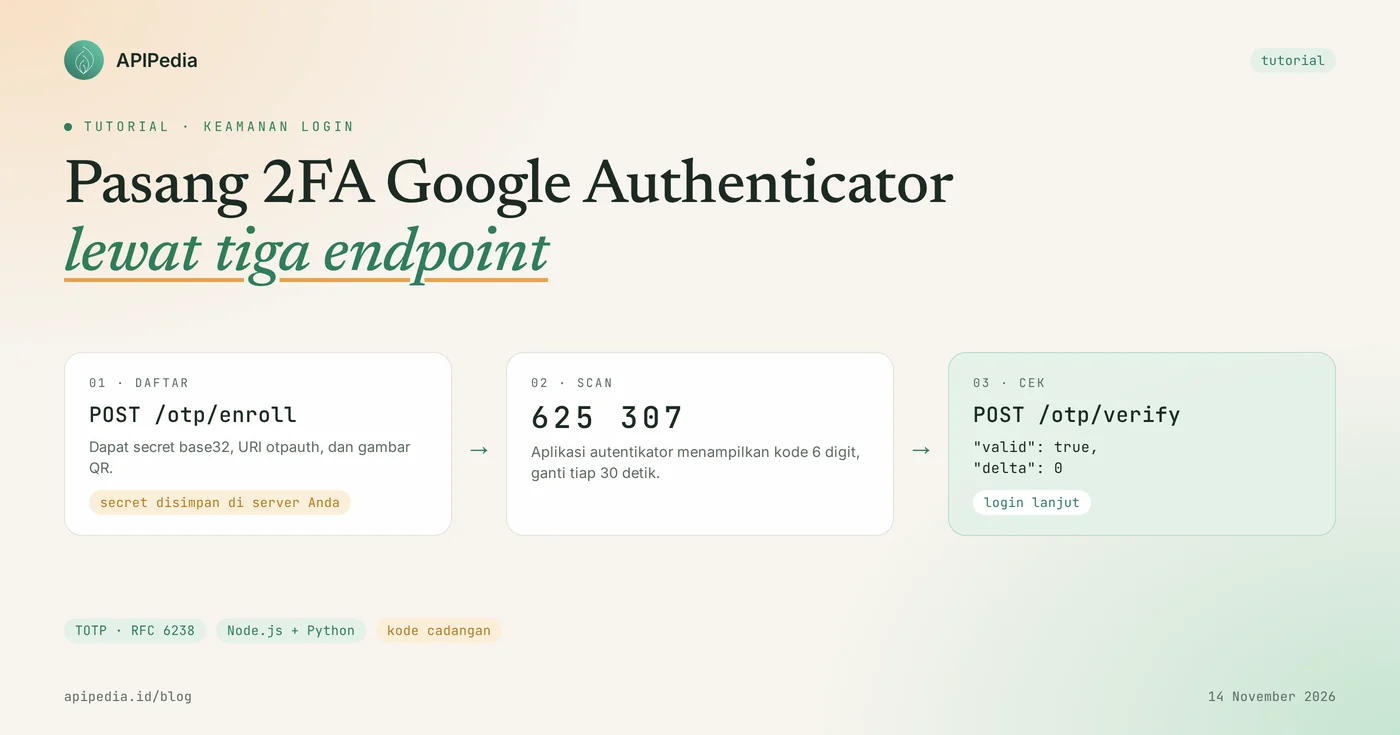
APIPedia's TOTP API installs Google Authenticator-compatible 2FA into your app via three endpoints: /otp/enroll generates secrets and QRs, /otp/verify matches 6-digit codes, and /otp/backup-codes issues backup codes. You don't need to write your own RFC 6238 algorithm, QR generator, or clock difference handler.
This tutorial covers the complete flow from the "Enable 2FA" button to login, with curl, Node.js, and Python examples. All sample responses below are taken from real calls to the API on November 14, 2026 using a sample account.
Quick summary
| Items | Details |
|---|---|
| Product | TOTP/HOTP Authenticator (Security category) |
| Base URL | https://api.apipedia.id/v1/otp |
| Endpoints | POST /enroll, POST /verify, POST /backup-codes |
| Standard | TOTP (RFC 6238) and HOTP (RFC 4226) |
| Default value | SHA1, 6 digits, 30 seconds per code, window 1 |
| Another option | SHA256/SHA512, 8 digits, period 15 to 120 seconds, window 0 to 10 |
| Secret storage | On your server. API does not save it ( stored: false) |
| Authentication | Header Authorization: Bearer apk_xxx |
What problems does TOTP-based 2FA solve?
TOTP-based 2FA eliminates the risk of accounts being taken over when passwords are leaked, because attackers still need a 6-digit code that only appears on the account owner's phone. The code is calculated from the shared secret and the current clock, then changes every 30 seconds.
Compared to codes via SMS, TOTP has three practical advantages:
- No fees per code. The code is calculated on the user's phone, no message is sent.
- Keep going without signal. Authenticator app works offline.
- Doesn't depend on phone numbers. Changing the number or SIM does not break access.
The parts that I often get wrong when writing myself are the details: base32 encoding, URI format otpauth://, clock tolerance, and preventing code from being used twice. These three endpoints take care of that part.
How does 2FA flow with TOTP API?
The flow consists of two stages: activation once per account, then verification at each login. Your server is always in the middle, so the API key never reaches the browser.
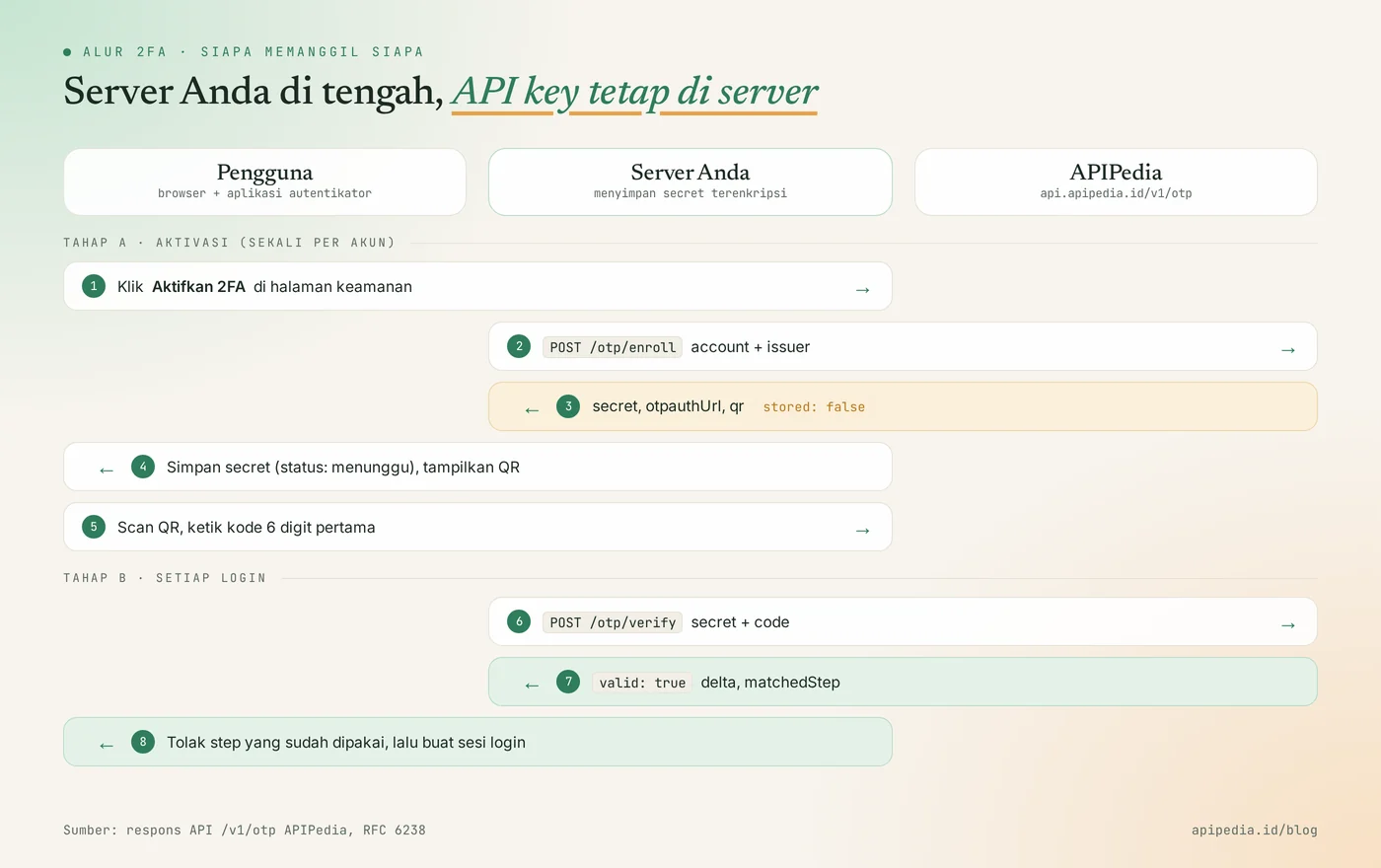
One important thing before writing code: This API is stateless. Secrets are not stored on APIPedia's side, so you store them (encrypted) and resend them every time you verify.
Step 1: How to create secret and QR?
The Secret and QR are created with a single call to POST /otp/enroll which only requires field account. Fill in issuer with the name of your application, because that is the name that appears in the authenticator application.
curl -s -X POST https://api.apipedia.id/v1/otp/enroll \
  -H "Authorization: Bearer apk_xxx" \
  -H "Content-Type: application/json" \
  -d '{"account": "[email protected]", "issuer": "TokoKita", "qrFormat": "svg"}'
Example response (fill qr truncated):
{
  "is_success": true,
  "message": "Secret OTP berhasil dibuat. APIPedia TIDAK menyimpan secret ini - simpan di sisi Anda (terenkripsi) karena wajib dikirim ulang saat verifikasi.",
  "data": {
    "secret": "7XWQF5HU4OGXF2F36UTB56Y6NS7UH5QJ",
    "otpauthUrl": "otpauth://totp/TokoKita:budi%40contoh.id?secret=7XWQF5HU4OGXF2F36UTB56Y6NS7UH5QJ&issuer=TokoKita&algorithm=SHA1&digits=6&period=30",
    "qr": "data:image/svg+xml;base64,PHN2ZyB4bWxucz0i...",
    "qrFormat": "svg",
    "type": "totp",
    "issuer": "TokoKita",
    "account": "[email protected]",
    "algorithm": "SHA1",
    "digits": 6,
    "period": 30,
    "secretSource": "generated",
    "stored": false
  }
}
What you need to do with this response:
- Store
secretin the database in an encrypted state, with the status "awaiting confirmation". - Display
qrdirectly as<img src="...">. The value is already a data URI, in PNG (default) or SVG format. - Also provide
secretas text for users who cannot scan QR.
Other optional parameters: digits (6 or 8), period (15 to 120 seconds), algorithm (SHA1, SHA256, SHA512), type ( totp or hotp), and secret if you want to use your own base32 secret of at least 128 bits. The secret in the example above is only for demonstration, do not reuse it.
Step 2: How to verify user code?
The code is verified with POST /otp/verify receiving secret and code, then returning valid: true or valid: false. Send code as text, not a number, so that the leading zero is not lost.
curl -s -X POST https://api.apipedia.id/v1/otp/verify \
  -H "Authorization: Bearer apk_xxx" \
  -H "Content-Type: application/json" \
  -d '{"secret": "7XWQF5HU4OGXF2F36UTB56Y6NS7UH5QJ", "code": "625307"}'
Response when code is correct:
{
  "is_success": true,
  "message": "Kode OTP valid.",
  "data": {
    "valid": true,
    "delta": 0,
    "timeStep": 59821764,
    "matchedStep": 59821764,
    "type": "totp",
    "algorithm": "SHA1",
    "digits": 6,
    "period": 30,
    "window": 1
  }
}
Response when code is incorrect or expired:
{
  "is_success": true,
  "message": "Kode OTP tidak valid atau sudah di luar jendela toleransi.",
  "data": { "valid": false, "delta": null, "timeStep": 59821764, "matchedStep": null, "window": 1 }
}
Note that the wrong code is still answered is_success: true with HTTP status 200. What determines whether it passes or not is data.valid, not is_success.
Once the first code passes, change the account's 2FA status to active. Don't enable 2FA before the user has successfully entered a code, as a failed QR scan will lock the account.
Step 3: How to install it on the backend?
In the backend you simply create one wrapper function to call the API, then two business functions: start activation and code check. Functions db, enkripsi, and dekripsi in the example belong to your own application.
Node.js
// otp.js (Node.js 18+, fetch bawaan)
const BASE = "https://api.apipedia.id/v1/otp";
const KEY = process.env.APIPEDIA_API_KEY; // apk_xxx

async function otp(path, body) {
  const res = await fetch(BASE + path, {
    method: "POST",
    headers: { Authorization: `Bearer ${KEY}`, "Content-Type": "application/json" },
    body: JSON.stringify(body),
  });
  const json = await res.json();
  if (!json.is_success) throw new Error(json.message);
  return json.data;
}

export async function mulaiAktivasi(user) {
  const data = await otp("/enroll", { account: user.email, issuer: "TokoKita" });
  await db.simpan2fa(user.id, { secret: enkripsi(data.secret), aktif: false, lastStep: 0 });
  return { qr: data.qr, secretManual: data.secret }; // tampilkan sekali di halaman aktivasi
}

export async function cekKode(user, code) {
  if (!/^\d{6}$/.test(code)) return false;
  const row = await db.ambil2fa(user.id);
  const data = await otp("/verify", { secret: dekripsi(row.secret), code });

  // tolak kode salah, dan kode benar yang sudah pernah dipakai (replay)
  if (!data.valid || data.matchedStep <= row.lastStep) return false;

  await db.simpan2fa(user.id, { aktif: true, lastStep: data.matchedStep });
  return true;
}
Python
# otp.py
import os
import requests

BASE = "https://api.apipedia.id/v1/otp"
HEADERS = {"Authorization": f"Bearer {os.environ['APIPEDIA_API_KEY']}"}  # apk_xxx


def otp(path: str, body: dict) -> dict:
    res = requests.post(BASE + path, json=body, headers=HEADERS, timeout=10)
    payload = res.json()
    if not payload["is_success"]:
        raise RuntimeError(payload["message"])
    return payload["data"]


def mulai_aktivasi(email: str) -> dict:
    data = otp("/enroll", {"account": email, "issuer": "TokoKita"})
    return {"secret": data["secret"], "qr": data["qr"]}  # enkripsi secret sebelum disimpan


def cek_kode(secret: str, code: str, last_step: int) -> tuple[bool, int]:
    hasil = otp("/verify", {"secret": secret, "code": code})
    if not hasil["valid"] or hasil["matchedStep"] <= last_step:
        return False, last_step
    return True, hasil["matchedStep"]  # simpan nilai ini sebagai last_step baru
On the login page, dial cekKode only after the password is correct. Also limit the number of attempts, for example 5 times per 15 minutes per account, because a 6-digit code only has one million possibilities.
Step 4: How to create backup code?
The backup code is created with POST /otp/backup-codes, which returns a list of codes along with their respective SHA-256 hashes. This code is used by users when their cellphone is lost or damaged.
curl -s -X POST https://api.apipedia.id/v1/otp/backup-codes \
  -H "Authorization: Bearer apk_xxx" \
  -H "Content-Type: application/json" \
  -d '{"count": 3}'
{
"is_success": true,
"message": "3 kode cadangan berhasil dibuat. Tampilkan kode ke pengguna SEKALI saja dan simpan hanya hash-nya; APIPedia tidak menyimpan keduanya.",
"data": {
"codes": ["k9wdv-c72k7", "yybeq-phv27", "82wkx-dy6sx"],
"hashes": [
"7209ce944539fe549366fd4005015214302a9a0ed84ed0944a1d943c7c48c8cb",
"7a3e1f53802cc3472cfb0cdc7eb1ee9b194c37811e72665d0a9dc26efa2eca12",
"5864f048342f375f5216fdbb0472ad2c5ab7ffb3b0caa7402a779f7102a74229"
],
"hashAlgorithm": "sha256",
"normalization": "huruf kecil, tanpa spasi dan tanda hubung",
"count": 3,
"length": 10,
"format": "grouped",
"entropyBits": 49,
"stored": false
}
}Display codes once, then save only hashes. When a user enters a backup code, normalize it first, calculate the hash, match it, then delete the used hash:
import hashlib

def cek_kode_cadangan(masukan: str, daftar_hash: list[str]) -> bool:
    norm = masukan.lower().replace("-", "").replace(" ", "")
    h = hashlib.sha256(norm.encode()).hexdigest()
    if h in daftar_hash:
        daftar_hash.remove(h)  # sekali pakai
        return True
    return False
We tested this function with the first code in the example: k9wdv-c72k7 produces the hash 7209ce94... which is the same as the API response. The number of codes can be set from 1 to 20 (default 10) and the length is 8 to 16 characters.
What is the correct window value?
The value window: 1, which is the default value, is correct for most applications. With this value, the API accepts code from one step before and one step after the server time, so that a cellphone clock difference of around 30 seconds is still tolerable.
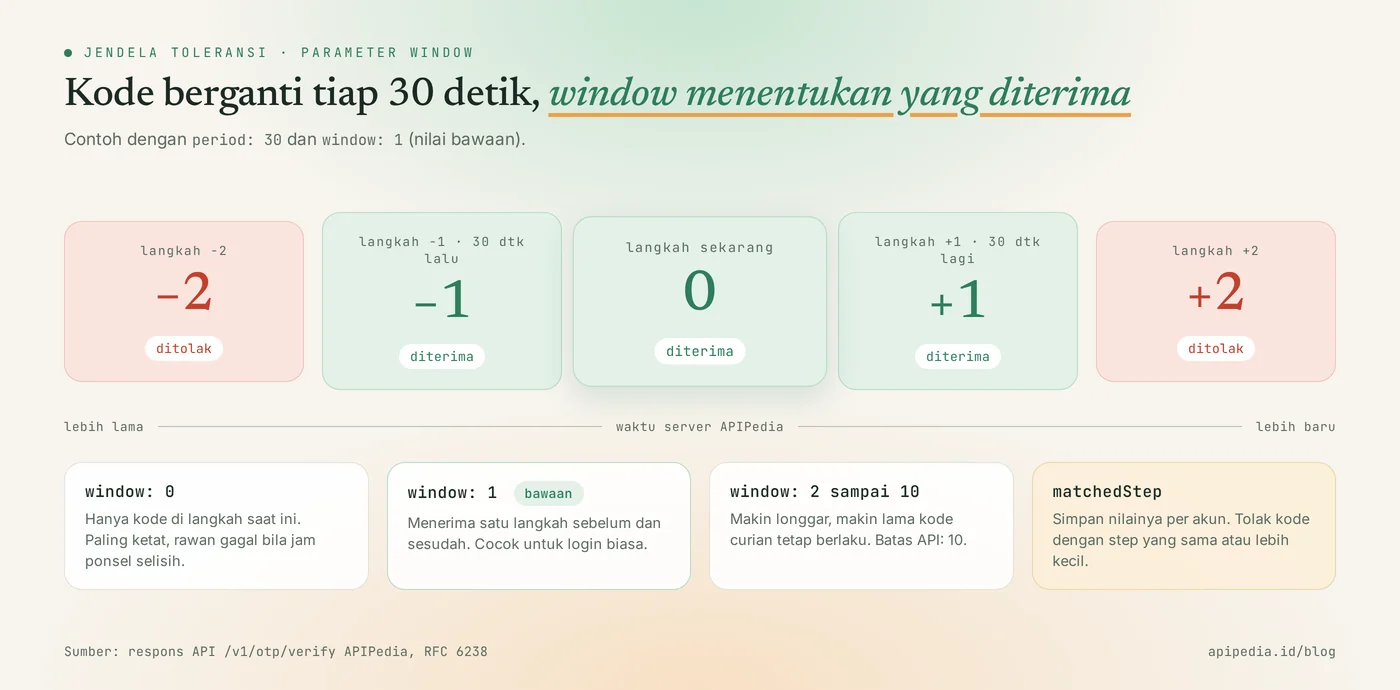
deltaindicates in which step the code matches: 0 means on time, -1 means code from 30 seconds earlier.matchedStepis a suitable step number. Save the value per account to prevent the same code from being used twice.- Big
windowextends the validity period of stolen codes. Increase only if many users fail due to device clock.
What common mistakes should you avoid?
The most common mistake is calling this API directly from a browser or mobile application, thereby exposing the user's API key and secret. Here's the complete list:
- Calling from frontend. All calls must go through your server.
- Don't keep secrets. A response
stored: falsemeans the secret is lost forever if you don't save it. - Storing secrets without encryption. Secret is equivalent to the second password. Encrypt in the database and do not write to the log.
- Just check
is_success. Fixed error codeis_success: true. Always checkdata.valid. - Sends codes as numbers.
012345to12345and rejected. Send as string. - Does not prevent replay. Without checking
matchedStep, the peeked code can be used again in the same window. - No trial limits. Set a rate limit per account on your login endpoint.
- No recovery path. Without a backup code, a lost phone means help tickets and manual verification.
- Using a colon in
account. The character is a separator in URIotpauth://, so it is not accepted.
Frequently asked questions
Is this API only for Google Authenticator?
No. The resulting secret and URI otpauth:// follow RFC 6238, so they can be scanned by any authenticator application that supports TOTP. Use the default values of SHA1, 6 digits, and 30 seconds for the broadest compatibility.
Does APIPedia store my user secrets?
No. Responses /otp/enroll and /otp/backup-codes contain stored: false, and the message states the secret must be kept on your side. Therefore the secret must be resent on each call /otp/verify.
What is the difference between TOTP and HOTP?
TOTP calculates the code from time, while HOTP calculates it from a counter that goes up every time the code is used. For HOTP, send type: "hotp" along with counter saved, then save nextCounter from the response. For application logins, TOTP is more common.
Why is the user code always rejected?
The most common cause is a cell phone clock that is out of sync. Have the user enable automatic time on their phone. If another user's delta is often -1 or 1, it's the same sign on a smaller scale.
Is this 2FA code sent via SMS or email?
No. No message sent. The code is calculated on the user's phone from the secret scanned at activation, and the API simply matches it.
Related reading on APIPedia: how API keys are stolen and how to protect them, the meaning of rate limit and error 429, KTP OCR API for onboarding, and connecting APIPedia to Claude via MCP.
Try it now: create an API key at console.apipedia.id, call /otp/enroll with your own email, scan the QR, then send the code that appears to /otp/verify. From zero to valid: true is usually done in a few minutes.
Source
Topics: #tutorial #2fa #totp #keamanan #google authenticator #api otp
About the author
Tim APIPedia — Tim Engineering APIPedia
Tim engineering di balik APIPedia yang membangun dan memelihara API data Indonesia - ongkir, OCR KTP, data wilayah, BMKG, hingga server MCP - dan menulis panduan integrasinya dari pengalaman langsung.