Translator API: How to Translate Automated Online Store Product Descriptions (curl, Node.js, Python)
By Tim APIPedia, Tim Engineering APIPedia · Published · Updated · 11 min read
APIPedia's Translator API translates up to 50 texts at once via POST /v1/translate. Example of an online store catalog with curl, Node.js, and Python.
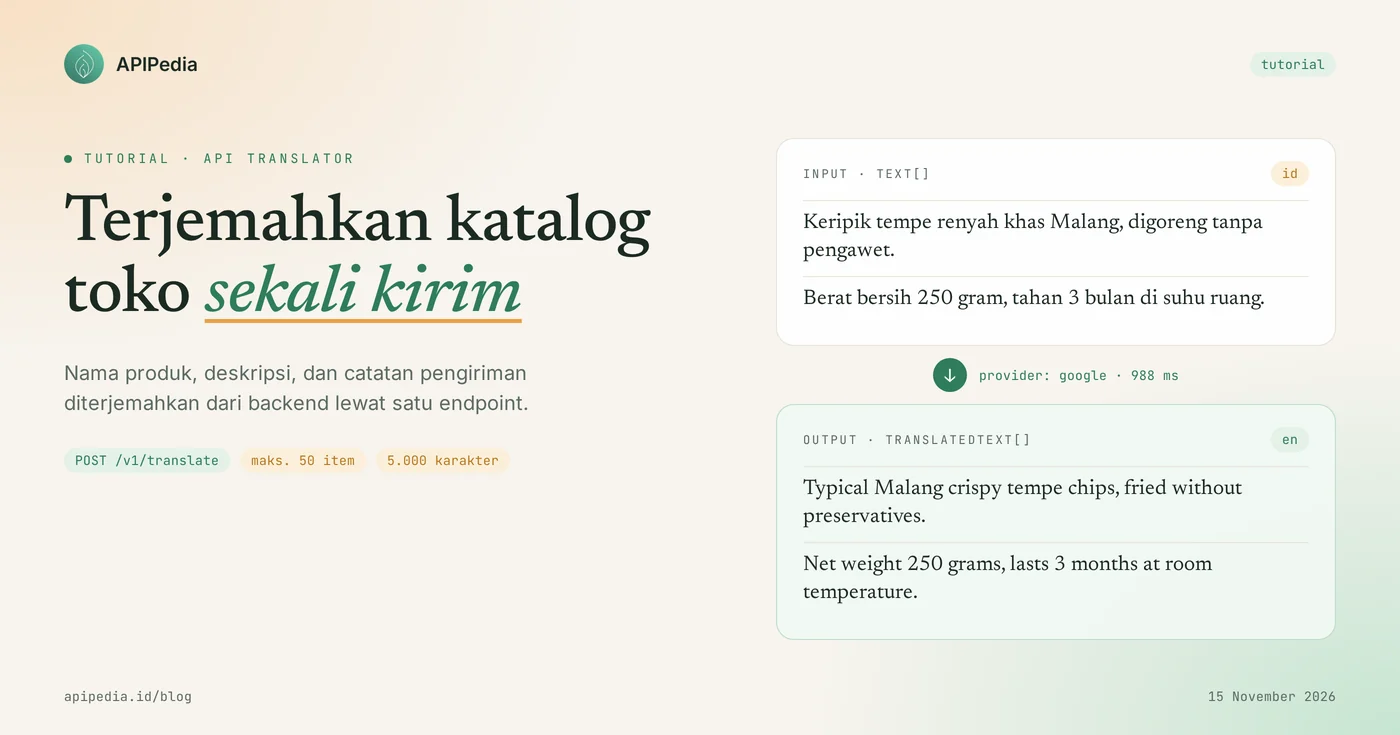
APIPedia's Translator API translates one text or up to 50 texts at once via one request POST /v1/translate, with the source language being detected automatically. The results are in field translatedText, in the same order as the text you sent.
This tutorial uses the case of an online store that wants to display a catalog in English: product names, descriptions and shipping notes are translated from the backend, then stored in the database. You'll see examples of curl, Node.js, and Python, real-world responses from our test on November 15, 2026, and when to use AI mode.
Quick summary: what do you need to know?
The Translator product has two endpoints: one for translating, one for viewing a list of languages and providers. The following table summarizes the essence.
| Items | Details |
|---|---|
| Translate | POST https://api.apipedia.id/v1/translate |
| List of languages and providers | GET https://api.apipedia.id/v1/translate/languages |
| Mandatory body | text (string or array of strings) and target (e.g. "en") |
| Body optional | source (default auto), provider (default auto), and model, formality, instructions for AI mode |
| Limit | 5,000 characters per request, maximum 50 items in one array |
| Authentication | Header Authorization: Bearer apk_xxx |
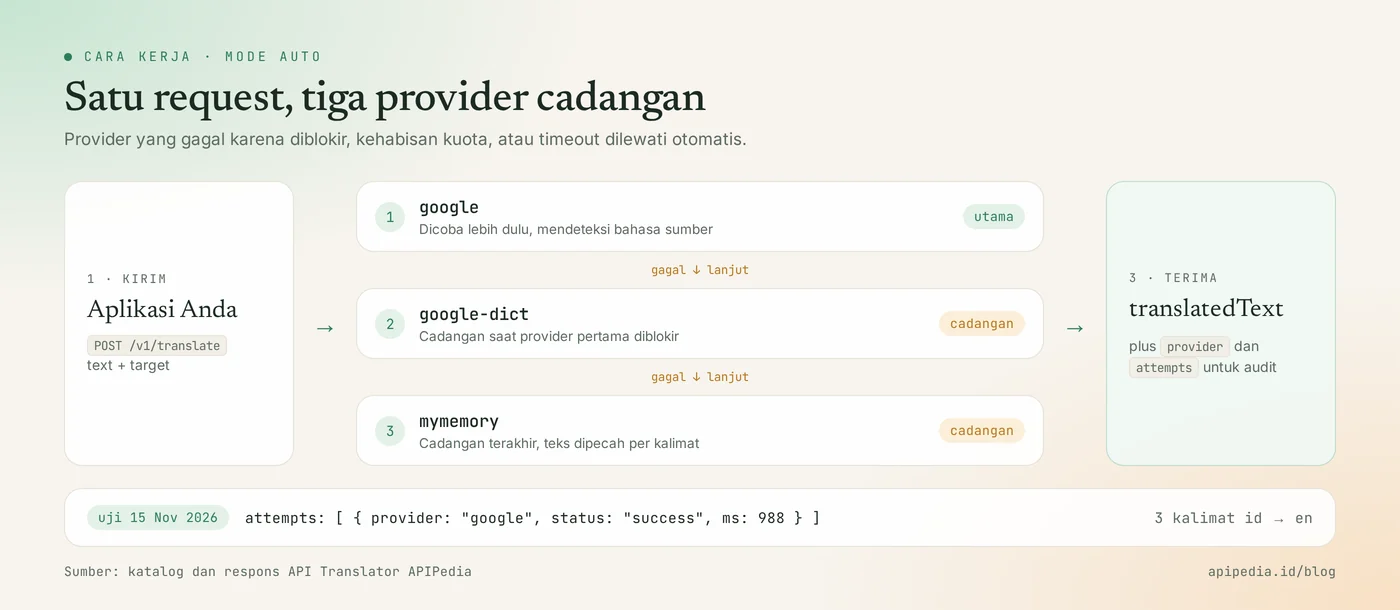
| Auto mode provider | google, then google-dict, then mymemory |
| Results | translatedText, source, target, provider, attempts |
What problems does the Translator API solve?
This API eliminates the work of copying product descriptions one by one to a translation tool. Stores with hundreds of products typically hold off on the English version because translating the manual is time-consuming, and any changes to the description have to be re-translated.
With one endpoint in the backend, translation becomes part of the product save flow. The admin types a description in Indonesian, your system sends it to the API, then the result is saved as a draft English version that just needs to be checked.
Mode auto also eliminates one source of disruption: if the first provider fails due to blocking, quota exhaustion, or timeout, the API tries the next provider without you writing your own backup logic.
What do you need to prepare before starting?
You only need one APIPedia API key. Register or log in at console.apipedia.id, open the API Token menu, then create a new key. The key starts with apk_ and is sent via header Authorization: Bearer apk_xxx.
Store the key in a server environment variable, for example APIPEDIA_KEY, and call the API from the backend. Translator products are listed in the Free tier in the catalog. AI mode is different: it cuts AI credits and requires a key with the AI Gateway scope.
Step 1: how to translate a single text with curl?
Send text and target as JSON to POST /v1/translate. The following example translates a one-sentence product description into English.
curl -s -X POST https://api.apipedia.id/v1/translate \
  -H "Authorization: Bearer apk_xxx" \
  -H "Content-Type: application/json" \
  -d '{"text": "Keripik tempe renyah khas Malang, digoreng tanpa pengawet.", "target": "en"}'
If text is a string, translatedText is also a string. Field source may be left blank; The API detects the language and reports it in the response. Commonly used language codes include id, en, jv (Javanese), su (Sundanese), ms, ar, ja, ko, and zh-CN.
Step 2: how to translate multiple texts in one request?
Send text as an array, and the API returns an array of results in the same order. This method is more economical than one request per sentence, because three product fields are just one call away.
curl -s -X POST https://api.apipedia.id/v1/translate \
  -H "Authorization: Bearer apk_xxx" \
  -H "Content-Type: application/json" \
  -d '{
    "text": [
      "Keripik tempe renyah khas Malang, digoreng tanpa pengawet.",
      "Berat bersih 250 gram, tahan 3 bulan di suhu ruang.",
      "Gratis ongkir untuk pembelian minimal 5 bungkus."
    ],
    "target": "en"
  }'
Real response from our test:
{
  "is_success": true,
  "message": "Text translated (provider google).",
  "data": {
    "translatedText": [
      "Typical Malang crispy tempe chips, fried without preservatives.",
      "Net weight 250 grams, lasts 3 months at room temperature.",
      "Free shipping for minimum purchase of 5 packs."
    ],
    "source": "id",
    "target": "en",
    "provider": "google",
    "attempts": [
      { "provider": "google", "status": "success", "ms": 988 }
    ]
  }
}| Fields | Meaning |
|---|---|
translatedText | Translation results. String if the input is a string, array if the input is an array. |
source | Source language. In this test, id were detected even though they were not sent. |
target | Your requested destination language. |
provider | The provider ultimately produces the translation. |
attempts | Trial history per provider: name, status, and processing time in milliseconds. |
One request is limited to 5,000 characters and 50 items. Larger catalogs need to be split into batches, as in the next step.
Step 3: how to install it in Node.js backend?
Create a function that splits text into batches according to boundaries, then combines the results back together. This example runs on Node.js 18 and above without any additional dependencies.
const BASE = "https://api.apipedia.id/v1";
const headers = {
  Authorization: `Bearer ${process.env.APIPEDIA_KEY}`, // apk_xxx
  "Content-Type": "application/json",
};

// Batas API: 50 item dan 5.000 karakter per request.
function bagiBatch(daftarTeks, maxItem = 50, maxKarakter = 5000) {
  const batches = [];
  let batch = [];
  let jumlah = 0;
  for (const teks of daftarTeks) {
    if (teks.length > maxKarakter) throw new Error("Satu teks melebihi 5.000 karakter");
    if (batch.length === maxItem || jumlah + teks.length > maxKarakter) {
      batches.push(batch);
      batch = [];
      jumlah = 0;
    }
    batch.push(teks);
    jumlah += teks.length;
  }
  if (batch.length) batches.push(batch);
  return batches;
}

export async function terjemahkan(daftarTeks, target = "en", source = "id") {
  const hasil = [];
  for (const batch of bagiBatch(daftarTeks)) {
    const res = await fetch(`${BASE}/translate`, {
      method: "POST",
      headers,
      body: JSON.stringify({ text: batch, target, source }),
    });
    const body = await res.json();
    if (!body.is_success) throw new Error(`HTTP ${res.status}: ${body.message}`);
    hasil.push(...body.data.translatedText); // urutan sama dengan input
  }
  return hasil;
}

// Contoh: terjemahkan tiga field satu produk, lalu simpan sebagai draf.
const produk = {
  nama: "Keripik tempe renyah khas Malang",
  deskripsi: "Digoreng tanpa pengawet, berat bersih 250 gram.",
  pengiriman: "Gratis ongkir untuk pembelian minimal 5 bungkus.",
};
const [nama, deskripsi, pengiriman] = await terjemahkan(Object.values(produk));
console.log({ nama, deskripsi, pengiriman });
Because the results are always in sequence according to the input, you can map translations back to their original fields without additional markers. Save the result in a separate column, for example deskripsi_en, along with a sign that the text is machine generated and has not been checked.
Step 4: how to do the same example in Python?
In Python, send JSON with requests and read translatedText from the response. The pattern is the same as the Node.js version.
import os

import requests  # pip install requests

BASE = "https://api.apipedia.id/v1"
HEADERS = {"Authorization": f"Bearer {os.environ['APIPEDIA_KEY']}"}  # apk_xxx


def bagi_batch(daftar_teks, max_item=50, max_karakter=5000):
    batch, jumlah = [], 0
    for teks in daftar_teks:
        if len(teks) > max_karakter:
            raise ValueError("Satu teks melebihi 5.000 karakter")
        if len(batch) == max_item or jumlah + len(teks) > max_karakter:
            yield batch
            batch, jumlah = [], 0
        batch.append(teks)
        jumlah += len(teks)
    if batch:
        yield batch


def terjemahkan(daftar_teks, target="en", source="id"):
    hasil = []
    for batch in bagi_batch(daftar_teks):
        res = requests.post(
            f"{BASE}/translate",
            headers=HEADERS,
            json={"text": batch, "target": target, "source": source},
            timeout=30,
        )
        body = res.json()
        if not body.get("is_success"):
            raise RuntimeError(f"HTTP {res.status_code}: {body.get('message')}")
        hasil.extend(body["data"]["translatedText"])
    return hasil


if __name__ == "__main__":
    teks = [
        "Keripik tempe renyah khas Malang, digoreng tanpa pengawet.",
        "Berat bersih 250 gram, tahan 3 bulan di suhu ruang.",
    ]
    for asli, inggris in zip(teks, terjemahkan(teks)):
        print(asli, "->", inggris)
When to use AI mode instead of auto mode?
Use AI mode when your text contains markdown, placeholders like {nama}, or requires a specific language style. According to the catalog, this mode preserves formatting, markdown, and placeholder {x}, and accepts settings formality and instructions.
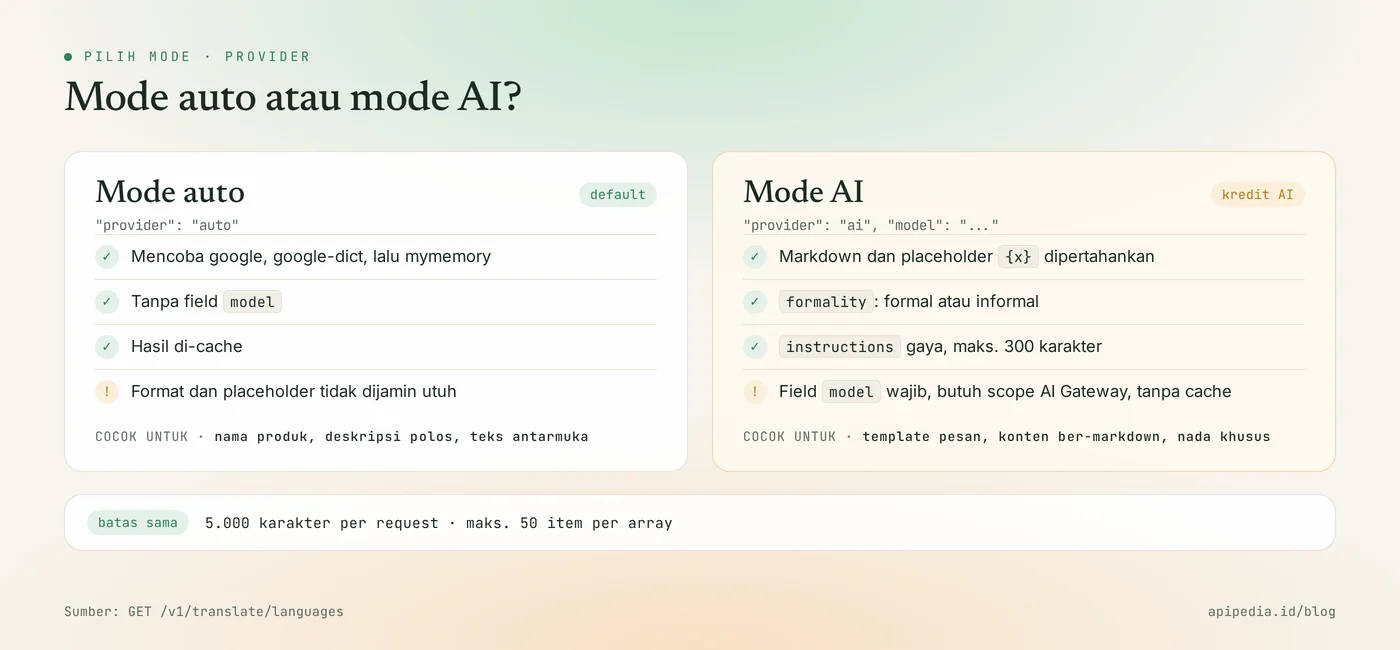
To use it, set provider to "ai" and fill model with a model ID of GET /v1/ai/models. The value MODEL_ANDA below is a placeholder, not a real model name.
curl -s -X POST https://api.apipedia.id/v1/translate \
  -H "Authorization: Bearer apk_xxx" \
  -H "Content-Type: application/json" \
  -d '{
    "text": "Halo {nama}, pesanan **#{nomor}** sedang dikemas.",
    "target": "en",
    "provider": "ai",
    "model": "MODEL_ANDA",
    "formality": "formal",
    "instructions": "Pertahankan nama produk dalam bahasa Indonesia."
}'| Matter | Auto mode | AI mode |
|---|---|---|
Field model | No need | Must |
| Format and placeholders | Not guaranteed to be intact | Maintained |
| Language style | Can't be set | formality and instructions (max. 300 characters) |
| Cost | Follows the usual request quota | Cutting AI credits |
| Cache | Yes | No |
A rule of thumb: start with auto mode for plain text, and move to AI mode only for message templates, marked-down content, or text where tone matters.
What are the limits of this Translator API?
This API produces machine translations, so the results need to be human-checked before appearing on important pages. In our test, "typical Malang tempeh chips" became "Typical Malang crispy tempeh chips": understandable, but not necessarily the word choice you want for a display case.
- Not for legal or medical documents. Contracts, ingredient labels and health claims still need an authorized translator.
- Auto mode provider can be changed. Two similar requests can be served by different providers, so the translation style can be slightly different. See field
provider. - One request has a maximum of 5,000 characters and 50 items. Long descriptions need to be broken down into paragraphs.
- The list at
/translate/languagesis a sample of 40 common languages. Other provider-supported BCP-47 codes, for examplept-BR, are also accepted.
What common mistakes should you avoid?
The most common mistake is re-translating the same text every time the page is opened. Translate once when the product is saved, then serve it from the database. Also check the following things.
- One request per sentence. Send an array to have dozens of texts completed in a single call.
- Does not fill
sourcefor short text. Single words such as variant names can be incorrectly detected. If you know the language, send"source": "id". - Sends complete HTML in auto mode. There is no guarantee that the tag will remain intact. Just send the text, or use AI mode for formatted content.
- Translating brand names and SKU codes. Separate it from the text before sending, then combine it again.
- Calling from a browser. Key
apk_xxxwill be read by anyone. Call from backend. - Ignoring
is_success. If the value isfalse, readmessage, do not save empty results to the database. - Immediate results. Save as draft and give admin a check button.
Status code that needs to be addressed
| Status | Meaning | Action |
|---|---|---|
| 200 | Translation complete | Read translatedText |
| 400 | Invalid parameter or body | Read message, which calls the field problematic |
| 401 | Token is missing, unknown, or expired | Check header Authorization |
| 403 | The key has no scope for this endpoint | Change the key scope on the Token page |
| 429 | Request limit exceeded | Wait, then repeat with a pause |
Frequently asked questions
Is APIPedia's Translator API free?
Translator products are listed in the Free tier in the APIPedia catalog. AI mode is an exception: the cost is deducted from the AI credits according to the model you choose.
What languages are supported?
Endpoint GET /v1/translate/languages returns 40 common languages, including Indonesian, English, Javanese, Sundanese, Malay, Arabic, Japanese, Korean, and Mandarin. Other BCP-47 codes supported by the provider are also accepted.
Can it be translated into Javanese or Sundanese?
Can. Codes jv for Javanese and su for Sundanese are in the language list. The quality of regional language translations is generally below that of major languages, so check the results.
How do I know which provider translated my text?
Read field provider in the response. Field attempts contains the complete history, including failed providers and the length of each attempt in milliseconds.
Are placeholders like {name} safe?
In AI mode, placeholder {x} and markdown are maintained. In auto mode there is no guarantee, so use AI mode for message templates.
Next step: try it on the console
A dual language catalog only needs one function terjemahkan in the backend and one additional column in the product table. Create a key at console.apipedia.id, run the curl example above with your own product description, then install that function in the product save flow.
To equip stores that serve overseas buyers, also read the rupiah exchange rate API to display prices in other currencies and the postage check API to estimate shipping costs. If your AI assistant needs to translate text, follow the guide for connecting APIPedia to Claude via MCP.
Topics: #api translator #terjemahan #toko online #tutorial #nodejs #python
About the author
Tim APIPedia — Tim Engineering APIPedia
Tim engineering di balik APIPedia yang membangun dan memelihara API data Indonesia - ongkir, OCR KTP, data wilayah, BMKG, hingga server MCP - dan menulis panduan integrasinya dari pengalaman langsung.