How to Put an AI Training Opt-Out Signal in robots.txt (Token __usage_ai-training)
By Tim APIPedia, Tim Engineering APIPedia · Published · Updated · 11 min read
Google, OpenAI, Microsoft, and Anthropic have now agreed on a single robots.txt token. Installation, testing and enforcement guide.
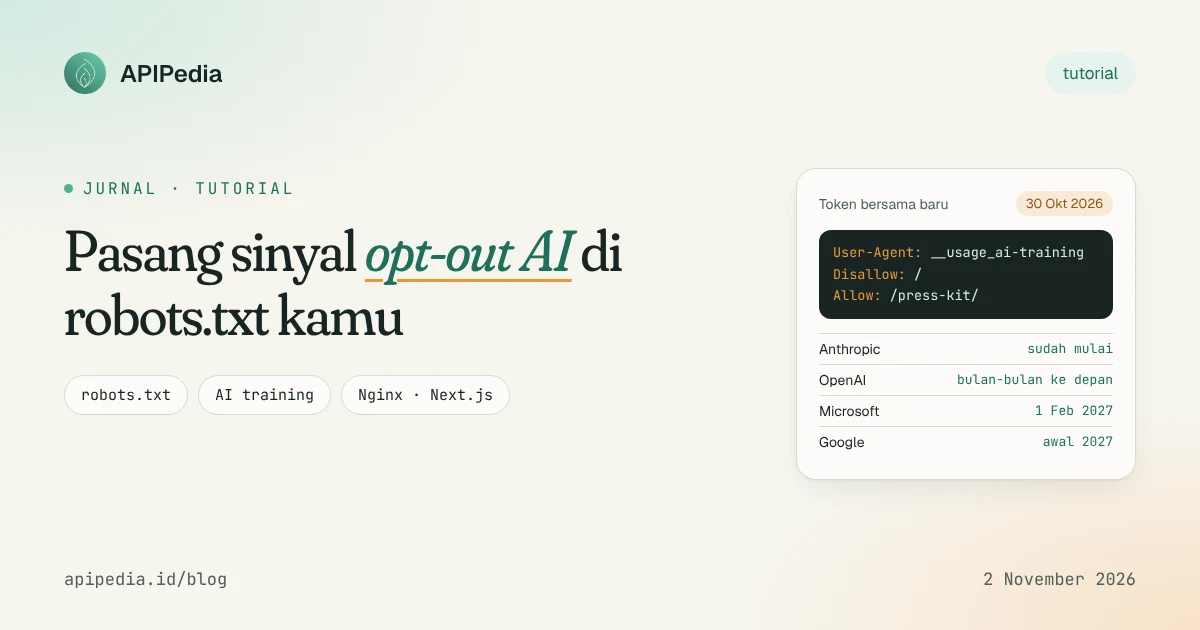
Starting October 30, 2026, Google, OpenAI, Microsoft, and Anthropic agreed to respect one shared robots.txt token, __usage_ai-training, to indicate whether your site's content can be used to train generative AI models. A single block of rules can now replace an ever-growing list of bots, without hurting SEO.
This topic has been busy since the weekend because for the first time four big players use the same language. But support is not yet simultaneous: Anthropic has started, Microsoft is following February 1, 2027, Google is targeting early 2027, and OpenAI only said "in a few months". This means that how to install it correctly now requires a little strategy.
This guide covers the practical steps: write a rule, install it in Nginx or Next.js, test the results with a small script, then monitor rogue bots. We have run all the code ourselves.
What exactly is token __usage_ai-training?
This is not the name of the crawler. This token is a policy token: you write it in line User-Agent as usual, but it means "rules for AI training purposes", regardless of which bot retrieves the content. The definition is in Internet-Draft individual draft-kelley-aipref-training-preference-signal-00 written by Anthropic's Kevin Kelley, published October 30, 2026 and expires May 3, 2027 if not updated.
Some rules of the game that are important to understand before writing anything:
- Group
User-Agent: *does not count. If you only haveDisallow: /in the star group, that's not an automatic rejection of training. Tokens must be written explicitly. - Without rules means it's okay. Sites that do not express a preference are considered to allow training.
- Path matching follows RFC 9309. The rule with the longest path wins, so
Allow: /press-kit/can beatDisallow: /. - Vendor tokens are more specific. The rule for
GPTBotorGoogle-Extendedtrumps shared tokens, so you can refuse in general but make an exception for one vendor. - It's not about searching. Googlebot and Bingbot continue to crawl and rank as usual.
When will each vendor start complying?
This is the reason you can't delete the old rules yet. Support comes in stages, and the dates are announced plans, not guarantees.
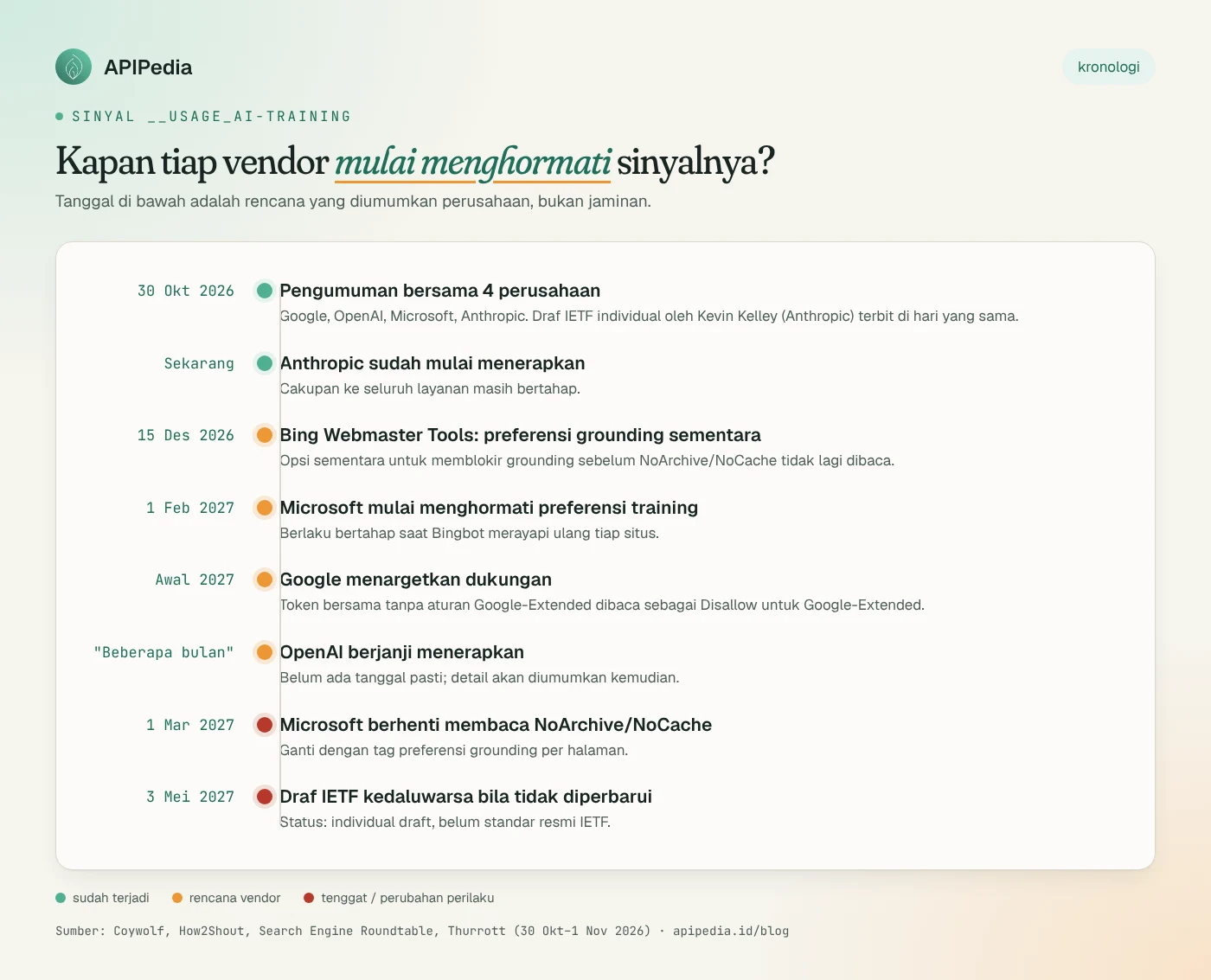
| Vendors | Old token | Shared token status | Notes |
|---|---|---|---|
| Anthropic | ClaudeBot | It has started to be implemented | Coverage for all services is still gradual |
| OpenAI | GPTBot | "In a few months" | Syntax details will be announced later |
| Microsoft | NoArchive / NoCache | February 1, 2027 | There are separate grounding preferences per page |
Google-Extended | Early 2027 | The shared token is read as Disallow Google-Extended if Google-Extended is not mentioned | |
| Meta, Apple, Amazon | diverse | Not committed yet | Keep using your respective tokens |
There are slight differences between sources. Coywolf said Anthropic was the only one already using this token, while Thurrott wrote that the other three companies would implement it "in 2027", even though OpenAI itself only said "in a few months". We use the statements of each vendor as quoted by the media.
Step 1: How to view the current robots.txt?
Starting from real conditions. Take the production robots.txt and look for existing AI rules:
curl -s https://contoh.co.id/robots.txt -o robots-lama.txt
grep -inE "user-agent|disallow|allow" robots-lama.txt
grep -inE "gptbot|google-extended|claudebot|ccbot|__usage_" robots-lama.txt || echo "Belum ada aturan AI"
Note three things: whether any of the * groups are too restrictive, whether vendor tokens already exist, and which folders you actually want to share (e.g. press kit or public documentation).
Step 2: How to write safe rules for the transition period?
The safest strategy now is to stake tokens together and keep legacy tokens per vendor. Once all vendors confirm support, legacy blocks can be streamlined.
# Situs biasa: semua crawler boleh merayapi
User-Agent: *
Allow: /

# Sinyal bersama: tolak pelatihan AI, kecuali folder press kit
User-Agent: __usage_ai-training
Disallow: /
Allow: /press-kit/

# Token lama per vendor (tetap dipasang sampai semua vendor mendukung sinyal bersama)
User-Agent: GPTBot
Disallow: /

User-Agent: Google-Extended
Disallow: /

User-Agent: ClaudeBot
Disallow: /

Sitemap: https://contoh.co.id/sitemap.xml
Note one pitfall: because group GPTBot is more specific, folder /press-kit/ remains closed to GPTBot. If you want the press kit to be open to all vendors, add Allow: /press-kit/ in each vendor group as well. One more note: block GPTBot stops crawling by those bots, while shared tokens only regulate usage for training.
Step 3: How to install it on Nginx or Next.js?
Static site or Nginx
Just save the file in the site root, then make sure it's served as plain text:
sudo cp robots.txt /var/www/html/robots.txt
curl -sI https://contoh.co.id/robots.txt | grep -iE "^(HTTP|content-type)"
# Harapan: HTTP/2 200 dan content-type: text/plain
Next.js (App Router)
If robots.txt is generated from code, Next.js accepts any string in userAgent, including policy tokens:
// app/robots.ts
import type { MetadataRoute } from "next";

export default function robots(): MetadataRoute.Robots {
  return {
    rules: [
      { userAgent: "*", allow: "/" },
      { userAgent: "__usage_ai-training", disallow: "/", allow: "/press-kit/" },
      { userAgent: ["GPTBot", "Google-Extended", "ClaudeBot"], disallow: "/" },
    ],
    sitemap: "https://contoh.co.id/sitemap.xml",
  };
}
Step 4: How to test the rules before deploying?
Many legacy robots.txt parsers don't understand policy tokens and don't use the "longest path wins" rule (Python's built-in parser, for example, uses the first-to-match rule). The following Node.js 18+ script follows RFC 9309 and treats token __usage_* as drafted: leave out the star group.
// cek-robots.mjs — cek preferensi robots.txt per token (RFC 9309: longest match, Allow menang bila seri)
// Pakai: node cek-robots.mjs <url-robots.txt | file lokal> <token> <path...>
import { readFile } from "node:fs/promises";

const [src, token, ...paths] = process.argv.slice(2);
if (!src || !token || paths.length === 0) {
  console.error("Pakai: node cek-robots.mjs <robots.txt> <token> <path...>");
  process.exit(1);
}

const text = src.startsWith("http")
  ? await (await fetch(src)).text()
  : await readFile(src, "utf8");

// 1) Kelompokkan baris jadi grup: beberapa User-Agent berurutan + aturan di bawahnya
const groups = [];
let cur = null, lastWasUA = false;
for (const raw of text.split(/\r?\n/)) {
  const line = raw.replace(/#.*/, "").trim();
  const m = line.match(/^([A-Za-z-]+)\s*:\s*(.*)$/);
  if (!m) continue;
  const key = m[1].toLowerCase(), val = m[2].trim();
  if (key === "user-agent") {
    if (!lastWasUA) { cur = { agents: [], rules: [] }; groups.push(cur); }
    cur.agents.push(val.toLowerCase());
    lastWasUA = true;
  } else if ((key === "allow" || key === "disallow") && cur) {
    if (val !== "") cur.rules.push({ allow: key === "allow", path: val });
    lastWasUA = false;
  } else {
    lastWasUA = false;
  }
}

// 2) Pilih grup: token persis (case-insensitive). Token kebijakan AI TIDAK ikut grup "*".
const t = token.toLowerCase();
const isPolicyToken = t.startsWith("__usage_");
let rules = groups.filter(g => g.agents.includes(t)).flatMap(g => g.rules);
let source = `grup "${token}"`;
if (rules.length === 0 && !isPolicyToken) {
  rules = groups.filter(g => g.agents.includes("*")).flatMap(g => g.rules);
  source = 'grup "*"';
}
if (rules.length === 0) source = "tidak ada aturan (default: diizinkan)";

// 3) Pencocokan path: dukung * dan $, pilih aturan terpanjang
const toRegex = p =>
  new RegExp("^" + p.replace(/[.+?^{}()|[\]\\]/g, "\\$&").replace(/\*/g, ".*").replace(/\\\$$|\$$/, "$"));

for (const path of paths) {
  let best = null;
  for (const r of rules) {
    if (!toRegex(r.path).test(path)) continue;
    if (!best || r.path.length > best.path.length ||
        (r.path.length === best.path.length && r.allow)) best = r;
  }
  const ok = best ? best.allow : true;
  console.log(`${ok ? "BOLEH " : "DITOLAK"}  ${token}  ${path}  <- ${best ? (best.allow ? "Allow: " : "Disallow: ") + best.path : source}`);
}
Run against a local file or production URL:
node cek-robots.mjs robots.txt __usage_ai-training /blog/artikel-1 /press-kit/logo.png
node cek-robots.mjs robots.txt Googlebot /blog/artikel-1
node cek-robots.mjs robots.txt GPTBot /press-kit/logo.png
Results in the example file above:
DITOLAK  __usage_ai-training  /blog/artikel-1  <- Disallow: /
BOLEH   __usage_ai-training  /press-kit/logo.png  <- Allow: /press-kit/
BOLEH   Googlebot  /blog/artikel-1  <- Allow: /
DITOLAK  GPTBot  /press-kit/logo.png  <- Disallow: /
The last line proves the trap in Step 2: GPTBot is still rejected in the press kit because the group is more specific. Googlebot is still allowed, so SEO is safe.
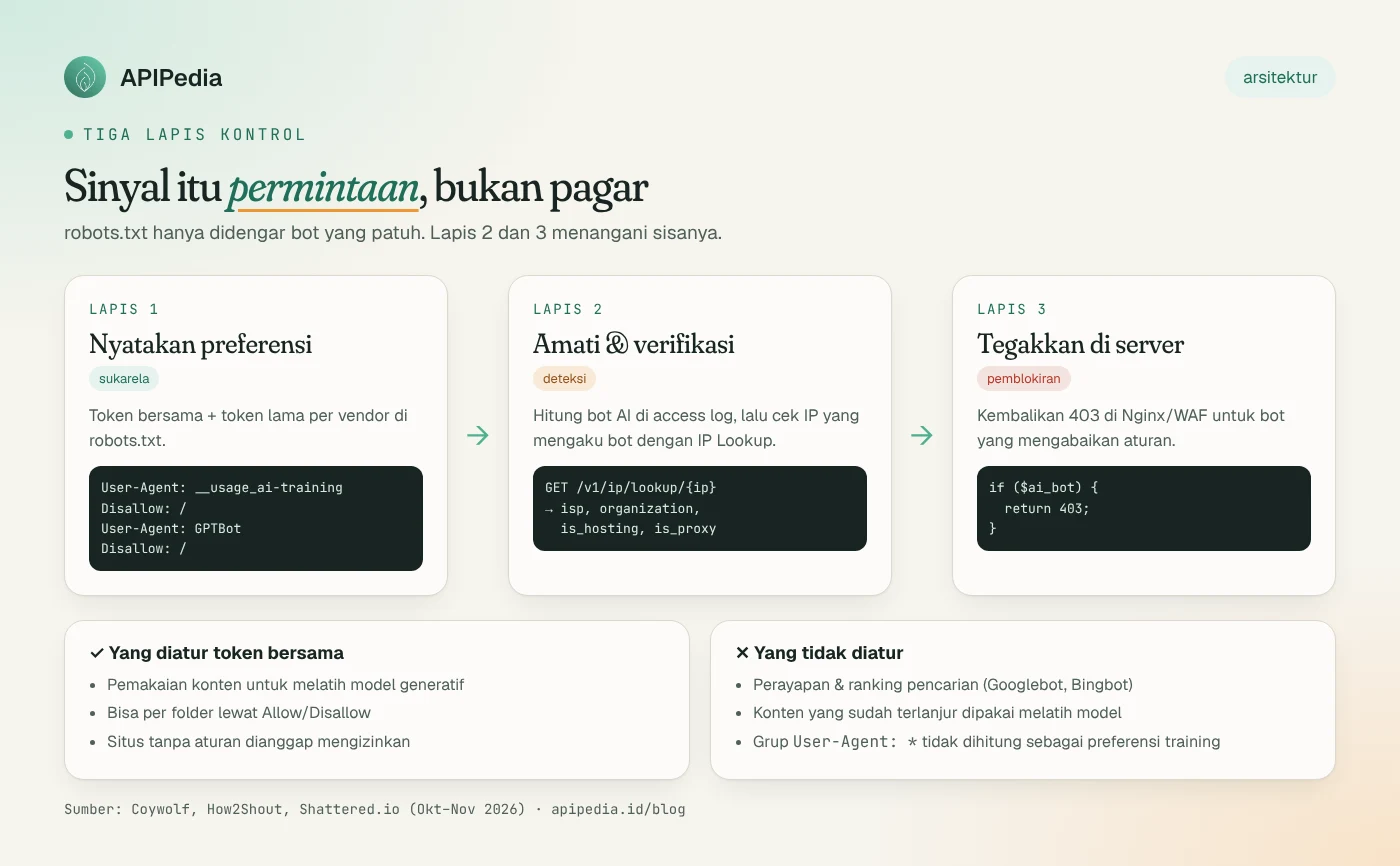
Why isn't robots.txt enough?
Because robots.txt is a request, not a fence. OpenAI itself calls it a coordination mechanism, not a security control. Non-compliant bots, or scrapers spoofing User-Agents, will still log in. The changes also only apply to the next crawl (robots.txt can be cached for up to 24 hours) and do not recall content that has already been used to train the model.
Step 5: How to monitor AI bots in access logs?
For the combined Nginx/Apache log format, User-Agent is in the sixth column when separated by quotation marks:
# Hitung kunjungan per bot AI
awk -F'"' '{print $6}' /var/log/nginx/access.log \
  | grep -oE 'GPTBot|ClaudeBot|CCBot|PerplexityBot|Bytespider|Googlebot|bingbot' \
  | sort | uniq -c | sort -rn

# Daftar IP yang mengaku GPTBot atau ClaudeBot
grep -E 'GPTBot|ClaudeBot' /var/log/nginx/access.log | awk '{print $1}' | sort -u
Anyone can write "ClaudeBot" in User-Agent. To check whether the IP is reasonable, you can use APIPedia's IP Lookup endpoint ( GET /v1/ip/lookup/{ip}) which returns country, ISP, organization, and markers is_hosting and is_proxy. API keys can be generated at console.apipedia.id.
// verifikasi-bot.mjs — cek IP yang mengaku bot AI lewat APIPedia IP Lookup
// Pakai: APIPEDIA_KEY=apk_xxx node verifikasi-bot.mjs access.log
import { readFile } from "node:fs/promises";

const KEY = process.env.APIPEDIA_KEY;
const BOTS = /GPTBot|ClaudeBot|PerplexityBot|CCBot/;
const lines = (await readFile(process.argv[2] ?? "access.log", "utf8")).split("\n");

const ips = new Map(); // ip -> nama bot yang diakui
for (const line of lines) {
  const ua = line.split('"')[5] ?? "";
  const bot = ua.match(BOTS)?.[0];
  if (bot) ips.set(line.split(" ")[0], bot);
}

for (const [ip, bot] of ips) {
  const res = await fetch(`https://api.apipedia.id/v1/ip/lookup/${encodeURIComponent(ip)}`, {
    headers: { Authorization: `Bearer ${KEY}` },
  });
  const { is_success, data, message } = await res.json();
  if (!is_success) { console.log(ip, "gagal:", message); continue; }
  console.log(`${bot.padEnd(10)} ${ip.padEnd(15)} ${data.country} | ${data.isp} | ${data.organization} | hosting=${data.is_hosting}`);
}
APIPEDIA_KEY=apk_xxx node verifikasi-bot.mjs /var/log/nginx/access.logExample output from our test log:
GPTBot     20.171.207.5    United States | Microsoft Corporation | Microsoft Azure Cloud (westus3) | hosting=true
ClaudeBot  8.8.8.8         United States | Google LLC | Google Public DNS | hosting=true
The second line is clearly fake: Google's public DNS resolver IP cannot possibly belong to the Anthropic crawler. For certainty, compare the results with the official IP list published by the vendor when available. IP Lookup helps filter out the suspicious, not replace those official lists.
Step 6: How to block bots that ignore rules?
If a bot keeps coming even though it has been rejected, enforce it on the server. We have tested this Nginx configuration: the regular browser gets 200, User-Agent GPTBot gets 403, and robots.txt can still be read by all bots.
# di dalam blok http { }
map $http_user_agent $ai_bot {
    default 0;
    ~*(GPTBot|ClaudeBot|CCBot|Bytespider) 1;
}

server {
    # ... konfigurasi server kamu
    location = /robots.txt { try_files $uri =404; }   # biarkan bot membaca aturan

    location / {
        if ($ai_bot) { return 403; }
        try_files $uri $uri/ =404;
    }
}
sudo nginx -t && sudo systemctl reload nginx
curl -s -o /dev/null -w "%{http_code}\n" -A "Mozilla/5.0 (compatible; GPTBot/1.2)" https://contoh.co.id/
# Harapan: 403User-Agent based blocking only stops honest bots from saying their name. For undercover scrapers, you need bot mitigation services at the CDN/WAF level. If you are a Cloudflare user, there is also the Content-Signal directive ( ai-train, ai-input, search) as another approach that still runs in parallel.
Short checklist
- Add group
User-Agent: __usage_ai-trainingexplicitly. - Retain
GPTBot,Google-Extended, andClaudeBotuntil each vendor confirms support. - Repeat
Allowexceptions in each vendor group if necessary. - Test with
cek-robots.mjsbefore deploy. - Monitor access logs and verify suspicious IPs.
- Bing users: set up grounding tags per page by March 1, 2027.
If you are also connecting an AI agent to your own API, the guide to connecting APIPedia to Claude via MCP could be further reading.
FAQs
Does this token affect my Google ranking?
No. Shared tokens only regulate usage for training. Googlebot and Bingbot continue to crawl and index as usual. Google's AI Overviews and AI Mode controls have separate settings in Search Console.
Is User-Agent: * with Disallow: / enough?
Not for this signal. Star groups do not count as training preferences, and blocking all bots will also remove your site from search engines.
Will content that has been used to train the model be deleted?
No. Changes only apply to the next crawl. Existing datasets and models are not affected.
Is this an official IETF standard?
Not yet. This is the individual Internet-Draft discussed in the AIPREF working group. The IETF says individual drafts have no formal standing. Another draft from Gary Illyes (Google) and Martin Thomson (Mozilla) proposed rule Content-Usage in robots.txt and HTTP headers, so the final syntax could still change.
Are bots outside these four companies complying?
There are no guarantees. Meta, Apple, and Amazon have not yet committed, and small open-weight or scraper projects are outside this deal. Therefore layers of monitoring and blocking are still necessary.
Source
- Coywolf: Google, OpenAI, Microsoft, and Anthropic back a shared robots.txt AI training signal (1 Nov 2026)
- H2S Media: Google, OpenAI, Microsoft and Anthropic Agree on One AI Training Opt-Out
- Search Engine Roundtable: Google AI training control
- Thurrott: Anthropic, Google, Microsoft, and OpenAI Agree to Let Sites Opt Out of AI Training (30 Oct 2026)
- Shattered.io: AI Training Opt-Out: 4 Giants Back One Token
- Search Engine Journal: Gary Illyes on robots.txt and AI training (22 Oct 2026)
- IETF Datatracker: draft-kelley-aipref-training-preference-signal
Topics: #robots-txt #ai #seo #nginx #tutorial
${c.about}
Tim APIPedia — Tim Engineering APIPedia
Tim engineering di balik APIPedia yang membangun dan memelihara API data Indonesia - ongkir, OCR KTP, data wilayah, BMKG, hingga server MCP - dan menulis panduan integrasinya dari pengalaman langsung.