Zero-Day Chrome CVE-2026-125350 Has Been Exploited: Check Version, Update, and Restart Today
By Tim APIPedia, Tim Engineering APIPedia · Published · 12 min read
Google confirmed the CVE-2026-125350 exploit in Chrome was out in circulation and CISA included it in KEV. Check version, update to 157.0.8103.78, then restart.
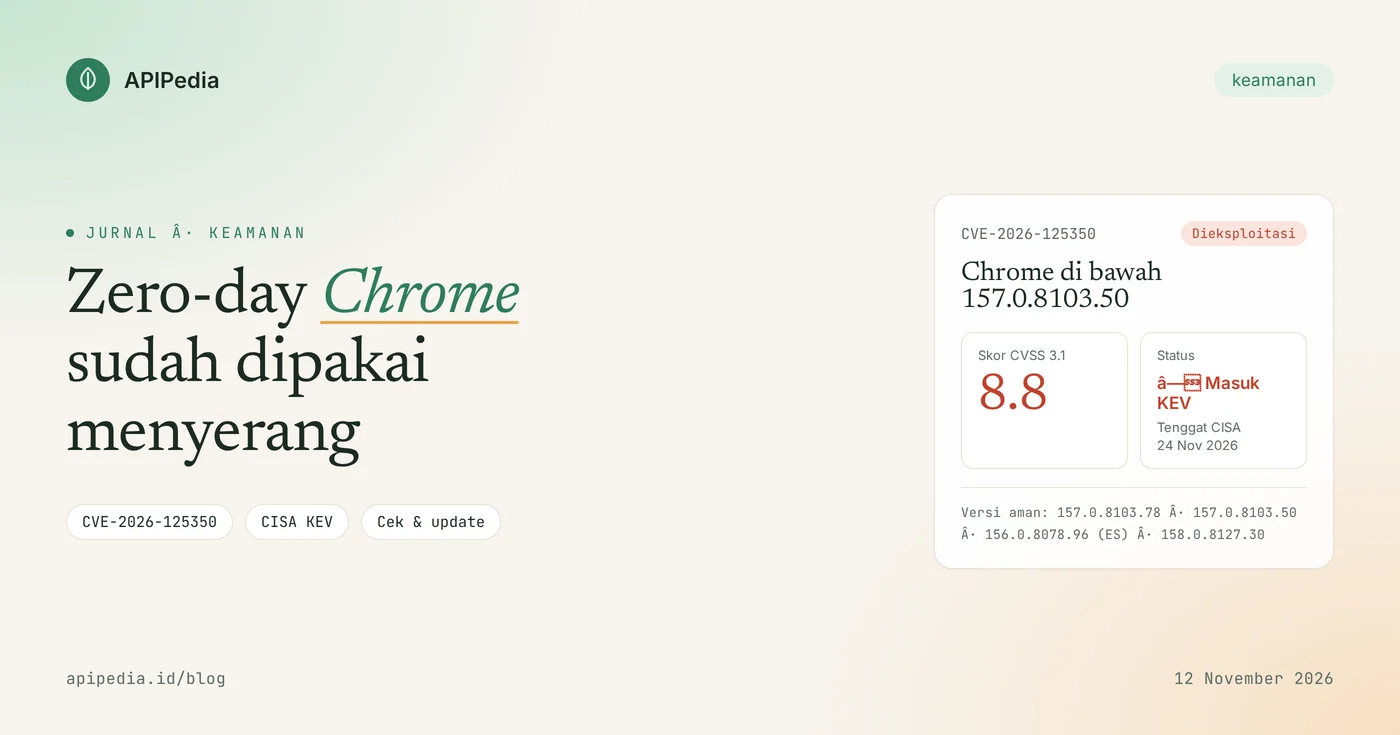
CVE-2026-125350 is a use-after-free vulnerability in Google Chrome's XML component that allows attackers to run code inside the browser's sandbox, simply by making a victim open a specially designed web page. Google says an exploit for this flaw is already in circulation, CISA includes it in the KEV catalog with a CVSS score of 8.8, and the fix is in Chrome 157.0.8103.50 and above.
Which makes it urgent: victims don't need to download or open any files. Malicious pages can come from compromised sites, advertisements, or iframes on sites you regularly visit. This article discusses how it works, safe versions, how to check your computer, temporary mitigations for unpatched browsers, and how to look for signs of an attack.
Quick summary: what do you need to know?
| Items | Details |
|---|---|
| ID | CVE-2026-125350 |
| Type | Use after free (CWE-416) in XML components, specifically the XSLT code (libxslt) that Chrome bundles |
| Impact | Remote code execution in the sandbox via custom HTML pages |
| Score | CVSS 3.1: 8.8 (High) |
| Impacted version | Chrome under 157.0.8103.50; Extended Stable below 156.0.8078.96; Chrome 158 Early Stable under 158.0.8127.30 |
| Recommended version | 157.0.8103.78 (release November 11, 2026), which also patches other gaps in the same release |
| Status | Exploited; enter CISA KEV November 10 2026, US federal agency deadline November 24 2026 |
| Inventor | Anonymous researcher, reported November 6, 2026 |
How does this loophole work?
Chrome bundles libxslt, a library that converts XML documents using XSLT stylesheets. Use after free occurs when the program is still using part of the memory that has been freed. An attacker who can control the contents of the memory can bend the program flow and run his own code.
According to the official CVE description, this vulnerability allows remote attackers to execute code in a sandbox via a special HTML page. The exploit occurs via regular web content, so the victim simply opens the page. The page can be an attacker's site, a legitimate site that has been compromised, or content inserted via advertisements and iframes.
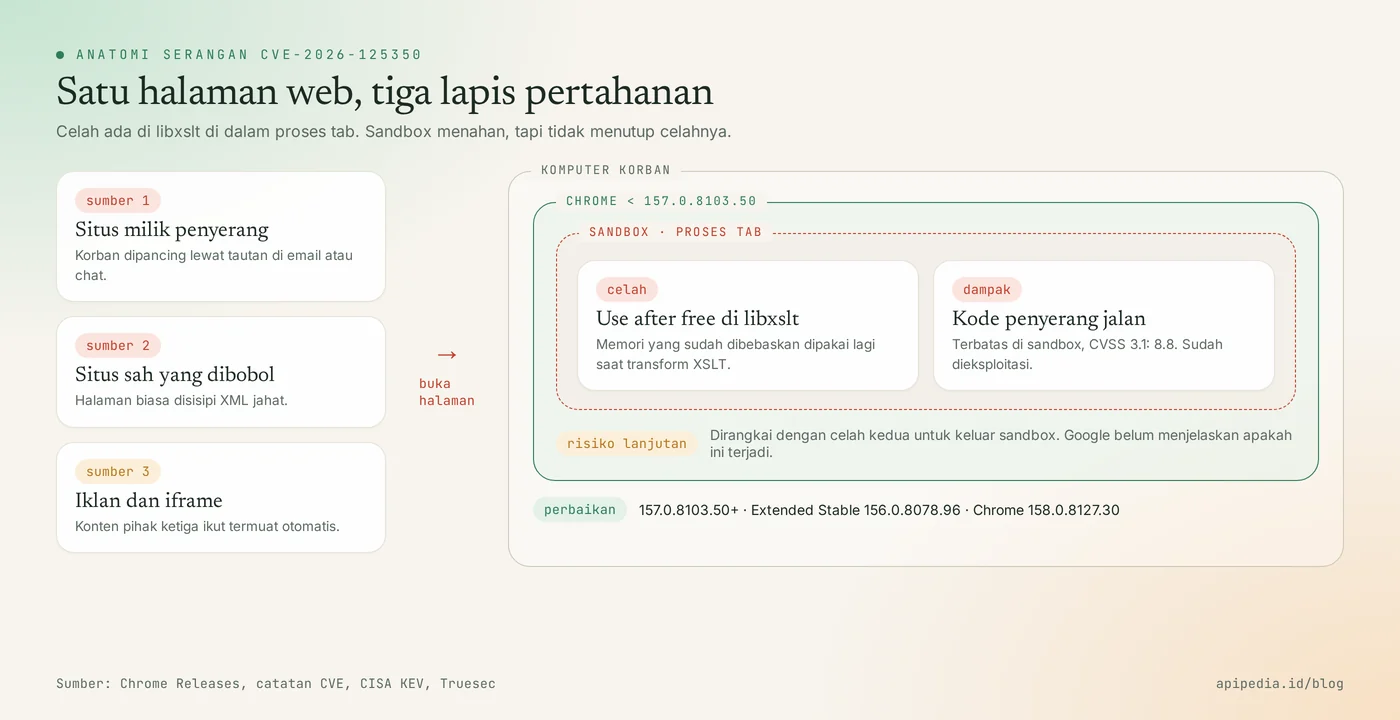
Google is holding back technical details of the bug until most users have updated their browsers. The libxslt fix has been merged into Chromium's 156, 157, and 158 branches, but according to reports as of November 11, the upstream libxslt project itself has not released a fix.
Why doesn't a sandbox make this loophole safe?
The sandbox limits what the code can do inside the tabbed process. But real-world browser attacks often chain two loopholes: one to run code in the renderer, another to escape the sandbox. Google did not explain who used the exploit, who it targeted, or whether the attacker paired it with a second loophole. Therefore, treat this gap as a priority, instead of waiting for further news.
Who is affected?
- Desktop Chrome users (Windows, macOS, Linux) under 157.0.8103.50, especially those who rarely close the browser. Updates that have been downloaded will only become active after restarting Chrome.
- Extended Stable users are under 156.0.8078.96, which is common in managed office environments.
- Computers receiving Chrome 158 Early Stable (158.0.8127.18/.19). Scripts that only check for "below 157.0.8103.50" will mistakenly assume this build is safe, even though the fix is only in 158.0.8127.30.
- Android Chrome users under 157.0.8103.50. Updates come via Google Play.
- Users of Microsoft Edge, Brave, Opera, and other Chromium browsers. As of November 11, these vendors have not publicly linked their releases to CVE-2026-125350.
- ChromeOS Stable 156.0.8078.93 and earlier, which did not have a fix release at the time this article was written.
Chrome on iPhone and iPad uses Apple's WebKit engine, so it is not included in this fix.
How serious is the situation?
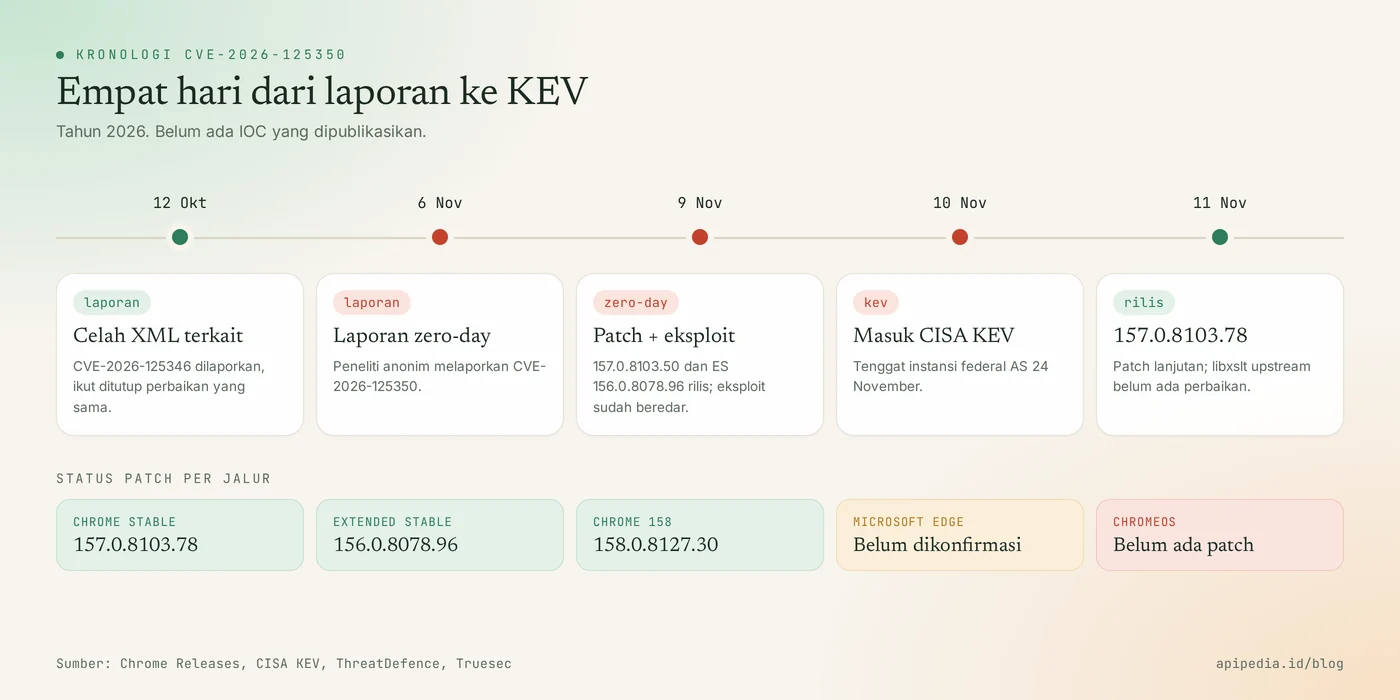
- The November 9, 2026 Chrome release notes say Google is aware that an exploit for CVE-2026-125350 already exists on the internet. The release patched nine security holes at once.
- The time between the report (November 6) and the patch (November 9) was only three days, and then CISA put it into KEV a day later.
- The same release also closes CVE-2026-125346, another use after free XML reported October 12 and covered by the same libxslt fix.
- On November 11, Google released 157.0.8103.78 which patches a number of other vulnerabilities, including some that could allow running sandboxed code via custom HTML pages. There have been no reports of these additional vulnerabilities being exploited.
- There are no published indicators of attack (IOC) for CVE-2026-125350.
One note: according to security media's tally, this is the eighth Chrome zero-day exploited so far in 2026. The pattern is consistent: patches are released quickly, but loopholes remain open on computers that aren't restarted.
Which version is safe?
| Product/line | Minimum safe version | Notes |
|---|---|---|
| Chrome Stable (Windows, macOS) | 157.0.8103.50/.51 | It is recommended to go directly to 157.0.8103.78 |
| Chrome Stable (Linux) | 157.0.8103.50 | It is recommended to go directly to 157.0.8103.78 |
| Chrome Extended Stable | 156.0.8078.96 | For managed Windows and macOS |
| Chrome 158 Early Stable | 158.0.8127.30 | 158.0.8127.18/.19 is still vulnerable |
| Android Chrome | 157.0.8103.50 | Via Google Play |
| Microsoft Edge | Not confirmed yet | Edge 157.0.4341.46 (November 10) has not been linked by Microsoft to this CVE |
| ChromeOS | There isn't any yet | 156.0.8078.93 and previously unpatched |
| Brave, Opera, Vivaldi | Check vendors | Assume it is affected until the vendor states otherwise |
How to check Chrome version?
Fastest way for one computer: go to chrome://settings/help. This page displays the current version and triggers the update download.
For Linux and macOS, the following script reads the installed version of Chrome and Chromium, then assigns a status according to the release path. You can also enter a version number copied from another computer.
#!/usr/bin/env bash
# Cek versi Chrome/Chromium untuk CVE-2026-125350 (hanya membaca, tidak mengubah apa pun)
# Pakai: bash cek-chrome.sh                                -> cek browser di mesin ini
#        bash cek-chrome.sh 157.0.8103.38 156.0.8078.96    -> cek versi yang Anda salin
lt() { [ "$1" != "$2" ] && [ "$(printf '%s\n%s\n' "$1" "$2" | sort -V | head -n1)" = "$1" ]; }

cek() {
  case "$1" in
    158.*)        lt "$1" 158.0.8127.30 && echo "RENTAN" || echo "AMAN" ;;
    156.0.8078.*) lt "$1" 156.0.8078.96 && echo "RENTAN" || echo "AMAN (Extended Stable)" ;;
    *) if   lt "$1" 157.0.8103.50; then echo "RENTAN"
       elif lt "$1" 157.0.8103.78; then echo "ZERO-DAY TERTUTUP, update ke 157.0.8103.78"
       else echo "AMAN"; fi ;;
  esac
}

if [ $# -gt 0 ]; then
  for v in "$@"; do printf '%-16s %s\n' "$v" "$(cek "$v")"; done; exit 0
fi

for b in google-chrome google-chrome-stable chromium chromium-browser \
         "/Applications/Google Chrome.app/Contents/MacOS/Google Chrome"; do
  command -v "$b" >/dev/null 2>&1 || [ -x "$b" ] || continue
  v=$("$b" --version 2>/dev/null | grep -oE '[0-9]+(\.[0-9]+){3}' | head -n1)
  [ -n "$v" ] && printf '%-40s %-16s %s\n' "$b" "$v" "$(cek "$v")"
done
Example of results when a script is given a list of versions:
$ bash cek-chrome.sh 157.0.8103.38 157.0.8103.50 157.0.8103.78 156.0.8078.88 158.0.8127.18
157.0.8103.38    RENTAN
157.0.8103.50    ZERO-DAY TERTUTUP, update ke 157.0.8103.78
157.0.8103.78    AMAN
156.0.8078.88    RENTAN
158.0.8127.18    RENTAN
On Windows, a computer can have two Chrome installations: the system version in Program Files and the per-user version in AppData. The following PowerShell script reads both and indicates if the update has been downloaded but Chrome has not been restarted (marked as file new_chrome.exe).
# Cek versi Chrome di Windows untuk CVE-2026-125350 (hanya membaca)
function Get-Status([version]$v) {
  if ($v.Major -ge 158) { if ($v -lt [version]'158.0.8127.30') {'RENTAN'} else {'AMAN'} }
  elseif ($v.Major -eq 156 -and $v.Build -eq 8078) {
    if ($v -lt [version]'156.0.8078.96') {'RENTAN'} else {'AMAN (Extended Stable)'} }
  elseif ($v -lt [version]'157.0.8103.50') {'RENTAN'}
  elseif ($v -lt [version]'157.0.8103.78') {'ZERO-DAY TERTUTUP, update ke 157.0.8103.78'}
  else {'AMAN'}
}

$paths = "$env:ProgramFiles\Google\Chrome\Application\chrome.exe",
         "${env:ProgramFiles(x86)}\Google\Chrome\Application\chrome.exe",
         "$env:LOCALAPPDATA\Google\Chrome\Application\chrome.exe"

foreach ($p in $paths) {
  if (-not (Test-Path $p)) { continue }
  $v = [version](Get-Item $p).VersionInfo.ProductVersion
  $pending = Test-Path (Join-Path (Split-Path $p) 'new_chrome.exe')
  "{0}`n  versi {1} -> {2}{3}" -f $p, $v, (Get-Status $v),
    $(if ($pending) {' | update sudah terunduh, RESTART Chrome'} else {''})
}
How to update safely?
The only way to close this gap is to update and then restart. The mitigations below only reduce the risk for browsers that cannot yet be patched, such as Edge where the status is unclear.
Step 1: temporary mitigation
Chrome and Edge have policy XSLTEnabled. When set to false, the browser turns off API XSLTProcessor and XSL stylesheet processing, which is the path to this loophole. This policy is supported by Chrome 146+ and Edge 147+, and takes effect immediately without restarting. Please note, these are recommendations from security researchers, not Google's official workarounds. A small number of sites that use XSLT, for example the XML sitemap display, can look different.
# Linux: kebijakan Chrome terkelola
sudo mkdir -p /etc/opt/chrome/policies/managed
echo '{ "XSLTEnabled": false }' | sudo tee /etc/opt/chrome/policies/managed/xslt.json

# Windows (Command Prompt sebagai admin): Chrome dan Edge
reg add "HKLM\SOFTWARE\Policies\Google\Chrome" /v XSLTEnabled /t REG_DWORD /d 0 /f
reg add "HKLM\SOFTWARE\Policies\Microsoft\Edge" /v XSLTEnabled /t REG_DWORD /d 0 /f
For Edge, some researchers recommend keeping it updated to the latest build (157.0.4341.46 and above) and leaving XSLT off until Microsoft confirms which build patches CVE-2026-125350. Meanwhile, redirect external site openings to updated Chrome.
Step 2: update and verify
Open chrome://settings/help, wait for the download to complete, then click Relaunch. Chrome reopens open tabs, except Incognito tabs. On Android, update Chrome via Google Play.
# Debian/Ubuntu dengan repo resmi Google
sudo apt-get update && sudo apt-get install --only-upgrade google-chrome-stable

# Fedora/RHEL dengan repo resmi Google
sudo dnf upgrade google-chrome-stable

# Verifikasi: harus 157.0.8103.78 atau versi aman sesuai jalur Anda
google-chrome --version
For office computers, force restart via Chrome RelaunchNotification policy values 2 (required restart after timeout) and RelaunchNotificationPeriod in milliseconds. The following example gives a time of 4 hours:
{
  "RelaunchNotification": 2,
  "RelaunchNotificationPeriod": 14400000
}
Save the JSON above to /etc/opt/chrome/policies/managed/ on Linux, or install via Group Policy or Intune on Windows. Check the results at chrome://policy.
How to detect signs of attack?
There are no published IOCs yet, so checks rely on behavior: browsers that have not been restarted, browser-run shell processes, repeated crashes, and unusual XSL file requests. Run this script on Linux with sudo to be able to read the processes of all users.
# 1) Proses Chrome yang masih memakai binary lama (update terpasang tapi belum restart)
for p in $(pgrep -f 'chrome|chromium'); do
  exe=$(readlink /proc/$p/exe 2>/dev/null)
  case "$exe" in *"(deleted)") echo "RESTART PERLU: PID $p $exe";; esac
done

# 2) Shell, interpreter, atau alat unduh yang dijalankan langsung oleh proses browser
ps -eo pid,ppid,comm --no-headers | awk '{c[$1]=$3; p[$1]=$2} END{for(i in c)
  if (c[i] ~ /^(sh|bash|dash|zsh|curl|wget|nc|python3?|perl)$/ && c[p[i]] ~ /^chrom/)
    print "PERIKSA: PID " i " " c[i] " <- " c[p[i]] " PID " p[i]}'

# 3) Lonjakan crash browser dalam 7 hari terakhir
find /home/*/.config/google-chrome/"Crash Reports" -type f -mtime -7 2>/dev/null | wc -l

# 4) Permintaan file .xsl/.xslt di log proxy (sesuaikan path; abaikan stylesheet sitemap)
zgrep -hiE '\.xslt?([?" ]|$)' /var/log/squid/access.log* 2>/dev/null | grep -vi sitemap | head -50
A blank result is a normal condition. On Windows, use EDR or Microsoft Defender to search for cmd.exe, powershell.exe, or host scripts run by chrome.exe or msedge.exe, as well as executable files written by the browser process outside the Downloads folder. Also go to chrome://extensions and remove unknown extensions.
If you find signs of a burglary?
- Disconnect the computer from the office network and save the logs and browser profile folder as evidence.
- Change passwords for important accounts from other devices, then log out all active sessions on email, Google accounts, and work web apps.
- Check for downloads in
chrome://downloads, new extensions, and programs that run automatically on startup. - Rotate API keys and tokens that are stored or have been opened in that browser.
- Rebuild the computer from a clean image if there is unexplained code execution, then install a secure version of Chrome.
Frequently asked questions
My Chrome updates automatically. Is it safe?
Not necessarily. Chrome downloads updates in the background, but the new version only becomes active after the browser is restarted. Go to chrome://settings/help and make sure the version is 157.0.8103.78 or the safe version according to your path.
Does the November 24 deadline apply to companies in Indonesia?
Not legally. The deadline applies to US civilian federal agencies. However, KEV status means this loophole has already been used to attack, so all organizations should patch it as soon as possible.
I use Microsoft Edge. What to do?
Update Edge to the latest build, disable XSLT via policy XSLTEnabled, and monitor the Edge security release notes until Microsoft mentions a build that patches CVE-2026-125350. In the meantime, open an external site in updated Chrome.
Is antivirus enough to protect?
No. Antivirus and EDR help detect activity after an attack, but only browser updates replace the vulnerable code.
Is Chrome on iPhone affected?
Chrome on iOS uses Apple's WebKit engine, and the fix for this CVE does not include Chrome iOS. Keep iOS and app automatic updates enabled.
This flaw adds to the list of CVEs exploited quickly after a patch release, such as the WordPress update flaw CVE-2026-119977. For developers, also check the Git vulnerability CVE-2026-111760 which was patched the same week.
Source
- Google Chrome Releases: Stable Channel Update for Desktop, November 9 and 11, 2026
- CISA: Known Exploited Vulnerabilities Catalog
- ThreatDefence: Chrome CVE-2026-125350 Zero-Day, Patching and Hunting
- Truesec: CVE-2026-125350, Use-After-Free Zero-Day in Google Chrome
- SOCRadar: CVE-2026-125350, Google Fixes Exploited Chrome XML Zero-Day
- Rescana: Google Chrome CVE-2026-125350, Use-After-Free in XML
- Secure Reading: Google Patches Actively Exploited Chrome Zero-Day CVE-2026-125350
Topics: #keamanan #cve #chrome #zero-day #cisa kev #browser
${c.about}
Tim APIPedia — Tim Engineering APIPedia
Tim engineering di balik APIPedia yang membangun dan memelihara API data Indonesia - ongkir, OCR KTP, data wilayah, BMKG, hingga server MCP - dan menulis panduan integrasinya dari pengalaman langsung.