Edge TTS: Free Text to Speech Without API Key (Tutorial + Demo)
By Tim APIPedia, Tim Engineering APIPedia · Published · Updated · 8 min read
Convert text into natural Indonesian, Javanese and Sundanese voices with Edge TTS: free, no API key. Complete with CLI, Python code, and web demo.
Edge TTS is a free way to turn text into natural sounds using Microsoft Edge's "Read Aloud" service, with no API key, no account, and no credit card. Through the open source Python edge-tts library, you can create MP3s from texts in Indonesian, Javanese, Sundanese, and dozens of other languages with just one command.
This article discusses how it works, how to use it via the terminal and Python, then build a simple web demo: type text, click a button, the sound immediately appears and can be played or downloaded. We're also honest about the limitations, because "free and unlimited" always has a footnote.
What is Edge TTS?
The Microsoft Edge browser has a Read Aloud feature that reads web pages aloud with high-quality neural sound. Library edge-tts (created by rany2 on GitHub) calls the same services from Python, so you can use it without opening Edge, without Windows, and without signing up for Azure.
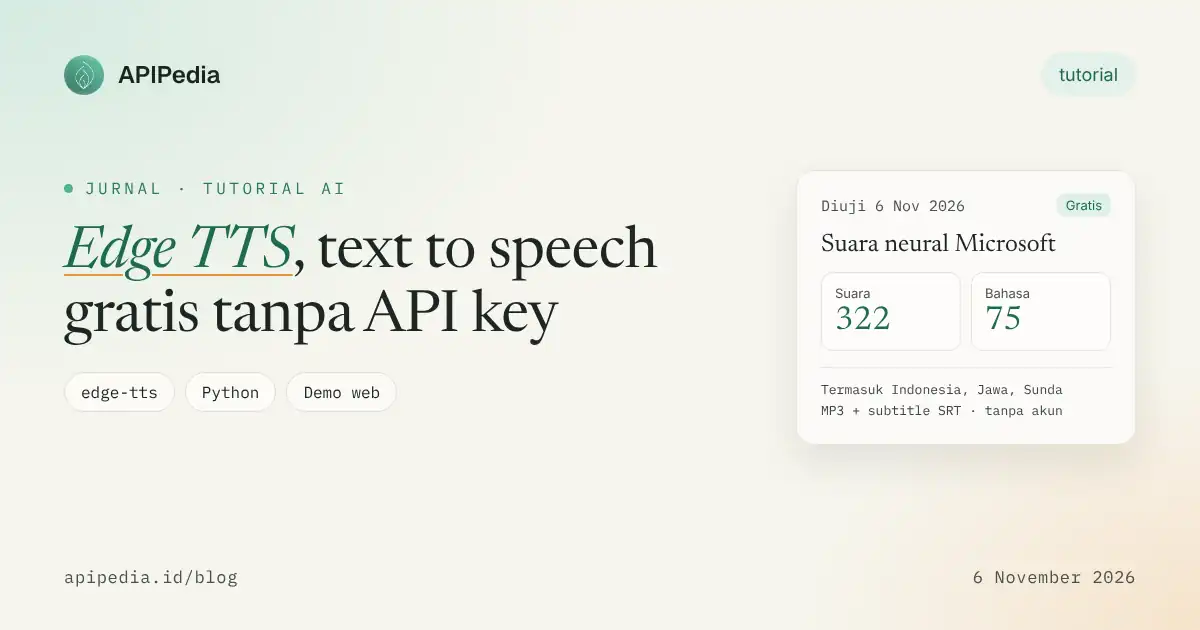
When we tested on November 6, 2026 with edge-tts version 7.3.1, 322 voices were available in 75 languages. For Indonesian users, the most relevant:
| Language | Female voice | Male voice |
|---|---|---|
| Indonesia | id-ID-GadisNeural | id-ID-ArdiNeural |
| Java | jv-ID-SitiNeural | jv-ID-DimasNeural |
| Sundanese | su-ID-TutiNeural | su-ID-JajangNeural |
| Malay | ms-MY-YasminNeural | ms-MY-OsmanNeural |
| English (multilingual) | en-US-AvaMultilingualNeural | en-US-AndrewMultilingualNeural |
Is it really free and unlimited?
Free: yes. There are no API keys, no billing, no announced character quotas.
Unlimited: not completely. Edge TTS uses internal Microsoft services that are not documented for developers. It means:
- There are no SLAs. Service may be slow, refuse connections, or change without notice. Library managers have to release new versions several times to keep it running, so always use the latest version.
- Too many requests from one IP can be limited. For personal use and small projects it is usually safe, but should not be used as the backbone of large-scale products.
- The licensing status for commercial use is unclear, as the service is not officially offered as an API. For commercial products, consider the official TTS API.
In short: great for learning, prototyping, personal content, internal tools, and accessibility. For production, prepare a backup plan.
Step 1: Install edge-tts
Requires Python 3.8 and above. Just one command:
pip install edge-ttsCheck the available voices, for example specifically Indonesian voices:
edge-tts --list-voices | grep id-IDStep 2: Try from terminal
The following command creates halo.mp3 files with Girl voices:
edge-tts --voice id-ID-GadisNeural \
  --text "Halo! Selamat datang di APIPedia." \
  --write-media halo.mp3
Set speed, pitch and volume with relative values:
edge-tts --voice id-ID-ArdiNeural \
  --rate=+15% --pitch=-5Hz --volume=+10% \
  --text "Pengumuman: rapat dimulai pukul sembilan pagi." \
  --write-media pengumuman.mp3
Little-known bonus: Edge TTS can also create SRT subtitles that sync with the audio. Practical for short videos.
edge-tts --voice id-ID-ArdiNeural \
  --file naskah.txt \
  --write-media narasi.mp3 \
  --write-subtitles narasi.srt
Result narasi.srt contains complete sentence snippets with timestamps, ready to import into CapCut, Premiere, or another video editor.
Step 3: Deploy from Python
The simplest version, suitable for automation scripts:
import asyncio
import edge_tts

async def main():
    tts = edge_tts.Communicate(
        text="Terima kasih sudah berbelanja. Pesanan Anda sedang dikemas.",
        voice="id-ID-GadisNeural",
        rate="+5%",
    )
    await tts.save("notifikasi.mp3")

asyncio.run(main())
For web applications, it's better to capture audio as a byte chunk (stream) so you don't have to write the file to disk:
import io
import edge_tts

async def text_to_mp3_bytes(text: str, voice: str = "id-ID-GadisNeural") -> bytes:
    buf = io.BytesIO()
    async for chunk in edge_tts.Communicate(text, voice).stream():
        if chunk["type"] == "audio":
            buf.write(chunk["data"])
    return buf.getvalue()
Demo: input text, generate sound, play immediately
Now we combine them all into a small web page. Users type text, select a voice, set speed and pitch, then click Create voice. Within seconds, the audio player appears and the sound starts playing, complete with an MP3 download button.
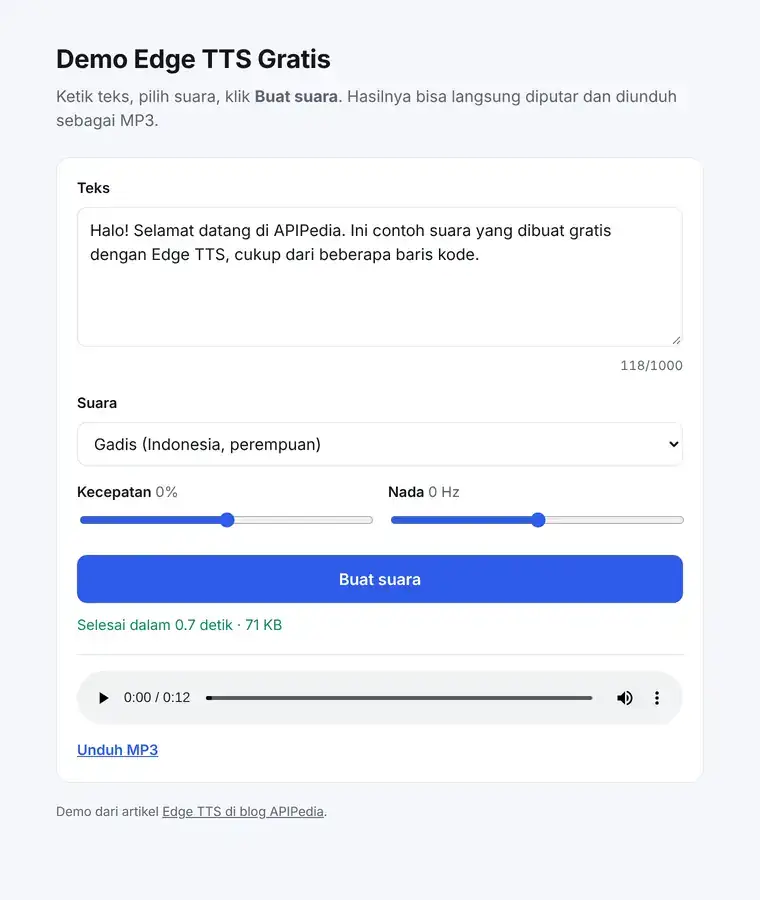
In our tests, a 118-character sentence produced 12 seconds of audio (about 71 KB) in 0.7 to 3.3 seconds, depending on the connection.
How it works
- The browser sends text, voice, speed, and tone to your server's
POST /api/ttsendpoints. - The Python server (FastAPI) calls
edge_tts.Communicate()and collects the audio chunks. - Microsoft's Read Aloud service generates neural sound via WebSocket and sends it back as an MP3.
- The server returns the MP3 (
audio/mpeg) to the browser, which converts it to a URL Blob to play at element<audio>.
Why do you need an intermediary server? The Edge TTS service is not designed to be called directly from a web page, so the browser cannot connect on its own. Your little bridging server.
Backend: server.py
# pip install edge-tts fastapi uvicorn
# Jalankan: uvicorn server:app --host 0.0.0.0 --port 8000
import io
from pathlib import Path

import edge_tts
from fastapi import FastAPI, HTTPException
from fastapi.responses import FileResponse, StreamingResponse
from pydantic import BaseModel, Field

app = FastAPI(title="Edge TTS Demo")

VOICES = {
    "id-ID-GadisNeural": "Gadis (Indonesia, perempuan)",
    "id-ID-ArdiNeural": "Ardi (Indonesia, laki-laki)",
    "jv-ID-SitiNeural": "Siti (Jawa, perempuan)",
    "su-ID-JajangNeural": "Jajang (Sunda, laki-laki)",
}

class TTSRequest(BaseModel):
    text: str = Field(..., min_length=1, max_length=1000)  # batasi panjang teks
    voice: str = "id-ID-GadisNeural"
    rate: int = Field(0, ge=-50, le=50)   # persen
    pitch: int = Field(0, ge=-20, le=20)  # Hz

@app.get("/")
def index():
    return FileResponse(Path(__file__).parent / "index.html")

@app.get("/api/voices")
def voices():
    return [{"id": k, "label": v} for k, v in VOICES.items()]

@app.post("/api/tts")
async def tts(req: TTSRequest):
    if req.voice not in VOICES:
        raise HTTPException(400, "Suara tidak dikenal")
    communicate = edge_tts.Communicate(
        req.text, req.voice,
        rate=f"{req.rate:+d}%", pitch=f"{req.pitch:+d}Hz",
    )
    buf = io.BytesIO()
    try:
        async for chunk in communicate.stream():
            if chunk["type"] == "audio":
                buf.write(chunk["data"])
    except Exception as e:
        raise HTTPException(502, f"Gagal membuat suara: {e}")
    buf.seek(0)
    return StreamingResponse(buf, media_type="audio/mpeg")
Frontend: index.html
The following compact version is sufficient for text input, generation, and playback of the results. Save it in the same folder as server.py.
<!doctype html>
<html lang="id">
<head>
  <meta charset="utf-8">
  <meta name="viewport" content="width=device-width, initial-scale=1">
  <title>Demo Edge TTS</title>
</head>
<body>
  <h1>Demo Edge TTS</h1>
  <textarea id="text" rows="5" cols="50">Halo! Ini suara dari Edge TTS.</textarea><br>
  <select id="voice"></select>
  Kecepatan <input type="range" id="rate" min="-50" max="50" step="5" value="0">
  <button id="go">Buat suara</button>
  <p id="status"></p>
  <audio id="player" controls></audio>
  <a id="dl" download="edge-tts.mp3" hidden>Unduh MP3</a>

<script>
const $ = (id) => document.getElementById(id);

// Isi pilihan suara dari server
fetch("api/voices").then(r => r.json()).then(list => {
  $("voice").innerHTML = list
    .map(v => `<option value="${v.id}">${v.label}</option>`).join("");
});

$("go").addEventListener("click", async () => {
  $("go").disabled = true;
  $("status").textContent = "Membuat suara...";
  try {
    const res = await fetch("api/tts", {
      method: "POST",
      headers: { "Content-Type": "application/json" },
      body: JSON.stringify({
        text: $("text").value,
        voice: $("voice").value,
        rate: Number($("rate").value),
      }),
    });
    if (!res.ok) throw new Error("Gagal (" + res.status + ")");
    const url = URL.createObjectURL(await res.blob());
    $("player").src = url;
    $("dl").href = url;
    $("dl").hidden = false;
    $("player").play();
    $("status").textContent = "Selesai!";
  } catch (e) {
    $("status").textContent = e.message;
  } finally {
    $("go").disabled = false;
  }
});
</script>
</body>
</html>
Running a demo
pip install edge-tts fastapi uvicorn
uvicorn server:app --host 0.0.0.0 --port 8000
# buka http://localhost:8000 di browser
Type any sentence, select a sound, click Create sound, and listen to the results.
Tips before the demo is opened to the public
- Limit text length. The demo above limits 1,000 characters per request via Pydantic validation.
- Set a rate limit per IP, for example
slowapior in a reverse proxy (Nginx, Cloudflare). Without this, one person could use up your server IP "allotment" in Microsoft services. - Cache results. Save MP3 with hash key of text + sound + speed + pitch. The same sentence does not need to be rephrased.
- Break up long text by paragraph, create sound by part, then combine them. More fail-proof than one giant request.
- Handle errors kindly. Since the service is unofficial, occasional failures are normal. Show a "try again" message instead of an error page.
- Update libraries regularly with
pip install -U edge-tts, as changes on Microsoft's side are usually addressed via new releases.
Usage ideas
- Voice-over short videos on TikTok, Reels, or Shorts, complete with SRT subtitles.
- Audio version of blog articles, so readers can "listen" to the article.
- Automatic announcements: queues, prayer schedules on mosque information boards, or school bells.
- WhatsApp or Telegram voice note bot.
- Regional language learning materials with Javanese and Sundanese voices.
- Accessibility features for visually impaired users.
Need a stable TTS for production?
If your application needs uptime guarantees and clear licensing, use the official TTS API. APIPedia's AI Gateway supports text-to-speech from multiple providers via one token and one base URL, so you can start with Edge TTS for a prototype, then move to the official model without overhauling the architecture. The list of models and prices is in the AI console catalogue.
Want a more expressive voice or clone your own voice? Also read our guide on ElevenLabs code to voice.
FAQs
Is Edge TTS really free?
Yes. No API key, account or credit card required. You just install library edge-tts and use it straight away.
Is there a limit on the number of characters?
There are no announced quotas, but the service is unofficial, so large requests from a single IP may be limited or denied at any time.
Can it be used for commercial content?
The status is gray because Microsoft does not offer this service as a public API. For commercial products, it is safer to use the official TTS API with a clear license.
Can it be called directly from JavaScript in the browser?
Not directly. Use an intermediate server like the FastAPI example above, or port edge-tts for Node.js on the server side.
Can you read Javanese and Sundanese texts?
Can. Voices jv-ID-SitiNeural, jv-ID-DimasNeural, su-ID-TutiNeural, and su-ID-JajangNeural are available.
Why does a connection error or 403 appear?
Usually because the library version is out of date or the service is limiting it. Run pip install -U edge-tts, wait a moment, then try again.
Source
Topics: #edge tts #text to speech #python #tutorial #ai voice #gratis
${c.about}
Tim APIPedia — Tim Engineering APIPedia
Tim engineering di balik APIPedia yang membangun dan memelihara API data Indonesia - ongkir, OCR KTP, data wilayah, BMKG, hingga server MCP - dan menulis panduan integrasinya dari pengalaman langsung.