GPUStack Vulnerability CVE-2026-102895: Admin Without Login Already Exploited, Upgrade to 2.2.2
By Tim APIPedia, Tim Engineering APIPedia · Published · 8 min read
GPUStack below 2.2.0 grants admin rights without logging in via a reverse proxy and has been exploited. This is how to check, upgrade and audit API keys.
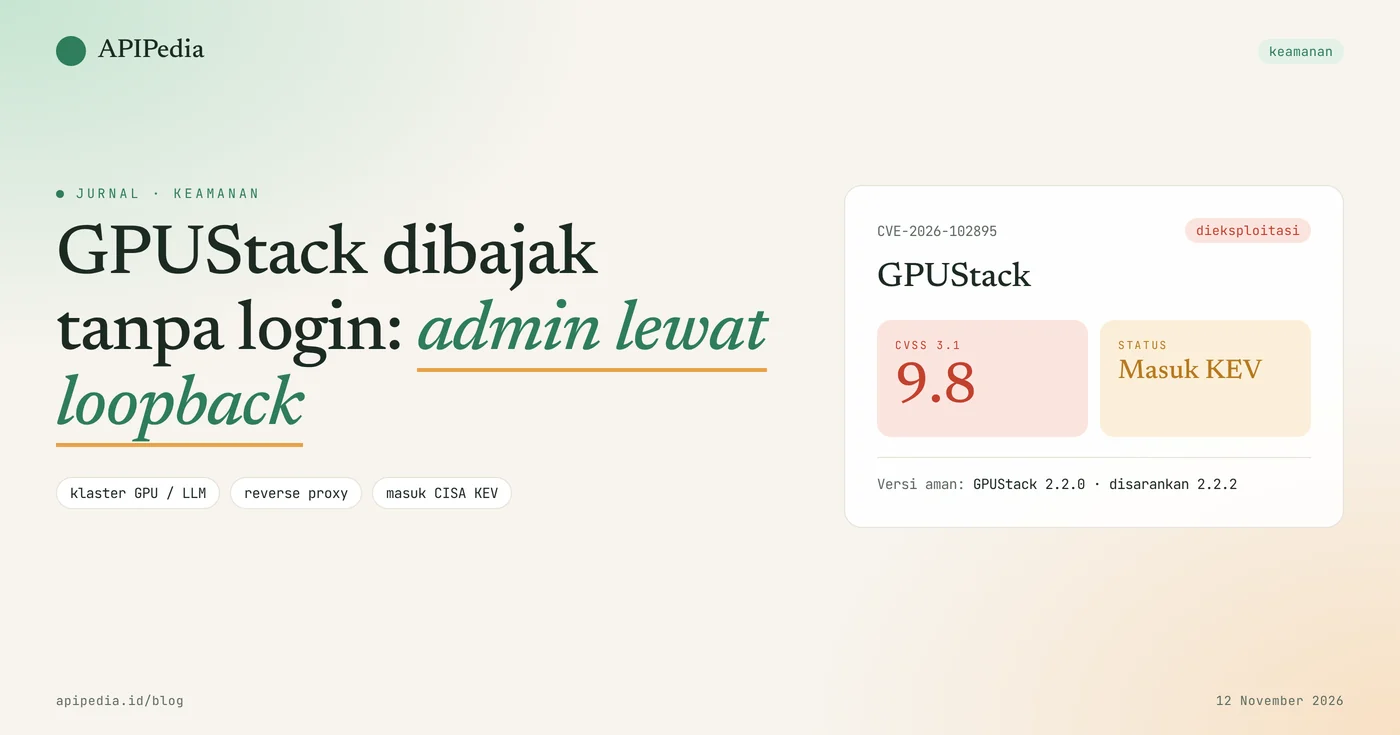
CVE-2026-102895 is an authentication bypass vulnerability in GPUStack that gives full administrator access to anyone without login, with a CVSS score of 9.8. All versions below 2.2.0 are affected, this flaw has been exploited in the wild, and CISA included it in the Known Exploited Vulnerabilities catalog on November 9, 2026.
GPUStack is an open source platform for managing GPU clusters and running your own AI models (self-hosted LLM). Teams deploying it behind Nginx or Caddy on the same server are most at risk. This article discusses how the vulnerability works, who is affected, safe versions, check scripts, upgrade steps, and subsequent audits.
Quick summary
| Items | Details |
|---|---|
| CVE | CVE-2026-102895 (advisory GHSA-gj9m-f8ph-pmhr) |
| Product | GPUStack (PyPI gpustack package and its official container image) |
| Gap type | Authentication bypass (CWE-287, CWE-290, CWE-346) |
| CVSS score 3.1 | 9.8 (critical), over network, no login, no user interaction |
| Impacted version | All versions before 2.2.0 |
| Safe version | 2.2.0 for this gap. 2.2.2 is recommended as it also patches CVE-2026-102894 |
| Status | Actively exploited, entered CISA KEV November 9, 2026, US federal deadline November 12, 2026 |
| Impact | Full admin access, permanent API key creation, secret reading, code execution on host worker |
How does this GPUStack loophole work?
This flaw works because GPUStack decides who can be an admin based on the network origin of the request, not credentials. Requests that appear to originate from loopback ( 127.0.0.1) are immediately treated as the default administrator account as long as option force_auth_localhost is false, and that was the default value before 2.2.0.
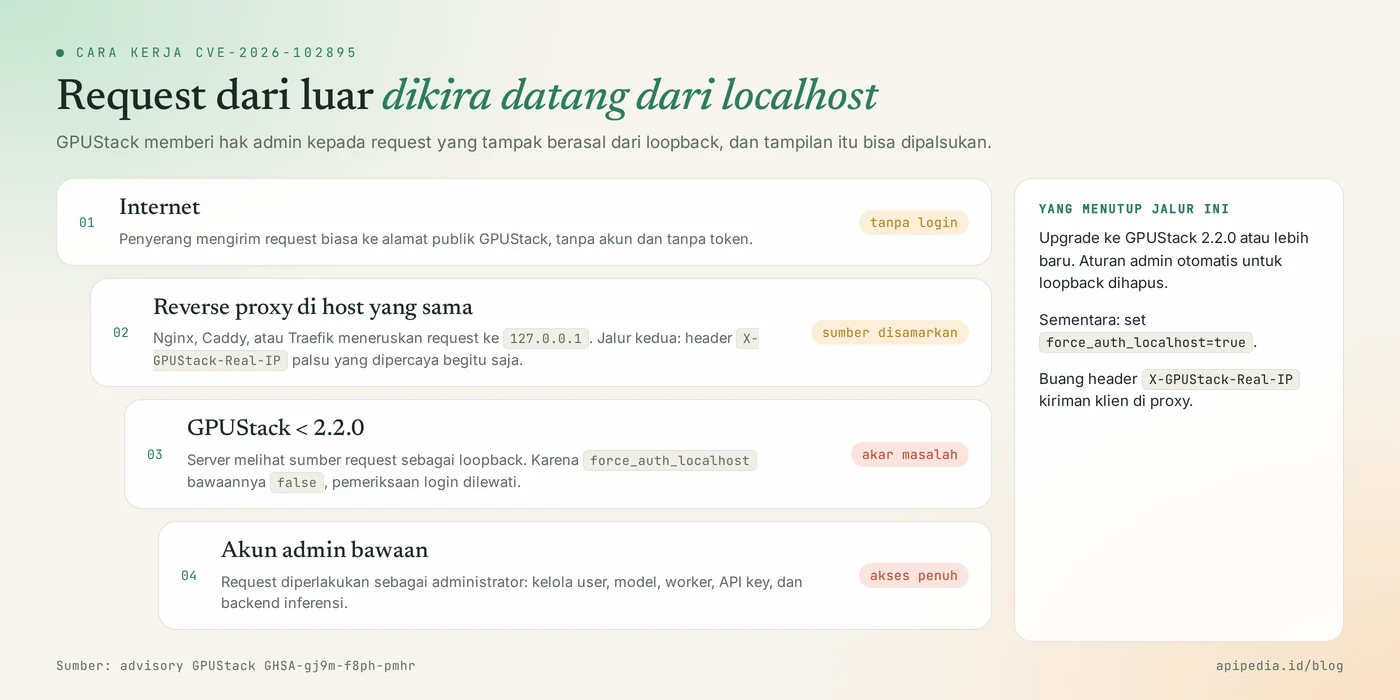
Two paths that make requests appear local
- Reverse proxy on the same host. If Nginx, Caddy, or Traefik are running on the same machine and forwarding to
127.0.0.1, all requests from the internet appear to come from loopback. No need for headers or any tricks. - Trusted IP address header. In default gateway mode, header
X-GPUStack-Real-IPof the client's post is trusted, so false loopback values end up on the same path.
This article does not contain examples of attack requests. What you need to understand: the very common "application behind a single server reverse proxy" configuration is actually the trigger.
Who is affected?
Affected are all GPUStack installations before 2.2.0 whose APIs or panels are reachable from untrusted networks.
- GPUStack server behind a reverse proxy on the same host, with
force_auth_localhostnot set. - An installation that uses a built-in gateway and opens directly to the internet.
- AI teams, campus labs, and startups are opening GPUStack panels to the public for easy access from anywhere.
- All workers registered on the server, because admin rights can be used to execute commands on the host worker.
The risk is much smaller if GPUStack can only be accessed via VPN or internal network, but it still needs to be upgraded.
How serious is this loophole?
It's serious: it scores 9.8 out of 10, doesn't require an account, and has been used in real attacks.
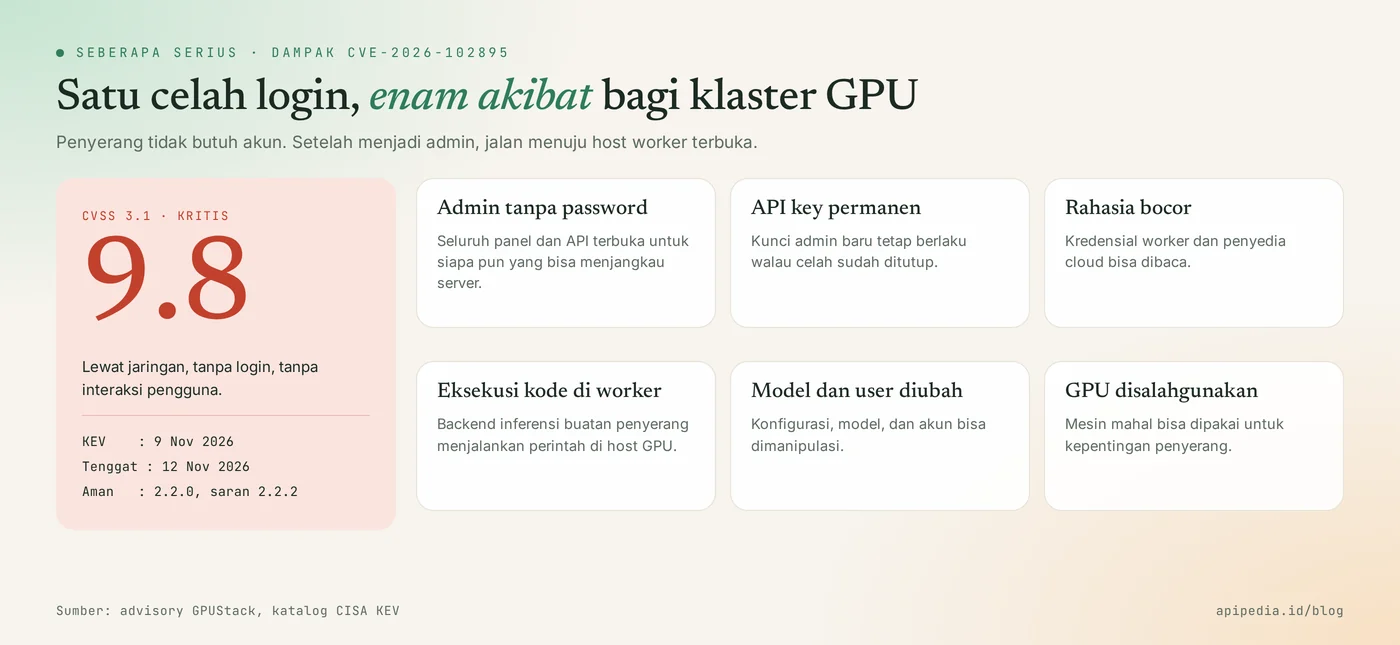
- Exploit confirmed. The vendor advisory states this flaw was observed to be exploited against version 2.1.1 installations. The attacker creates his own inference backend to run a reverse shell on the host.
- Enter CISA KEV November 9, 2026 with a November 12 deadline for US federal civil agencies.
- Access persists after patch. The admin API key created by the attacker remains valid even if the server has been upgraded. Upgrading alone is not enough.
- The secret is revealed. Worker and cloud provider credentials stored in GPUStack can be read.
- There is a second vulnerability, CVE-2026-102894 (CVSS 9.1) in the SAML login path, which affects 0.7.1 through before 2.2.2. The flaw has not been reported exploited.
Which version is safe?
The safe version of CVE-2026-102895 is 2.2.0 and above, and the recommended upgrade target is 2.2.2 and above.
| GPUStack version | CVE-2026-102895 (loopback) | CVE-2026-102894 (SAML) | Action |
|---|---|---|---|
| Under 2.2.0 | Prone to | Vulnerable (as of 0.7.1) | Upgrade immediately to 2.2.2+ |
| 2.2.0 and 2.2.1 | It's been patched | Prone to | Upgrade to 2.2.2+ |
| 2.2.2 and above | It's been patched | It's been patched | Continue to audit |
How do I check if my server is affected?
Check GPUStack version and value force_auth_localhost. Run the following script in the container or environment where GPUStack is installed. The script is read-only, and its version comparison logic has been tested in the sandbox with mock output for 0.7.1, 2.1.1, 2.2.0, and 2.2.2.
#!/bin/sh
# Cek paparan CVE-2026-102895 di GPUStack. Hanya membaca.
ver=$(gpustack version 2>/dev/null | grep -oE '[0-9]+\.[0-9]+\.[0-9]+' | head -n1)
[ -z "$ver" ] && ver=$(pip show gpustack 2>/dev/null | awk '/^Version:/{print $2}')
[ -z "$ver" ] && { echo "GPUStack tidak ditemukan di lingkungan ini"; exit 0; }
echo "Versi GPUStack : $ver"
env | grep -i FORCE_AUTH_LOCALHOST || echo "force_auth_localhost tidak diset di environment (cek juga file konfigurasi server)"
maj=$(echo "$ver" | cut -d. -f1); min=$(echo "$ver" | cut -d. -f2); pat=$(echo "$ver" | cut -d. -f3)
if [ "$maj" -lt 2 ] || { [ "$maj" -eq 2 ] && [ "$min" -lt 2 ]; }; then
  echo "HASIL: RENTAN CVE-2026-102895. Upgrade ke 2.2.2 atau lebih baru."
elif [ "$maj" -eq 2 ] && [ "$min" -eq 2 ] && [ "$pat" -lt 2 ]; then
  echo "HASIL: aman dari CVE-2026-102895, tetapi naikkan ke 2.2.2 untuk celah SAML CVE-2026-102894."
else
  echo "HASIL: versi sudah memuat kedua perbaikan."
fi
For container installation, run from the host:
docker ps --format '{{.Names}}\t{{.Image}}' | grep -i gpustack
docker exec NAMA_CONTAINER gpustack version
How to update safely?
Safe order: close the attack path first, upgrade to 2.2.2 or later, then audit. Don't skip audits, as upgrading does not revoke access that an attacker has already established.
Step 1: temporary mitigation
- Set
force_auth_localhost=truein server configuration, then restart GPUStack. - Remove header
X-GPUStack-Real-IPof client posts in reverse proxy. - Restrict access to the panel and API to only VPN or internal network.
# Nginx: kosongkan header kiriman klien sebelum diteruskan ke GPUStack
location / {
    proxy_set_header X-GPUStack-Real-IP "";
    proxy_pass http://127.0.0.1:PORT_GPUSTACK;
}
This mitigation only covers CVE-2026-102895. New SAML loophole closed in 2.2.2.
Step 2: upgrade and verify
# instalasi pip
pip install --upgrade 'gpustack>=2.2.2'

# instalasi container: tarik tag 2.2.2 atau lebih baru, lalu BUAT ULANG container
docker pull IMAGE_GPUSTACK:TAG_BARU
docker stop NAMA_CONTAINER && docker rm NAMA_CONTAINER
# jalankan lagi dengan perintah/compose yang sama, memakai tag baru

# verifikasi
docker exec NAMA_CONTAINER gpustack version
Pulling a new image does not replace the current process. The container must be recreated. Follow the official GPUStack upgrade guide for data migration steps according to your installation method.
How to detect signs of burglary?
There is no official IOC list yet, so detection is done by auditing what an admin can create. Check the following:
- User and API key. Look for admin accounts and API keys that you didn't create, especially full-scope keys.
- Inference backend. Compare the backend list with your notes. Foreign backend is the strongest sign.
- Host workers. Look for anomalous outbound connections and shell processes born from inference backend processes.
- Proxy and server logs. Look for successful API requests without authentication headers, as well as requests that carry header
X-GPUStack-Real-IP.
# request dari luar yang membawa header alamat IP (bila proxy mencatat header)
grep -i "x-gpustack-real-ip" /var/log/nginx/*.log 2>/dev/null | tail -n 20

# pemanggilan endpoint pembuatan backend inferensi
grep -h "inference-backends" /var/log/nginx/access.log* 2>/dev/null | grep POST | tail -n 20

# di host worker: koneksi keluar aktif dan proses shell yang mencurigakan
ss -tnp | grep -v "127.0.0.1" | head -n 30
ps -eo pid,ppid,user,etime,cmd --sort=start_time | grep -E "sh -c|bash -i" | grep -v grep
If you find signs of a burglary?
- Cut off public access to GPUStack and isolate suspicious worker hosts.
- Remove unknown API keys, users, and inference backends.
- Rotate all credentials stored in GPUStack: worker tokens, cloud provider keys, and model registry tokens.
- Check your cloud account for resources you didn't create, such as a new GPU instance.
- Rebuild host workers that once ran foreign backends from a clean image.
Frequently asked questions
What is GPUStack?
GPUStack is an open source platform for managing GPU clusters and serving LLM-like AI models via API. Many teams use it to run their own models on servers or private clouds.
My server does not use a reverse proxy. Is it still vulnerable?
Can. In default gateway mode, the client's sent IP address header is trusted, so the second path remains open. All versions prior to 2.2.0 are considered vulnerable.
Is upgrading to 2.2.0 enough?
Enough for CVE-2026-102895, but not yet for the SAML vulnerability CVE-2026-102894. Jump up to 2.2.2 or later to get both covered.
If you have upgraded, is the old API key safe?
Not automatic. The key created by the attacker before the upgrade remains valid. Audit the key list and revoke unknown ones.
My GPUStack is only on the internal network. Need an upgrade?
Need. The risk from the internet is smaller, but anyone on the internal network can become an admin without logging in. That's a problem if a device is already infected.
Also read about another flaw that KEV hit this week: WordPress update flaw CVE-2026-119977. For typical risks of AI services, see LLMjacking: AI API key stolen and Node-RED with no login hijacked.
Source
Topics: #keamanan #cve #gpustack #ai #llm #cisa kev
${c.about}
Tim APIPedia — Tim Engineering APIPedia
Tim engineering di balik APIPedia yang membangun dan memelihara API data Indonesia - ongkir, OCR KTP, data wilayah, BMKG, hingga server MCP - dan menulis panduan integrasinya dari pengalaman langsung.