HTML to PDF API: How to Create Automatic PDF Invoices from HTML Templates
By Tim APIPedia, Tim Engineering APIPedia · Published · 12 min read
APIPedia's HTML to PDF API converts an HTML template into a PDF invoice via a single POST /v1/pdf/html request. There are curl, Node.js, and Python examples.
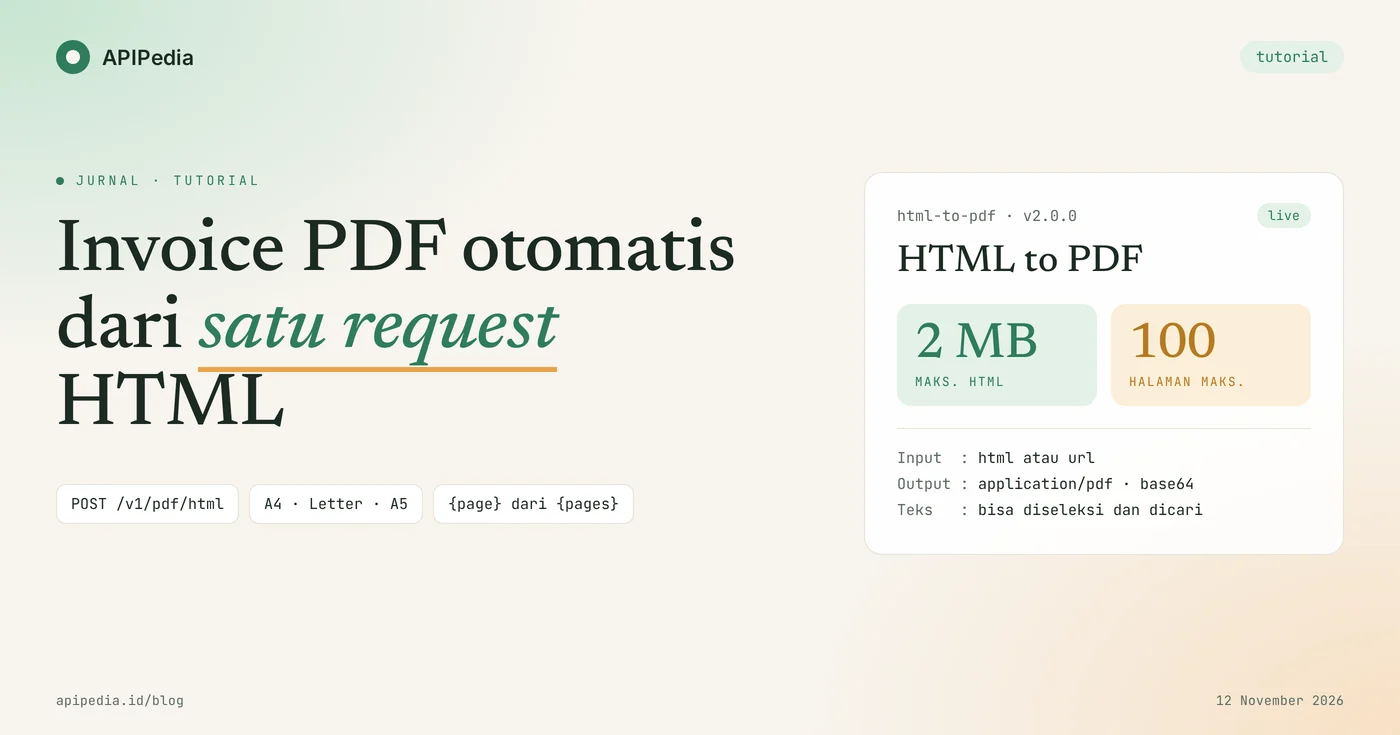
APIPedia's HTML to PDF API converts HTML templates into PDF files via a single request POST /v1/pdf/html, so that invoices can be created automatically every time an order is paid. You send a maximum of 2 MB of HTML, choose the paper size and margins, and then receive a PDF where the text can be selected and searched.
This tutorial walks you through creating a PDF invoice from order data: building a template compatible with the rendering engine, sending requests with curl, Node.js, and Python, reading responses, adding page numbers, and avoiding the most common mistakes. All examples use key apk_xxx and fictitious data.
Quick summary: what do you need to know?
The HTML to PDF API has one endpoint, accepts JSON, and returns PDF or base64 files. The following table summarizes the most frequently searched items.
| Items | Details |
|---|---|
| Endpoints | POST https://api.apipedia.id/v1/pdf/html |
| Authentication | Header Authorization: Bearer apk_xxx |
| Inputs | Exactly one of html (max. 2 MB) or url (public http/https addresses) |
| Paper size | A4 (default), Letter, Legal, A3, A5; landscape for landscape orientation |
| Margins | Objects top, right, bottom, left in px, in, cm, or mm; default 10mm |
| Outputs | File application/pdf, or JSON contains base64 through output=base64 |
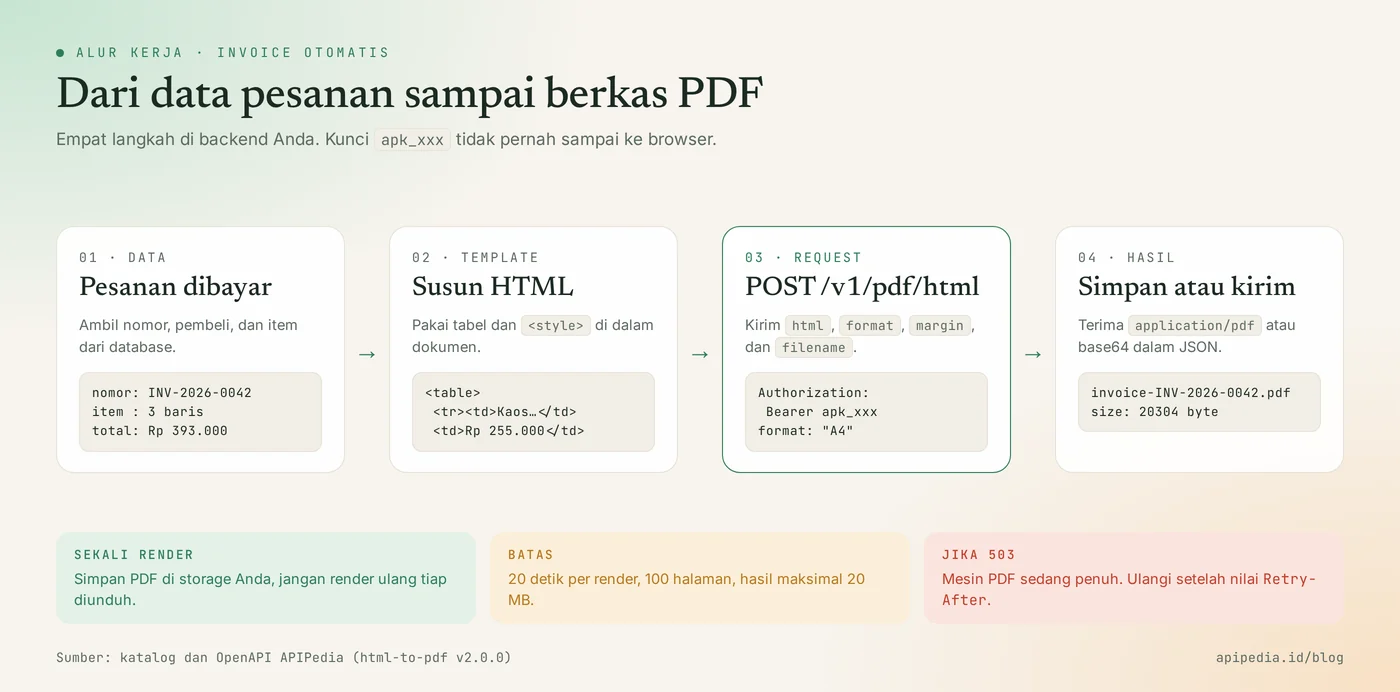
| Limit | Render 20 seconds, 100 pages, PDF maximum 20 MB |
| CSS Coverage | Inline styles and blocks <style>; flexbox, CSS Grid, external stylesheets, and JavaScript are not supported |
What problems does the HTML to PDF API solve?
This API eliminates the need to install and maintain a PDF creation engine on your own server. Online stores, checkout applications, and subscription systems almost always need to send invoices or receipts. Creating them by hand is impossible, whereas running your own PDF library means dealing with fonts, memory, and render queues.
With an API, your backend simply compiles HTML from order data and sends it in one request. The results are built from text, not screenshots, so invoice numbers and customer names can still be searched within the PDF.
What do you need to prepare before starting?
You only need one APIPedia API key. Register or log in at console.apipedia.id, open the API Token menu, then create a new key. The key starts with apk_ and is sent via header Authorization: Bearer apk_xxx.
Store the key in a server environment variable, for example APIPEDIA_KEY. Don't put it in code running in a browser, because anyone can read it. The HTML to PDF product is listed in the Free tier of the catalog, so you can try it at no cost.
Step 1: how to create an invoice template that is safe to render?
Safe templates use tables for layout and put all CSS in blocks <style> or attributes style. This API's rendering engine is not a browser. Flexbox, CSS Grid, and <link rel="stylesheet"> are not read, and JavaScript is never executed.
Save the following example as invoice.html. The header section uses a two-column table instead of flexbox, and the number column is right-aligned with class .r.
<!doctype html>
<html>
<head>
<meta charset="utf-8">
<title>Invoice INV-2026-0042</title>
<style>
  body { font-family: Helvetica, Arial, sans-serif; font-size: 12px; color: #1c2a23; }
  h1 { font-size: 22px; color: #2e7d5b; margin: 0 0 4px; }
  table { width: 100%; border-collapse: collapse; }
  th { background: #e3f1e8; text-align: left; padding: 8px; border-bottom: 1px solid #2e7d5b; }
  td { padding: 8px; border-bottom: 1px solid #e6e2d8; }
  .r { text-align: right; }
  .polos td { border: 0; padding: 0 0 16px; }
  .total td { font-weight: bold; border-top: 2px solid #1c2a23; }
</style>
</head>
<body>
  <table class="polos">
    <tr>
      <td><h1>INVOICE</h1>Toko Contoh Sejahtera<br>Jl. Contoh No. 1, Bandung</td>
      <td class="r">No: INV-2026-0042<br>Tanggal: 12 November 2026<br>Jatuh tempo: 19 November 2026</td>
    </tr>
  </table>
  <p>Ditagihkan kepada: <strong>PT Pelanggan Fiktif</strong></p>
  <table>
    <thead>
      <tr><th>Deskripsi</th><th class="r">Qty</th><th class="r">Harga</th><th class="r">Subtotal</th></tr>
    </thead>
    <tbody>
      <tr><td>Kaos polos hitam L</td><td class="r">3</td><td class="r">Rp 85.000</td><td class="r">Rp 255.000</td></tr>
      <tr><td>Topi kanvas</td><td class="r">2</td><td class="r">Rp 60.000</td><td class="r">Rp 120.000</td></tr>
      <tr><td>Ongkos kirim</td><td class="r">1</td><td class="r">Rp 18.000</td><td class="r">Rp 18.000</td></tr>
      <tr class="total"><td colspan="3" class="r">Total</td><td class="r">Rp 393.000</td></tr>
    </tbody>
  </table>
</body>
</html>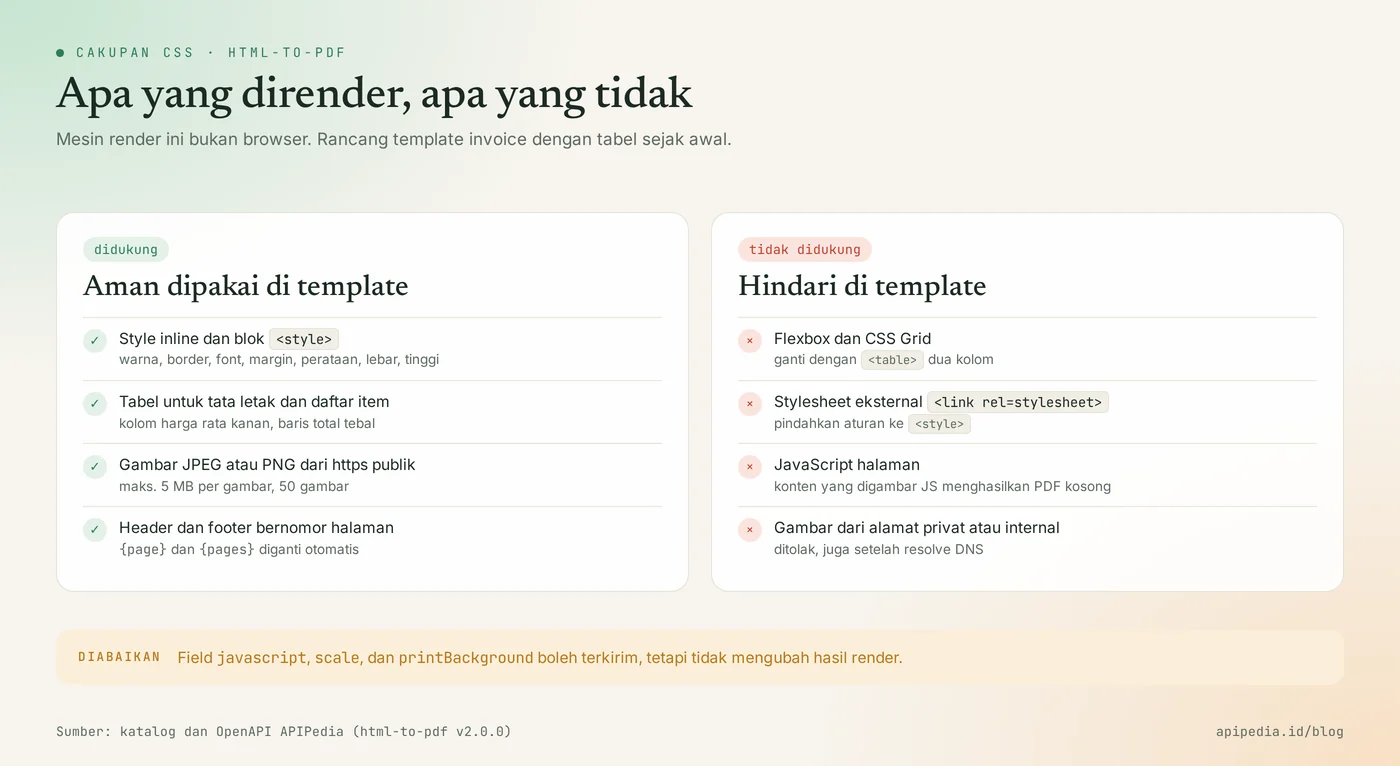
Image and logo rules
The logo must be a JPEG or PNG that can be accessed via public https. The limit is 5 MB per image and 50 images per document. Images that fail to load are skipped without failing the render, so check your resulting PDF first to make sure the logo actually appears.
Step 2: how to send HTML to API with curl?
Send the contents of the HTML file as field html in the JSON body, then save the response as a PDF file. The command below uses jq to wrap invoice.html into valid JSON, so that quotation marks in HTML do not need to be manually escaped.
jq -n --rawfile html invoice.html '{
  html: $html,
  format: "A4",
  margin: { top: "20mm", bottom: "20mm", left: "15mm", right: "15mm" },
  filename: "invoice-INV-2026-0042.pdf"
}' | curl -s -X POST https://api.apipedia.id/v1/pdf/html \
  -H "Authorization: Bearer apk_xxx" \
  -H "Content-Type: application/json" \
  -d @- -o invoice-INV-2026-0042.pdf
By default, the response is file application/pdf with header Content-Disposition: attachment. Go to invoice-INV-2026-0042.pdf to see the results.
Available body parameters
| Fields | Type | Information |
|---|---|---|
html | strings | HTML document or snippet, maximum 2 MB. Fill this or url, not both. |
url | strings | The public http/https address to render. Private and internal addresses are rejected. |
format | strings | A4 (default), Letter, Legal, A3, or A5. |
landscape | boolean | Landscape orientation. |
margin | object | top, right, bottom, left with units of px, in, cm, or mm. Default 10mm. |
filename | strings | The name of the downloaded file. |
displayHeaderFooter | boolean | Enable headers and footers. |
headerTemplate, footerTemplate | strings | Fill in the header and footer, maximum 20 KB each. |
output | strings | pdf (default) or base64. Can also be sent as query ?output=base64. |
Step 3: how to create an invoice from order data in Node.js?
In Node.js, compose the HTML of the order object, send it with fetch, then write the binary response to a file. This example runs on Node.js 18 and above without any additional dependencies. Function esc escapes text from the user so that product names containing the mark < do not break the template.
import { writeFile } from "node:fs/promises";
const API = "https://api.apipedia.id/v1/pdf/html";
const KEY = process.env.APIPEDIA_KEY; // apk_xxx
const rupiah = (n) => "Rp " + n.toLocaleString("id-ID");
const esc = (s) =>
String(s).replace(/[&<>"]/g, (c) => ({ "&": "&", "<": "<", ">": ">", '"': """ })[c]);
function invoiceHtml(order) {
const baris = order.item
.map(
(i) => `<tr><td>${esc(i.nama)}</td><td class="r">${i.qty}</td>
<td class="r">${rupiah(i.harga)}</td><td class="r">${rupiah(i.qty * i.harga)}</td></tr>`
)
.join("");
const total = order.item.reduce((n, i) => n + i.qty * i.harga, 0);
return `<!doctype html><html><head><meta charset="utf-8"><style>
body { font-family: Helvetica, Arial, sans-serif; font-size: 12px; color: #1c2a23; }
table { width: 100%; border-collapse: collapse; }
th { background: #e3f1e8; text-align: left; padding: 8px; }
td { padding: 8px; border-bottom: 1px solid #e6e2d8; }
.r { text-align: right; }
.total td { font-weight: bold; border-top: 2px solid #1c2a23; }
</style></head><body>
<h1>INVOICE ${esc(order.nomor)}</h1>
<p>Ditagihkan kepada: <strong>${esc(order.pembeli)}</strong></p>
<table>
<thead><tr><th>Deskripsi</th><th class="r">Qty</th><th class="r">Harga</th><th class="r">Subtotal</th></tr></thead>
<tbody>${baris}
<tr class="total"><td colspan="3" class="r">Total</td><td class="r">${rupiah(total)}</td></tr>
</tbody>
</table>
</body></html>`;
}
export async function buatInvoicePdf(order) {
const filename = `invoice-${order.nomor}.pdf`;
const res = await fetch(API, {
method: "POST",
headers: { Authorization: `Bearer ${KEY}`, "Content-Type": "application/json" },
body: JSON.stringify({
html: invoiceHtml(order),
format: "A4",
margin: { top: "20mm", bottom: "20mm", left: "15mm", right: "15mm" },
filename,
}),
});
if (!res.ok) {
const err = await res.json().catch(() => ({}));
throw new Error(`HTTP ${res.status}: ${err.message ?? "gagal membuat PDF"}`);
}
await writeFile(filename, Buffer.from(await res.arrayBuffer()));
return filename;
}
const berkas = await buatInvoicePdf({
nomor: "INV-2026-0042",
pembeli: "PT Pelanggan Fiktif",
item: [
{ nama: "Kaos polos hitam L", qty: 3, harga: 85000 },
{ nama: "Topi kanvas", qty: 2, harga: 60000 },
{ nama: "Ongkos kirim", qty: 1, harga: 18000 },
],
});
console.log("Tersimpan:", berkas);Save as invoice.mjs, then run with APIPEDIA_KEY=apk_xxx node invoice.mjs. In a real application, call buatInvoicePdf from the payment webhook handler or from the task queue, not from a page request.
Step 4: how to receive PDF as base64 in Python?
Add output=base64 so that the response is a JSON envelope containing the PDF in base64. This form is practical if you want to save the results to a database, upload them to object storage, or attach them to an email without writing a temporary file.
import base64
import os
from html import escape

import requests  # pip install requests

API = "https://api.apipedia.id/v1/pdf/html"
KEY = os.environ["APIPEDIA_KEY"]  # apk_xxx

CSS = """
body { font-family: Helvetica, Arial, sans-serif; font-size: 12px; color: #1c2a23; }
table { width: 100%; border-collapse: collapse; }
th { background: #e3f1e8; text-align: left; padding: 8px; }
td { padding: 8px; border-bottom: 1px solid #e6e2d8; }
.r { text-align: right; }
.total td { font-weight: bold; border-top: 2px solid #1c2a23; }
"""


def rupiah(n):
    return "Rp " + f"{n:,}".replace(",", ".")


def invoice_html(order):
    baris = "".join(
        f"<tr><td>{escape(i['nama'])}</td><td class='r'>{i['qty']}</td>"
        f"<td class='r'>{rupiah(i['harga'])}</td>"
        f"<td class='r'>{rupiah(i['qty'] * i['harga'])}</td></tr>"
        for i in order["item"]
    )
    total = sum(i["qty"] * i["harga"] for i in order["item"])
    return (
        "<!doctype html><html><head><meta charset='utf-8'><style>" + CSS + "</style></head><body>"
        f"<h1>INVOICE {escape(order['nomor'])}</h1>"
        f"<p>Ditagihkan kepada: <strong>{escape(order['pembeli'])}</strong></p>"
        "<table><thead><tr><th>Deskripsi</th><th class='r'>Qty</th>"
        "<th class='r'>Harga</th><th class='r'>Subtotal</th></tr></thead><tbody>"
        + baris
        + f"<tr class='total'><td colspan='3' class='r'>Total</td><td class='r'>{rupiah(total)}</td></tr>"
        "</tbody></table></body></html>"
    )


def buat_invoice_pdf(order):
    res = requests.post(
        API,
        params={"output": "base64"},
        headers={"Authorization": f"Bearer {KEY}"},
        json={
            "html": invoice_html(order),
            "format": "A4",
            "margin": {"top": "20mm", "bottom": "20mm", "left": "15mm", "right": "15mm"},
            "filename": f"invoice-{order['nomor']}.pdf",
        },
        timeout=30,
    )
    body = res.json()
    if not body.get("is_success"):
        raise RuntimeError(f"HTTP {res.status_code}: {body.get('message')}")

    data = body["data"]
    with open(data["filename"], "wb") as f:
        f.write(base64.b64decode(data["base64"]))
    return data["filename"], data["size"]


if __name__ == "__main__":
    nama, ukuran = buat_invoice_pdf({
        "nomor": "INV-2026-0042",
        "pembeli": "PT Pelanggan Fiktif",
        "item": [
            {"nama": "Kaos polos hitam L", "qty": 3, "harga": 85000},
            {"nama": "Topi kanvas", "qty": 2, "harga": 60000},
            {"nama": "Ongkos kirim", "qty": 1, "harga": 18000},
        ],
    })
    print(f"Tersimpan: {nama} ({ukuran} byte)")
What does an example HTML to PDF API response look like?
With output=base64, responses use the APIPedia standard envelope { is_success, message, data }. Here's the real response from the invoice template above, with the base64 content truncated:
{
  "is_success": true,
  "message": "PDF berhasil dibuat",
  "data": {
    "filename": "invoice-INV-2026-0042.pdf",
    "size": 20304,
    "maxPages": 100,
    "base64": "JVBERi0xLjMKJf////8KOCAwIG9iago8PAov..."
  }
}| Fields | Meaning |
|---|---|
filename | The file name corresponds to field filename that you sent. |
size | PDF size in bytes. The one-page invoice in this example is 20,304 bytes in size. |
maxPages | Page limit per render, which is 100. Pages outside the limit are cropped. |
base64 | Fill PDF. Decode into bytes before saving or sending. |
Without output=base64, there is no JSON envelope on the success response. The response content is directly in the form of PDF bytes, so check the HTTP status before writing it to a file.
How to add page numbers in footer?
Set displayHeaderFooter to true, then write {page} and {pages} in footerTemplate. The two bookmarks are replaced automatically with the current page number and number of pages. This is useful for invoices with many lines or monthly reports.
{
  "html": "<h1>Laporan Penjualan Oktober 2026</h1>...",
  "format": "A4",
  "margin": { "top": "25mm", "bottom": "20mm", "left": "15mm", "right": "15mm" },
  "displayHeaderFooter": true,
  "headerTemplate": "Toko Contoh Sejahtera",
  "footerTemplate": "Halaman {page} dari {pages}"
}
Give sufficient top and bottom margins so that the header and footer do not overlap the contents of the document.
What common mistakes should you avoid?
Most of the problems stem from the templates designed for the browser, not from the API. Check the following list before opening a support ticket.
- The layout shifts. The template uses flexbox or CSS Grid. Replace with table.
- Unstyled PDF. CSS is loaded via
<link rel="stylesheet">. Move the rule to block<style>. - Blank PDF of
url. The page is drawn by JavaScript, while JavaScript is not executed. Send the finished HTML via fieldhtml. - Logo is missing. The image is in SVG or WebP format, or is located at an internal address. Use JPEG or PNG on public https.
- Sending
htmlandurlat once. Fill in exactly one. - Rely on
javascript,scale, orprintBackground. These three fields are ignored. - Re-render every time it is downloaded. Save the PDF once in your storage, then serve it from there.
- User data is not escaped. Buyer names or notes can break the HTML. Always escape before inserting.
Status code that needs to be addressed
| Status | Meaning | Action |
|---|---|---|
| 400 | Invalid input, private URL, or page failed to fetch | Read message, which calls the field problematic |
| 401 | Token is missing, unknown, or expired | Check header Authorization |
| 403 | The key has no scope for this endpoint | Create a key with the appropriate scope |
| 503 | PDF machine busy, queue full | Repeat after header value Retry-After |
| 504 | Rendering exceeds 20 seconds | Shrink documents or reduce images |
Frequently asked questions
Is APIPedia's HTML to PDF API free?
The HTML to PDF product is listed in the Free tier of the APIPedia catalog. You simply create a key in the API Token menu on the console to start testing. Quota details for each package are on the console package page.
Can text in PDF be selected and searched?
Can. PDFs are built from text, not from screenshots of pages. Invoice numbers, customer names and amounts can still be copied and searched.
Why is the PDF result different from the display in the browser?
This rendering engine is not a browser. It reads <style> inline and block styles for common properties such as color, border, font, margin, alignment, width, and height. Complex layouts still render, but may shift from their original appearance.
What is the maximum size of a document that can be rendered?
Maximum HTML 2 MB, maximum output 100 pages and 20 MB, with rendering time 20 seconds. For longer reports, break them up into multiple PDFs per period.
Can AI assistants create PDFs via this API?
Can. The APIPedia MCP server provides tools html_to_pdf that call the same endpoint. How to connect is in the guide for connecting APIPedia to Claude via MCP.
Next step: try it on the console
Automatic invoices only need one table-based HTML template and one request POST /v1/pdf/html. Create a key in console.apipedia.id, run the curl example above with invoice.html, then move the logic to your backend.
To complete the online shop flow, fill in the shipping cost line with estimates from the postage check API, and calculate the due date on working days with the national holiday API.
Topics: #html ke pdf #invoice pdf #api dokumen #tutorial #nodejs #python
${c.about}
Tim APIPedia — Tim Engineering APIPedia
Tim engineering di balik APIPedia yang membangun dan memelihara API data Indonesia - ongkir, OCR KTP, data wilayah, BMKG, hingga server MCP - dan menulis panduan integrasinya dari pengalaman langsung.