Microsoft 365 Global Down Nearly 24 Hours: Official Cause, Impact, and Lessons for IT Teams
By Tim APIPedia, Tim Engineering APIPedia · Published · Updated · 10 min read
Outlook, Teams, and Copilot were disrupted for nearly 24 hours on November 12–13, 2026. Microsoft said the trigger was a network change, not a cyberattack.
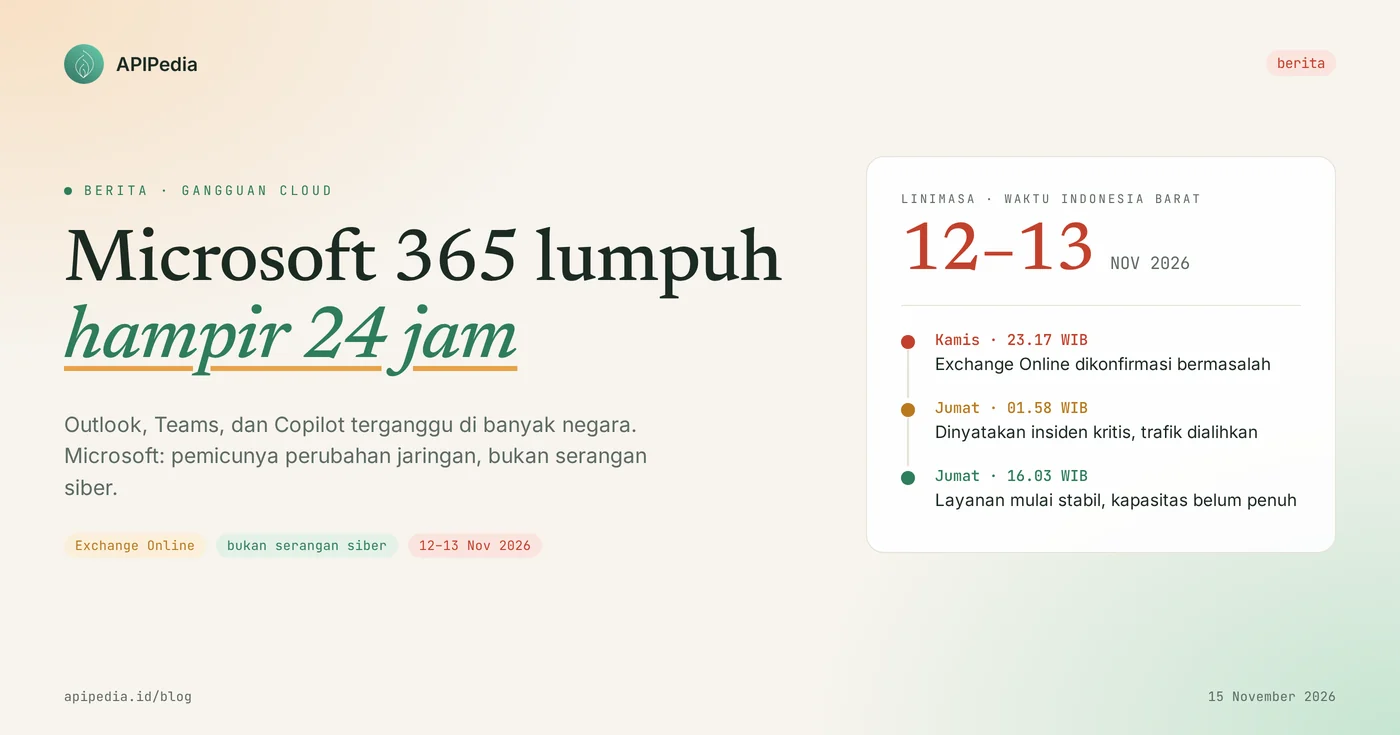
Microsoft 365 experienced a global outage for nearly 24 hours on November 12–13, 2026, making Outlook, Teams, Copilot, and other services that depend on Exchange Online difficult or impossible to use. Microsoft said the trigger was a problem with previous network capacity increases that emerged after the latest network changes, not a cyber attack and not related to AI or agents.
For users in Indonesia, the peak of disruption fell on Friday morning November 13, just as working hours started. Microsoft has apologized, said the problem was resolved, and promised to publish a full post-incident report. This article summarizes what's been confirmed, what's still unknown, and what IT admins and digital business owners can do to prevent similar disruptions from bringing work to a halt.
Quick summary
| Items | Details |
|---|---|
| When | Starting Thursday, November 12 2026 at approximately 08.17 US Pacific Time (23.17 WIB); starting to stabilize Friday, November 13, 2026 |
| Long interruption | Nearly 24 hours; Some reports say it will take more than a day to fully recover |
| Services impacted | Exchange Online, Outlook, Teams, Microsoft 365 Copilot, SharePoint, OneDrive, and other features that depend on email |
| Cause according to Microsoft | Issues with previous network capacity upgrades that emerged after recent network changes |
| Cyber attack? | No. Microsoft said there was no indication of malicious activity, and it was not related to AI or agents |
| Status | Major issues resolved, service restored gradually; A post-incident report is promised to follow |
What happened to Microsoft 365?
The outage started with Exchange Online, the email service behind Outlook, then spread to other Microsoft 365 services. According to Microsoft's status update, the first issue was confirmed on Thursday, November 12, 2026 at approximately 8:17 AM US Pacific Time, or 11:17 PM EDT. Initially, Microsoft said that users on the American continent had difficulty accessing Exchange Online mailboxes via various connection methods.
About two hours later, outages were reported in many regions, and Microsoft said Teams, SharePoint, and Copilot could be affected. The following is the time sequence, converted to WIB:
| Time (WIB) | Incident |
|---|---|
| Thursday 12 Nov, 23.17 | Microsoft confirms Exchange Online issue |
| Friday 13 Nov, 01.27 | Disruption was reported in many areas; Teams, SharePoint, and Copilot could be affected |
| Friday 13 Nov, 01.58 | Declared a critical incident; traffic is redirected and servers are restarted to reduce load |
| Friday 13 Nov, 02.30 | Microsoft said the direct cause: some servers were unavailable so other servers were burdened |
| Friday 13 Nov, 05.57 | Limited recovery is starting to be seen in some regions |
| Friday 13 Nov, 14.25 | Servers are more stable after fixes are applied across the infrastructure |
| Friday 13 Nov, 16.03 | Service looks stable, but capacity has not returned to normal |
Services that do not depend on Exchange Online reportedly remain running. That's why each organization's experience is different: some just lose emails, others have Teams and Copilot meetings crash.
What causes Microsoft 365 to go down?
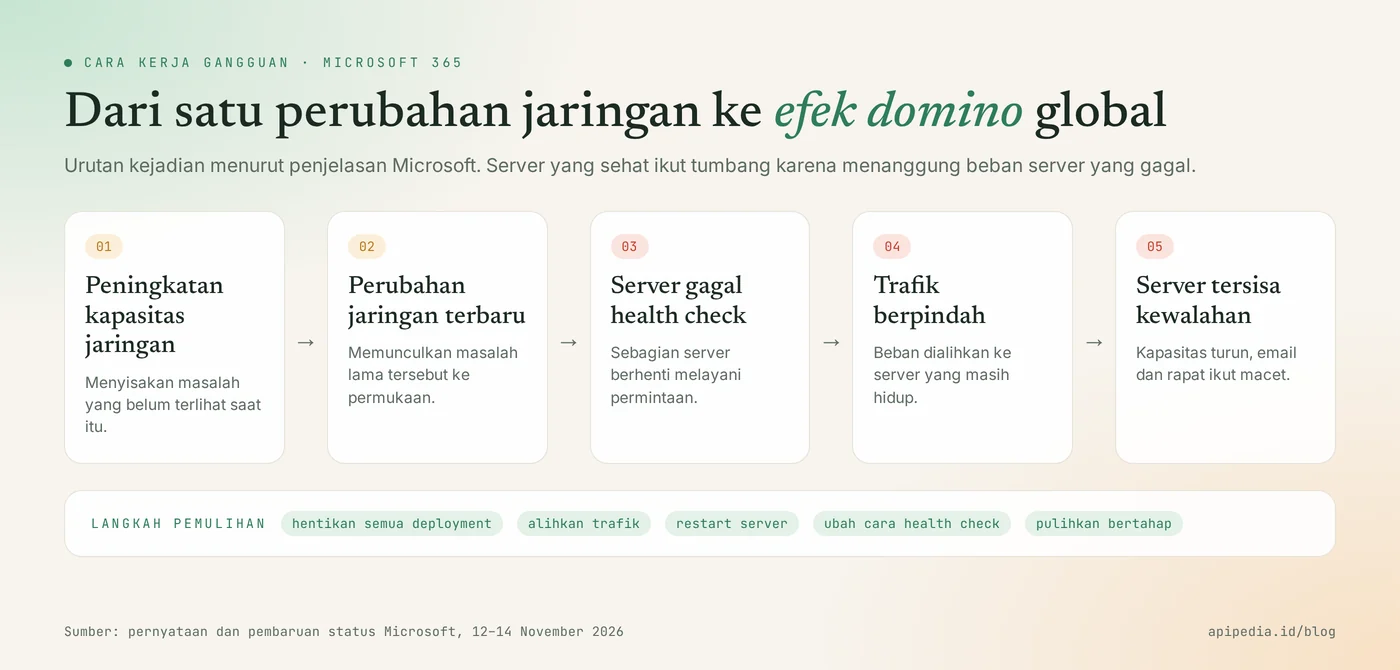
The cause is Microsoft's own internal network problem. In its official statement, Microsoft wrote that this incident stemmed from problems during a previous network capacity increase, which only came to the surface after the latest network changes. Full technical details have not been disclosed and will only be explained in the post-incident report.
Why can one problem paralyze many servers?
Because the load on a failed server moves to a server that is still healthy. During the incident, Microsoft explained that some servers failed to pass automatic health checks and stopped serving requests. The core process that handles establishing secure connections on the server is overwhelmed. Traffic is then redirected to the remaining servers, which then become overloaded. Microsoft emphasized that this load spike was not due to an increase in user traffic, but rather due to lost capacity.
Why does recovery take so long?
Because Microsoft chose to restore services in stages. Steps taken include stopping all deployments, diverting traffic from problematic infrastructure, restarting servers, and testing alternative health check methods. At one point, Microsoft admitted that recovered servers could become unresponsive again. In its closing statement, Microsoft said the recovery was carried out in stages while validating stability at each stage, and admitted that this method took longer.
Is this a cyber attack?
No, according to Microsoft. Charles Lamanna, Microsoft's Executive Vice President for Copilot, Agents and Platforms, said there was no indication that this disruption was the result of malicious activity or a cyber attack. Microsoft's next official statement also said that this incident was not related to cyber or AI or agents.
It is necessary to distinguish between facts and analysis. Fact: Microsoft denies the cyberattack and cites network changes as the trigger. What is still being analyzed: a number of network experts suspect that there was a misconfiguration in the network layer that triggered a domino effect. The allegation made sense given Microsoft's explanation, but it wasn't confirmed until the post-incident report came out.
How big is the impact?
The impact is global and affects public services, not just offices. In the United States, an outage monitoring site recorded 48,124 user reports at the peak. This figure only counts people who reported it, so the actual number of affected users is much higher.
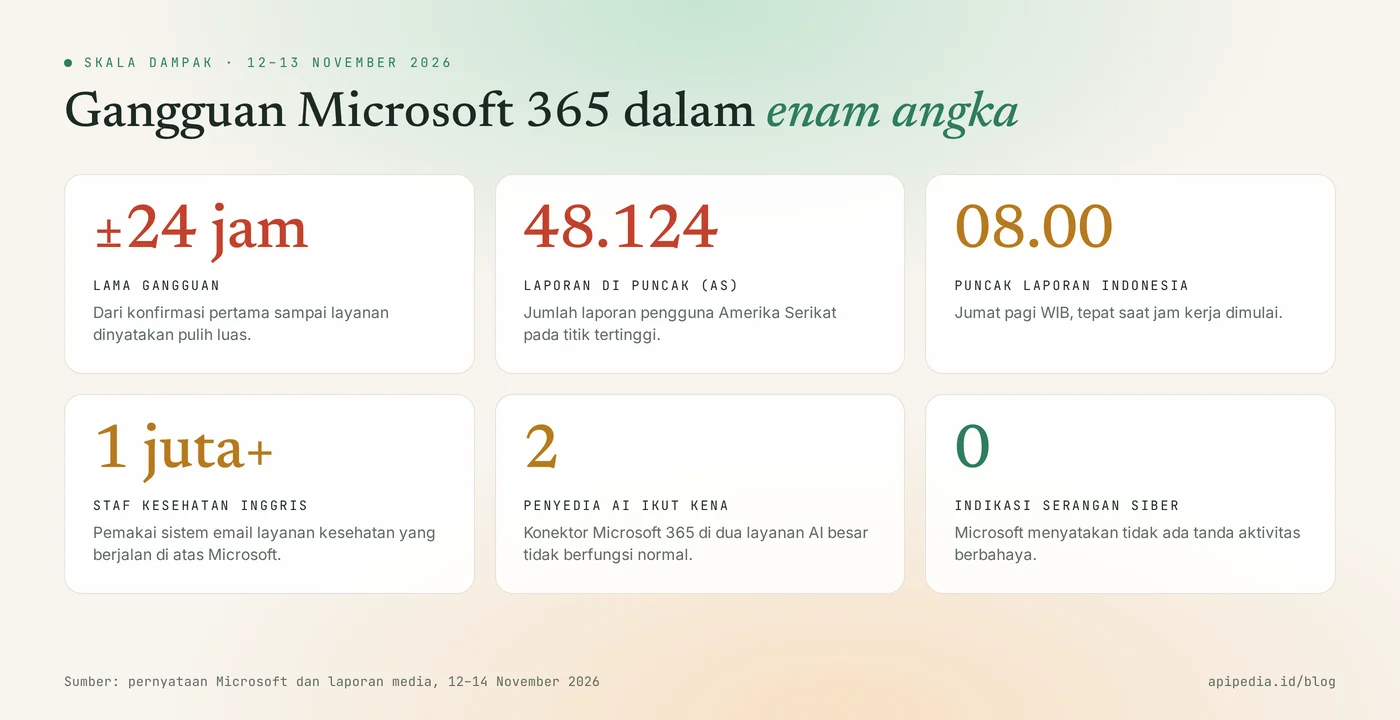
- UK: hundreds of hospitals, GP clinics and community health services struggle to log in to email and send data. The healthcare email system there is used by more than a million staff. Police asked residents to report by telephone, some court hearings were disrupted, and school inspections were delayed because emails did not arrive.
- Third-party AI services: OpenAI and Anthropic confirmed Microsoft 365 connectors in their services did not function normally during the outage, as the issue was on the upstream side.
- Emergency services: the UK government said emergency numbers were not affected, and health facilities switched to other systems or paper records.
What is the impact for users in Indonesia?
Indonesian users were hit at the most inopportune hour. Because the disruption started near midnight WIB, reports from Indonesia only spiked when people started working. Local media citing disturbance monitoring data recorded peak reports around 08.00 to 08.30 WIB on Friday, November 13 2026.
Complaints reported from Indonesia include:
- Outlook email cannot be sent, received, or inbox fails to load.
- Teams can't connect to the meeting.
- OneDrive and the web version of Word are problematic.
There are no official figures yet for the number of Indonesian organizations affected. What is clear is that companies, campuses and agencies that use Microsoft 365 as their main email lost their official communication channels for most of Friday.
Why is this disruption important for developers and digital business owners?
Because email is not only a correspondence tool, but also a system path. Many applications depend on Microsoft 365 mailboxes without realizing it:
- Transactional emails and OTPs sent via Microsoft 365 accounts are also blocked, so users cannot log in or complete payments.
- Integrations and automation that read inboxes (helpdesk tickets from emails, approvals, notifications) stop receiving data.
- AI agents and connectors that access email, calendars, or documents also fail, as do connectors in large AI services.
- Microsoft account-based logins to third-party applications can be disrupted if they depend on a service that is experiencing problems.
Here's our analysis: the lesson isn't "don't use the cloud," it's "know your dependencies." Any provider of any size can go down because of a single network change, and what differentiates a crippled organization from one that remains running is whether or not there is a backup path.
What do IT admins need to do now?
Start by checking the impact on your tenants, then prepare a backup path. Our recommended order:
- Check Service Health in the Microsoft 365 admin center. Note the incidents listed for your tenant and their timeframe. This is the basis for internal reports and claims.
- Check your email queue. Make sure emails that were delayed during the outage are sent or received, and notify the team if there are important messages that need to be resent.
- Review service credit entitlements. The Microsoft 365 service level agreement promises 99.9% monthly uptime and provides a service credit mechanism. Read the claim terms and deadlines in your subscription's SLA document, then submit via Microsoft support if you meet the requirements.
- Define a backup communication channel. For example, official instant messaging groups, phone numbers, or internal status pages that don't run on the same platform as the main email.
- Separate system email from work email. OTPs, notifications, and transactional emails should use a dedicated delivery service with a backup provider, not employee mailboxes.
- Add failure handling in integration. Use retries with cascading delays, queues, and clear time limits so automation doesn't lose data when upstream services go down.
- Test emergency plans. Simulate “email being down all day” and see which processes stop.
Also be wary of scams riding on this news. After a major outage, a fake email or message usually appears claiming to be from Microsoft support and asking for a re-login. Remind employees to only log in via official addresses.
Frequently asked questions
Is Microsoft 365 back to normal?
Microsoft said the main issue was resolved and service was broadly restored, with a gradual recovery for remaining customers and regions. If your account still has problems, check Service Health in the admin center and contact Microsoft support.
Will my data or email be lost due to this disruption?
There is no Microsoft statement regarding data loss. This disruption concerns service availability, namely email being delayed or inaccessible, not data leakage or deletion. Keep a check on important messages sent during the outage.
Is this interference caused by AI or Copilot?
No, according to Microsoft. The official statement said this incident was not related to AI or agents. Copilot is among the services affected, not the cause.
When will Microsoft's post-incident report be published?
There is no definite date yet. Microsoft only said it would publish a full report once the review is complete. As of this writing on November 15, 2026, the report is not yet available.
Can customers ask for compensation?
Can be submitted if it meets the SLA requirements. Microsoft 365 has a service credit mechanism for months when uptime is below commitment. Terms, size, and application deadlines follow your subscription's SLA document, so the final decision rests with Microsoft.
To strengthen your integration against upstream service disruptions, also read how webhooks and retries work, what rate limits and error 429s mean, and how OAuth works for app access permissions. Other Microsoft news this week: the exploited Outlook vulnerability CVE-2026-124194.
Source
- Microsoft Service Health: Microsoft 365 service status page (primary source)
- Charles Lamanna (Microsoft): statement that there is no indication of malicious activity (primary source)
- Forbes: Microsoft Apologizes For Outage And Reveals Cause
- Windows Central: Microsoft apologizes for major outage
- Windows Latest: Microsoft 365 status update timeline
- AOL UK: Microsoft outage hits hospitals, GPs, schools and police across UK
- Liputan6: Microsoft Outlook Down Mass, Global Users Affected
- Fortune Indonesia: Why did Microsoft 365 and Outlook experience a down time?
- Suara.com: Microsoft apologizes after global downturn, denies cyber attacks
Topics: #berita #microsoft 365 #outlook #cloud #gangguan layanan #admin it
About the author
Tim APIPedia — Tim Engineering APIPedia
Tim engineering di balik APIPedia yang membangun dan memelihara API data Indonesia - ongkir, OCR KTP, data wilayah, BMKG, hingga server MCP - dan menulis panduan integrasinya dari pengalaman langsung.