How to Use OpenAI Decisions API: Build a CS Chat Router with Code Examples
By Tim APIPedia, Tim Engineering APIPedia · Published · Updated · 11 min read
OpenAI Decisions API Tutorial (GA 22 Oct 2026): classify CS messages with predicate, choice, score, then forward to APIPedia Postage Check API.
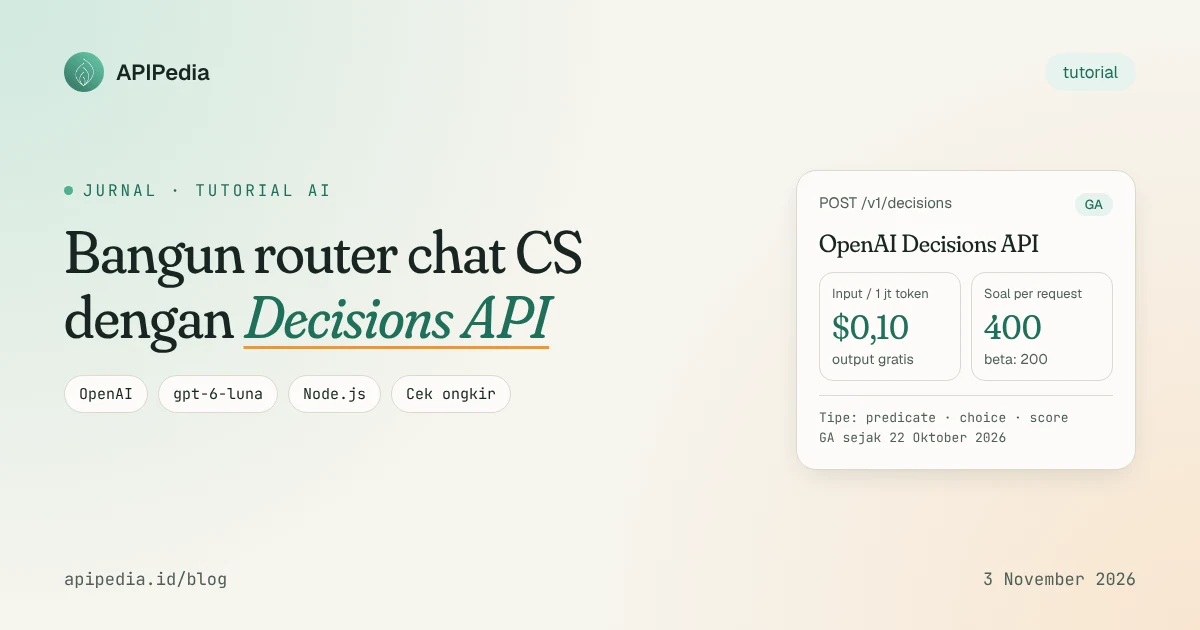
The OpenAI Decisions API is a custom endpoint ( POST /v1/decisions) that answers classification questions in a structured form: probabilities, choices, or scores, rather than free text. Since GA went official on October 22, 2026, many teams have used it for message routing because it is cheap ($0.10 per 1 million input tokens, free output) and much faster than the chat model.
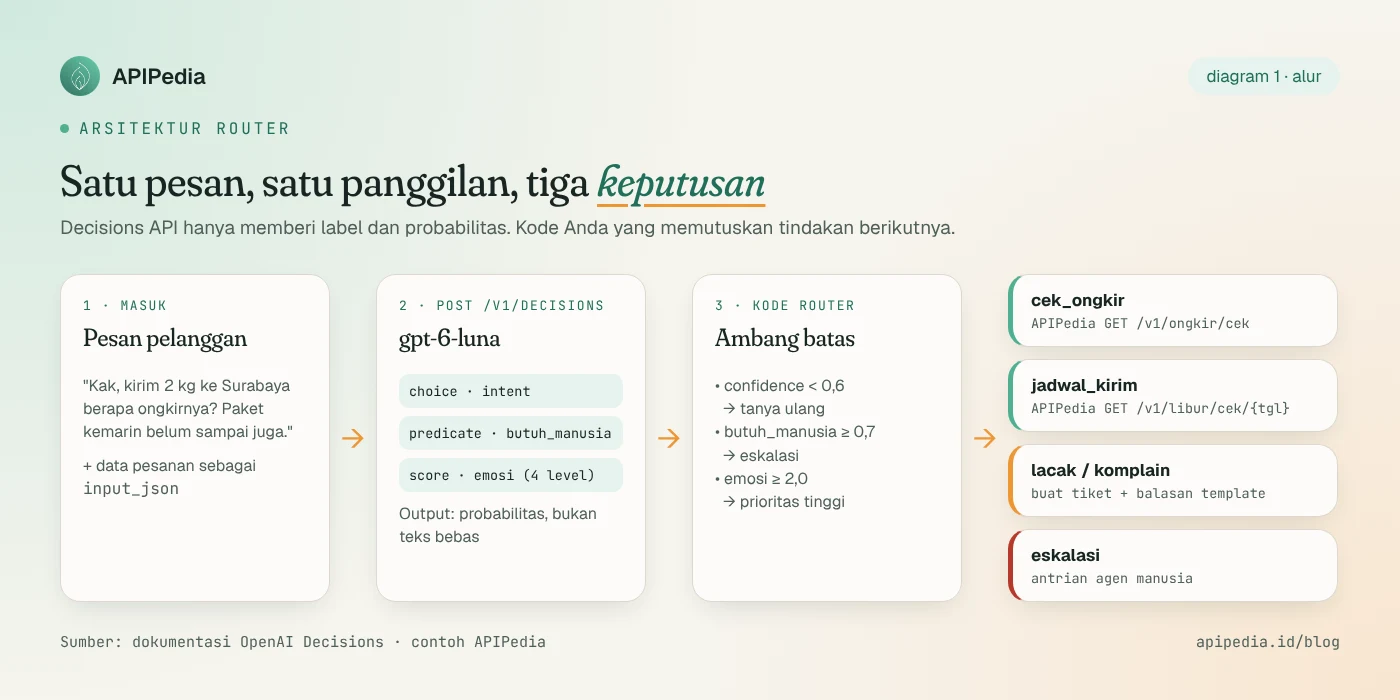
In this tutorial we build a customer service chat router for an online store: a single Decisions API call determines the intent of the message, whether a human agent is needed, and how upset the customer is. For postage inquiries, the router directly calls the APIPedia Postage Check API. All code can be run with Node.js 18+.
How is the Decisions API different from the regular Responses API?
Responses API (or chat completions) generates text. If you use it for classification, you should write the prompt "answer only with one of these labels", then parse the text and hope the model complies. The Decisions API cuts through all that: you send a proof ( input) and a list of questions ( questions), then receive an array of answers types.
According to OpenAI's official documentation, this endpoint supports only gpt-6-luna models and returns answers about 10 times faster than calling the same model via the Responses API. Absolute figures for latency are not listed in the documentation; Loop's OODA summary mentions a range of 100–180 ms per response, but that has not been independently verified.
| Aspect | Decisions API | Responses API for classification |
|---|---|---|
| Output form | JSON type: probability, choice, score | Free text, needs parsing |
| Model | Only gpt-6-luna | Lots of choices |
| Output costs | Not billed | Billed per token |
| Input price (without cache) | $0.10 / 1 million tokens | Depends on model |
| Questions per request | 1–400 (beta: 200) | One prompt, one answer |
| Can you write a reply? | No | Yes |
The final point is important: the Decisions API does not write reply sentences and does not extract entities such as city names. He just decided. So a reasonable pattern is: Decisions API for routing, then plain code, data API, or chat model for the next step.
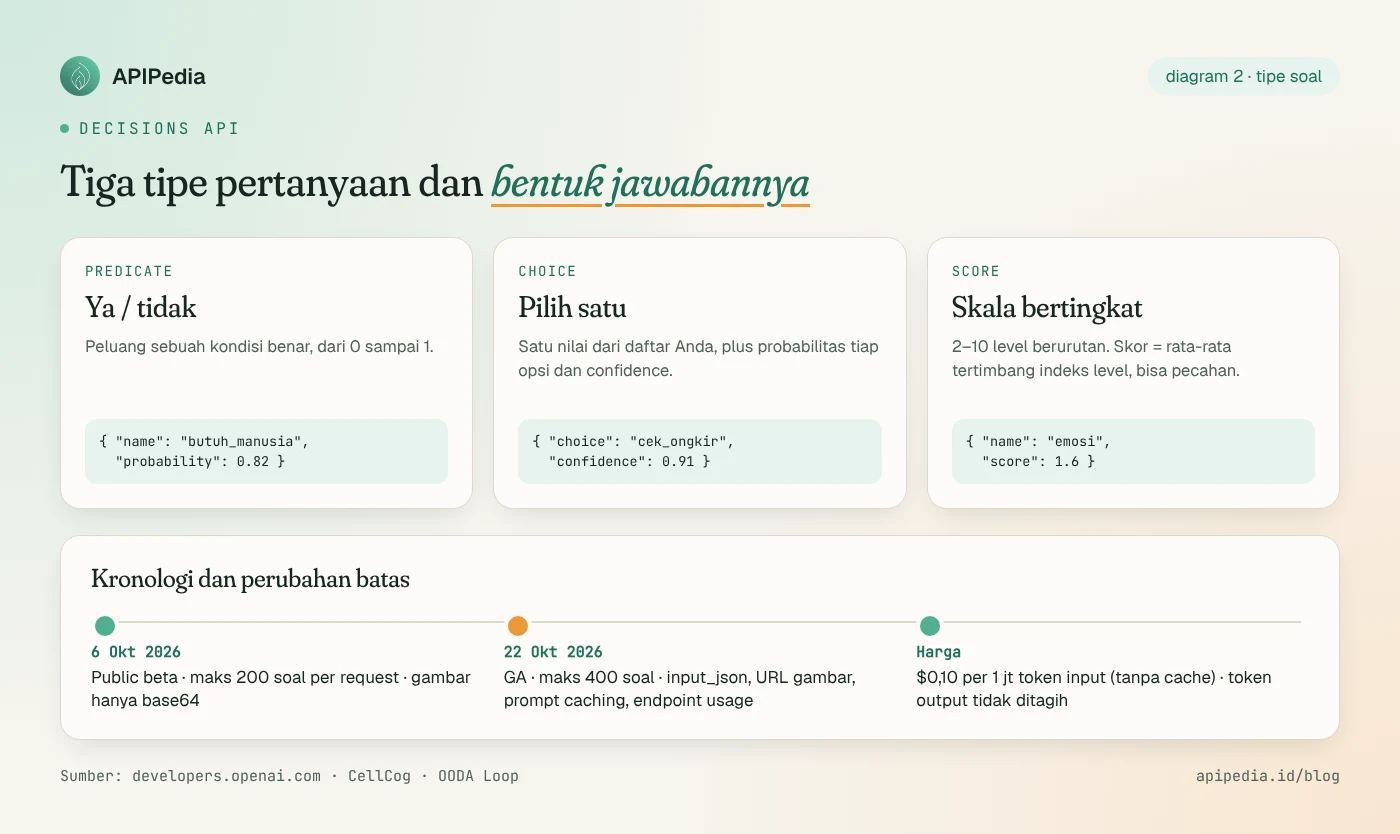
Three types of questions: predicate, choice, score
- predicate: the probability that a condition is true, from 0 to 1. Example: "Did the customer ask to speak to a human?"
- choice: choose one value from your list. The answer contains
choice,probabilitiesof each option, andconfidence. Include a backup option likelainnyaso that strange input isn't forced into the wrong category. - score: assesses input at 2–10 sequential levels. The value
scoreis the weighted average of the level index (starting at 0), so it could be a fraction like 1.6.
There is one additional answer type: refusal, when the model refuses to answer one question. Your code must handle it separately.
Step 1: First test run with curl
Set up an OpenAI API key in an environment variable, then send one predicate question. The body structure follows the official documentation: model, input, and questions.
export OPENAI_API_KEY="sk-..."

curl -s https://api.openai.com/v1/decisions \
  -H "Authorization: Bearer $OPENAI_API_KEY" \
  -H "Content-Type: application/json" \
  -d '{
    "model": "gpt-6-luna",
    "input": "Kak, paket saya dari minggu lalu belum sampai. Bisa sambungkan ke admin?",
    "questions": [
      {
        "type": "predicate",
        "name": "butuh_manusia",
        "instructions": "Apakah pelanggan secara eksplisit meminta dilayani oleh manusia/admin?"
      }
    ]
  }'
The response contains answers arrays (one per question) and usage objects. It looks something like this; Figures below are for illustration only:
{
  "answers": [
    { "type": "predicate", "name": "butuh_manusia", "probability": 0.93 }
  ],
  "usage": {
    "input_tokens": 61,
    "input_tokens_details": { "cached_tokens": 0 }
  }
}
Step 2: Design questions for CS routers
One request can contain up to 400 questions, and they all share the same input. For our router, three are enough:
- intent (choice):
cek_ongkir,jadwal_kirim,lacak_paket,komplain,lainnya. - need_human (predicate): whether to redirect to an agent.
- emotion (score, 4 levels): calm, slightly annoyed, irritated, very angry.
Customer order data can also be sent as part input_json in the user message. This feature is only available at GA and only applies to role user messages; the contents of field data are treated as ordinary data, not instructions.
Step 3: Classification function in Node.js
The code below uses Node.js 18+'s fetch built-ins, with no dependencies. Save as decide.mjs.
// decide.mjs
const OPENAI_URL = "https://api.openai.com/v1/decisions";

const QUESTIONS = [
  {
    type: "choice",
    name: "intent",
    instructions: "Apa maksud utama pesan pelanggan toko online ini?",
    choices: [
      { value: "cek_ongkir", description: "Menanyakan ongkos kirim ke suatu kota" },
      { value: "jadwal_kirim", description: "Menanyakan kapan paket dikirim atau apakah toko libur" },
      { value: "lacak_paket", description: "Menanyakan posisi paket yang sudah dikirim" },
      { value: "komplain", description: "Mengeluhkan produk rusak, salah kirim, atau pelayanan" },
      { value: "lainnya", description: "Tidak cocok dengan kategori mana pun" }
    ]
  },
  {
    type: "predicate",
    name: "butuh_manusia",
    instructions: "Apakah percakapan ini sebaiknya dialihkan ke agen manusia (diminta eksplisit, ada ancaman, atau masalah pembayaran)?"
  },
  {
    type: "score",
    name: "emosi",
    instructions: "Seberapa kesal pelanggan berdasarkan nada pesannya?",
    levels: [
      { label: "tenang", description: "Bertanya biasa, tanpa keluhan" },
      { label: "sedikit_kesal", description: "Ada nada tidak sabar" },
      { label: "kesal", description: "Mengeluh jelas atau mengulang pertanyaan" },
      { label: "sangat_marah", description: "Marah, mengancam, atau memakai huruf kapital berlebihan" }
    ]
  }
];

export async function decide(pesan, dataPesanan = null) {
  const content = [{ type: "input_text", text: pesan }];
  if (dataPesanan) content.push({ type: "input_json", data: dataPesanan });

  const res = await fetch(OPENAI_URL, {
    method: "POST",
    headers: {
      Authorization: `Bearer ${process.env.OPENAI_API_KEY}`,
      "Content-Type": "application/json"
    },
    body: JSON.stringify({
      model: "gpt-6-luna",
      input: [{ role: "user", content }],
      questions: QUESTIONS
    })
  });
  if (!res.ok) throw new Error(`Decisions API ${res.status}: ${await res.text()}`);

  const { answers } = await res.json();
  // Ubah array answers menjadi objek { intent: {...}, butuh_manusia: {...}, ... }
  return Object.fromEntries(answers.map((a) => [a.name, a]));
}
If you prefer the official SDK, the OpenAI documentation mentions the same pattern via client.decisions.create({ model, input, questions }) in both the JavaScript and Python SDKs, with identical field names.
Step 4: Router with threshold and APIPedia Postage Check API
Here's the part that is often forgotten: probability is useless without a threshold. Our rules:
- If there is an answer of
refusalorconfidenceintents below 0.6, ask the customer to clarify. - If
butuh_manusia≥ 0.7 oremosi≥ 2.0 (level "upset" and above), escalate immediately. - Apart from that, carry out the action according to the intent.
For intent cek_ongkir, the destination city is taken from the chat form field (Decisions API does not extract text). Then we call two APIPedia endpoints: /v1/ongkir/search to look up the region ID and /v1/ongkir/cek to estimate the rate. For jadwal_kirim, we check whether tomorrow is a national holiday after /v1/libur/cek/{tanggal}.
// router.mjs
import { decide } from "./decide.mjs";

const APIPEDIA = "https://api.apipedia.id/v1";
const headers = { Authorization: `Bearer ${process.env.APIPEDIA_KEY}` };
const ORIGIN_ID = "3273"; // KOTA BANDUNG, id dari /v1/ongkir/search?q=bandung

async function apipedia(path) {
  const res = await fetch(`${APIPEDIA}${path}`, { headers });
  const body = await res.json();
  if (!body.is_success) throw new Error(body.message);
  return body.data;
}

async function cekOngkir(kotaTujuan, beratGram) {
  const cari = await apipedia(`/ongkir/search?q=${encodeURIComponent(kotaTujuan)}`);
  const tujuan = cari.hasil.find((w) => w.tipe === "kabupaten") ?? cari.hasil[0];
  if (!tujuan) return `Kota "${kotaTujuan}" belum ketemu, boleh tulis nama kabupaten/kotanya?`;

  const data = await apipedia(
    `/ongkir/cek?origin=${ORIGIN_ID}&destination=${tujuan.id}&weight=${beratGram}`
  );
  const termurah = [...data.tarif].sort((a, b) => a.total - b.total).slice(0, 3);
  return `Estimasi ongkir ke ${tujuan.nama} (${data.berat_tagih_kg} kg): ` +
    termurah.map((t) => `${t.nama} Rp${t.total.toLocaleString("id-ID")}`).join(", ");
}

async function cekJadwal() {
  const besok = new Date(Date.now() + 86400000)
    .toLocaleDateString("en-CA", { timeZone: "Asia/Jakarta" }); // YYYY-MM-DD
  const d = await apipedia(`/libur/cek/${besok}`);
  return d.is_libur
    ? `Besok ${d.keterangan}, pengiriman dilanjutkan di hari kerja berikutnya.`
    : "Pesanan sebelum jam 15.00 dikirim besok.";
}

export async function route({ pesan, kotaTujuan, beratGram = 1000, pesanan }) {
  const r = await decide(pesan, pesanan);

  if (Object.values(r).some((a) => a.type === "refusal")) return { aksi: "eskalasi" };
  if (r.butuh_manusia.probability >= 0.7 || r.emosi.score >= 2.0) {
    return { aksi: "eskalasi", prioritas: r.emosi.score >= 2.0 ? "tinggi" : "normal" };
  }
  if (r.intent.confidence < 0.6) return { aksi: "klarifikasi" };

  switch (r.intent.choice) {
    case "cek_ongkir":
      return { aksi: "balas", teks: await cekOngkir(kotaTujuan, beratGram) };
    case "jadwal_kirim":
      return { aksi: "balas", teks: await cekJadwal() };
    case "lacak_paket":
    case "komplain":
      return { aksi: "tiket", kategori: r.intent.choice };
    default:
      return { aksi: "klarifikasi" };
  }
}

// Uji cepat: node router.mjs
if (import.meta.url === `file://${process.argv[1]}`) {
  console.log(await route({
    pesan: "Halo kak, kirim 1,5 kg ke Surabaya kira-kira berapa ya?",
    kotaTujuan: "surabaya",
    beratGram: 1500
  }));
}
Run with:
export OPENAI_API_KEY="sk-..."
export APIPEDIA_KEY="apk_..."   # buat di https://console.apipedia.id
node router.mjs
When we tested the APIPedia endpoint for the Bandung (3273) to Surabaya City (3578) route weighing 1,500 grams, the bill weight was rounded up to 2 kg and the cheapest tariff that came out was Special Express POS Rp. 29,854. Remember, this is an estimate from static data, not the official courier rate. A complete guide to postage endpoints is in the Indonesian Postage Check API article, and holiday calendar details in the Indonesian National Holidays API.
Step 5: Save costs with prompt caching
If each request carries the same long context (for example store policies or a short catalog), put that context at the beginning input. OpenAI's documentation explains there is an implicit cache breakpoint at the end input, with the requirement that the reusable prefix be at least 1,024 tokens; content questions does not count. You can separate the cache per tenant by prompt_cache_key.
Regarding cache prices, sources differ slightly. The official documentation simply calls cache hits "discounted" and cache writes billed at caching rate gpt-6-luna. Kju and OODA Loop wrote a figure of $0.01 per 1 million tokens for cached input. Check the official price page before calculating your budget.
Step 6: Monitor usage
Since GA there is a special usage endpoint. This endpoint requires an admin API key with permissions api.usage.read, not a regular project key. Note that num_model_requests counts requests, not the number of questions.
curl -s "https://api.openai.com/v1/organization/usage/decisions?start_time=$(date -d '7 days ago' +%s)" \
  -H "Authorization: Bearer $OPENAI_ADMIN_KEY"
Rough count: one CS message is about 150 input tokens. At $0.10 per 1 million tokens, 100,000 messages (15 million tokens) is roughly $1.50 before cache. This figure does not include regional processing premiums or long context multipliers called documentation.
Limitations you need to know
- One model only: only
gpt-6-luna. - Unsupported inputs: files, audio, and
file_id. Images can be via public HTTP/HTTPS URLs or base64 URL data. - Region: processing available in the United States and Europe (EEA and Switzerland). There is no Asian region option yet, so consider personal data regulations (PDP Law) before sending customer data. Send only what is necessary, for example without NIK or cellphone number.
- No reply text: if you need a natural answer, use the chat model after routing.
- Speed claim: “10x faster” is OpenAI's claim for decision tasks only. OneMetrik cautions that total workflow time can still be dominated by database, network, or manual approval calls.
FAQs
Can the Decisions API be used from Indonesia?
Yes, as long as your OpenAI account is active and has API access. What you need to pay attention to is the data processing location (US or Europe) and the network latency of your server.
How many questions should be included in one request?
The limit is 1–400. Combine questions that use the same evidence ( input) in one request so that input is only paid once. Questions for different messages must still be requested separately.
Why is my emotional score 1.6, not a whole number?
Because score is the weighted average level index. A value of 1.6 means the model is leaning towards “upset” (index 2) but there is still a chance of “slight upset”. See array probabilities if you need the complete distribution.
What happens if the message doesn't match any of the options?
The model still has to choose one of the values in choices. That's why option lainnya and checking confidence are important so that strange messages don't get misrouted.
Can the APIPedia API be called from another AI agent?
Can. Apart from REST like the example above, APIPedia is also available as an MCP server. See the guide to connecting APIPedia to Claude via MCP.
Source
Topics: #openai #decisions api #tutorial #ai #nodejs #cek ongkir
${c.about}
Tim APIPedia — Tim Engineering APIPedia
Tim engineering di balik APIPedia yang membangun dan memelihara API data Indonesia - ongkir, OCR KTP, data wilayah, BMKG, hingga server MCP - dan menulis panduan integrasinya dari pengalaman langsung.