PHP2Shell (CVE-2026-109618 & CVE-2026-109619): Viral PHP RCE Flaw, How to Check and Patch
By Tim APIPedia, Tim Engineering APIPedia · Published · Updated · 11 min read
PHP2Shell are two no-login RCE loopholes in PHP core that have been exploited. Safe version, how to check the server, temporary mitigation, and advanced CVE.
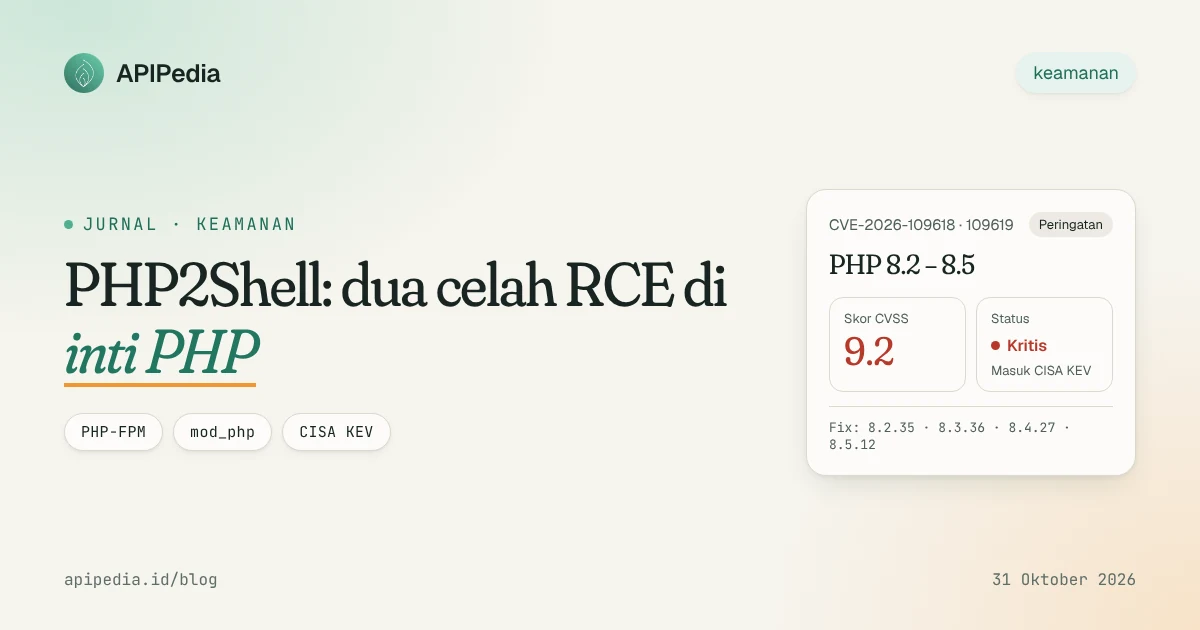
PHP2Shell is the name for two remote code execution (RCE) vulnerabilities in the PHP core, CVE-2026-109618 and CVE-2026-109619, which can be exploited without login and are each rated at CVSS v4 9.2. The flaw is in the PHP runtime, not in the application code, so even well-coded sites remain vulnerable as long as the PHP version has not been updated.
PHP released a fix on October 21, 2026 in versions 8.5.12, 8.4.27, 8.3.36, and 8.2.35. Five days later CISA added both to its Known Exploited Vulnerabilities (KEV) catalog, and on October 29 Palo Alto Networks confirmed active exploitation. This article summarizes the chronology, how both vulnerabilities work, how to check your server, temporary mitigations, and the advanced vulnerability CVE-2026-115560.
PHP2Shell Overview
| Aspect | Details |
|---|---|
| CVE | CVE-2026-109618 (memory corruption during OOM), CVE-2026-109619 (use-after-free inter-request) |
| Score | CVSS v4 9.2 (Critical), respectively |
| Impact | RCE without authentication with web worker process privileges |
| Affected | All PHP installations that serve web requests: PHP-FPM, Apache mod_php, php-cgi, FrankenPHP, LiteSpeed |
| The riskiest | Apache mod_php |
| Improved version | 8.2.35, 8.3.36, 8.4.27, 8.5.12 (release October 21, 2026) |
| Inventor | Researchers from Wiz, Calif., and OpenAI |
| Status | Enter CISA KEV October 26, 2026; active exploitation confirmed |
| Exposure | More than 22.6 million instances are potentially vulnerable according to Palo Alto Networks telemetry |
Why did PHP2Shell go viral?
This loophole was widely discussed even before the patch came out. On October 20, a post on Hacker News claimed two RCE PHP vulnerabilities with a CVSS score of 10.0 affecting versions since PHP 5 would be announced on October 22. Because details leaked before the embargo expired, PHP moved the fix release up one day to October 21 at 14:00 UTC.
There are three reasons this gap is considered serious:
- The scale. PHP powers most sites on the internet, including WordPress, Laravel, and various hosting panels. The flaw reportedly affects almost all versions since PHP 5.4.
- No login. Attackers simply send specially designed HTTP requests.
- Not application dependent. In mod_php, the demonstrated attack can succeed before a single line of application code is executed.
One correction to the news circulating: the 10.0 score comes from a leaked post, not from PHP. PHP's official rating is 9.2 for both passes.
How do these two loopholes work?
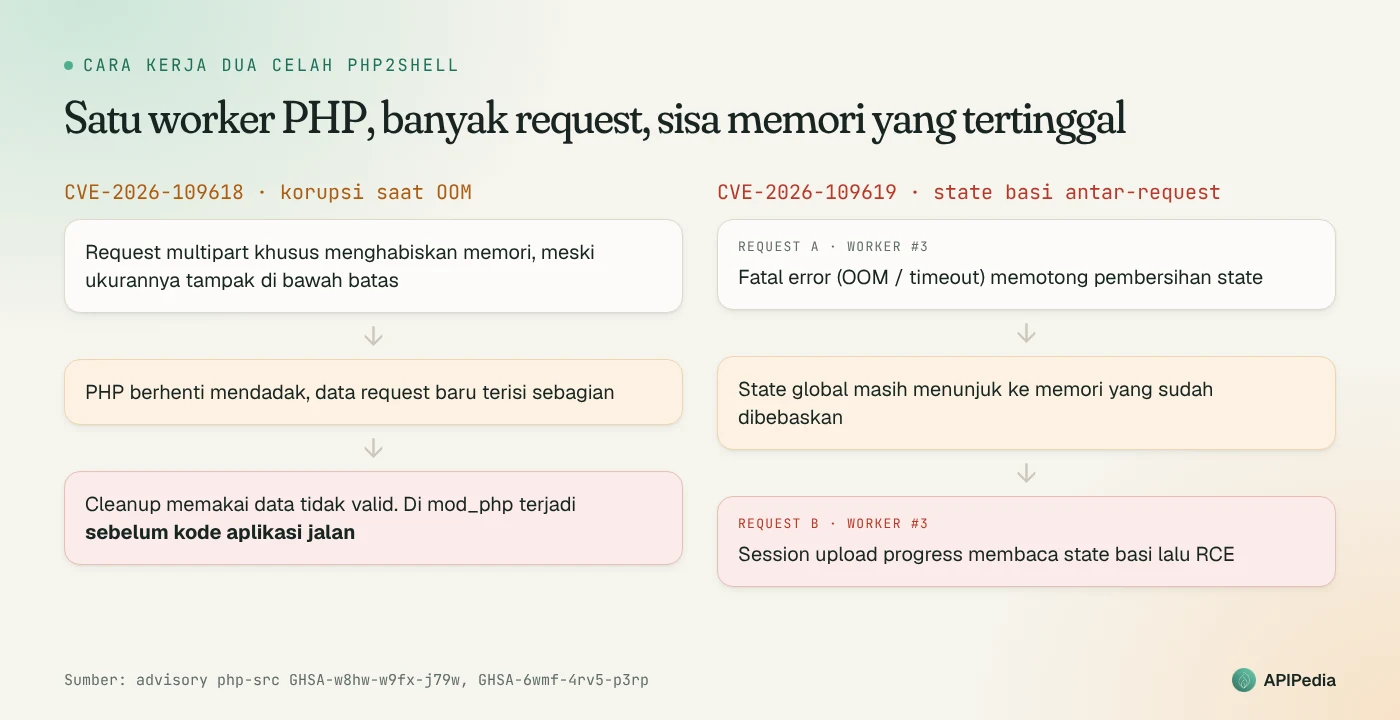
CVE-2026-109618: memory corruption when out of memory
When memory allocation fails, PHP can stop processing requests suddenly. If the request's internal data is only partially filled, the cleanup process then uses invalid data. Specially designed multipart requests, the kind used for forms and file uploads, can consume memory even if their size appears to be below PHP's configuration limits.
In Apache mod_php, cleanup continues to run even if the startup request fails, so attacks can be carried out before the application code runs, with built-in memory and input limits. PHP-FPM stops the worker when startup fails so this path is closed, but code analysis still shows FPM is vulnerable after successful startup. So far there is no complete FPM exploit for this CVE.
CVE-2026-109619: stale memory carried over to subsequent requests
One PHP worker process is usually used for many requests. This gap arises because there is an internal state that still points to memory that was freed at the end of the previous request. Subsequent requests handled by the same worker can read the stale value before normal initialization clears it. Fatal errors, such as out of memory or execution timeouts, are common triggers because they interrupt the cleanup process.
PHP Advisory confirms two RCE paths:
- Fatal backtrace error in PHP 8.5 (option
fatal_error_backtraces, on by default) in mod_php. - Session life cycle in mod_php and FPM, via the session upload progress feature which is active by default. This path can be triggered even if your application never calls
session_start().
Has PHP2Shell been exploited?
Yes, although the picture is gradual:
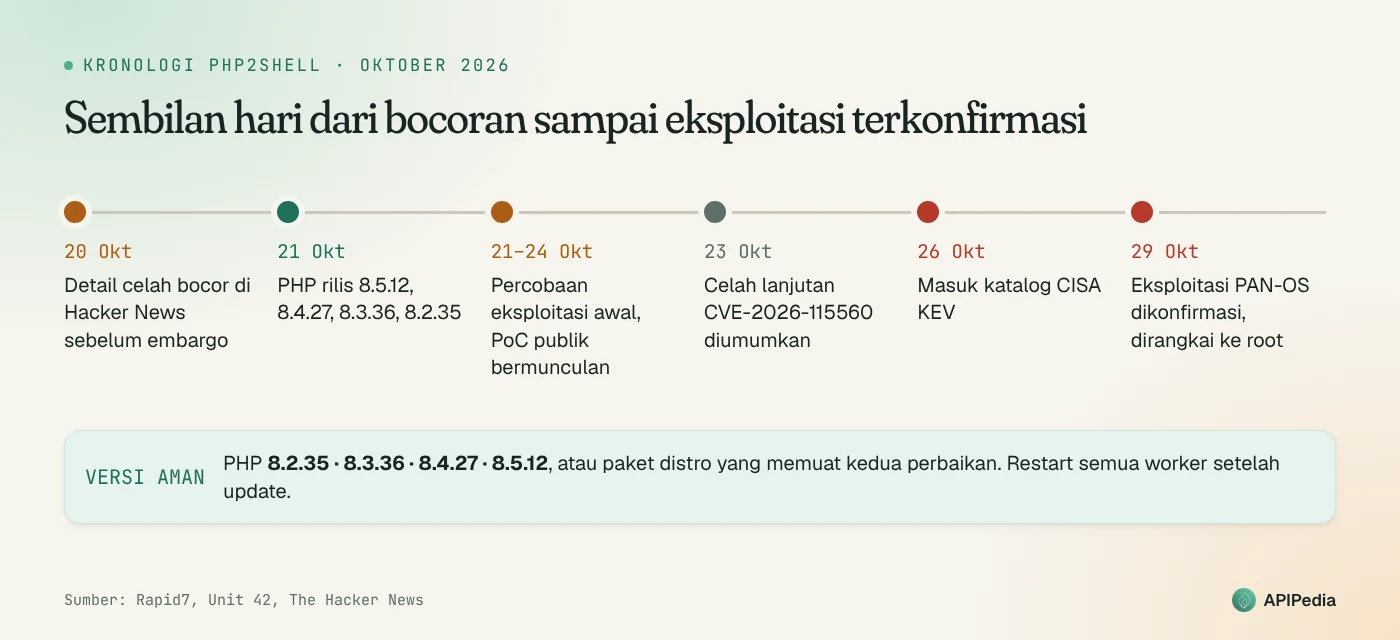
| Date (2026) | Incident |
|---|---|
| October 20 | Details of the flaw were leaked to Hacker News before the embargo |
| October 21 | PHP releases 8.5.12, 8.4.27, 8.3.36, 8.2.35 and two advisories |
| October 21-24 | Cloudflare and other researchers reported initial exploitation attempts; several public PoCs appeared |
| October 23 | PHP announces advanced vulnerability CVE-2026-115560 (see section below) |
| October 26 | CISA included both CVEs in the KEV by a US federal agency deadline of October 29 |
| October 29 | Palo Alto Networks confirmed exploitation of the PAN-OS management interface exposed to the internet |
Rapid7 assesses that the public PoCs in circulation each only work on certain combinations of OS, PHP version, and web server, and none of them are reliable in general. Rapid7 calls this a window of time to patch, not a reason to delay, as more portable techniques could emerge at any time.
The PAN-OS case shows what a real attack looks like. Dream Research reported a campaign that coupled PHP2Shell with a privilege escalation vulnerability in the Linux kernel to gain root access, and Palo Alto Networks' Unit 42 verified the same attack toolkit. According to Palo Alto, only about 0.02% of its customer base opened its management interface to the internet and was impacted.
Which PHP version is safe?
| Branch | Vulnerable version | Improved version |
|---|---|---|
| PHP 8.5 | Before 8.5.12 | 8.5.12 |
| PHP 8.4 | Before 8.4.27 | 8.4.27 |
| PHP 8.3 | Before 8.3.36 | 8.3.36 |
| PHP 8.2 | Before 8.2.35 | 8.2.35 |
| PHP 7.4, 8.0, 8.1 | All | Limited source backports from PHP, or vendor/distro packages |
| Another PHP 7.x and 5.x | All | There is no improvement from PHP; upgrade or isolation |
Linux distributions and LTS vendors receive patches earlier, so the distro package may be safe even if the version number still looks old because the fix was backported. An update containing both fixes in full is the only full remediation.
How do I check my server?
First, check the PHP version and installed packages. On servers with backports, the distro package version is more trustworthy than number php -v.
# Versi PHP CLI
php -v

# Versi PHP-FPM (sesuaikan nomor versinya)
php-fpm8.3 -v

# Debian/Ubuntu: versi paket distro (cocokkan dengan advisory keamanan distro)
dpkg -l | grep -E '^ii\s+(php|libapache2-mod-php)'

# RHEL/AlmaLinux/Rocky
rpm -qa | grep -i php
Remember that one server can have several PHP versions at once, for example on cPanel, Plesk, or servers with many FPM pools. Make sure every runtime that serves web requests is updated, not just the PHP CLI.
After the update, restart all PHP processes. New installed packages mean nothing as long as the old worker is still running.
sudo systemctl restart php8.3-fpm   # ulangi untuk setiap versi FPM
sudo systemctl restart apache2      # bila memakai mod_php (httpd di RHEL)
Temporary mitigation if you can't update yet
PHP provides configuration steps to reduce exposure to certain attack paths. Everything only reduces risks, does not close gaps, and must be followed by a restart of all workers.
- Turn off session upload progress in
php.ini, FPM pool, or server configuration. This closes the confirmed session path, as well as the CVE-2026-115560 path. Setting it pastini_set()or.user.iniis too late because the request has already been parsed. - In PHP 8.5, turn off
fatal_error_backtracesadministratively. - For the OOM gap, PHP suggests
memory_limit=-1which is forced at the server level so applications cannot change it. This step removes the memory limit per request, so it must be balanced with other limits:post_max_size=8Mif you don't need to upload files or32Mif you need it,upload_max_filesizebelow, and a request size limit in the reverse proxy. If the application does not use multipart, block multipart requests before they reach PHP.
Example for a PHP-FPM pool (e.g. /etc/php/8.3/fpm/pool.d/www.conf):
php_admin_flag[session.upload_progress.enabled] = off
; khusus PHP 8.5:
php_admin_flag[fatal_error_backtraces] = off
Example for Apache mod_php:
php_admin_flag session.upload_progress.enabled offSome things that are not helpful and need to be avoided:
- Hiding errors via
display_errors,error_reporting,log_errors, or@operators does not prevent access to stale state. - Using
RLIMIT_ASorRLIMIT_DATAinstead of a memory limit can actually trigger a vulnerable path. - The container or cgroup memory limit is not enough, and can kill the master process along with all workers.
- Clean logs are not proof that the server is secure.
What is CVE-2026-115560?
Two days after the emergency patch, on October 23, PHP announced a third flaw that was not fixed by the October 21 release. This vulnerability only applies to unusual configurations, namely applications that:
- set
session.serialize_handlertophp_binaryorphp_serializein the configuration, then - changing it to
phpat runtime withini_set(), - before calling
session_start().
PHP considers this scenario to be rare, so the fix is in the regular release cycle, not an emergency release. There have been no reports of exploitation. PHP's recommendation until the fix is published is the same as the mitigation above: turn off session.upload_progress.enabled. Also check your application code for call ini_set('session.serialize_handler', ...).
There are also reports of memory stability regressions on patched versions. This report is separate from PHP2Shell and is not proven to work for RCE. Don't go back to the old version just because of this regression.
How to detect a server that may have been compromised?
If your server is exposed to the internet and hasn't been patched since October 21, assume it's likely been compromised and check for the following signs. This pattern is summarized from Unit 42 threat hunting queries, and is generally applicable to exploiting PHP web applications.
- The PHP process generates shell or system commands. Worker
php-fpm,apache2/httpd,lsphp, or userwww-data/apache/nginxrunningwhoami,id,uname -a,cat /etc/passwd, orps aux. - Payload download.
curlorwgetwhich writes the file, primarily to/tmp,/var/tmp, or/dev/shm, followed bychmod +x. - Binaries that run from a temporary directory or from a file that has been deleted.
- Reverse shell, for example
/dev/tcp/,nc -e,mkfifo, orcurl ... | sh. - Persistence. New crontab for web user, change
authorized_keys, new user, or new systemd unit. - Access credentials. Reading of file
.env, cloud credentials, or service metadata169.254.169.254.
# Contoh cepat: proses yang dijalankan user web
ps -eo user,pid,ppid,cmd --forest | grep -E '^(www-data|apache|nginx)'

# File executable baru di direktori sementara dalam 10 hari terakhir
find /tmp /var/tmp /dev/shm -type f -perm -u+x -mtime -10 -ls

# Crontab milik user web
sudo crontab -u www-data -l
If there are any findings, rotate all secrets that the application can read (database credentials, API key, contents .env), then consider rebuilding the server from a clean image.
A short checklist for today
- Inventory of all servers, containers, and hosting accounts running PHP, including staging and network device admin panels.
- Update to 8.2.35 / 8.3.36 / 8.4.27 / 8.5.12 or a distro package containing both fixes.
- Restart all PHP-FPM and Apache workers.
- Turn off
session.upload_progress.enabledat the server level, to guard against CVE-2026-115560. - Close internet access to the device management interface (firewall, router, hosting panel).
- Run the inspection for traces of intrusion above, and rotate the secret if there are any suspicious signs.
- For PHP 7.x or 8.0-8.1, plan to upgrade to a branch that is still supported.
Frequently asked questions
I use shared hosting. What needs to be done?
PHP version on managed shared hosting providers. Check your provider's announcements or status page, make sure they have installed the corrected version, then select the latest PHP version available in the panel. Several large providers had mitigations installed before the patch was released.
My site is WordPress/Laravel which is always updated. Is it safe?
Not necessarily. The gap is in the PHP runtime, not in WordPress or Laravel, so what needs to be updated is the PHP.
Are PHP CLI or cron jobs affected?
The advisory highlights installations that serve web requests. The biggest risk is PHP-FPM, mod_php, php-cgi, FrankenPHP, and LiteSpeed which receive requests from the internet.
Is configuration mitigation enough?
No. PHP insists an update containing both fixes is the only complete remediation. Mitigation only closes confirmed attack paths.
Is the exploit public?
Several public PoCs are already circulating and active exploits have been confirmed, including a campaign that weaves PHP2Shell with a Linux kernel vulnerability to gain root. Treat it as an emergency priority.
Source
- CVE-2026-109618 and CVE-2026-109619: Critical Unauthenticated RCE in PHP, Rapid7
- Threat Brief: Critical Vulnerabilities in PHP, Unit 42 Palo Alto Networks
- Security advisory: Critical remote code execution vulnerability, PHP
- Advisory CVE-2026-109618 (OOM corruption), php-src
- Advisory CVE-2026-109619 (stale global state), php-src
- PHP Issues Emergency Patches for Two Critical PHP2Shell RCE Flaws, The Hacker News
- PHP Warns of Another Unpatched RCE Risk, The Hacker News
- PHP2Shell Isn't Over: New Unpatched RCE Flaw Surfaces, SecureWorld
- php2shell-protection wiki, Syhunt
Topics: #keamanan #cve #php #php2shell #devsecops
${c.about}
Tim APIPedia — Tim Engineering APIPedia
Tim engineering di balik APIPedia yang membangun dan memelihara API data Indonesia - ongkir, OCR KTP, data wilayah, BMKG, hingga server MCP - dan menulis panduan integrasinya dari pengalaman langsung.