Event Ticket QR Code: How to Create and Scan QR via API (Node.js and Python)
By Tim APIPedia, Tim Engineering APIPedia · Published · Updated · 11 min read
Create an HMAC-signed event ticket QR via POST /v1/qr/generate, then scan at check-in with /v1/qr/decode. There are curl, Node.js, and Python examples.
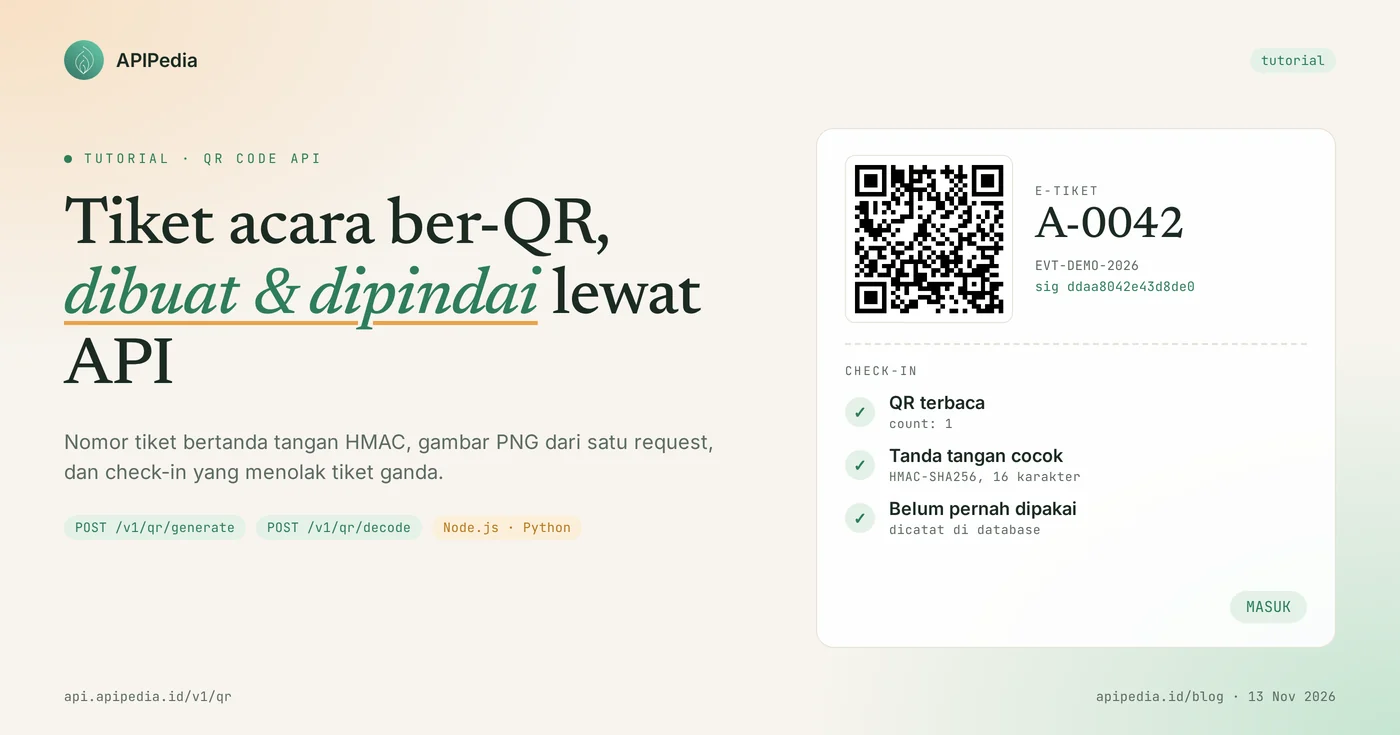
Event ticket QR codes can be generated and scanned with APIPedia's two QR Code Generator endpoints: POST /v1/qr/generate generating a QR image from the ticket number, and POST /v1/qr/decode reading its contents back from a photo at check-in. This product is listed in the Free tier of the catalog, accepts JSON, and returns PNG as URL data.
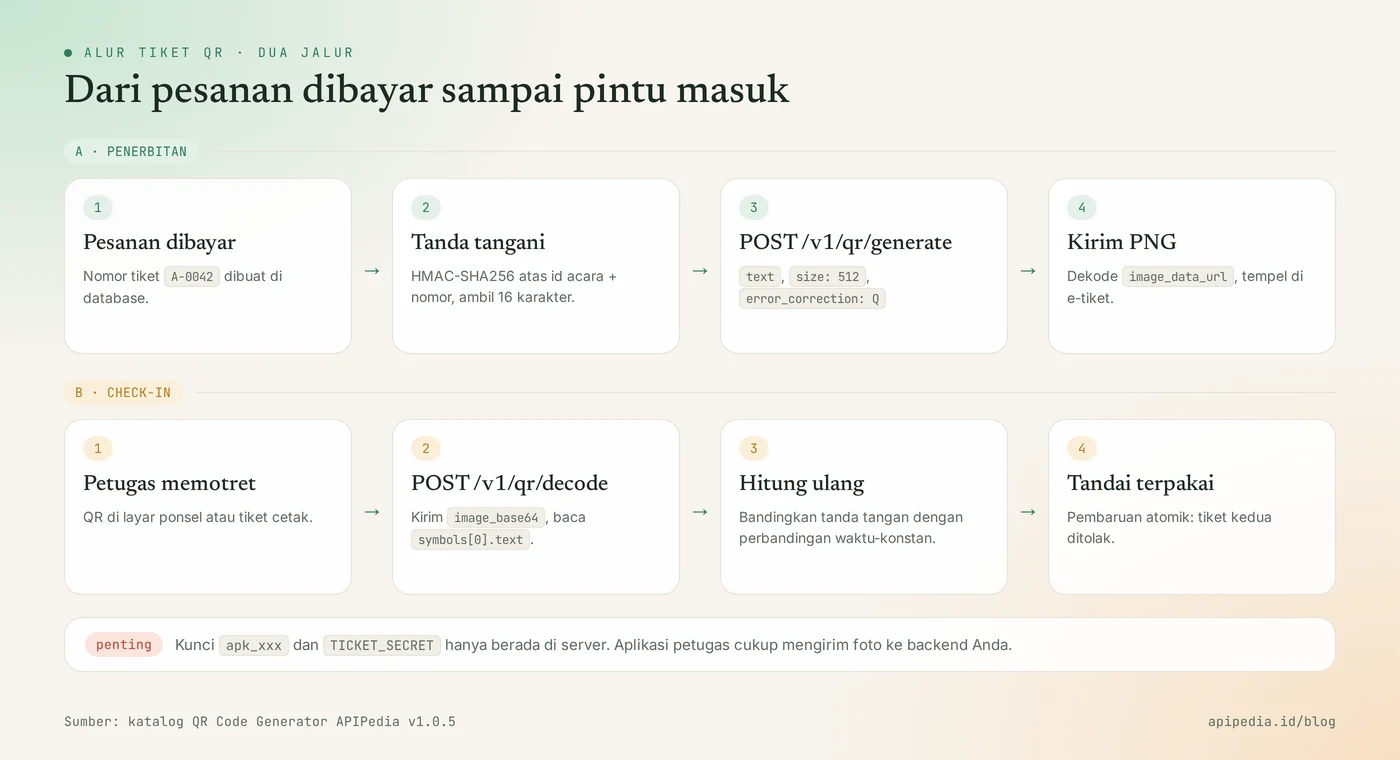
This tutorial walks you through building a ticket flow from inception to entry: constructing an unforgeable QR body, creating its image with curl and Node.js, reading the QR image with Node.js and Python, then rejecting duplicate tickets. All examples use apk_xxx keys and fictitious data, and the form of the example response follows a real call to the API.
Quick summary: what do you need to know?
APIPedia's QR Code Generator has two POST endpoints under https://api.apipedia.id/v1/qr. The following table summarizes the most commonly searched parameters and limits.
| Items | Details |
|---|---|
| Create QR | POST https://api.apipedia.id/v1/qr/generate |
| Read QR | POST https://api.apipedia.id/v1/qr/decode |
| Authentication | Header Authorization: Bearer apk_xxx |
| Fill in the QR | Field text, maximum about 2,900 characters; content_type also supports url, vcard, and wifi |
| Image size | size 64 to 2048 pixels, default 512 |
| Error correction | error_correction: L, M (default), Q, or H |
| Output generated | PNG inside data.image_data_url (base64 URL data, not CDN link) |
| Decode input | image_base64: PNG, JPEG, WebP, GIF, or BMP, maximum 8 MB |
| Symbols read | QR Code, Micro QR, and rMQR; up to 50 symbols per image via max_symbols |
| Tiers | Free in the APIPedia catalog |
What problems does QR ticketing via API solve?
QR tickets via API accomplish two jobs at once: creating QR images without installing an image library on the server, and reading QR photos without a dedicated scanner app. Seminar, campus workshop or community concert committees usually only have a registration form and a WhatsApp group. Attendance lists are checked off manually, lines are long, and screenshots of tickets are easy to pass on to others.
With these two endpoints, your backend can simply send text to get a PNG, then send a photo to get the text back. Important logic like signatures and “in use” status stay on your server, so you have full control over who can log in.
What do you need to prepare before starting?
You only need one APIPedia API key and one server's own secret. Register or log in at console.apipedia.id, open the API Token menu, then create a new key starting with apk_.
APIPEDIA_KEY: keyapk_xxxto call the API. Store them in server environment variables, not in browser code or attendant applications.TICKET_SECRET: a long random string of your own making, for example the resultopenssl rand -hex 32. This secret is used to sign tickets and is never sent to APIPedia.- Node.js 18 and above or Python 3 with
requestslibraries.
Step 1: how to compose QR content that cannot be faked?
Fill in the secure QR containing the ticket number plus HMAC signature, not just the ticket number. A QR is just drawn text, so anyone can create a QR of A-0043 if the pattern is guessed. The signature makes the counterfeit ticket rejected because the counterfeiter doesn't know TICKET_SECRET.
The format used in this tutorial is four parts separated by dots:
TIKET.<id-acara>.<nomor-tiket>.<tanda-tangan>
TIKET.EVT-DEMO-2026.A-0042.ddaa8042e43d8de0
The signature is the first 16 characters of HMAC-SHA256 above EVT-DEMO-2026.A-0042. Avoid dots inside the event ID and ticket number so that the separator is not ambiguous. Do not put participants' names, emails or phone numbers in the QR, as their contents can be read by any scanner.
Step 2: how to create a ticket QR image?
QR image created by sending ticket text to POST /v1/qr/generate. Use error_correction worth Q so that the QR remains readable even if the participant's cellphone screen is cracked or the print is a little dirty, and size 512 so that it is sharp on screen or paper.
curl -X POST https://api.apipedia.id/v1/qr/generate \
  -H "Authorization: Bearer apk_xxx" \
  -H "Content-Type: application/json" \
  -d '{
    "text": "TIKET.EVT-DEMO-2026.A-0042.ddaa8042e43d8de0",
    "size": 512,
    "error_correction": "Q"
  }'
Example of a generate response
The following responses are from real calls; The contents of image_data_url were truncated because they were thousands of characters long.
{
  "is_success": true,
  "message": "QR code berhasil dibuat",
  "data": {
    "content_type": "text",
    "format": "png",
    "size": 512,
    "error_correction": "Q",
    "image_data_url": "data:image/png;base64,iVBORw0KGgoAAAANSUhEUgAA..."
  }
}
Trim the prefix data:image/png;base64,, decode the rest, then save as a PNG file or paste it directly in the attribute src image on the ticket page. If you want to send the ticket as a document, the flow can be continued with the HTML to PDF tutorial.
Node.js version: create and save PNG
The following module contains the entire flow, including the check-in functionality discussed in the next step. The signature and check-in logic has been tested with the example data above.
// tiket.mjs - Node.js 18+ (fetch bawaan)
import crypto from "node:crypto";
import fs from "node:fs/promises";

const API = "https://api.apipedia.id/v1/qr";
const KEY = process.env.APIPEDIA_KEY;      // apk_xxx
const SECRET = process.env.TICKET_SECRET;  // rahasia milik server Anda

function tandaTangan(eventId, nomor) {
  return crypto.createHmac("sha256", SECRET)
    .update(`${eventId}.${nomor}`)
    .digest("hex")
    .slice(0, 16);
}

async function panggil(path, body) {
  const res = await fetch(`${API}${path}`, {
    method: "POST",
    headers: {
      Authorization: `Bearer ${KEY}`,
      "Content-Type": "application/json",
    },
    body: JSON.stringify(body),
  });
  const json = await res.json();
  if (!json.is_success) throw new Error(`${res.status}: ${json.message}`);
  return json.data;
}

// Langkah 1 + 2: susun isi tiket, minta gambar QR, simpan PNG
export async function buatQrTiket(eventId, nomor) {
  const text = `TIKET.${eventId}.${nomor}.${tandaTangan(eventId, nomor)}`;
  const data = await panggil("/generate", {
    text,
    size: 512,
    error_correction: "Q",
  });
  const base64 = data.image_data_url.split(",")[1];
  await fs.writeFile(`tiket-${nomor}.png`, Buffer.from(base64, "base64"));
  return text;
}

// Langkah 3 + 4: baca foto QR, periksa tanda tangan, tandai terpakai
export async function checkIn(fotoPath, sudahDipakai) {
  const image_base64 = (await fs.readFile(fotoPath)).toString("base64");
  const data = await panggil("/decode", { image_base64, max_symbols: 1 });
  if (data.count === 0) return { ok: false, alasan: "QR tidak terbaca" };

  const [awalan, eventId, nomor, sig] = data.symbols[0].text.split(".");
  if (awalan !== "TIKET" || !sig) return { ok: false, alasan: "Bukan tiket acara ini" };

  const benar = tandaTangan(eventId, nomor);
  const cocok = sig.length === benar.length &&
    crypto.timingSafeEqual(Buffer.from(sig), Buffer.from(benar));
  if (!cocok) return { ok: false, alasan: "Tanda tangan tidak cocok" };

  if (sudahDipakai.has(nomor)) return { ok: false, alasan: "Tiket sudah dipakai" };
  sudahDipakai.add(nomor);
  return { ok: true, eventId, nomor };
}
Step 3: how to read the QR during check-in?
QR is read by sending a photo in base64 to POST /v1/qr/decode format. The clerk takes a photo of the attendee's phone screen or printed ticket from your check-in page, the backend forwards the photo, and the API returns the text inside data.symbols[0].text.
# ubah foto QR menjadi base64 satu baris, lalu kirim
B64=$(base64 -w0 tiket-A-0042.png)

curl -X POST https://api.apipedia.id/v1/qr/decode \
  -H "Authorization: Bearer apk_xxx" \
  -H "Content-Type: application/json" \
  -d "{\"image_base64\": \"$B64\", \"max_symbols\": 1}"
Example of decode response
The following response follows the actual response form for the QR above and has been trimmed: coordinates position, bytes_hex, and some symbol identity fields are omitted for brevity.
{
  "is_success": true,
  "message": "1 barcode berhasil dibaca",
  "data": {
    "count": 1,
    "symbols": [
      {
        "format": "QRCode",
        "format_label": "QR Code",
        "text": "TIKET.EVT-DEMO-2026.A-0042.ddaa8042e43d8de0",
        "content_type": "Text",
        "encoding": "ascii",
        "encoding_source": "guessed",
        "has_eci": false,
        "text_is_binary": false,
        "bytes_length": 43,
        "bytes_base64": "VElLRVQuRVZULURFTU8tMjAyNi5BLTAwNDIuZGRhYTgwNDJlNDNkOGRlMA==",
        "orientation": 0,
        "is_mirrored": false,
        "is_inverted": false,
        "parsed": { "type": "text" }
      }
    ],
    "formats_searched": ["QRCode", "MicroQRCode", "RMQRCode"],
    "image": { "mime": "image/png", "bytes": 3660 }
  }
}
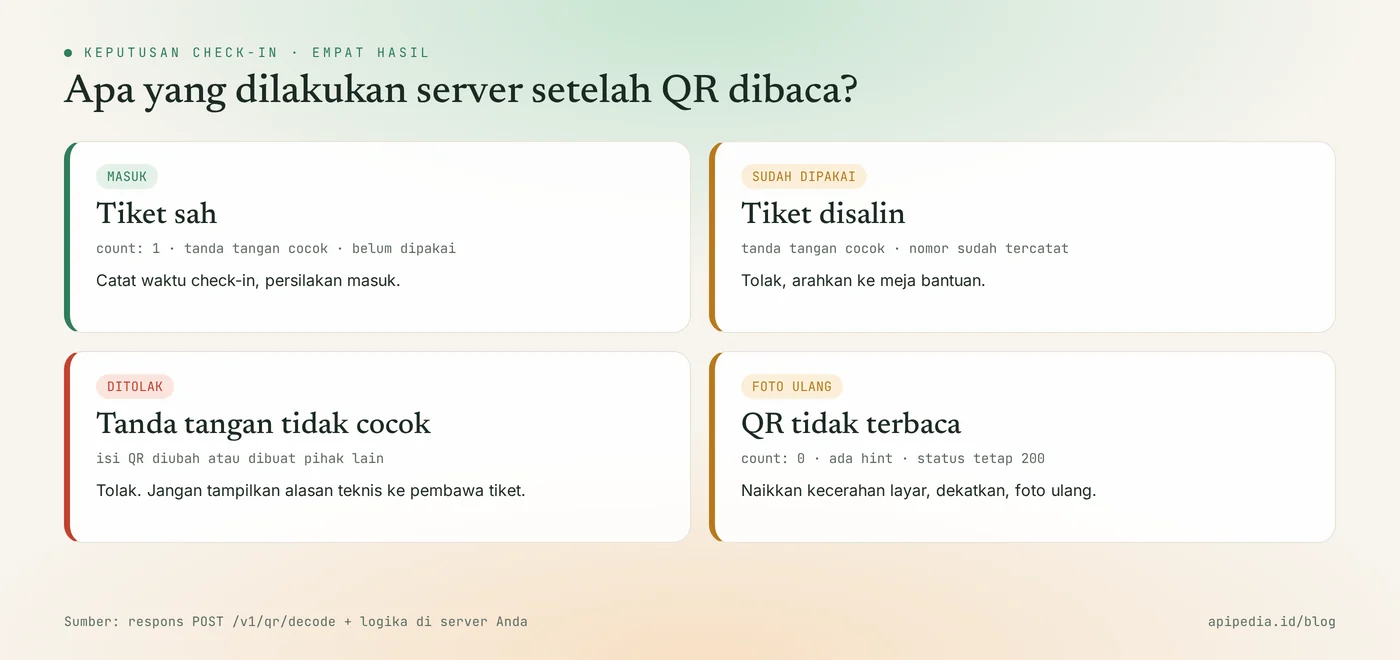
The two most important fields are count and symbols[0].text. Images without QR are not errors: the API still answers 200 with count 0, symbols blank, and a hint. Field try_harder is active by default, so tilted or upside down photos are still attempted to be read.
Step 4: how to verify tickets and reject duplicate tickets?
Tickets are verified by recalculating the signatures on the server and then matching the ticket number with the "already used" record in the database. The API only reads images; the decision to let it in or not is completely in your code. Function checkIn in the Node.js module above already does this, and here's the equivalent in Python.
# checkin.py - pip install requests
import base64, hashlib, hmac, os, requests

API = "https://api.apipedia.id/v1/qr/decode"
KEY = os.environ["APIPEDIA_KEY"]            # apk_xxx
SECRET = os.environ["TICKET_SECRET"].encode()

def tanda_tangan(event_id, nomor):
    pesan = f"{event_id}.{nomor}".encode()
    return hmac.new(SECRET, pesan, hashlib.sha256).hexdigest()[:16]

def check_in(foto_path, sudah_dipakai):
    with open(foto_path, "rb") as f:
        image_base64 = base64.b64encode(f.read()).decode()
    res = requests.post(
        API,
        headers={"Authorization": f"Bearer {KEY}"},
        json={"image_base64": image_base64, "max_symbols": 1},
        timeout=15,
    )
    body = res.json()
    if not body["is_success"]:
        raise RuntimeError(f"{res.status_code}: {body['message']}")
    data = body["data"]
    if data["count"] == 0:
        return {"ok": False, "alasan": "QR tidak terbaca"}

    bagian = data["symbols"][0]["text"].split(".")
    if len(bagian) != 4 or bagian[0] != "TIKET":
        return {"ok": False, "alasan": "Bukan tiket acara ini"}
    _, event_id, nomor, sig = bagian

    if not hmac.compare_digest(sig, tanda_tangan(event_id, nomor)):
        return {"ok": False, "alasan": "Tanda tangan tidak cocok"}
    if nomor in sudah_dipakai:
        return {"ok": False, "alasan": "Tiket sudah dipakai"}
    sudah_dipakai.add(nomor)
    return {"ok": True, "event_id": event_id, "nomor": nomor}

print(check_in("tiket-A-0042.png", set()))
In production, replace set() with column checked_in_at in the ticket table and do the update atomically, for example UPDATE ... WHERE checked_in_at IS NULL. That way, two officers who scan the same ticket at the same second will not both pass it.
What errors occur most often?
The most common mistake is sending an incomplete body or an image that cannot be read. All errors use the same envelope with is_success being false and data being null, and the message mentions the problematic field.
{
  "is_success": false,
  "message": "Field \"text\" wajib diisi.",
  "data": null
}- 400 when generating: field
textis empty,sizeis outside 64 to 2048, or the content exceeds the QR capacity. Shorten the ticket content; just ID and signature. - 400 on decode: base64 is corrupted, image format is not supported, or file is over 8 MB. Reduce photos on the client side before sending.
- 401: wrong key, expired, or header
Authorizationnot sent. - 403: the key is valid but the scope does not include the QR endpoint. Change the scope on the Token page.
count0: not an error. The photo is too dark, blurry, or cropped. Ask participants to increase the screen brightness and then take the photo again.- Keys in the officer's application: do not call the API directly from the officer's browser. Pass photos to backend so
apk_xxxandTICKET_SECRETdon't leak. - Compare signature with
==: usecrypto.timingSafeEqualorhmac.compare_digestas in the example.
Frequently asked questions
Is APIPedia's QR Code Generator free?
Yes, the QR Code Generator product is listed in the Free tier in the APIPedia catalog. You still need an API key from the console to call it, and each call is logged in your account usage.
Are QR images stored on APIPedia servers?
No image links returned. The PNG is sent directly in the response as URL data at image_data_url, so it's up to you to save it in your own storage or recreate it when needed.
Can the decode endpoint read QRIS or product barcodes?
Endpoint /v1/qr/decode reads QR Code, Micro QR, and rMQR, and recognizes content such as URL, Wi-Fi, vCard, and QRIS in field parsed. For barcodes such as EAN-13 or Code 128, use the Barcode Generator & Reader product di /v1/barcode/decode.
Which error correction level is appropriate for a ticket?
Grade Q is suitable for most tickets because it balances durability and pattern density. Use H if the QR is printed small on a bracelet or card that is easily scratched, and M if the content is long and only displayed on the screen.
Are tickets still safe if participants share screenshots?
Signatures prevent counterfeit tickets, not copied tickets. Copies are handled by "already in use" logging: the first person to scan goes in, subsequent scans with the same number are rejected.
Where to go from here?
The next step is to try both endpoints with your own key at console.apipedia.id; Complete specifications are on the QR Code Generator product page. For a more complete event flow, also read OCR KTP to verify participant identity, how webhooks work to receive payment notifications, and connecting APIPedia to Claude via MCP if you want an AI agent to create the QR.
Topics: #qr code #tiket acara #qr code generator #tutorial #nodejs #python
About the author
Tim APIPedia — Tim Engineering APIPedia
Tim engineering di balik APIPedia yang membangun dan memelihara API data Indonesia - ongkir, OCR KTP, data wilayah, BMKG, hingga server MCP - dan menulis panduan integrasinya dari pengalaman langsung.