Upgrading to Node.js 26 LTS: Migration Guide and How to Use Temporal API
By Tim APIPedia, Tim Engineering APIPedia · Published · Updated · 10 min read
Node.js 26 is officially LTS as of October 28, 2026. Follow the 5 safe upgrade steps and build a workday SLA calculator with Temporal API.
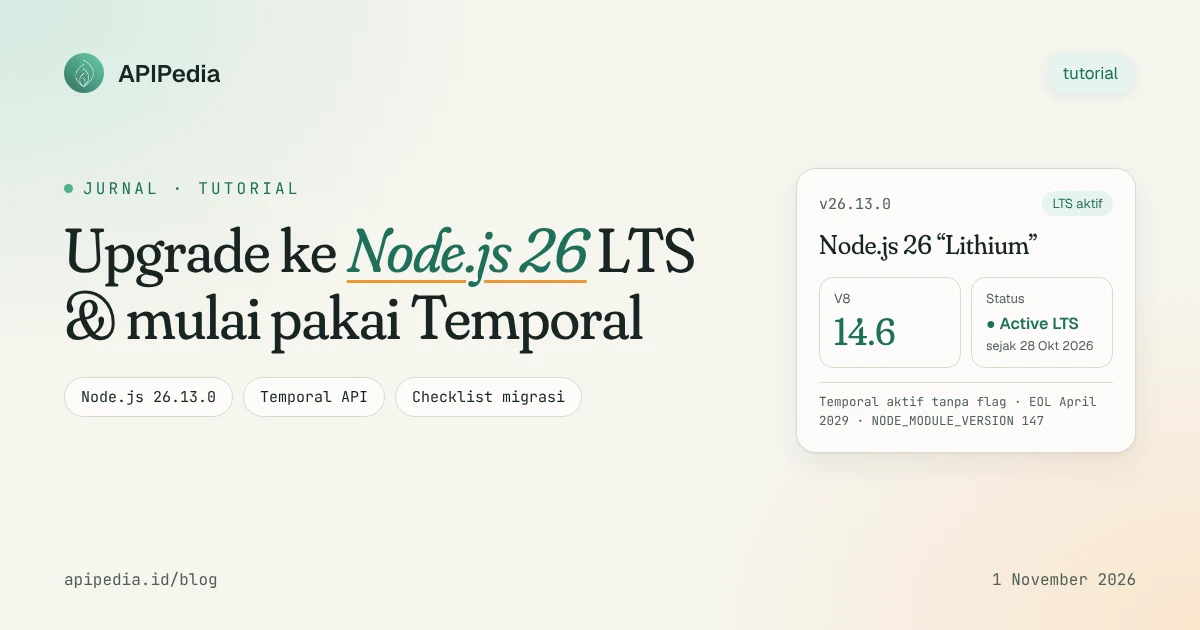
Node.js 26 officially became an LTS (Long-Term Support) release with the codename "Lithium" via version 26.13.0 on October 28, 2026. This means that this version is now safe to target production and is supported until April 2029. The biggest bonus: Temporal API, a modern replacement for Date, is active without flags.
This guide focuses on practice. You'll check the version, scan for code that's about to break, install Node.js 26 alongside the old version, then write a workday SLA deadline calculator with Temporal. We have run all the code blocks below on Node.js v26.13.0.
What changes when Node.js 26 moves up to LTS?
Node.js 26.0.0 was released May 5, 2026 as a Current release. After about six months, the line is promoted to Active LTS. According to the release notes summarized by linuxcompatible.org, version 26.13.0 brings no new code changes over 26.12.1 other than release metadata such as object process.release. So all the security fixes in 26.12.1 (released October 21, 2026) carry over.
Important things you need to know:
- Built-in active temporal. No need for experimental flags anymore.
- V8 14.6 (from Chromium 146), brings
Map.prototype.getOrInsert()andIterator.concat(). - Undici 8 as a default
fetch()machine. Sources call 8.0.2 while 26.0.0; in the 26.13.0 build we tested,process.versions.undicireported 8.12.2. - NODE_MODULE_VERSION 147, so all native add-ons must be rebuilt.
- Removed old APIs:
http.Server.prototype.writeHeader(), module_stream_*, and flag--experimental-transform-types. module.register()is now runtime-deprecated and raises a warning.
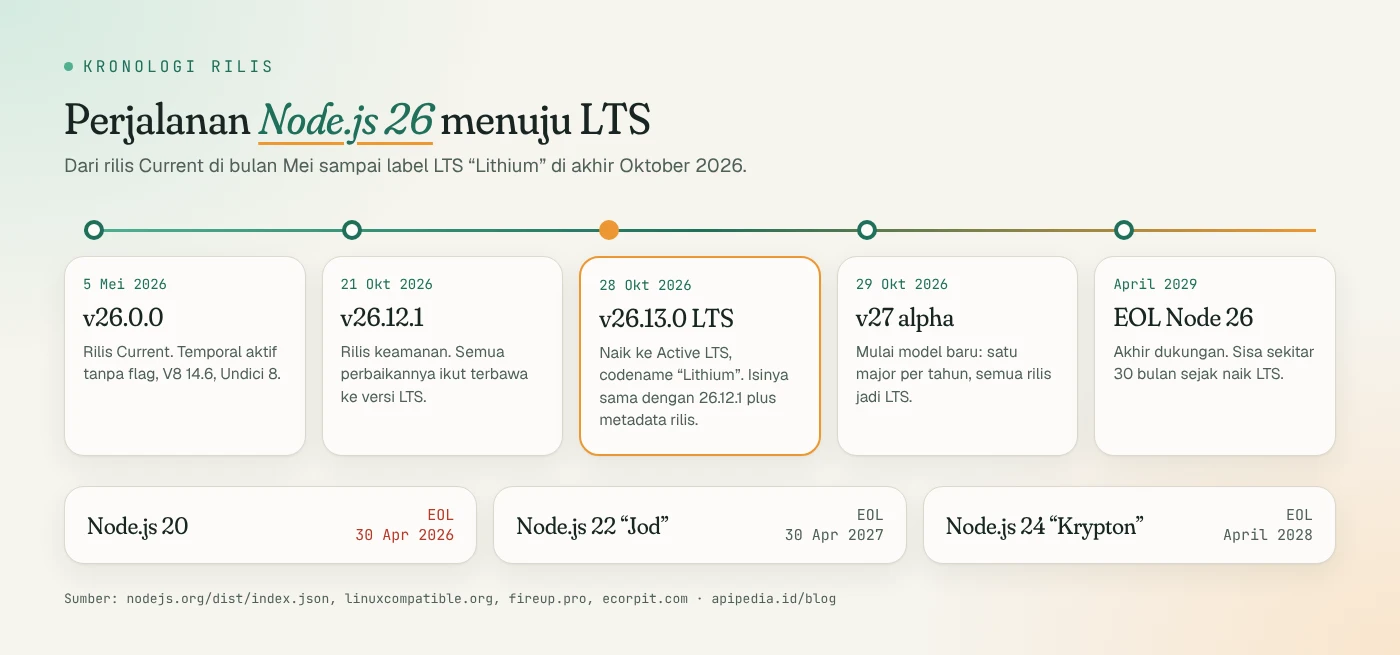
There are also changes to the release model. Node.js 26 is the last path with the old model (two majors per year). Starting in 27.x, Node.js only has one major release per year in April, going up LTS in October, and every release will be LTS. Alpha Node.js 27 appeared in the official release index on October 29, 2026.
Which version should be used now?
| Track | Status (1 Nov 2026) | V8 | End of support | Suggestion |
|---|---|---|---|---|
| Node.js 20 | EOL | - | April 30, 2026 | Moving on, no more security patches |
| Node.js 22 "Jod" | LTS Maintenance | - | April 30, 2027 | Plan migration in 6 months |
| Node.js 24 "Krypton" | LTS | - | April 2028 | Safe for current production |
| Node.js 26 "Lithium" | Active LTS since 28 Oct 2026 | 14.6 | April 2029 | New upgrade target, run it first in CI |
| Node.js 27 | Alpha | 15.6 | April 2030 (plan) | Just for experimentation |
Note: We only found the Node.js 24 EOL date in secondary sources, so double check the official nodejs.org release page before putting together a roadmap.
Step 1: How to check LTS version and status?
Run the following command on the local machine or server. Column lts contains the codename if the build is LTS, and undefined if it is still Current.
node -v                          # v26.13.0
node -p "process.release.lts"    # Lithium  (undefined = bukan LTS)
node -p "process.versions.v8"    # 14.6.202.34-node.40
node -p "process.versions.modules"  # 147 -> ABI untuk add-on native
node -p "typeof Temporal"        # object
Step 2: What needs to be scanned before upgrading?
The most common cause of applications failing in Node.js 26 is that old APIs have been removed. Scan the code yourself and node_modules:
# Cari API yang dihapus di Node.js 26 (kode sendiri + dependensi)
grep -rnE "writeHeader\(|require\(['\"]_stream_|from ['\"]_stream_" \
  --include='*.js' --include='*.cjs' --include='*.mjs' --include='*.ts' \
  src/ node_modules/ 2>/dev/null | grep -v '\.d\.ts' | head -50
If there are results, the fix is usually just one line:
// Sebelum (gagal di Node.js 26: writeHeader sudah dihapus)
res.writeHeader(200, { 'Content-Type': 'application/json' });

// Sesudah
res.writeHead(200, { 'Content-Type': 'application/json' });

// Sebelum
const Readable = require('_stream_readable');
// Sesudah
const { Readable } = require('node:stream');
A result in folder node_modules means the dependencies need to be updated. Check that the latest version of the package has the fix before patching it yourself.
Step 3: How to install Node.js 26 without disturbing other projects?
Use a version manager so that Node.js 24 and 26 can coexist. What is often forgotten: native add-ons had to be rebuilt because the ABI went up to 147.
# Pasang Node.js 26 di samping versi lama (nvm)
nvm install 26
nvm use 26
nvm alias default 26   # opsional, setelah semua test lolos

# Atau kunci versi per proyek
echo "26" > .nvmrc

# Add-on native (bcrypt, sharp, sqlite3, dll.) harus dibangun ulang untuk ABI 147
rm -rf node_modules
npm ci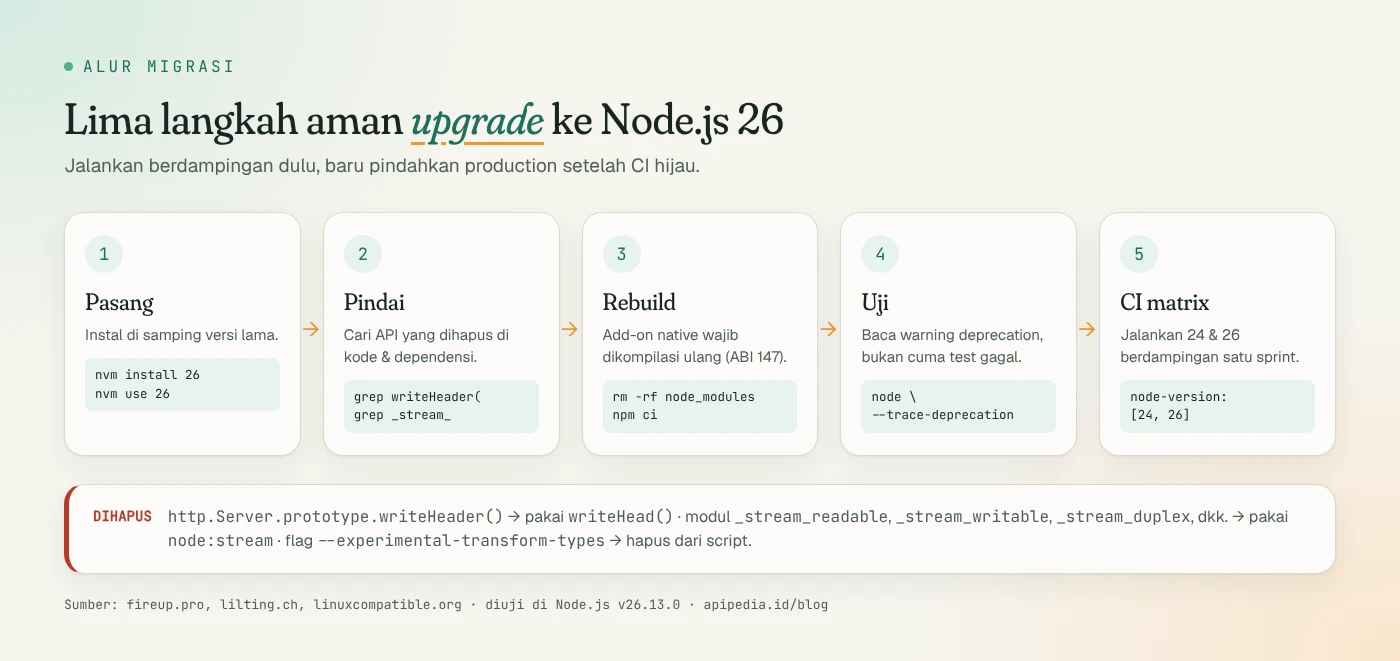
Step 4: How to start wearing Temporal?
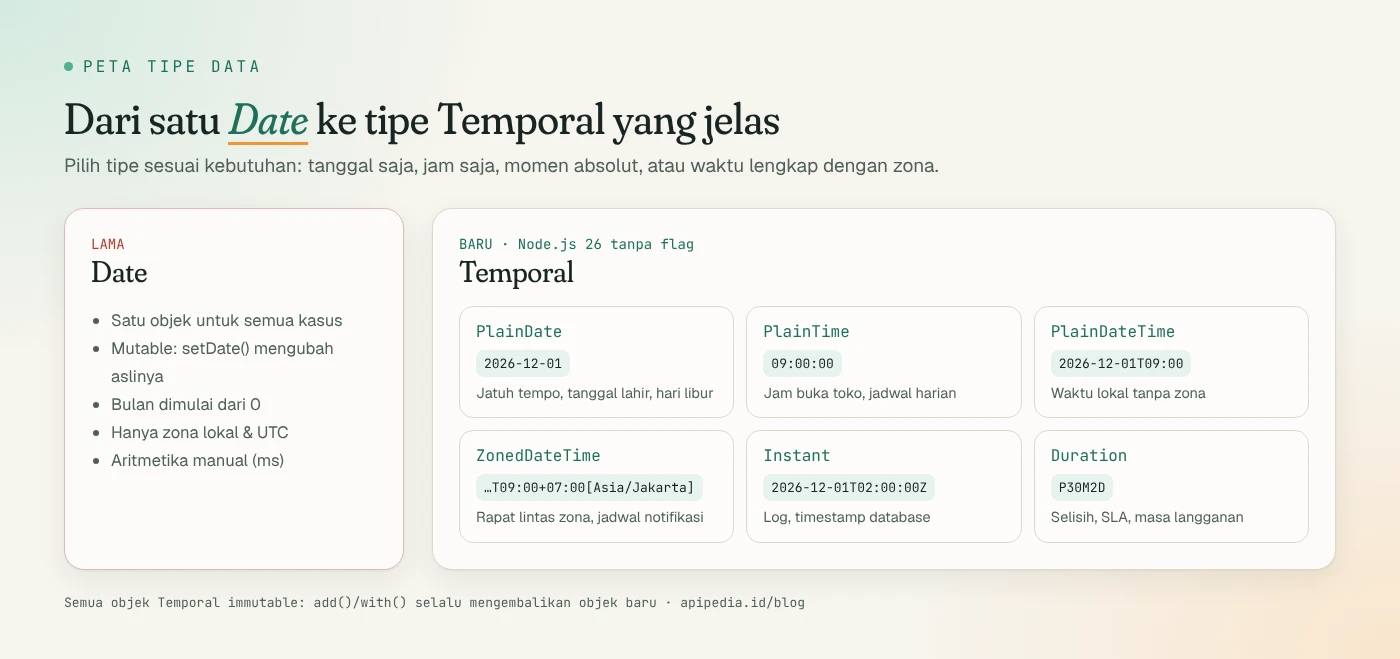
Date has many pitfalls: it is mutable, months start at 0, and only recognizes local zones and UTC. Temporal breaks them down into more precise types. For due dates, use PlainDate, for cross-zone meetings, use ZonedDateTime, for log timestamps, use Instant.
Save as temporal-dasar.mjs then run with node temporal-dasar.mjs:
// Waktu sekarang di Jakarta (WIB)
const now = Temporal.Now.zonedDateTimeISO('Asia/Jakarta');
console.log('Sekarang :', now.toString());

// Tanggal tanpa jam (cocok untuk tanggal jatuh tempo)
const tagihan = Temporal.PlainDate.from('2026-11-01');
const jatuhTempo = tagihan.add({ days: 30 });
console.log('Jatuh tempo:', jatuhTempo.toString(), '| hari ke-', jatuhTempo.dayOfWeek);

// Rapat jam 09.00 WIB, berapa jam di Tokyo dan London?
const rapat = Temporal.ZonedDateTime.from('2026-11-05T09:00[Asia/Jakarta]');
console.log('Tokyo    :', rapat.withTimeZone('Asia/Tokyo').toPlainTime().toString());
console.log('London   :', rapat.withTimeZone('Europe/London').toPlainTime().toString());

// Selisih dua tanggal dalam satuan yang jelas
const lts = Temporal.PlainDate.from('2026-10-28');
const eol = Temporal.PlainDate.from('2029-04-30');
console.log('Sisa dukungan:', lts.until(eol, { largestUnit: 'months' }).toString());

// Objek Temporal immutable: add() mengembalikan objek baru
console.log('Asli tetap:', tagihan.toString());
Example output in Node.js 26.13.0 (first line depending on time of run):
Sekarang : 2026-11-01T13:45:22.738763916+07:00[Asia/Jakarta]
Jatuh tempo: 2026-12-01 | hari ke- 2
Tokyo    : 11:00:00
London   : 02:00:00
Sisa dukungan: P30M2D
Asli tetap: 2026-11-01
Note that dayOfWeek uses the numbers 1 (Monday) through 7 (Sunday), unlike getDay() which starts from 0 on Sunday. Duration P30M2D means 30 months 2 days in ISO 8601 format.
One caveat for frontend code: Temporal is not yet supported by Safari. According to lilting.ch, Chrome and Edge 144+ as well as Firefox 139+ are supported, with coverage of around 69% of browsers. In browsers, keep using polyfills; on the Node.js 26 server you are free to use it directly.
Step 5: What new V8 features are immediately useful?
Two small features that often shorten code: getOrInsert for the "fetch or fill default" pattern in Map, and Iterator.concat for chaining multiple iterables without an intermediate array.
// Map.prototype.getOrInsert & getOrInsertComputed (proposal "upsert")
const hitung = new Map();
for (const kota of ['Bandung', 'Surabaya', 'Bandung']) {
  hitung.set(kota, hitung.getOrInsert(kota, 0) + 1);
}
console.log(hitung); // Map(2) { 'Bandung' => 2, 'Surabaya' => 1 }

const cache = new Map();
const profil = cache.getOrInsertComputed('u-1', (id) => ({ id, dibuat: Date.now() }));
console.log(profil.id);

// Iterator.concat menyambung beberapa iterable tanpa membuat array perantara
const semua = Iterator.concat(['a', 'b'], new Set(['c']), ['d'].values());
console.log([...semua]); // [ 'a', 'b', 'c', 'd' ]
Mini project: calculating workday SLA deadlines
A real case in many Indonesian apps: "tickets must be answered within 5 working days". Working days mean Saturday, Sunday, national holidays and collective leave. Temporal handles date arithmetic, while we take the list of official holidays from the APIPedia National Holidays API (endpoint GET /v1/libur/tahun/{tahun}) which follows the SKB of three ministers.
// Hitung tenggat SLA "N hari kerja" dengan Temporal + API Hari Libur APIPedia
// Jalankan: APIPEDIA_KEY=apk_xxx node sla-hari-kerja.mjs 2026-12-21 5
const KEY = process.env.APIPEDIA_KEY;
const BASE = 'https://api.apipedia.id/v1/libur';

async function ambilLibur(tahun) {
  const res = await fetch(`${BASE}/tahun/${tahun}`, {
    headers: { Authorization: `Bearer ${KEY}` },
  });
  const json = await res.json();
  if (!json.is_success) {
    // Contoh: libur tahun depan belum ditetapkan SKB -> hitung akhir pekan saja
    console.warn(`Peringatan: ${json.message}`);
    return new Set();
  }
  return new Set(json.data.libur.map((l) => l.tanggal)); // libur nasional + cuti bersama
}

const cacheLibur = new Map();
async function isLibur(tanggal) {
  const set = cacheLibur.get(tanggal.year) ?? (await ambilLibur(tanggal.year));
  cacheLibur.set(tanggal.year, set);
  return set.has(tanggal.toString());
}

async function tambahHariKerja(mulai, n) {
  let t = Temporal.PlainDate.from(mulai);
  let sisa = n;
  while (sisa > 0) {
    t = t.add({ days: 1 });
    const akhirPekan = t.dayOfWeek >= 6; // 6 = Sabtu, 7 = Minggu
    if (!akhirPekan && !(await isLibur(t))) sisa--;
  }
  return t;
}

const [mulai = Temporal.Now.plainDateISO('Asia/Jakarta').toString(), n = '3'] =
  process.argv.slice(2);
const tenggat = await tambahHariKerja(mulai, Number(n));
console.log(`Mulai ${mulai} + ${n} hari kerja = ${tenggat} (${
  tenggat.toLocaleString('id-ID', { weekday: 'long', day: 'numeric', month: 'long', year: 'numeric' })
})`);
Run with the API key from console.apipedia.id:
APIPEDIA_KEY=apk_xxx node sla-hari-kerja.mjs 2026-12-21 5
# Mulai 2026-12-21 + 5 hari kerja = 2026-12-30 (Rabu, 30 Desember 2026)
The results are correct: 24 December 2026 (Christmas holiday), 25 December (Christmas), and 26-27 December (weekend) were skipped. This script deliberately does not fail when the following year's data has not been determined by the SKB. When we tested, the API returned a message that 2027 data was not yet available, so the script only skipped the weekend. Consequently, January 1 2027 is also counted as a working day. For cross-year SLAs, add a manual holiday list until the SKB is issued.
If you only need the number of business days between two dates, there is a more concise endpoint: GET /v1/libur/hari-kerja?mulai=2026-12-01&sampai=2026-12-31. The results are for December 2026: 31 days, 21 weekdays, 8 weekend days, and 2 holidays.
How to keep CI secure during the transition?
Run tests on two versions simultaneously during one sprint. Flag --trace-deprecation helps find the source of warnings such as module.register().
# .github/workflows/test.yml
name: test
on: [push, pull_request]
jobs:
  test:
    runs-on: ubuntu-latest
    strategy:
      matrix:
        node-version: [24, 26]
    steps:
      - uses: actions/checkout@v4
      - uses: actions/setup-node@v4
        with:
          node-version: ${{ matrix.node-version }}
          cache: npm
      - run: npm ci
      - run: node --trace-deprecation --test
After qualifying, lock the minimum version at package.json so that other teams don't accidentally use the old version:
{
  "engines": {
    "node": ">=26.13.0"
  }
}
A short checklist before moving into production
node -p "process.release.lts"returnsLithium.- No scan results
writeHeader(and_stream_. node_moduleshas been rebuilt for ABI 147.- The test passed on Node.js 24 and 26 and the deprecation warning was reviewed.
fetch()behaviors (timeout, streaming, connection) have been tested in staging since the Undici engine has been upgraded to version 8.- Docker image replaced to tag
node:26and retested.
FAQs
Is Node.js 26 safe for production?
Yes, since October 28 2026 the status is Active LTS. Still run in CI and staging first, especially if your app uses native add-ons or relies on behavior fetch().
Am I obliged to replace all Date to Temporal?
No. Date still works. Start with the most bug-prone sections: due date, time zone, and duration calculations. Old code can be migrated gradually.
Why does my application error "Cannot find module '_stream_readable'"?
Internal module _stream_* removed in Node.js 26. Replace with require('node:stream'). If the error comes from a dependency, update the package to the latest version.
Still using Node.js 20, what are the risks?
Node.js 20 expires on April 30, 2026 and is no longer receiving fixes, including security fixes. Move to Node.js 24 or directly to 26.
When can Node.js 27 be used?
The plan is for 27.0.0 to be released in April 2027 and up to LTS in October 2027. Currently the alpha version is only suitable for experimentation.
Source
- Node.js: official release index (version, date, V8, npm, LTS status)
- Linux Compatible: Node.js 26.13.0 "Lithium" reaches LTS
- fireup.pro: Node.js 26 LTS, what's new and how to upgrade
- lilting.ch: Node.js 26 Current, Temporal and Undici
- ecorpit: Node.js and EOL Node.js 20 release model changes
- Tech Insider: Node.js 22 vs 24 vs 26
Topics: #nodejs #javascript #temporal-api #tutorial #migrasi
${c.about}
Tim APIPedia — Tim Engineering APIPedia
Tim engineering di balik APIPedia yang membangun dan memelihara API data Indonesia - ongkir, OCR KTP, data wilayah, BMKG, hingga server MCP - dan menulis panduan integrasinya dari pengalaman langsung.