WordPress Update Vulnerability CVE-2026-119977 Exploited: Check Version and Secure Site
By Tim APIPedia, Tim Engineering APIPedia · Published · Updated · 9 min read
CISA inserted a WordPress Core update race condition loophole into KEV. Check the version, close the wp-content/upgrade folder, update, then check the log.
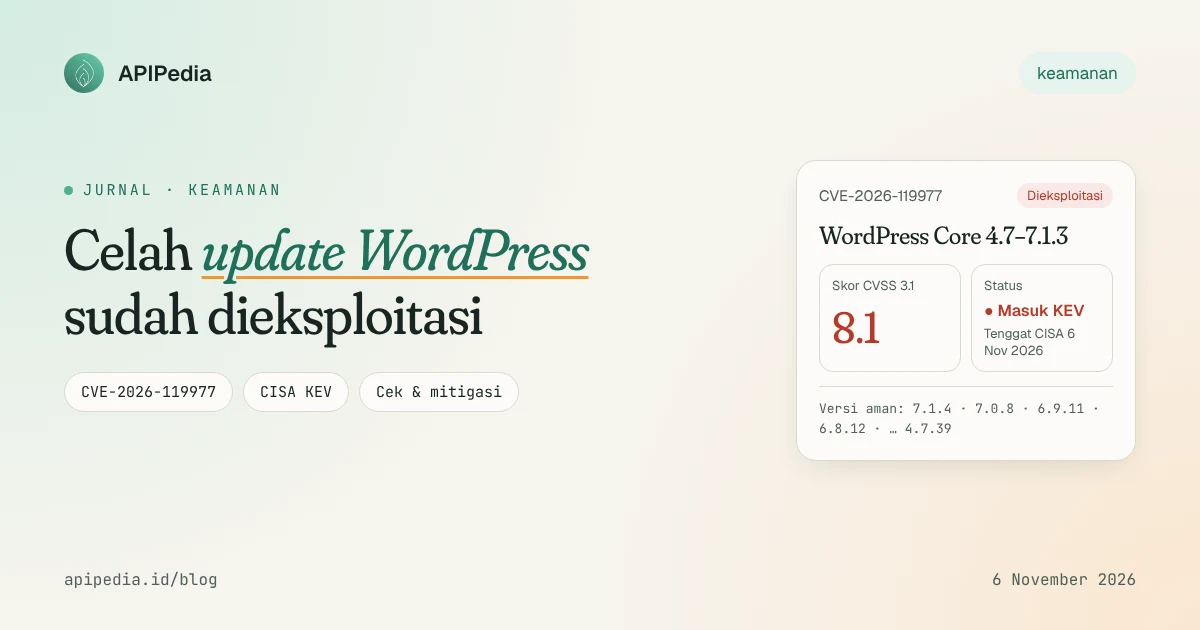
CVE-2026-119977 is a race condition vulnerability in the WordPress Core update process that allows an unlogged attacker to run PHP code on the server, just as the site is being updated. This flaw affects WordPress 4.7 through 7.1.3, has been exploited, and is in the CISA KEV catalog with a deadline of November 6, 2026.
What makes it unique: this gap actually opens when you do the right thing, namely updating WordPress. So the order of the steps is important. This article discusses how it works, which versions are safe, how to check your site, and how to look for traces of attacks in the logs.
Quick summary: what do you need to know?
| Items | Details |
|---|---|
| ID | CVE-2026-119977 (WordPress advisory: GHSA-4w3m-c66w-69mg) |
| Type | Race condition TOCTOU (CWE-367) on full package Core update |
| Impact | Remote PHP code execution without authentication |
| Score | CVSS 3.1: 8.1 (AV:N/AC:H/PR:N/UI:N). WordPress itself rates it "Low" |
| Impacted version | WordPress Core 4.7 to 7.1.3 |
| Safe version | 7.1.4 (release October 28, 2026) or backport per branch, for example 7.0.8, 6.9.11, 6.8.12 |
| Status | Exploited; enter CISA KEV November 3 2026, US federal agency deadline November 6 2026 |
| Inventor | Umut Bayram |
How does this loophole work?
When WordPress performs a full package Core update, the new version files are first extracted to a temporary (staging) folder in wp-content/upgrade/, then moved to replace the old files. On the affected version, the name of this folder is predictable because it follows the package name, and on many servers the folder can be accessed via the web and allows PHP to run.
In the copy of the package, installer wp-admin/setup-config.php is also included. This installer can run without site configuration. According to ThreatDefence's analysis, the PoC in circulation uses it to promote the attacker's database configuration in place of the original file, then run code on the server.
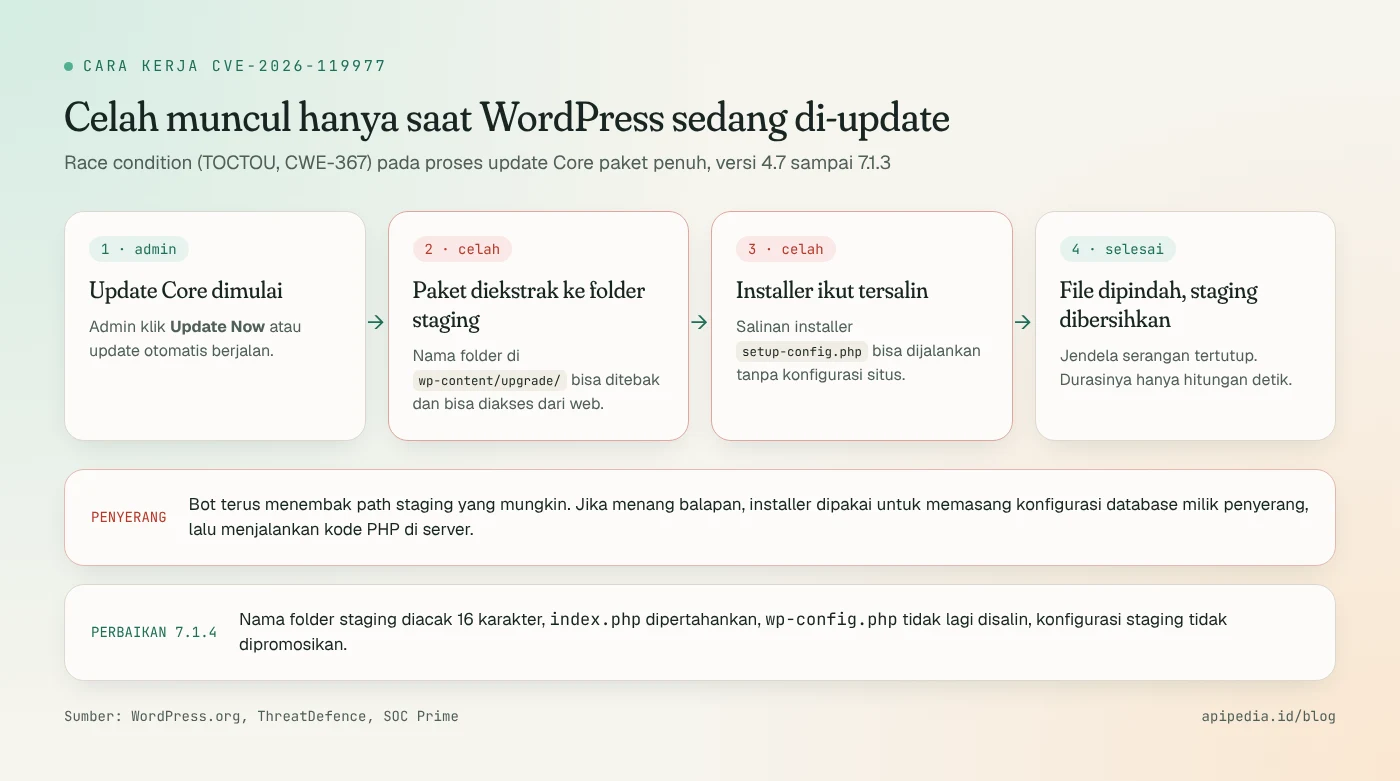
The attack window is narrow, only a matter of seconds. Therefore the CVSS score gives the Attack Complexity value "High". But attackers don't need to be so lucky; The bot simply continues to send requests to possible paths until a site is updated. Patchstack also discovered that the old version's cleanup routine removed index.php protectors, so that on servers that enabled directory listing, folder names could be read directly.
Why can the plugin firewall be bypassed?
The installer in the staging folder runs without loading the WordPress configuration. This means that a firewall running as a regular WordPress plugin may never see the request. Wordfence itself warns that PHP requests can directly pass through plugin-level firewalls without Extended Protection mode. The best protection is at the web server, CDN, or WAF level.
Who is affected?
- All WordPress Core 4.7 to 7.1.3 sites that have not received the patch, including staging sites, demos, and old forgotten sites.
- Sites with folder
wp-content/upgradeare publicly accessible and allow PHP execution. This is a common configuration in shared hosting. - Sites with WordPress 4.6 or earlier no longer get security patches at all, so must be migrated to a supported branch.
- Agencies and hosting providers manage multiple installations: a single server can contain dozens of sites with different versions.
Please note: this loophole is not in the plugin or theme, but in Core. Even sites with minimal plugins are still affected.
How serious is the exploitation?
The available data comes mostly from Wordfence and reflects blocked attempts, not confirmed breaches:
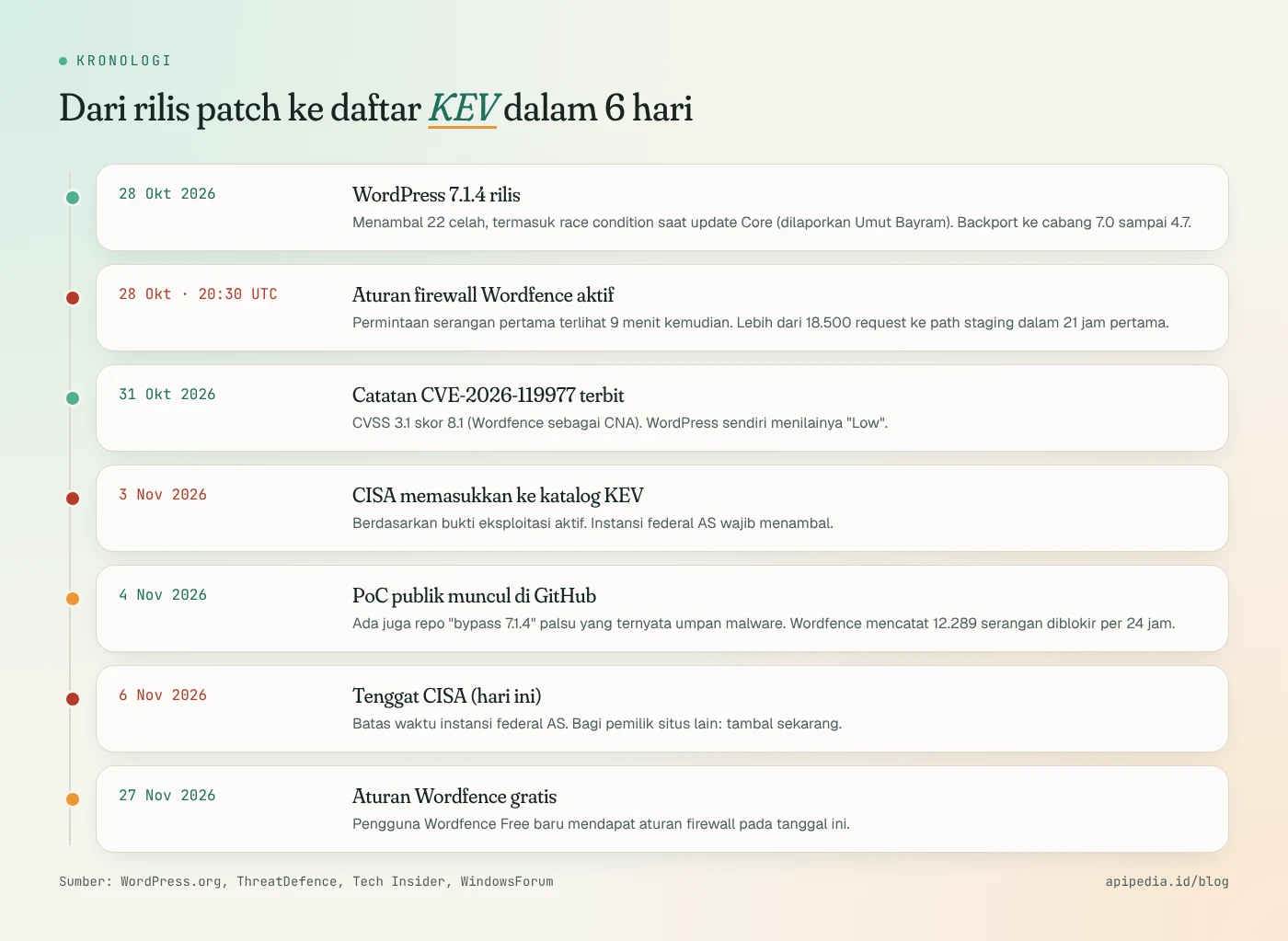
- The Wordfence firewall rule went live October 28 at 20:30 UTC, and the first attack request was seen nine minutes later.
- More than 18,500 requests to path
setup-config.phpwere staging in the first 21 hours. - Wordfence records as of November 4 stated that 12,289 attacks were blocked in the last 24 hours. Other media quoted different figures (13,095 and 62,969 per 24 hours) because they were taken at different times.
- CISA added this flaw to KEV on November 3 based on evidence of active exploitation, without naming a perpetrator or ransomware link.
- A working PoC appeared on GitHub on November 4. There is also a fake "bypass 7.1.4" repo that only contains a short download link and appears to be malware bait. Don't run it.
There are differences in assessments that are worth noting. Wordfence (as CNA) and Tenable gave it a score of 8.1, while the WordPress advisory rated it "Low" and did not include a CVE number. This difference is normal because of the difficulty of winning races, but KEV's status shows this gap is already used in the real world.
Which version is safe?
WordPress 7.1.4 patched 22 gaps at once, and the fixes were backported to the old branch. For this update gap, branch 4.7 and above received a fix.
| Branch | Minimum safe version | Notes |
|---|---|---|
| 7.1 | 7.1.4 | Latest release, the only one actively supported |
| 7.0 | 7.0.8 | Received all 22 repairs |
| 6.9 | 6.9.11 | Received all 22 repairs |
| 6.8 / 6.7 | 6.8.12 / 6.7.11 | 20 of 22 improvements |
| 6.0 to 6.6 | 6.6.11, 6.5.14, 6.4.14, 6.3.14, 6.2.15, 6.1.16, 6.0.18 | The number of repairs is getting smaller |
| 4.7 to 5.9 | Example: 5.9.20, 5.0.31, 4.9.35, 4.7.39 | We recommend upgrading to 7.1.4 |
| 4.6 and below | There isn't any | Mandatory migration to a supported branch |
How to check WordPress version?
Easiest way: go to Dashboard → Updates. If you have SSH access, use WP-CLI from the installation folder:
# Versi Core yang terpasang
wp core version

# Cek apakah ada update yang tersedia
wp core check-update

# Tanpa WP-CLI: baca langsung dari file versi
grep "wp_version =" wp-includes/version.php

# Banyak situs di satu server (contoh: semua di /var/www)
for d in /var/www/*/; do
  [ -f "$d/wp-includes/version.php" ] && \
  echo "$d $(grep -oP "wp_version = '\K[^']+" "$d/wp-includes/version.php")"
done
How to update safely?
Since the update itself opens an attack window in older versions, the recommended order is: block web access to the staging folder first, then update.
Step 1: block wp-content/upgrade on the web server
# Nginx: di dalam blok server situs, lalu: nginx -t && systemctl reload nginx
location ^~ /wp-content/upgrade/ {
    deny all;
}
# Apache: di konfigurasi virtual host (sesuaikan path DocumentRoot)
<Directory "/var/www/html/wp-content/upgrade">
Require all denied
</Directory>It's better to put the rules in the server configuration or CDN rather than relying on .htaccess in that folder. In Cloudflare or another WAF, block requests whose paths start with /wp-content/upgrade/. Then make sure the rules work:
# Harus mengembalikan 403, bukan daftar isi folder atau 200
curl -s -o /dev/null -w "%{http_code}\n" https://situsanda.id/wp-content/upgrade/
Step 2: update and verify
wp core update
wp core version            # pastikan 7.1.4 atau versi aman cabang Anda
wp core verify-checksums   # file Core harus cocok dengan rilis resmi
Automatic updates can fail silently, so don't assume a site is safe before checking the version. If you use managed hosting, ask what mitigations they have installed; IONOS and Pantheon for example report mitigations at the platform level, but they are not a substitute for updates.
How to detect whether a site has been hacked?
No fixed IOC (IP, user agent, or webshell name) has been published yet, so hunting relies on path and timing patterns. Normal visitors never request PHP files in the staging folder, so every hit is worth checking, and a 200 response is a priority.
# 1) Request ke file PHP di folder staging (termasuk log lama terkompresi)
zgrep -hE '"(GET|POST) /wp-content/upgrade/[^ ]*\.php' /var/log/nginx/access.log* | head -50

# 2) Respons 200 = prioritas tinggi
zgrep -hE '"(GET|POST) /wp-content/upgrade/[^ ]*\.php[^"]*" 200 ' /var/log/nginx/access.log*

# 3) Sisa file di folder staging (normalnya hanya index.php)
find wp-content/upgrade -mindepth 1 ! -name index.php

# 4) File PHP yang tidak semestinya ada di uploads
find wp-content/uploads -name "*.php"

# 5) Waktu update vs waktu ubah wp-config.php
#    Update Core tidak pernah menulis wp-config.php
stat -c '%y %n' wp-includes/version.php wp-config.php

# 6) Admin dan plugin yang tidak dikenal
wp user list --role=administrator --fields=ID,user_login,user_registered
wp plugin list
If wp-config.php changes at the same time as the update, check the values DB_HOST, DB_NAME, DB_USER, and $table_prefix. Other signs to look for: PHP processes or web servers running sh, curl, or wget, as well as outgoing connections to port 3306 on public addresses that are not your database server.
If you find signs of a burglary?
- Shut down the site and keep copies of files, databases, and logs as evidence.
- Check other sites on the same server and the credentials stored there.
- Rebuild from a patched official release, reinstall plugins and themes from official sources, restore content from backup before updating.
- Change the database password, salt and key to
wp-config.php, admin password, as well as API key and hosting credentials. If the site stores API keys for third-party services, rotate them too; LLMjacking cases show how expensive leaking keys can be.
Frequently asked questions
My site has updated automatically, is it safe?
Most likely it's already patched, but check the version with wp core version or dash. Updates running on older versions still go through vulnerable windows, so keep checking the logs around the time of the update.
Does the November 6 deadline apply to sites in Indonesia?
Not legally. The deadline applies to US civilian federal agencies. But the KEV status is a strong signal that this vulnerability has been attacked, so all site owners should patch it ASAP.
I'm using the free version of Wordfence, is it protected?
Not yet. The new firewall rules for Wordfence Free users are scheduled for November 27, 2026. Moreover, direct requests to PHP staging files can bypass the plugin level firewall. Update and block folders on the web server.
Does blocking wp-content/upgrade interfere with the update process?
No. The update process runs on the server side via the file system, not via HTTP requests to that folder. This rule only closes access from outside.
I found the GitHub repo "bypass 7.1.4", need to try it?
Don't. Such repos reportedly only contain short download links and appear to be malware bait targeting admins and researchers.
This flaw joins the list of CVEs exploited quickly after patch releases, such as the GitLab flaw CVE-2026-97229. The pattern is the same: the gap between patch and attack is now minutes, not weeks.
Source
- WordPress.org: Version 7.1.4 (list of fixes and backport versions)
- ThreatDefence: WordPress CVE-2026-119977, Hunting the 7.1.4 Upgrade RCE
- SOC Prime: CVE-2026-119977 WordPress Core RCE Exploited
- Tech Insider: WordPress CVE-2026-119977, CISA Sets Nov. 6 Deadlines
- WindowsForum: CISA Flags WordPress CVE-2026-119977 as Actively Exploited
- nFlo: CVE-2026-119977, RCE During WordPress Core Upgrades
Topics: #keamanan #wordpress #cve #cisa kev #php
${c.about}
Tim APIPedia — Tim Engineering APIPedia
Tim engineering di balik APIPedia yang membangun dan memelihara API data Indonesia - ongkir, OCR KTP, data wilayah, BMKG, hingga server MCP - dan menulis panduan integrasinya dari pengalaman langsung.