An API Key is Like a Boarding House Access Card: What is an API, How an API Key Works, and How to Safeguard It
By Tim APIPedia, Tim Engineering APIPedia · Published · Updated · 12 min read
An API key is like a boarding house access card: a unique application identification code for each request. Understand how it works, 401 and 403 errors, and how to save them.
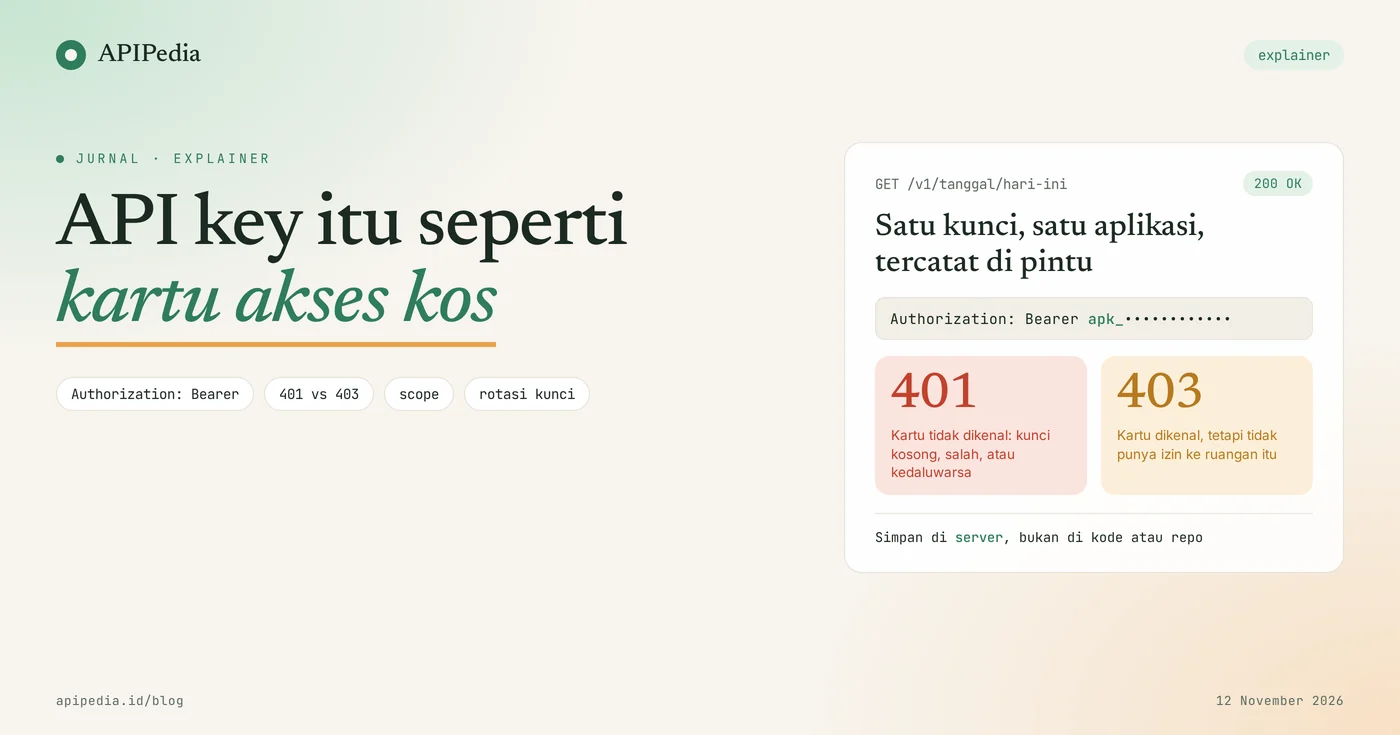
An API key is a unique code that your application sends with each request so that the API server knows who is calling it, what it can do, and how much it will use. The easiest analogy: an API key is like a boarding house access card. You simply stick the card on the door, the door recognizes the card, records who enters, and rejects unregistered cards.
For beginners, the terms API and API key often feel abstract, even though you use them every time an application retrieves data from another service. This article discusses what an API is, how API keys work step by step, the meaning of errors 401 and 403, things that are often misunderstood, and how to store keys so they don't leak.
Quick summary: what terms do you need to know?
There are eight terms that almost always come up when discussing API keys, and they can all be explained in terms of kos-kosan.
| Term | It means | The boarding house analogy |
|---|---|---|
| FIRE | Authorized gateway to request data or services from other systems | The front door of the boarding house, the only legal way in |
| Endpoints | Address of one service in the API, for example /v1/tanggal/hari-ini | One room in the boarding house |
| API key | The caller's unique application identifier code | Resident access card |
| Authentication | Check who is calling | Door card reading: registered or not |
| Authorization (scope) | Checks what the caller is allowed to do | This card can open any floor |
| 401 Unauthorized | The key is missing, incorrect, or no longer valid | Unknown card |
| 403 Forbidden | The key is recognized, but does not have permission | Valid card, but not for that floor |
| Rotation | Replace the old key with a new key | Old cards are turned off, new cards are printed |
What is an API?
API (Application Programming Interface) is an official door provided by a system so that other applications can request data or services without needing to know the contents of the kitchen. Your application sends a request to an address, then the server sends a response, usually in JSON format.
Everyday example: an online shop application displays shipping costs. The store does not calculate its own rates. It asks the API for postage, receives the figure, then displays it to the buyer. The same thing happens when the application displays prayer schedules, the rupiah exchange rate, or answers from the AI model.
Here's the real answer from the APIPedia Date API as we call GET /v1/tanggal/hari-ini on November 12, 2026:
{
  "is_success": true,
  "message": "Tanggal hari ini berhasil diambil",
  "data": {
    "masehi": "2026-11-12",
    "hari": "Kamis",
    "pasaran": "Pon",
    "hijriah": "1 Jumadilakhir 1448 H",
    "is_libur": false,
    "keterangan_libur": null
  }
}
The answer only comes out if the request contains a valid API key. This is where the access card comes into play.
What is an API key and what does it do?
An API key is a random string of characters issued by an API provider for an account or application, and functions as an identifier for each request. In APIPedia, keys start with apk_ and are created in the API Token menu on the console.
This key has four functions at once:
- Recognize the caller. The server knows which request came from which account and application.
- Restrict permissions. One key can be restricted to certain endpoints via scope.
- Calculate usage. Rate limits, daily quotas and charges are calculated in the name of the key or account owner.
- Can be removed one by one. If one key leaks, just turn that key off. Other apps with different keys still run.
This last function is the reason a boarding house access card is more practical than a shared padlock key. If one resident loses their card, the manager simply turns off the card, without changing the locks of all the rooms.
How does the API key work in each request?
API keys work by being sent with each request, then checked by the API gateway before the request is forwarded to the destination service. The server doesn't "remember" you from previous requests, so the card has to be taped each time.
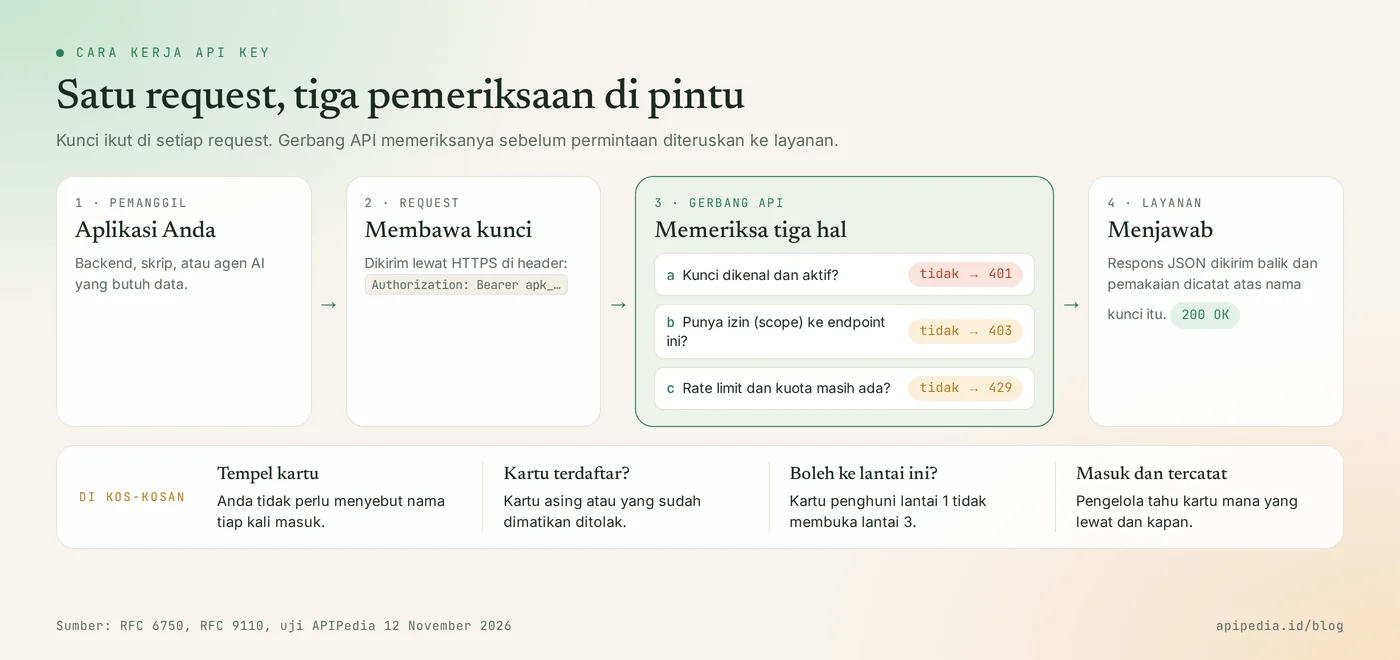
- The application compiles requests. It contains the endpoint address and requested data.
- The key is placed in the header. The most common form is
Authorization: Bearer apk_xxx, sent via HTTPS. - API gateway checks. Is the key known and active, is there enough permission, and are the rate limits and quotas still in place.
- Answering service. A response is sent back and usage is recorded on behalf of that key.
With curl, a complete request looks like this:
curl -s https://api.apipedia.id/v1/tanggal/hari-ini \
  -H "Authorization: Bearer apk_xxx"
Why the name "Bearer"?
The word bearer means "bearer". The RFC 6750 standard defines a bearer token as a token that can be used by any party holding it. This means that the server doesn't check who the person is, it only checks the card. Anyone who picks up your card can enter. Therefore the same standard requires sending over an encrypted connection (HTTPS), and does not recommend placing tokens in URLs because URLs are easily recorded in browser history and server logs.
What do errors 401 and 403 mean when calling the API?
A 401 error means the server doesn't recognize your key, while a 403 means the key is recognized but doesn't have permission to request it. The two are often confused, even though the ways to fix them are different.
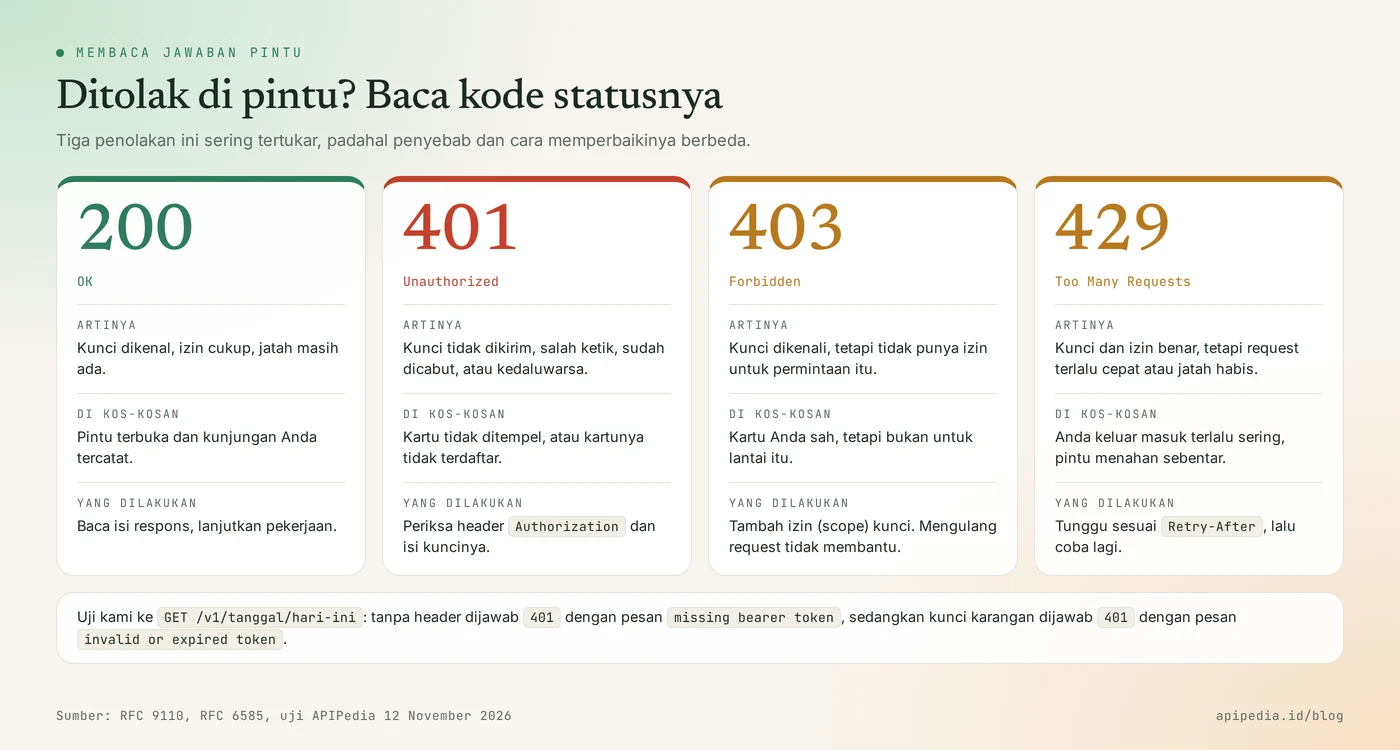
| Status | It means | Common causes | Action |
|---|---|---|---|
| 401 Unauthorized | Key not recognized | Header forgotten to send, typo, key revoked or expired | Check the header and key contents |
| 403 Forbidden | Key recognized, permissions lacking | The key scope does not cover that endpoint | Change scope or use another key |
| 429 Too Many Requests | Too fast or the quota runs out | Successive requests, daily quota runs out | Wait then try again |
We tested three requests to GET /v1/tanggal/hari-ini on November 12, 2026. Without headers, the answer:
{ "is_success": false, "message": "Unauthorized: missing bearer token", "data": null }With authored keys, the status remains 401, but the message is different:
{ "is_success": false, "message": "Unauthorized: invalid or expired token", "data": null }The third request sends the key without the word Bearer in front of it. The result returns missing bearer token. So if you're sure the key is correct but it's still a 401, check the header format first.
According to the MDN documentation, a 403 reauthentication doesn't change anything, and repeating the same request will fail with the same error. What needs to be changed is the permissions. For 429, the complete explanation is in the article rate limits are like toll gates.
What is often misunderstood about API keys?
There are six erroneous assumptions that arise most often, and almost all of them result in a leaky key.
- "API key is the same as password." Similar, but not the same. Passwords identify people and usually only one per account. API keys identify applications, can be created multiple times, and can be revoked one by one without disturbing the others.
- "The API key encrypts my data." No. Keys are just identification. What encrypts data traffic is HTTPS.
- "Safe to place in the JavaScript of a web page or in a mobile application." No. The code sent to the user's device can be opened by anyone. Call the API from your backend, then the frontend simply talks to that backend.
- "When it's committed, just delete the line." Not enough. Git history keeps the old version. Keys that have been exposed must be removed and replaced.
- "Long keys are definitely safe." Length only protects against guesswork. The 256-bit key posted in a public repository can still be used by anyone who finds it.
- "The API key is the same as the OAuth login." Different. The API key represents your application itself. OAuth is used when an application needs permission for another user's account, for example sending email from a Gmail account they have connected to.
How difficult is the API key to guess?
Very difficult, as long as the key is generated from a secure random source. The following script creates example keys with Python's built-in library and then counts the number of possibilities. This is an illustration of the concept, not how a particular service creates its keys.
import math, secrets

kunci = "apk_" + secrets.token_urlsafe(32)     # 32 byte acak dari sumber aman
print(kunci[:10] + "...", "| panjang:", len(kunci), "karakter")
print("kemungkinan:", f"2^{32 * 8}", "~", f"10^{int(32 * 8 * math.log10(2))}")
Results when we run:
apk_E2tjiA... | panjang: 47 karakter
kemungkinan: 2^256 ~ 10^77
With 10 to the power of 77 possibilities, guessing is not a realistic method. Keys almost always fall into someone else's hands because they leak, not because they are guessed. That's why storage space is more important than length.
Where should API keys be stored?
API keys should be stored in environment variables or secrets managers on the server side, not in code, repositories, or URLs. Your code simply reads the variable name, so the key isn't copied when the code is shared.
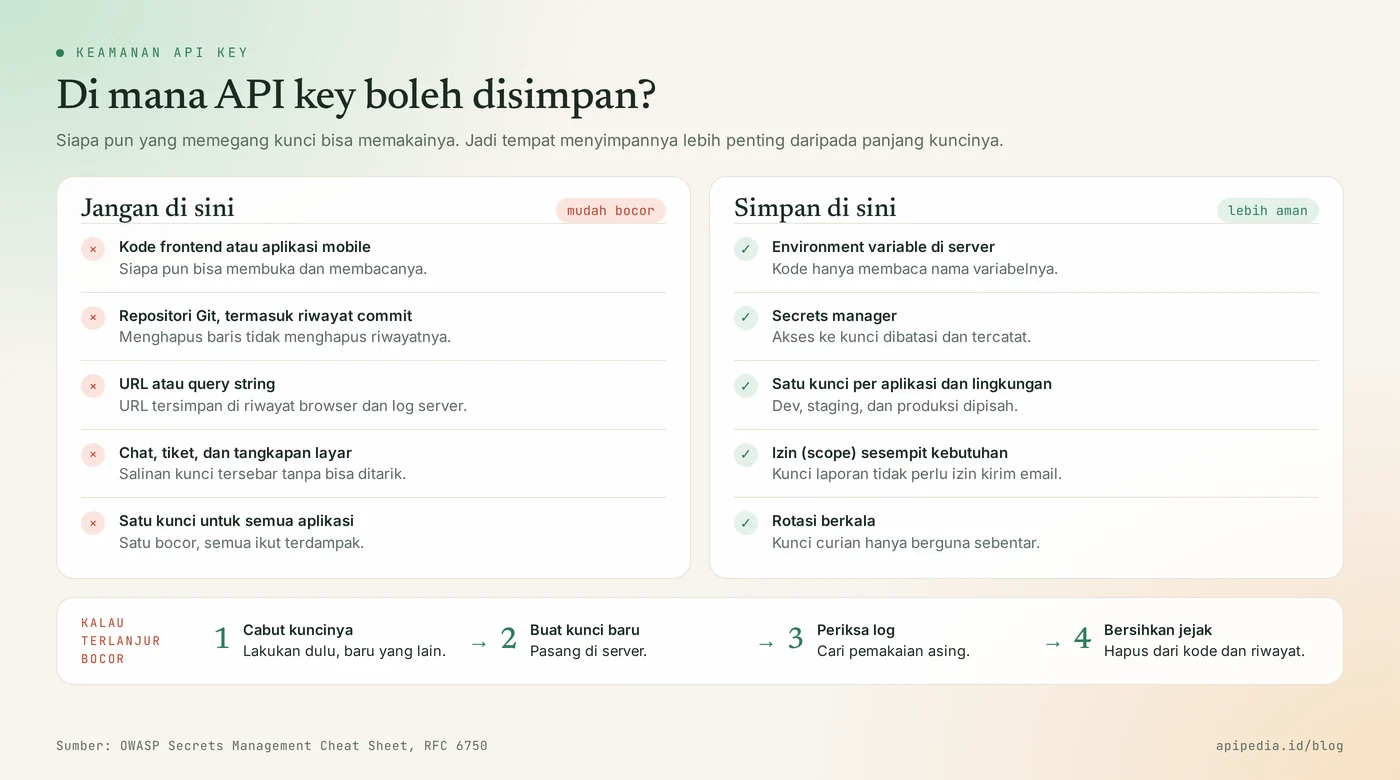
The following Python example reads the key from the environment, displays only a snippet of it, and differentiates 401 from 403. We tested it against a local mock server that emulates all three answers.
import json, os, sys, urllib.request, urllib.error

BASE = os.environ.get("API_BASE", "https://api.apipedia.id/v1")
KUNCI = os.environ.get("APIPEDIA_KEY")          # dibaca dari environment, bukan ditulis di kode

if not KUNCI:
    sys.exit("APIPEDIA_KEY belum diisi. Jalankan: export APIPEDIA_KEY=apk_xxx")

def panggil(path: str) -> dict:
    req = urllib.request.Request(f"{BASE}{path}", headers={"Authorization": f"Bearer {KUNCI}"})
    try:
        with urllib.request.urlopen(req, timeout=10) as r:
            return json.load(r)
    except urllib.error.HTTPError as e:
        pesan = json.load(e).get("message", "")
        if e.code == 401:
            sys.exit(f"401: kunci tidak ada, salah, atau kedaluwarsa ({pesan})")
        if e.code == 403:
            sys.exit(f"403: kunci dikenali, tetapi tidak punya izin ({pesan})")
        raise

print("kunci:", KUNCI[:4] + "..." + KUNCI[-4:])   # tampilkan potongan saja, jangan kunci utuh
print(panggil(sys.argv[1] if len(sys.argv) > 1 else "/tanggal/hari-ini"))
The test results with a mistyped key, then with a key whose permissions don't include the destination endpoint:
kunci: apk_...etik
401: kunci tidak ada, salah, atau kedaluwarsa (Unauthorized: invalid or expired token)

kunci: apk_...saja
403: kunci dikenali, tetapi tidak punya izin (Forbidden: scope tidak mencukupi)
The 403 message above is from our dummy server. The message wording in real services may be different, but the status code is the same.
Practical tips for maintaining API keys
The following seven habits close most of the key leak paths, and align with OWASP's secret management guidelines.
- Save on server. Use environment variables or secrets manager. Insert files
.envto.gitignoresince the first commit. - One key for one application and one environment. Separate dev, staging, and production keys so the source of the problem is easy to track.
- Give as narrow a pass as possible. The key to reading data does not require permission to send email. This is the principle of least privilege.
- Rotate regularly. OWASP recommends regular rotation so that stolen keys are only useful for a short time.
- Do not write the complete key in the log. Display just a few characters, like the code example above.
- Monitor usage. A spike in requests at odd hours is an early sign that someone else is using the key.
- Enable the secret scanner in the repository. Scanners like this look for committed keys throughout Git history, and some can reject pushes that contain keys.
What should be done if the API key has already been leaked?
Remove the key first, then do the others. The order:
- Revoke the leaked key on the API provider's key management page.
- Create a new key and install it on the server.
- Check the usage log for requests that are not from you.
- Clean traces of it from code, logs, and repository history.
Changing the account password does not turn off the keys that are already in circulation. The key remains valid until it is revoked.
Frequently asked questions
The following five questions most often arise from developers who are holding an API key for the first time.
Is an API key the same as a token?
In everyday conversation the two are often used interchangeably. In general, API keys are long-lived and represent the application, whereas access tokens such as in OAuth are usually short-lived and represent permissions from a user.
Can one API key be used by multiple applications?
Yes, but not recommended. All of these applications will share the same rate limit and quota, and when the key leaks you have to change the lock on all applications at once.
Are API keys free?
Generating keys is generally free. What counts is the usage. On APIPedia, the Free package provides 500 requests per day with a limit of 10 requests per second, according to the package list as of November 12, 2026.
Why do I get a 401 even though the key is correct?
The most frequent cause is the header format. Make sure the form is Authorization: Bearer followed by a space then the key, without quotes or extra spaces. In our test, the wordless key Bearer answered missing bearer token.
Does the AI agent also need an API key?
Yes. When the AI assistant calls a tool via the MCP server, the server still needs to know which account is calling. The APIPedia MCP server uses the same apk_ keys as regular REST calls, and each tool call counts toward the account quota.
To see the real-world consequences of leaked keys, read LLMjacking: AI API keys stolen and victims foot the bill. If you want to use the same key from the AI assistant, follow the guide for connecting APIPedia to Claude via MCP. Other concepts in this series: webhooks are like couriers knocking on doors and AI tokens are like credit. Your first key can be generated at console.apipedia.id.
Source
Topics: #api key #api #explainer #keamanan api #error 401 #autentikasi
About the author
Tim APIPedia — Tim Engineering APIPedia
Tim engineering di balik APIPedia yang membangun dan memelihara API data Indonesia - ongkir, OCR KTP, data wilayah, BMKG, hingga server MCP - dan menulis panduan integrasinya dari pengalaman langsung.