What is MCP? Different Context Protocol Models and Ordinary APIs, Such as USB-C Plugs for AI
By Tim APIPedia, Tim Engineering APIPedia · Published · 10 min read
MCP is an open protocol for AI to use tools and data. Understand how it works, how it differs from regular APIs, and an example of an MCP server in Python.
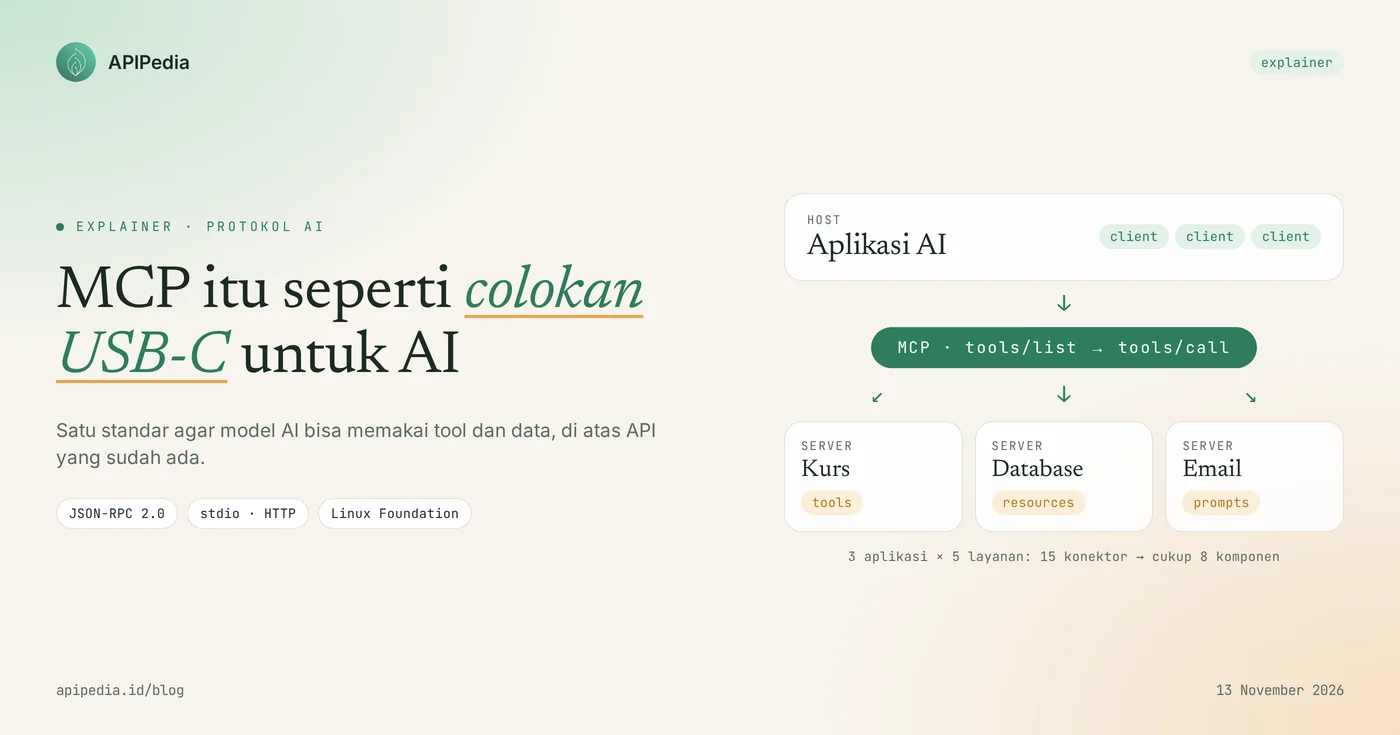
What is MCP? MCP (Model Context Protocol) is an open protocol that standardizes the way AI applications connect to tools, data, and services outside themselves. Anthropic introduced MCP on November 25, 2024. As of December 9, 2025, MCP is managed by the Agentic AI Foundation under the Linux Foundation, and its latest specification revision is dated 2026-07-28.
"Donating MCP to the Linux Foundation as part of AAIF ensures MCP remains open, neutral, and community-driven." — Mike Krieger, Anthropic Chief Product Officer, at the December 9, 2025 announcement (free translation)
This article is aimed at developers and product owners in Indonesia who are already familiar with REST APIs and want to know when MCP is appropriate to use. The official analogy: MCPs are like USB-C plugs for AI. One plug shape, many devices. This article explains how MCP works, how it differs from the regular APIs you're already familiar with, when it's best to use each, an example of a simple MCP server in Python, and the security risks that need to be taken care of.
Quick summary
In short, MCP is a JSON-RPC 2.0 standard that Anthropic released in 2024, is now maintained by the Linux Foundation, and sits on top of the API, not replacing it.
| Items | Details |
|---|---|
| Name | Model Context Protocol (MCP) |
| Early maker | Anthropic, announced November 25, 2024 |
| Manager now | Agentic AI Foundation (AAIF), a directed fund under the Linux Foundation, since December 9, 2025 |
| Message format | JSON-RPC 2.0 |
| Transport | stdio (local process) and Streamable HTTP (remote server) |
| Which is provided by the server | Tools (actions), Resources (data), Prompts (templates) |
| Latest version of specifications | 2026-07-28, stateless without handshake initialize |
| Relationship with API | Not a replacement; MCP servers typically wrap existing APIs |
How does MCP work?
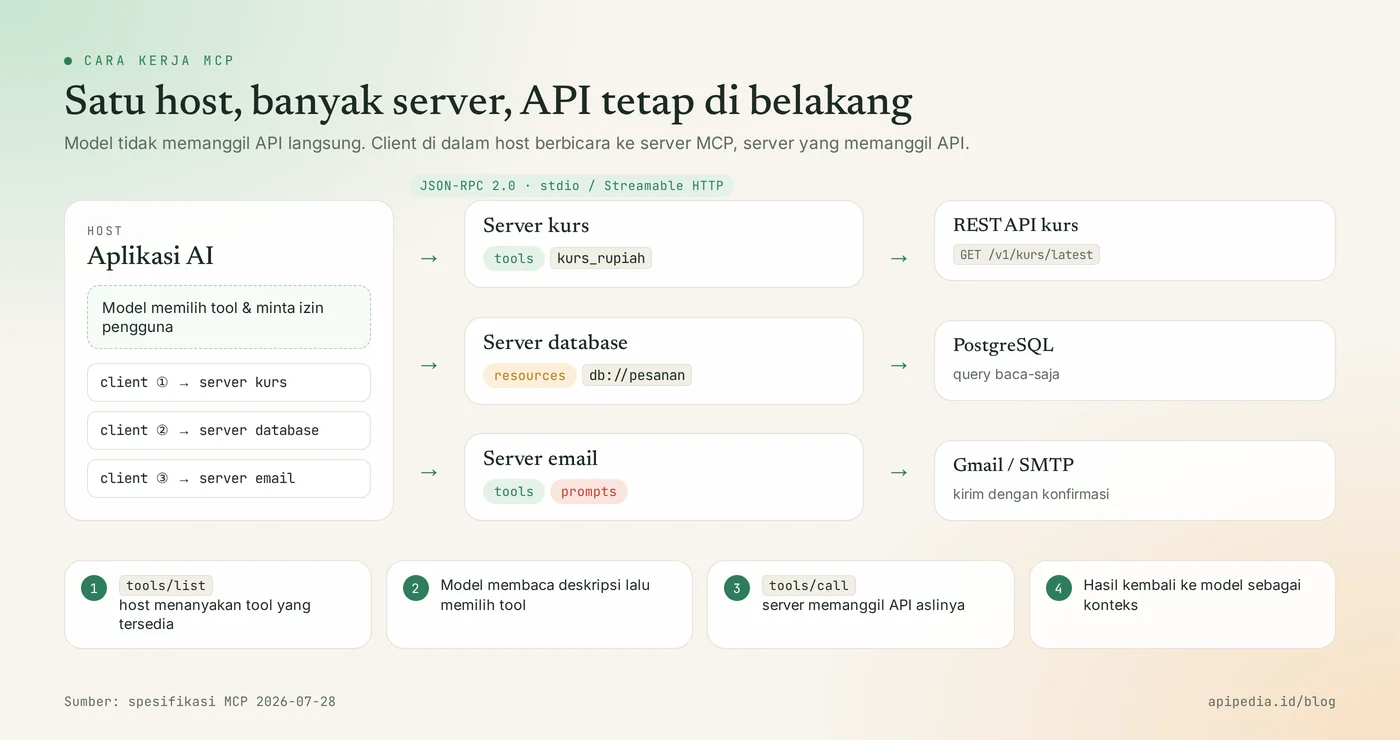
MCP works with three roles: host, client, and server. The host is the AI application you use, for example a chat application or code editor. Inside the host there are clients, one for each connection. A server is a small program that offers certain capabilities, for example reading a database, sending email, or calling an exchange rate API.
When you ask the AI, the host looks at a list of tools from all connected servers, then the model decides which tools need to be called. The client sends a request to the server in JSON-RPC 2.0 format, the server does its work (often by calling a regular API), and then the results return to the model as context.
Three things that the MCP server provides
- Tools: functions that the model can perform, for example
kirim_emailorcek_ongkir. Each tool has a name, description, and JSON Schema-based input scheme. - Resources: data that can be read as context, for example the contents of files, table rows, or documents. Resources are accessed via URI.
- Prompts: ready-to-use message or workflow templates that users can choose from.
What does the MCP message look like?
MCP messages are plain JSON-RPC 2.0. The example below is a request to call the tool and the answer. As of revision 2026-07-28, each request carries the protocol version at _meta, and each result has column resultType.
// client → server
{
  "jsonrpc": "2.0",
  "id": 7,
  "method": "tools/call",
  "params": {
    "name": "kurs_rupiah",
    "arguments": { "mata_uang": "USD" },
    "_meta": { "io.modelcontextprotocol/protocolVersion": "2026-07-28" }
  }
}

// server → client
{
  "jsonrpc": "2.0",
  "id": 7,
  "result": {
    "resultType": "complete",
    "content": [{ "type": "text", "text": "1 USD = Rp16.xxx (contoh)" }]
  }
}
How is MCP different from regular API?
The difference comes down to who uses it: A typical API is a contract between programs and services put together by a developer, whereas an MCP is a uniform contract for an AI model to discover and call capabilities itself while running. With a typical API, developers read the documentation, write code for a specific endpoint, and then that code always calls the same endpoint. With MCP, the model asks "what tools are there?" past tools/list, read the description, then choose for yourself.
| Aspect | Regular API (REST/GraphQL) | MCP |
|---|---|---|
| Main user | Developer-made code | AI model via host application |
| How to find features | Read the documentation or OpenAPI | Asked while walking ( tools/list, resources/list) |
| Format | Varies per service: path, method, field name | Uniform: JSON-RPC 2.0 with standard methods |
| Description | Written for humans to read | Written for understanding the model (name, description, input schema) |
| Integration into many AI applications | One connector per application and service pair | One server can be used by all hosts that support MCP |
| Who decides when to be called | Program logic (if/else, schedule, buttons) | Model, with user permission |
| Example | GET /v1/kurs/latest?base=USD | tools/call with the name kurs_rupiah |
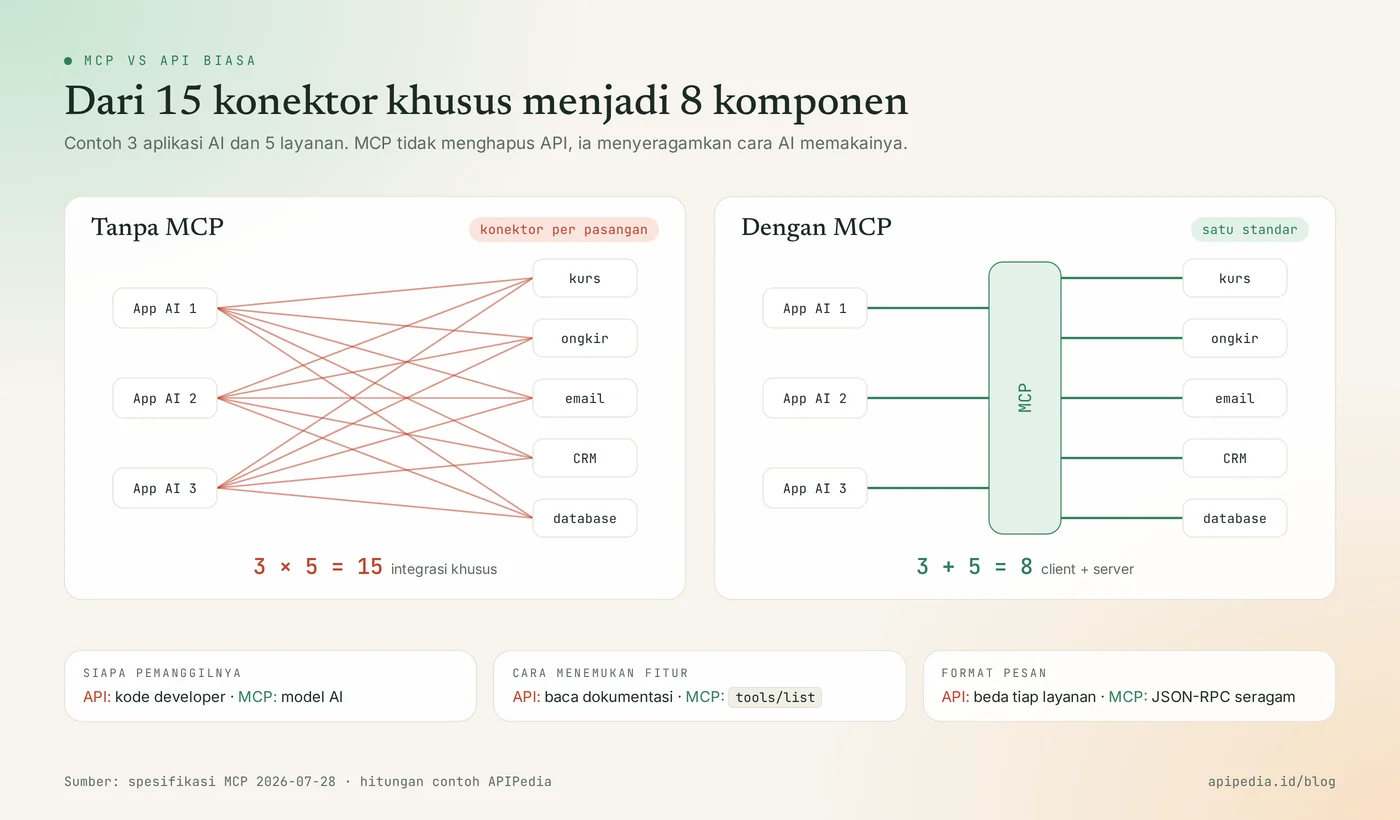
The greatest advantages of MCP are seen when the number of applications and services increases. Without standards, 3 AI applications that want to connect to 5 services would need 3 × 5 = 15 dedicated connectors. With MCP, just 3 clients and 5 servers, a total of 8 components, and each new server can immediately be used by all applications.
MCP does not replace API
MCP stands on top of APIs, not replacing them. Most MCP servers are thin layers that translate tool calls into HTTP requests to existing APIs. So an API that is neat, documented, and has clear rate limits remains the foundation. If your API is bad, the MCP server on top of it will be bad too.
What is the difference between MCP and function calling?
Function calling is a model API feature (OpenAI, Anthropic, Google, and others) that allows the model to propose function calls, but the list of functions is written by the developer himself in each application. MCP standardizes where the list of functions comes from. The host retrieves the tool from the MCP server, then passes it to the model via function calling. The two complement each other.
When to use MCP and when is a regular API enough?
Use MCP if the person calling the service is an AI agent or assistant, and use regular API if the flow is defined and executed by your own code. One MCP server can be used by many hosts at once, while one direct API call does not consume any model tokens at all.
- Choose MCP when you want your service to be used in many AI applications (chat assistant, code editor, automated agent) without creating individual plugins.
- Choose MCP when the sequence of steps is not fixed and a model needs to be decided, for example "find late orders, check shipping, then create a summary".
- Just plain APIs for deterministic flows: cron jobs, payment webhooks, data sync, or mobile app backends.
- Just a plain API when latency and cost per call are tight. Through MCP, each step also consumes model tokens.
- Use both: provide a public API for developers, then wrap the endpoints agents need most frequently as MCP servers.
How to create a simple MCP server?
The fastest MCP server is built with the official SDK (available for Python, TypeScript, and other languages), then wraps a single API endpoint into a single tool. We tested the example below on November 13, 2026 with the Python mcp 2.3.0 SDK on Python 3.13: the server is run via stdio, then a test client calls list_tools() and tool kurs_rupiah appears complete with its input scheme. Replace API_BASE and endpoint with your own API.
pip install "mcp>=2" httpx# server_kurs.py
import os
import httpx
from mcp.server.mcpserver import MCPServer # di SDK 1.x namanya FastMCP
mcp = MCPServer("kurs-rupiah")
API_BASE = os.environ.get("API_BASE", "https://api.contoh.id/v1")
API_KEY = os.environ.get("API_KEY", "")
@mcp.tool()
def kurs_rupiah(mata_uang: str = "USD") -> dict:
"""Ambil kurs terbaru 1 unit mata uang asing dalam rupiah (contoh: USD, SGD, JPY)."""
r = httpx.get(f"{API_BASE}/kurs/latest",
params={"base": mata_uang.upper(), "symbols": "IDR"},
headers={"Authorization": f"Bearer {API_KEY}"}, timeout=10)
r.raise_for_status()
return r.json()
if __name__ == "__main__":
mcp.run() # transport stdio (bawaan)Two pitfalls we encountered while testing: in the 2.x SDK, from mcp.server.fastmcp import FastMCP immediately failed with ModuleNotFoundError because the class had been renamed MCPServer, and attribute inputSchema in the client-side tool object was now named input_schema. Many old tutorials still use the 1.x version name, so check your SDK version with pip show mcp before copying the code.
The function docstring becomes the tool description, and the parameter type automatically becomes JSON Schema. That's what the model reads to decide when the tool is called, so write the description as clearly as possible.
Connecting servers to AI applications
Applications that support local MCP usually have a configuration file containing commands for running the server. The general format is like this:
{
  "mcpServers": {
    "kurs-rupiah": {
      "command": "python3",
      "args": ["/path/ke/server_kurs.py"],
      "env": { "API_KEY": "isi-kunci-anda" }
    }
  }
}
For multiple use via the internet, run a server with Streamable HTTP transport ( mcp.run(transport="streamable-http")) behind HTTPS and OAuth authorization according to specifications.
What are the security risks of MCP?
MCP's main risk: each tool amounts to executing code on your behalf, so a single malicious server or compromised tool description could tell the AI to do things you didn't ask. The MCP specification itself requires that hosts ask the user for explicit permission before running the tool, and states that tool descriptions of untrusted servers should be considered untrusted.
- Install servers from trusted sources only. The local server runs with your computer's account privileges.
- Beware of injection prompts. The contents of emails, web pages, or documents that the tool reads may contain hidden instructions for the model.
- Restrict API key permissions. Give the MCP server a key with the smallest scope possible, not an admin key.
- Don't automatically agree to dangerous actions. Send emails, delete data, and financial transactions should still require confirmation.
- Audit the server list regularly. Delete servers that are no longer in use and check whether other applications have secretly added them.
Frequently asked questions
Here are the five most frequently asked questions when developers first get to know MCP in 2026.
Can MCP only be used with Claude?
No. MCP is an open standard that is now managed by the Linux Foundation through the Agentic AI Foundation, which was founded together with Anthropic, Block, and OpenAI with the support of Google, Microsoft, AWS, Cloudflare, and Bloomberg. The same MCP server can be used by any host that supports this protocol.
Will MCP replace REST API?
No. MCP is a layer for AI agents that typically calls REST APIs behind them. Web, mobile and server-to-server integration applications still use regular APIs.
Is it paid to use MCP?
MCP's official specifications and SDK are open and free to use. Fees arise from other places: the AI model tokens that process the tool's results, and the API rates called by the MCP server.
Which MCP versions should be supported?
The current version is 2026-07-28, which makes MCP stateless: no more handshakes initialize, and each request brings its own version and capabilities. This specification provides a compatibility path with handshake-based revisions such as 2025-11-25, and the official SDK handles version negotiation.
What is the difference between local and remote MCP servers?
The local server is hosted as a process on your computer and communicates via stdio. The remote server runs on the internet, is accessed via Streamable HTTP, and uses OAuth for authorization, making it suitable for SaaS services used by many users.
Want to understand the foundations under MCP? Also read our explanation of how webhooks work, API rate limits and error 429, as well as AI tokens and how tokenizers work. For the security side, look at the case of plugins and MCPs being secretly installed by coding agents and AI API key theft via LLMjacking.
Source
- Model Context Protocol: Specification 2026-07-28
- Protocol Context Model: Key Changes 07-28-2026
- Model Context Protocol: Versioning
- Anthropic: Introducing the Model Context Protocol (25 November 2024)
- Anthropic: Donating the Model Context Protocol and establishing the Agentic AI Foundation (December 9, 2025)
- MCP Python SDK: v2 migration guide
Topics: #mcp #api #explainer #agen ai #model context protocol #python
About the author
Tim APIPedia — Tim Engineering APIPedia
Tim engineering di balik APIPedia yang membangun dan memelihara API data Indonesia - ongkir, OCR KTP, data wilayah, BMKG, hingga server MCP - dan menulis panduan integrasinya dari pengalaman langsung.