OCR is Like a Typist: How Machines Read Text from Photos, What Confidence Scores Mean, and Why the Results Can Be Wrong
By Tim APIPedia, Tim Engineering APIPedia · Published · 12 min read
OCR converts document photos into text. Here's how it works, what the confidence score means, test results for six photo conditions, and tips for accuracy.
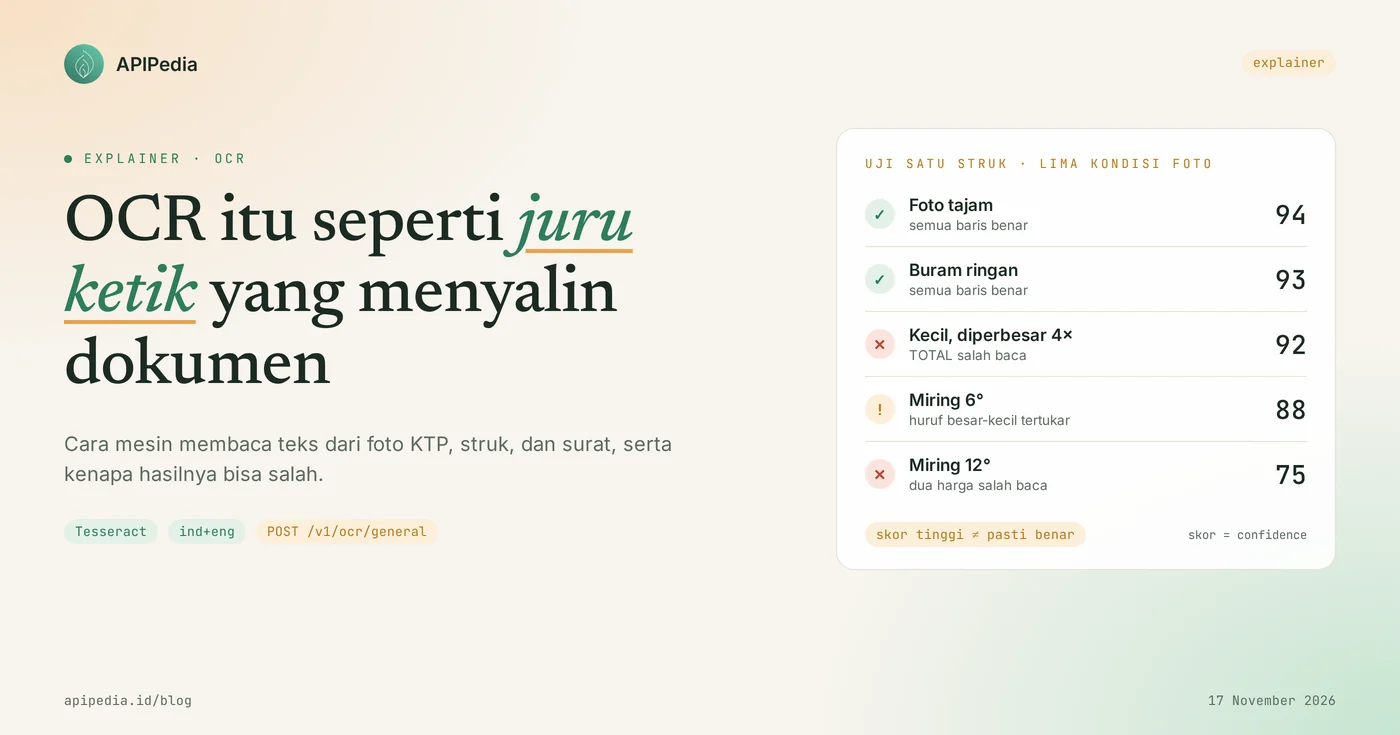
OCR (Optical Character Recognition) is a technology that converts text in images, for example ID card photos, shopping receipts, or scanned letters, into digital text that can be copied, searched and processed by programs. The easiest way to imagine it: OCR is like a typist in front of the sub-district office. He looked at the sheet you handed him, spelled it out letter by letter, then retyped the contents. If the photocopy is blurry or slanted, he could make typos.
For developers and business owners, OCR is important because a lot of data still comes as photos: customer ID cards, reimbursement receipts, travel documents. This article discusses how OCR works step by step, what a score of confidence means, our real test results on six photo conditions, things that are often misunderstood, and tips for more accurate reading results.
Quick summary: what terms do you need to know?
OCR reads the shape of the letters in the image and outputs the text along with a confidence score, without understanding the meaning of the document. The following table summarizes the terms you will encounter frequently.
| Term | It means |
|---|---|
| OCR | Optical Character Recognition, character recognition from images into text |
| OCR engine (engine) | The program that performs the reading. For example, Tesseract, an open source engine licensed with Apache 2.0 |
| Binarization | Change the image to black and white so that the letters are separated from the background |
| Layout analysis | Searches for blocks of text, lines, and words before letters are recognized |
| LSTM | The type of neural network that Tesseract has used since version 4.0 to recognize one line of text at a time |
| Language data | Model per language. ind+eng means Indonesian and English are used together |
confidence | Machine confidence score, 0 to 100. This is a measure of confidence, not a measure of correctness |
| Structured OCR | OCR results have been sorted by field, for example NIK, name and address on the KTP |
What is OCR?
OCR is the process of recognizing letters and numbers in an image and then rewriting them as text. To a computer, a photo of a receipt is just a collection of colored pixels. The computer doesn't know that the row of dark pixels says "TOTAL 120,000" until an OCR engine reads it.
Back to the typist. He doesn't need to understand the contents of your letter. The task is only to copy what is visible. Because of this, he can copy letters in foreign languages, but he won't realize that the numbers he is typing don't make sense. OCR engines have the same nature: diligently copying, not checking meaning.
In everyday life, OCR works when you scan a document into a searchable PDF, when an app fills in a form from a photo of your ID card, and when your phone's camera copies text from a bulletin board.
How does OCR work step by step?
OCR works in five steps: the image is received, it is trimmed to black-and-white, its lines of text are searched, the letters are recognized, and then the text and confidence score are output. This sequence follows the workings of Tesseract, the engine also used by APIPedia's General OCR product.
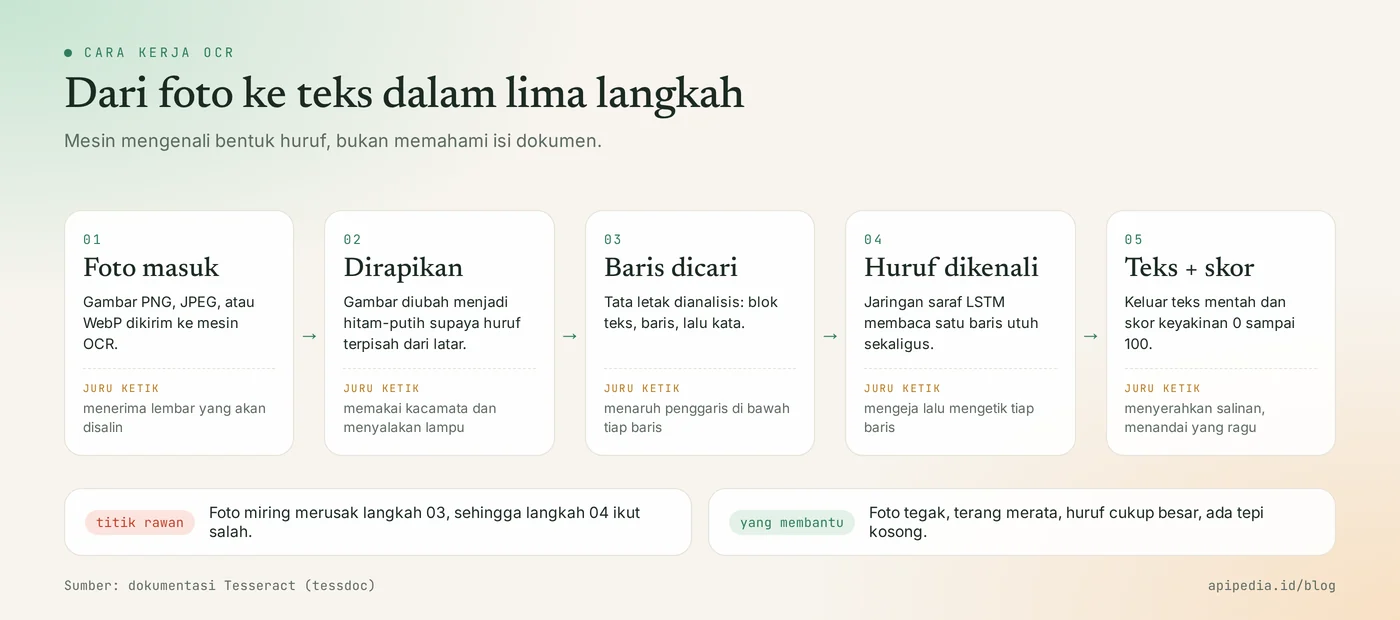
Steps 1 and 2: the image is received and then trimmed
The machine first converts the image to black-and-white, a process called binarization. Tesseract documentation says the engine does this internally with the Otsu algorithm, and since version 5.0.0 two additional methods are available, Adaptive Otsu and Sauvola. If the background of the photo is dark, for example due to the shadow of a hand, the binarization results may be poor and some letters will be lost.
Step 3: the text line is searched
Before reading letters, the machine determines where blocks of text, lines, and words are located. Typists do something similar by placing a ruler under the line being copied. This is where tilted photos become a problem: Tesseract documentation states the quality of row splitting drops significantly when the page is too tilted.
Step 4: letters are recognized
Since version 4.0, Tesseract uses an LSTM neural network configured as a text line identifier. This means the machine reads a whole line as a sequence, rather than matching individual letters to print. The context around the letters helps, just as a typist can guess the faded letters from the words around them.
Step 5: text and confidence scores are output
The final result is the raw text and confidence score. The score represents how confident the machine is in its own readings. Typists who are unsure usually put a small question mark in the edge of the paper, and a score of confidence acts like that mark.
What do real examples of OCR results look like?
The OCR results are in the form of text as is, line by line, plus one confidence number. We created a fictitious receipt image measuring 640×360 pixels, then sent it to POST /v1/ocr/general on November 17, 2026.
jq -n --arg img "$(base64 -w0 struk.png)" '{image_base64: $img}' \
  | curl -s -X POST https://api.apipedia.id/v1/ocr/general \
      -H "Authorization: Bearer apk_xxx" \
      -H "Content-Type: application/json" \
      -d @-
Real response to sharp photos:
{
  "is_success": true,
  "message": "Text extracted from image",
  "data": {
    "text": "TOKO SUMBER REJEKI\n\nJl. Melati No. 12, Sleman\nBeras 5 kg 68.500\nMinyak 2 L 34.000\nGula 1 kg 17.500\nTOTAL 120.000\nTerima kasih",
    "confidence": 94,
    "lang": "ind+eng"
  }
}
All lines read correctly with a score of 94. You can double-check the name of the body field in the OCR General product OpenAPI specifications on the console. Key apk_xxx is just an example, and how to protect it is in the article API keys are like boarding house access cards.
What happens if the photo is blurry, small, or tilted?
The quality of the photo immediately changes the reading results, and what was most detrimental in our tests was the slant and too small font size. We sent the same receipt in six conditions to the same endpoint. The results are as follows.
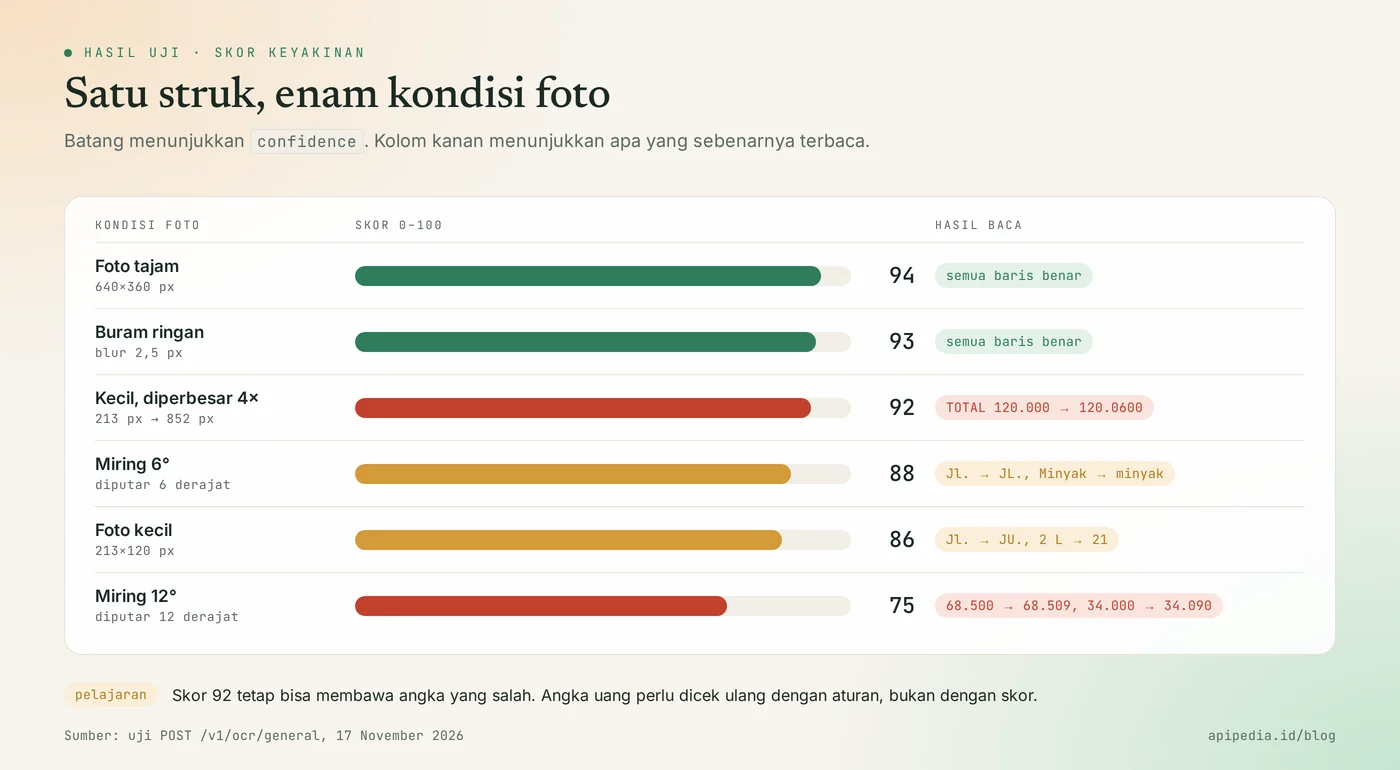
| Photo condition | confidence | What is read |
|---|---|---|
| Sharp, 640×360 pixels | 94 | All lines are correct |
| Light blur (2.5 pixel blur) | 93 | All lines are correct |
| Small then enlarged 4 times | 92 | TOTAL 120.0600, should be 120,000 |
| Tilt 6 degrees | 88 | JL. and minyak, the price remains correct |
| Small, 213×120 pixels | 86 | JU. and Minyak 21 |
| Tilt 12 degrees | 75 | 68.509 and 34.090, two prices are wrong |
There are two lessons from this table. Firstly, a light blur is still safe, while a 12 degree tilt already changes two values. Second, a score of 92 on an enlarged photo still brings the wrong total. This test uses a single handcrafted image with neat block letters, so consider the numbers as an illustration, not a guarantee for your photo.
What are often misunderstood about OCR?
The most common misconception is to assume a high confidence score means the result must be correct. Here are five assumptions that need to be clarified.
- "High score means correct." The score measures a machine's confidence, not truth. In the above test, a score of 92 brings an incorrect total.
- "OCR understands the contents of the document." OCR only copies letter shapes. He didn't know that 68,509 was not a fair price for rice, or that the number of items did not equal the total.
- "OCR can ensure documents are authentic." OCR reads what is written, including on fake documents. The result of reading the KTP is not identity verification with Dukcapil.
- "Enlarging a small photo restores the details." Zooming in only adds pixels, not information. Our results improved in some rows, but the totals were wrong.
- "OCR and AI vision are the same." Classic OCR copies characters. The vision model can read more difficult photos and interpret their contents, but the cost is per token and it can make up text where there is none. The basis is in the article that AI tokens are like credit.
How do I take photos so that OCR results are more accurate?
Photos that are upright, evenly lit, and have fairly large fonts provide the most accurate results. The following tips are summarized from the image quality guidelines in the Tesseract documentation and from our test results.
- Straighten documents. Align the edge of the document with the edge of the camera screen. Tilt was the biggest spoiler in our tests.
- Move the camera closer. The document should fill most of the frame. For scan results, Tesseract documentation recommends a minimum of 300 dpi.
- Flatten the light. Avoid hand shadows and light reflections, especially on laminated cards such as KTPs.
- Leave blank edges. Text that sticks to the edges of an image is more difficult to read. Edges that are too wide don't help either.
- Use dark text on a light background. Tesseract version 4 and above expects this condition.
- Send the original file. Screenshots from chat applications are usually reduced and compressed.
- Be aware of the tables. Tesseract documentation admits the engine has difficulty reading data in tables without additional layout processing.
How to check OCR results in the app?
Check the OCR results with the rules you know about the document, not just with the score. For receipts, the rules are simple: the number format must be reasonable and the number of items must equal the total. We have run the following code against three real responses from the test above.
import re


def angka_rupiah(s):
    """'68.500' -> 68500. Format lain (mis. '120.0600') -> None."""
    return int(s.replace(".", "")) if re.fullmatch(r"\d{1,3}(\.\d{3})*", s) else None


def cek_struk(text):
    item, total = [], None
    for baris in text.splitlines():
        kata = baris.split()
        if len(kata) < 2 or not re.fullmatch(r"[\d.]+", kata[-1]):
            continue  # bukan baris harga
        nilai = angka_rupiah(kata[-1])
        if nilai is None:
            return {"ok": False, "alasan": f"Format angka tidak wajar: {kata[-1]}"}
        if kata[0].upper() == "TOTAL":
            total = nilai
        else:
            item.append(nilai)
    if total is None:
        return {"ok": False, "alasan": "Baris TOTAL tidak ditemukan"}
    if sum(item) != total:
        return {"ok": False, "alasan": f"Jumlah item {sum(item)} tidak sama dengan total {total}"}
    return {"ok": True, "total": total}
Results when run:
tajam -> {'ok': True, 'total': 120000}
diperbesar 4x -> {'ok': False, 'alasan': 'Format angka tidak wajar: 120.0600'}
miring 12 -> {'ok': False, 'alasan': 'Jumlah item 103099 tidak sama dengan total 120000'}
Two problematic photos were caught without looking at the score at all. The same principles apply to other documents: the NIK must be 16 digits with the correct structure, the date must be an existing date, and the account number must be a number. If the check fails, ask the user to retake the photo or direct them to a manual check.
What OCR services are available on APIPedia?
APIPedia provides three OCR products in its catalog: OCR General for free text, as well as KTP OCR and SIM OCR for results that have been sorted by field. OCR General also has an AI mode for difficult photos.
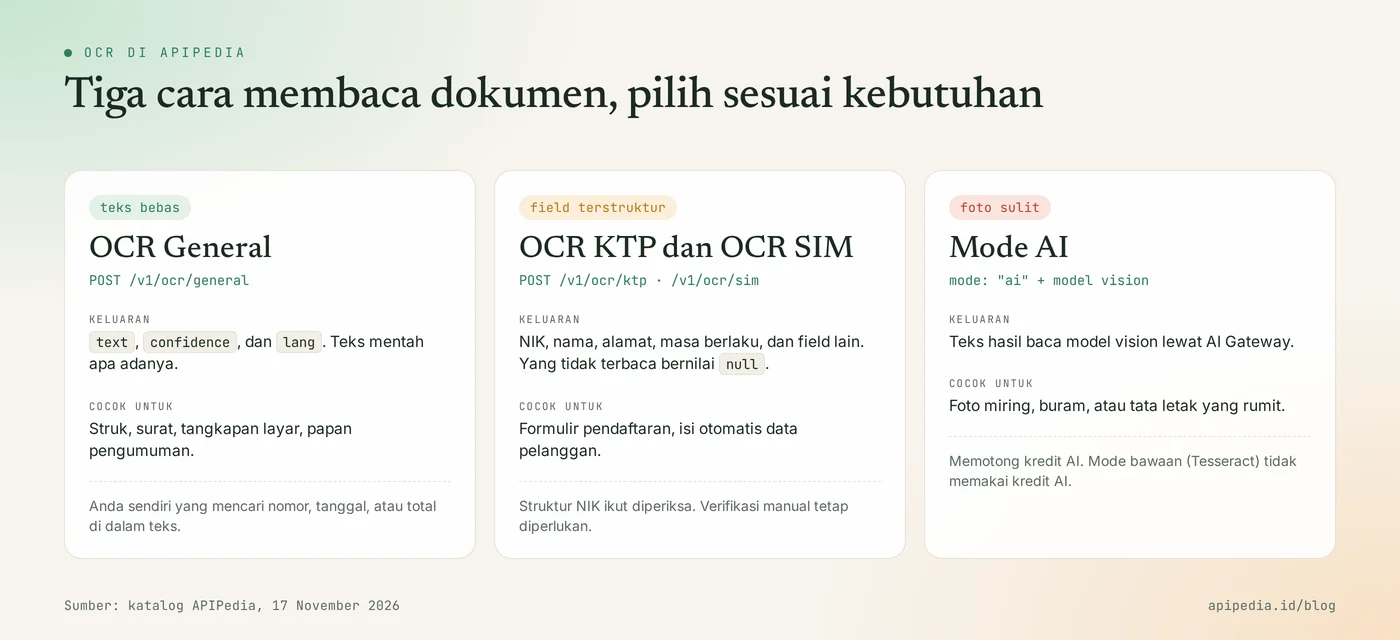
- OCR General uses Tesseract with
ind+englanguage data running as WebAssembly on the server. Input PNG, JPEG, or WebP images in base64. PDF files are not yet supported. - KTP OCR reads the KTP photo and then deciphers the NIK, name, place and date of birth, address, and other fields. Unreadable fields are returned
null, and the NIK structure is also checked. - SIM OCR describes the SIM number, name, address, class and validity period in the same way.
- AI mode in OCR General (
mode: "ai"with fieldmodel) uses a vision model via AI Gateway. This mode deducts AI credits, while the default mode does not.
All three are listed in the Free tier in the catalog, and each call still counts towards the account request quota. The AI assistant can also use it via tools ocr_general, ocr_ktp, and ocr_sim on the APIPedia MCP server.
Frequently asked questions
What does OCR stand for?
OCR is an abbreviation for Optical Character Recognition, namely optical character recognition. This technology converts text on images into digital text.
Can OCR read handwriting?
The most reliable OCR for printed letters. Handwriting is much more difficult because the shape of the letters is different for each person, so the results need to be checked by humans or read with a vision model.
What confidence score is safe to use?
There is no one number that is safe for all cases. In our test, a score of 92 still led to an incorrect total. Use a low score as a reason to request a retake, and use the document's rules to confirm its content.
Can APIPedia's General OCR read PDF?
Not yet. According to the catalog, input must be a PNG, JPEG, or WebP image in base64. Convert PDF pages to images first before sending them.
When is it better to use KTP OCR instead of General OCR?
Use KTP OCR if you need ready-to-use fields such as NIK and name. General OCR only returns raw text, so field sorting is your job.
Next step: what to read after this?
The most practical step after understanding the concept is to try one photo of your own document at console.apipedia.id and compare the results with the original text. For installation guidance, read the KTP OCR API to read e-KTP and check NIK. If your application also accepts QRIS images, continue to how to read and validate the store's QRIS. Before processing many photos at once, first understand the rate limit and error 429. How to connect the OCR tool to the AI assistant is in the guide to connecting APIPedia via MCP.
Source
- Tesseract User Manual (tessdoc): versions, LSTM engine, licensing and language support
- Tesseract: Improving the quality of the output (binarization, resolution, skew, edges, tables)
- Tesseract: Neural nets in Tesseract 4.00 (LSTM based text line recognition)
- Tesseract.js: WebAssembly port of Tesseract
- OpenAPI catalog and specifications of OCR products in the APIPedia console
Topics: #ocr #explainer #tesseract #ocr ktp #ai #api dokumen
About the author
Tim APIPedia — Tim Engineering APIPedia
Tim engineering di balik APIPedia yang membangun dan memelihara API data Indonesia - ongkir, OCR KTP, data wilayah, BMKG, hingga server MCP - dan menulis panduan integrasinya dari pengalaman langsung.