RAG Is Like an Open Book Exam: How Embedding Works, Vector Search, and When You Need It
By Tim APIPedia, Tim Engineering APIPedia · Published · Updated · 11 min read
RAG makes the AI open your document first before answering, like an open book exam. Here's how embedding works, vector search, and when RAG isn't necessary.
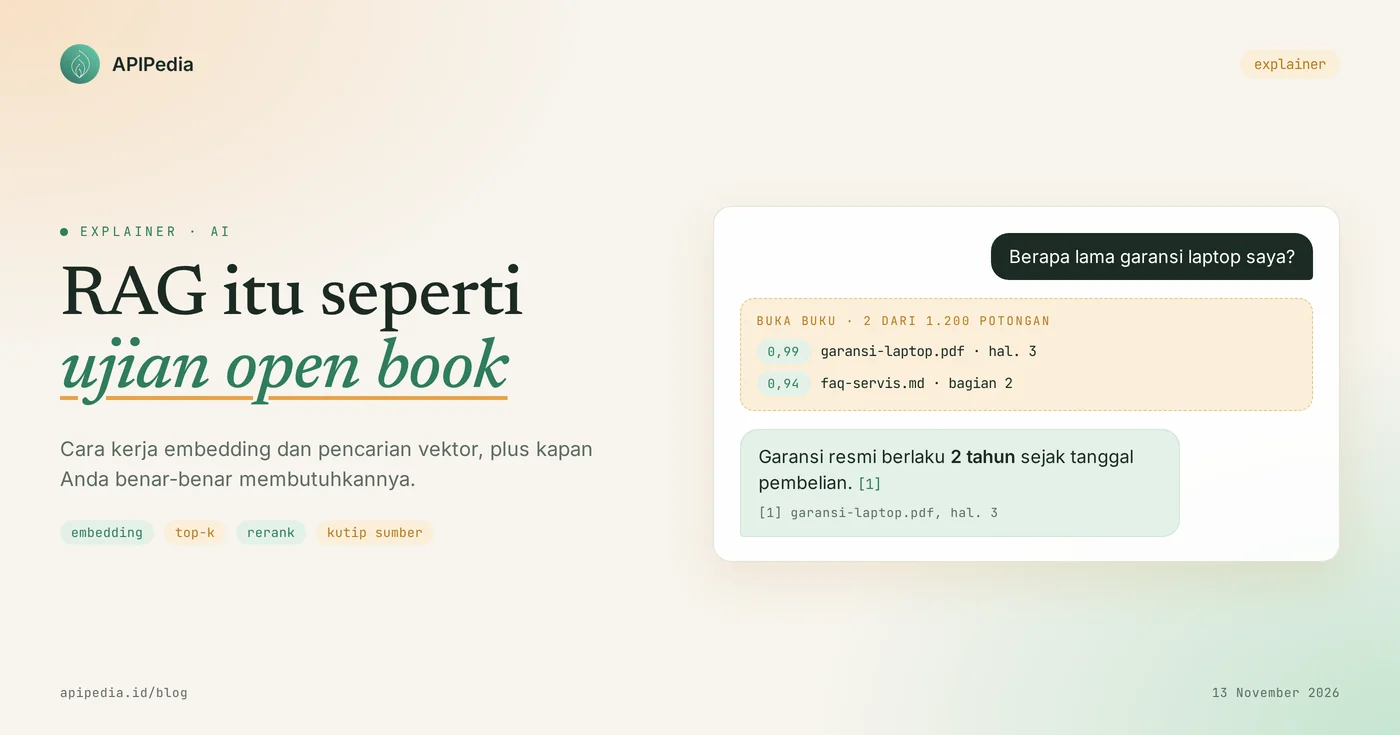
RAG (Retrieval-Augmented Generation) is a technique that makes an AI model first search for relevant chunks of a document, then answer based on those chunks. The most fitting analogy is an open book exam: the model doesn't need to memorize the contents of your book, just know how to open the page correctly before writing the answer. The search tool is called embedding, which is text that is converted into a series of numbers.
This concept is important because an AI model only knows what is in its training data. He doesn't know your store's warranty policy, your office's SOP, or what prices changed yesterday. This article explains RAG and embedding from scratch, complete with small code examples you can run, common misconceptions, and when you don't need RAG.
Quick summary: what terms do you need to know?
There are six terms that almost always come up when people discuss RAG. The following table pairs each term with its equivalent on the open book exam.
| Term | Short meaning | Equivalent in open book exams |
|---|---|---|
| RAG | Look for relevant documents first, then model answers | Exams that may open the book |
| Chunk | Pieces of documents, usually several hundred tokens | One page or one paragraph of a book |
| Embedding | A series of numbers that represent the meaning of a text | The shelf number indicates the topic of the page |
| Vector index | A place to store all embeddings along with the original text | Table of contents and index at the back of the book |
| Top-k | The number of most similar chunks taken, for example 5 or 20 | The number of pages you have opened |
| Rerank | Reorder search results so that the best are at the top | Sort out which pages really answer the question |
What is RAG, and why is it similar to an open book exam?
RAG is a way of combining two types of memory: the model's built-in memory and searchable external documents. This term was introduced in a 2020 research paper entitled "Retrieval-Augmented Generation for Knowledge-Intensive NLP Tasks". The paper calls the model's built-in memory parametric memory, and the indexed external documents non-parametric memory. In the original experiment, the external document was a Wikipedia vector index.
Imagine two types of exams. In closed book exams, you only rely on memorization. If you forget, you tend to make up answers that sound convincing. In an open book exam, you can open your notes, so that the answers can be checked on the page. AI models without RAG are like exam takers closing their books. The model with RAG is like an open book participant who knows which page to open.
The paper also notes two problems it aims to address: the difficulty of pinpointing the origin of an answer, and the difficulty of updating model knowledge. RAG answered both. Sources can be cited, and knowledge updated simply by changing documents.
What is embedding?
Embedding is a list of fractional numbers that represent the meaning of a text. Two texts whose meanings are close together will produce a series of numbers that are also close together, even though the words are different. The documentation of one popular family of embedding models defines them as vectors containing floating point numbers, with a default length of 1,536 numbers for small models and 3,072 numbers for large models.
An everyday analogy is the shelves in a supermarket. Instant noodles and kitchen spices are in the adjacent aisle, while laundry soap is in another aisle. Embedding gives each sentence a "hallway address" based on its meaning. To search for relevant sentences, the computer simply searches for the address closest to the question address.
How is closeness of meaning calculated?
The closeness of two embeddings is usually calculated by cosine similarity, which is a number that gets closer to 1 the more the two vectors are in the same direction. The following Python script uses a toy vector of 4 hand-crafted numbers, so that how it works is clear. We have run this script and the output is listed below.
import math

def cosine(a, b):
    dot = sum(x * y for x, y in zip(a, b))
    return dot / (math.sqrt(sum(x * x for x in a)) * math.sqrt(sum(y * y for y in b)))

# Vektor mainan 4 angka: [elektronik, garansi/waktu, makanan, perjalanan]
dokumen = {
    "Garansi resmi laptop berlaku 2 tahun":   [0.9, 0.9, 0.0, 0.0],
    "Servis gratis notebook selama 24 bulan": [0.9, 0.5, 0.0, 0.2],
    "Jadwal kereta Jakarta-Bandung":          [0.1, 0.3, 0.0, 0.9],
    "Resep sambal terasi pedas":              [0.0, 0.1, 0.95, 0.0],
}
pertanyaan = [0.8, 0.9, 0.0, 0.1]  # "Berapa lama garansi laptop?"

hasil = sorted(((cosine(pertanyaan, v), teks) for teks, v in dokumen.items()), reverse=True)
for skor, teks in hasil:
    print(f"{skor:.2f}  {teks}")

top_k = [teks for _, teks in hasil[:2]]
print("Dikirim ke model:", top_k)
0.99 Garansi resmi laptop berlaku 2 tahun
0.94 Servis gratis notebook selama 24 bulan
0.38 Jadwal kereta Jakarta-Bandung
0.08 Resep sambal terasi pedas
Dikirim ke model: ['Garansi resmi laptop berlaku 2 tahun', 'Servis gratis notebook selama 24 bulan']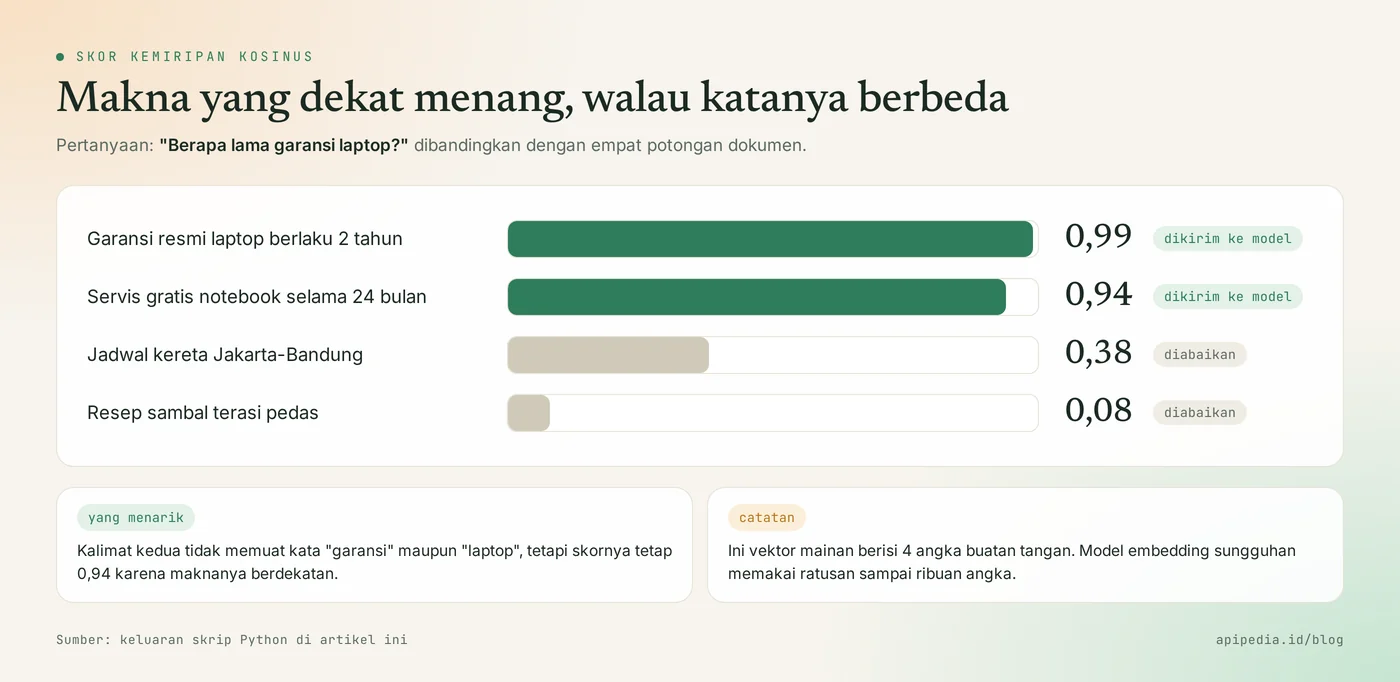
Pay attention to the second sentence. It contains neither the words "warranty" nor "laptop", but it scores 0.94 because they are close in meaning. This is the difference between searching for meaning and searching for ordinary keywords. On real models, you don't fill in the numbers yourself. The embedding model that generates it, and there are hundreds to thousands of numbers per text.
How RAG works step by step?
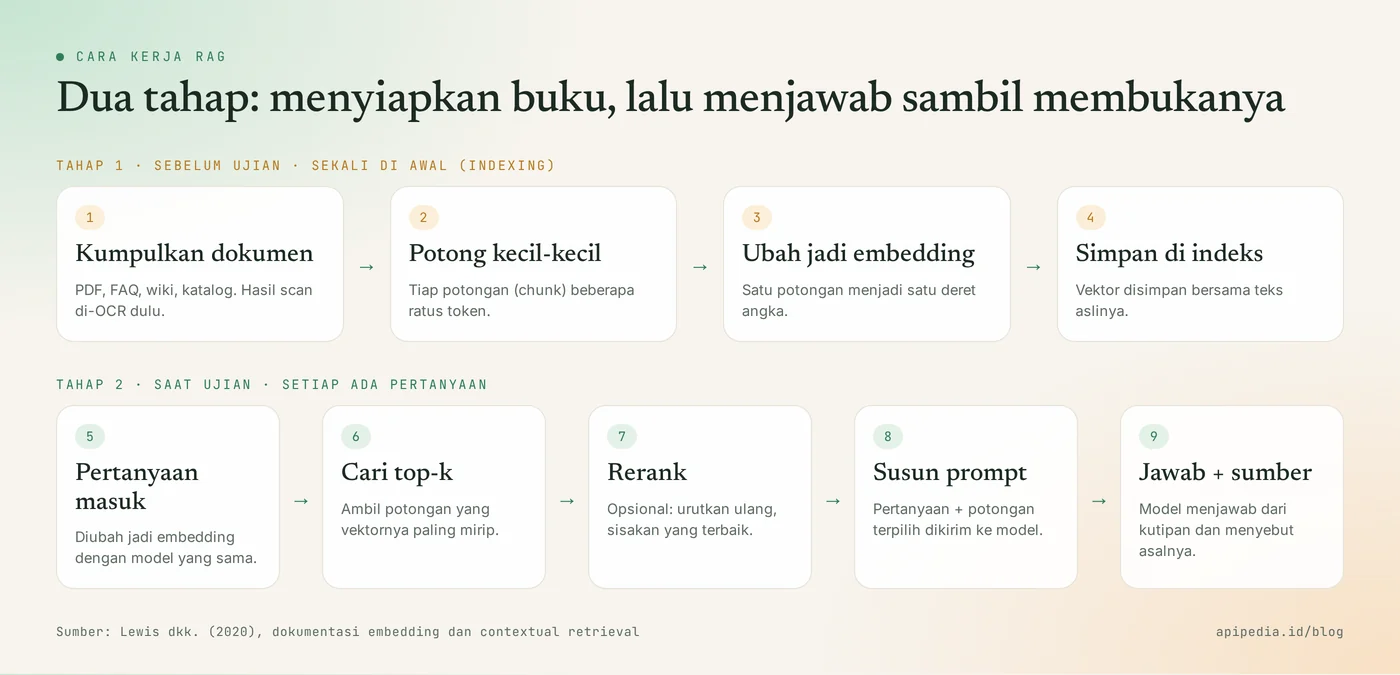
RAG works in two stages: setting up the index once at the start, then searching and answering each time a question is asked. The first stage is like tidying up your notes and making a table of contents before the exam. The second stage is when the exam takes place.
Stage 1: preparing the book (indexing)
- Collect documents. PDF, FAQ, internal wiki, or product catalogue. The scanned document needs to be converted into text first via OCR.
- Cut into chunks. Documents are broken into small chunks, generally no more than a few hundred tokens per chunk.
- Create embeddings. Each chunk is sent to the embedding model and returns as a series of numbers.
- Save in index. The number series is stored along with the original text and source information, for example file names and page numbers.
Stage 2: answer while opening the book
- Questions are converted into embeddings with the same model as when indexing.
- Look for top-k. The system takes the number of chunks with the highest similarity scores.
- Rerank (optional). A custom model reorders the candidates, then only the best ones are used. A retrieval technique guide exemplifies retrieving 150 candidates that are filtered down to 20.
- Organize prompts. Questions and selected chunks are combined, with instructions for the model to answer only from those chunks.
- The model answers and cites the source, so readers can check.
When do you need RAG, and when don't you?
You need a RAG when the documents are too numerous to attach to the prompt, change frequently, or the answer requires citing sources. For small documents, the simplest way is often better: just paste everything into the prompt. The same retrieval techniques guide provides a rough benchmark: a knowledge base under 200,000 tokens, roughly 500 pages, can be directly entered intact.
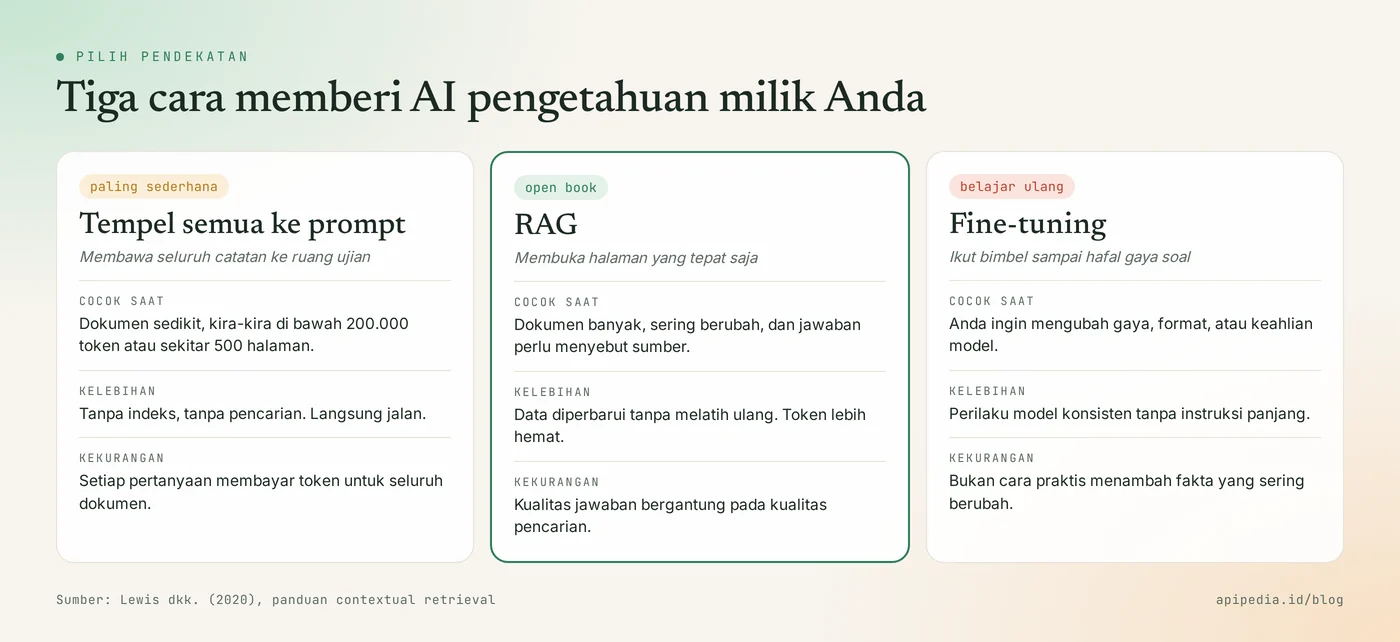
Keep in mind, sticking to an entire document means you pay tokens for that entire document on each question. If you're not familiar with how tokens are calculated, first read our explanation of pulse-like AI tokens.
What is often misunderstood about RAG?
The most common misconception is to think of RAG as the same as training a model. Here are some assumptions that need to be cleared up.
- "RAG means training AI with my data." No. The weight of the model has not changed at all. The document is simply attached to the prompt when the question comes, then forgotten once the answer is complete.
- "With RAG, AI won't make up any more." Not necessarily. RAG reduces risk, but if the page is retrieved incorrectly, the answer is also incorrect. In one published test, regular embedding search still failed to find the correct chunk in 5.7% of cases, and only dropped to 1.9% after multiple techniques were combined.
- "Embedding is encryption, so it's safe to share." No. Embedding is a representation of meaning, not a safeguard. Treat vector indexes like original documents, including access rights and personal data.
- "You have to use a special vector database." Not always. For several thousand chunks, calculating similarities one by one like the script above is still quite fast. New vector databases felt necessary as the data grew.
- "The search for meaning is always better than the search for words." Not for unique codes. Order numbers, error codes, or NIK are more precisely searched by exact word matching. Many systems combine both.
- "Large context models make RAG obsolete." Large contexts actually make it possible to paste small documents directly. But for thousands of documents, the costs and wait times still make searching more reasonable.
How to start your first RAG?
Start with the smallest testable version: dozens of documents, one embedding model, and twenty test questions. Some time-saving tips:
- Prepare test questions in advance. Write down 20 real questions along with the documents that should be taken. It's the only way to know whether your changes are fix or break.
- Cut to follow the structure. Break it down by subtitle or by FAQ item, not by blind character count. The size, boundaries, and overlap of chunks affect search results.
- Save the source in each chunk. File names, pages, and update dates make answers quotable and checkable.
- Use the same embedding model for documents and questions. Replacing a model means reindexing everything.
- Allow the model to say they don't know. Add an instruction: if the answer is not in the quote, say not found.
Create embeddings via APIPedia's AI Gateway
APIPedia's AI Gateway provides endpoints /embeddings and /rerank under base URL https://api.apipedia.id/v1/ai, in a format compatible with the OpenAI SDK. The list of models and prices is at GET /models. The following example follows that format; replace NAMA_MODEL_EMBEDDING with one of the embedding models from that list.
# 1) Lihat model yang tersedia, pilih yang bertipe embedding
curl https://api.apipedia.id/v1/ai/models \
  -H "Authorization: Bearer apk_xxx"

# 2) Ubah teks menjadi embedding
curl -X POST https://api.apipedia.id/v1/ai/embeddings \
  -H "Authorization: Bearer apk_xxx" \
  -H "Content-Type: application/json" \
  -d '{
    "model": "NAMA_MODEL_EMBEDDING",
    "input": ["Garansi resmi laptop berlaku 2 tahun"]
  }'
In this format, the number series is data[0].embedding. Save the number along with the original text, then compare it with the question embedding using function cosine as in the script above. For scanned documents, General's OCR product can convert images to text before cropping. Usage limits still apply, so when indexing thousands of pieces, send in batches to avoid being hit by the rate limit.
Frequently asked questions
How is RAG different from fine-tuning?
RAG adds knowledge through documents that are searched when questions come in, while fine-tuning changes the model weights through additional training. RAG is suitable for frequently changing facts. Fine-tuning is suitable for changing a model's style, format, or skill. Both can be used together.
Does RAG make AI stop hallucinating?
Not completely. RAG reduces hallucinations because the model answers from quotes, but the results depend on the quality of the search. Have the model name the source and allow it to answer "not found" to make errors easier to spot.
Do I have to have a vector database?
Not to begin with. With several thousand chunks, storing the embedding in a regular file or table and calculating the similarities one by one is still sufficient. Move to vector databases when the amount of data or search speed starts to become an issue.
What is the ideal chunk size?
There are no single numbers. Common practice is a few hundred tokens per piece, following natural limits such as subtitles. Test several measures with your own list of questions, then choose the one that most often takes the correct cut.
Can embedding be used other than RAG?
Can. Embedding is also used for search, text grouping, recommendations, anomaly detection, and classification. RAG is just one of the most popular uses.
Want to continue learning other basic concepts? Read what MCP is and how it differs from regular APIs, how AI tokens work, how webhooks work, and how to protect AI API keys from being stolen. API keys to try AI Gateway can be created at console.apipedia.id.
Source
- Lewis et al., "Retrieval-Augmented Generation for Knowledge-Intensive NLP Tasks" (arXiv:2005.11401, 2020)
- OpenAI Developers: Vector embeddings (definition, vector length, uses)
- Anthropic Engineering: Contextual Retrieval (chunk, BM25, rerank, benchmark 200,000 tokens)
- APIPedia OpenAPI AI Gateway Specifications
Topics: #rag #embedding #vector search #ai #explainer #ai gateway
About the author
Tim APIPedia — Tim Engineering APIPedia
Tim engineering di balik APIPedia yang membangun dan memelihara API data Indonesia - ongkir, OCR KTP, data wilayah, BMKG, hingga server MCP - dan menulis panduan integrasinya dari pengalaman langsung.