How to Use Tencent Hy4 via API: Send Text, Images, and Calculate Fees in Rupiah
By Tim APIPedia, Tim Engineering APIPedia · Published · Updated · 8 min read
Tencent Hy4 (770B) released November 4 with vision and computer use. The guide calls it via OpenRouter, sends a picture, and calculates the cost in rupiah.
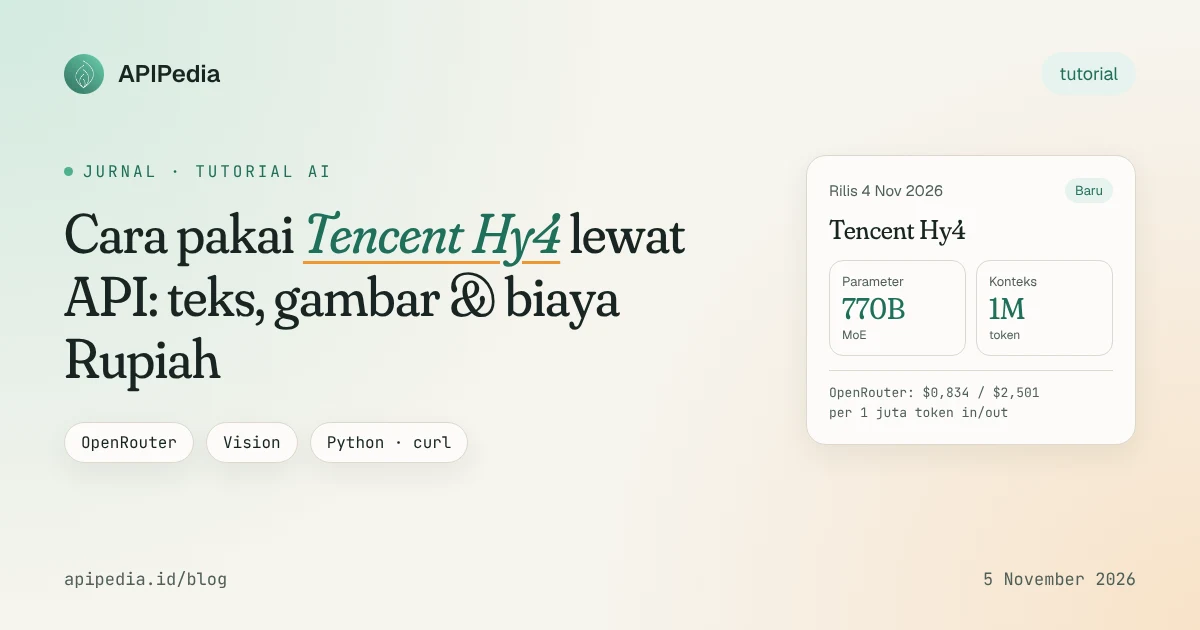
Tencent Hy4 is a 770 billion parameter open-weight AI model officially released November 4, 2026 with new capabilities to read images and operate computers. The model can be called via OpenRouter with an OpenAI-style API format, the price is relatively cheap, so Indonesian developers can try it right away today.
This guide discusses the practical steps: creating an API key, confirming the model ID, sending text and image prompts, and calculating the cost per request in rupiah. All code examples can be copied and run.
What's new in Hy4?
Tencent released the Hy4 Preview at the end of August 2026. The full version that came out November 4 added two things that weren't in the preview: visual understanding (reading graphics, documents, and several images at once) and computer use (operating the command line and graphical interface). According to Tencent, the training also includes professional software such as Blender and CAD.
| Aspect | Hy4 (4 Nov 2026) | Notes |
|---|---|---|
| Architecture | Mixture-of-Experts, 770B total | Preview: 49B active parameters per token |
| Context | ±1 million tokens | OpenRouter lists 1,048,576 tokens |
| New capabilities | Vision and computer use | Not yet in Hy4 Preview |
| OpenRouter Price | $0.834 input / $2.501 output per 1 million tokens | Same as preview price |
| TokenHub Discount | 50% until December 31, 2026 | Tencent Cloud TokenHub |
| Limited free | November 4–15, 2026 | On WorkBuddy and CodeBuddy |
| Model weight | Promised "in a few days" | There is no definite date yet |
There are slight differences in price figures between sources. TechNode and Apiyi wrote $0.834/$2.501 per million tokens (numbers on OpenRouter). Tencent's press release mentions "around" $0.90/$2.70 and $0.045 for cached input. For bills, stick to the numbers listed on the dashboard of the provider you use.
How powerful is the Hy4 compared to its competitors?
All figures below come from Tencent material summarized by Apiyi. Tencent reran competing models with its own settings, so this isn't an independent test.
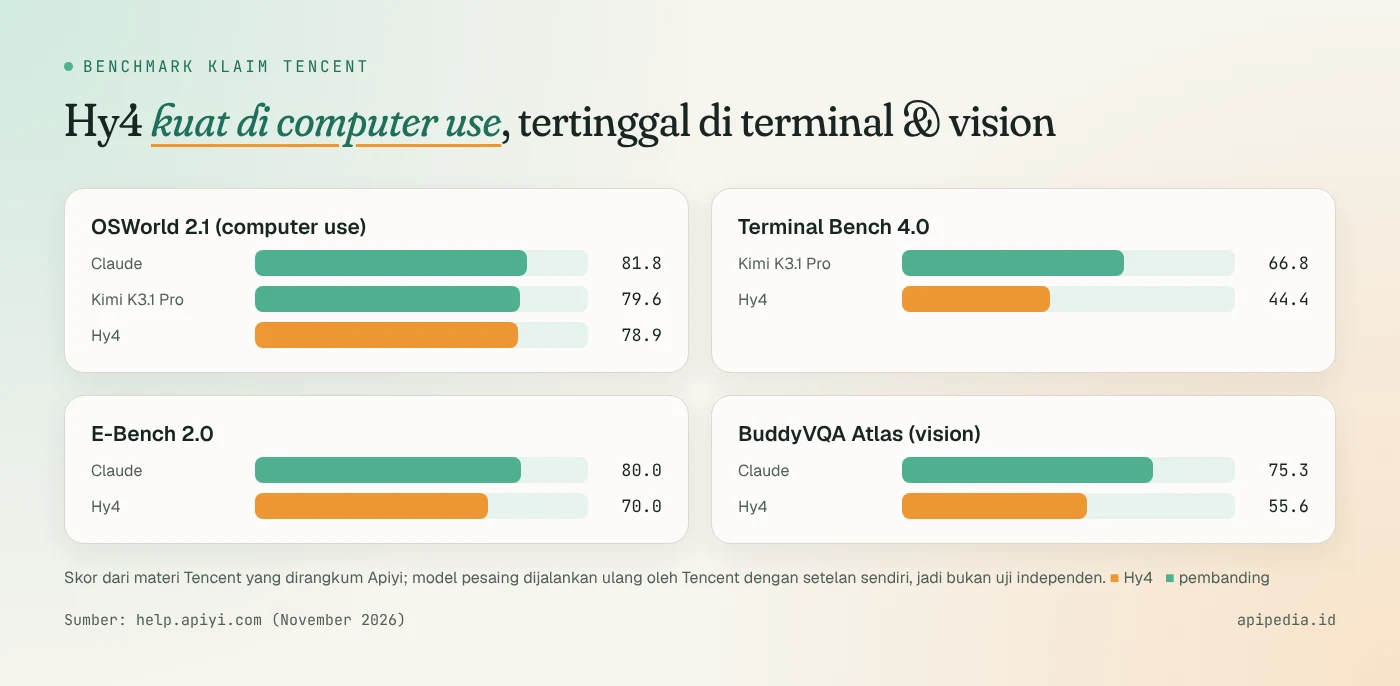
- Computer use is quite competitive. In OSWorld 2.1, the Hy4 scored 78.9, slightly behind the Kimi K3.1 Pro (79.6) and Claude (81.8).
- Terminal agents are still lagging behind. In Terminal Bench 4.0, the Hy4 got 44.4, while the Kimi K3.1 Pro got 66.8.
- Vision is only in the early stages. On BuddyVQA Atlas, Hy4 got 55.6, while Claude got 75.3.
- Hallucinations down. Tencent's press release said the hallucination rate fell from 12.95% (preview) to 7.2%.
In conclusion, Hy4 is attractive for office tasks, long document analysis, and interface automation at low cost. For heavy coding agents in the terminal, test it first with your own case. If you want another open-weight comparison, also read the Kimi K3.1 Pro review.
What is the flow of use?
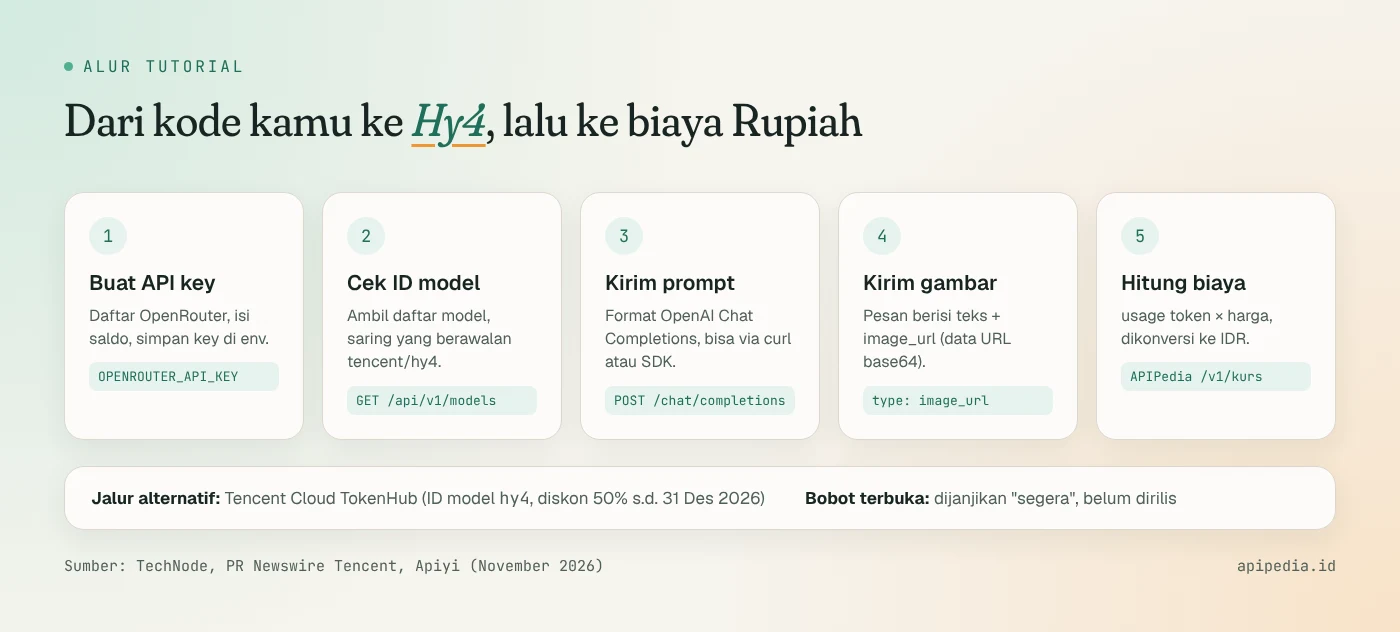
We use OpenRouter because the endpoint is compatible with OpenAI Chat Completions, can be paid with international cards, and does not require a Tencent Cloud account. If you already have a TokenHub account, the model ID there is hy4 and you can take advantage of the 50% discount.
Step 1: Prepare API key
Create an account on OpenRouter, top up your balance, then create an API key. Store it in an environment variable, don't write it directly in the code.
# Linux / macOS
export OPENROUTER_API_KEY="sk-or-v1-xxxxxxxx"

# Pastikan terbaca (hanya tampilkan 8 karakter awal)
echo "${OPENROUTER_API_KEY:0:8}..."
Step 2: Make sure the model ID is correct
Apiyi writes that the OpenRouter ID for the full version is tencent/hy4, while the preview uses tencent/hy4-preview. Since the catalog is subject to change, check directly from the model list endpoint. This endpoint is public and does not require a key.
curl -s https://openrouter.ai/api/v1/models \
  | jq -r '.data[] | select(.id | startswith("tencent/hy4"))
           | "\(.id)\tctx=\(.context_length)\tin=\(.pricing.prompt)\tout=\(.pricing.completion)"'
Prices in column pricing are expressed per token in dollars. Multiply by one million to get the price per million tokens. If the command above does not display tencent/hy4, use the ID that appears in the list.
Step 3: Send the first text prompt
curl -s https://openrouter.ai/api/v1/chat/completions \
  -H "Authorization: Bearer $OPENROUTER_API_KEY" \
  -H "Content-Type: application/json" \
  -d '{
    "model": "tencent/hy4",
    "messages": [
      {"role": "system", "content": "Jawab dalam bahasa Indonesia yang ringkas."},
      {"role": "user", "content": "Jelaskan beda REST dan GraphQL dalam 3 poin."}
    ],
    "max_tokens": 400
  }' | jq '{jawaban: .choices[0].message.content, usage: .usage}'
Section usage contains prompt_tokens and completion_tokens. We will use it to calculate costs in step 5.
Python version with OpenAI SDK
Because the format is compatible, OpenAI's official SDK simply points to base_url OpenRouter.
# pip install openai
import os
from openai import OpenAI

client = OpenAI(
    base_url="https://openrouter.ai/api/v1",
    api_key=os.environ["OPENROUTER_API_KEY"],
)

stream = client.chat.completions.create(
    model="tencent/hy4",
    messages=[{"role": "user", "content": "Buat checklist deploy aplikasi Node.js ke VPS."}],
    max_tokens=600,
    stream=True,
)

for chunk in stream:
    if chunk.choices and chunk.choices[0].delta.content:
        print(chunk.choices[0].delta.content, end="", flush=True)
print()
How to send pictures to Hy4?
This is the newest feature. The image is sent as part content of type image_url. For local files, first convert them to base64 URL data. The following example has Hy4 read a sales graph and return a JSON summary.
import base64, json, os, sys
from openai import OpenAI

client = OpenAI(base_url="https://openrouter.ai/api/v1",
                api_key=os.environ["OPENROUTER_API_KEY"])

path = sys.argv[1]  # contoh: python baca_grafik.py grafik.png
mime = "image/png" if path.endswith(".png") else "image/jpeg"
data_url = f"data:{mime};base64," + base64.b64encode(open(path, "rb").read()).decode()

resp = client.chat.completions.create(
    model="tencent/hy4",
    messages=[{
        "role": "user",
        "content": [
            {"type": "text", "text": (
                "Baca grafik ini. Balas HANYA JSON dengan kunci: "
                "judul, periode, nilai_tertinggi, tren (naik/turun/datar)."
            )},
            {"type": "image_url", "image_url": {"url": data_url}},
        ],
    }],
    max_tokens=500,
)

teks = resp.choices[0].message.content
print(teks)
print("token:", resp.usage.prompt_tokens, "in /", resp.usage.completion_tokens, "out")
Some tips for more stable vision results:
- Shrink large images (e.g. 1,600 px wide) to avoid bloated input tokens.
- Request a clear output format, for example JSON, then validate it in your code. Don't immediately believe the reading results.
- For identity documents such as KTPs, it is safer to use special OCR such as KTP OCR on APIPedia where the results are structured per column.
How much does it cost in rupiah?
The formula is simple: (prompt_tokens × harga input + completion_tokens × harga output) ÷ 1.000.000. The results are in dollars, then converted to rupiah. For the exchange rate, we can use the APIPedia exchange rate endpoint which takes the ECB reference rate.
// node biaya-hy4.mjs 50000 5000   (Node.js 18+)
const [promptTokens = 50000, completionTokens = 5000] = process.argv.slice(2).map(Number);

const HARGA = { input: 0.834, output: 2.501 }; // USD per 1 juta token (OpenRouter)
const usd = (promptTokens * HARGA.input + completionTokens * HARGA.output) / 1_000_000;

const res = await fetch(
  "https://api.apipedia.id/v1/kurs/convert?from=USD&to=IDR&amount=" + usd,
  { headers: { Authorization: `Bearer ${process.env.APIPEDIA_API_KEY}` } }
);
const { is_success, data, message } = await res.json();
if (!is_success) throw new Error(message);

console.log(`Biaya: $${usd.toFixed(6)} ≈ Rp${Math.round(data.result).toLocaleString("id-ID")}`);
console.log(`Kurs ${data.date}: 1 USD = Rp${data.rate.toLocaleString("id-ID")} (${data.source})`);
Example calculation using the ECB exchange rate 4 November 2026 (1 USD = IDR 18,129):
| Scenario | In/out tokens | USD fee | Estimated Rupiah |
|---|---|---|---|
| Summarize long documents | 50,000 / 5,000 | $0.0542 | ± Rp. 983 |
| 1 million input tokens only | 1,000,000/0 | $0.834 | ± Rp. 15,120 |
| 1 million output tokens only | 0 / 1,000,000 | $2,501 | ± Rp. 45,341 |
The above figures do not include cache discounts, platform fees, or taxes. If your bill is paid with an Indonesian bank card, also check the VAT impact on foreign digital transactions (SPP-TDLN). A complete guide to the exchange rate endpoint is in the Rupiah exchange rate API article, and the API key can be created in the APIPedia console.
What do you need to watch out for?
- Weights have not been released. Even though it is called open-weight, Tencent has only promised the weight and card system "in a few days". For now, practical access is via API.
- Vendor benchmarks. All scores come from Tencent. There has been no independent test for computer use.
- Sensitive data. Prompts and images pass through OpenRouter and the inference provider. Do not send customer personal data without a clear legal basis.
- Control expenses. Context 1 million tokens is big. Set
max_tokensand credit limits on the dashboard so that one giant prompt doesn't drain the balance. - Hy4 Flash is still waiting. A more economical version is promised soon, but there are no specifications or pricing yet.
FAQs
Is Hy4 free?
There is a limited free quota on WorkBuddy and CodeBuddy on 4–15 November 2026. Via API, Hy4 pays per token, with a 50% discount on Tencent Cloud TokenHub until 31 December 2026.
Can it be run on your own server?
Not yet. Tencent stated the weight would be released soon, without a specific date. With 770 billion parameters, running it yourself also requires a large GPU cluster, so the API remains the most realistic path for most teams.
Can the code for OpenAI be used directly?
Yes, for Chat Completions just change base_url to https://openrouter.ai/api/v1 and model to ID Hy4. Apiyi also said Tencent's API is compatible with OpenAI Responses and Anthropic Messages formats, based on preview documentation.
What is the difference between Hy4 and Hy4 Preview?
The full Hy4 improves vision and computer use, and is claimed to be better at long reasoning tasks. The API price is the same as the preview.
Suitable for Indonesian language chatbots?
Tencent does not release benchmarks specifically for Indonesian. Test with 20–50 real conversation examples of your product before moving production traffic.
Source
- TechNode: Tencent launches Hy4 with vision and computer-use capabilities
- PR Newswire: Tencent Launches Hy4 (official press release)
- Apiyi: Hy4 770B, vision, computer use, and price
- OpenRouter: Tencent Hy4 Preview model page
- TechNode: Tencent says Hy4 and Hy4 flash will support visual understanding
- DEV Community: Tencent's Hy4 can see and use your computer, explained honestly
Topics: #tencent hy4 #tutorial #llm #openrouter #ai vision
${c.about}
Tim APIPedia — Tim Engineering APIPedia
Tim engineering di balik APIPedia yang membangun dan memelihara API data Indonesia - ongkir, OCR KTP, data wilayah, BMKG, hingga server MCP - dan menulis panduan integrasinya dari pengalaman langsung.