GitHub Copilot Fusion: How it Works, Price, and How to Try It
By Tim APIPedia, Tim Engineering APIPedia · Published · Updated · 9 min read
Copilot Fusion selects and combines AI models per coding task. Here's how it works, how it compares to Claude Code, pricing, and how to try it.
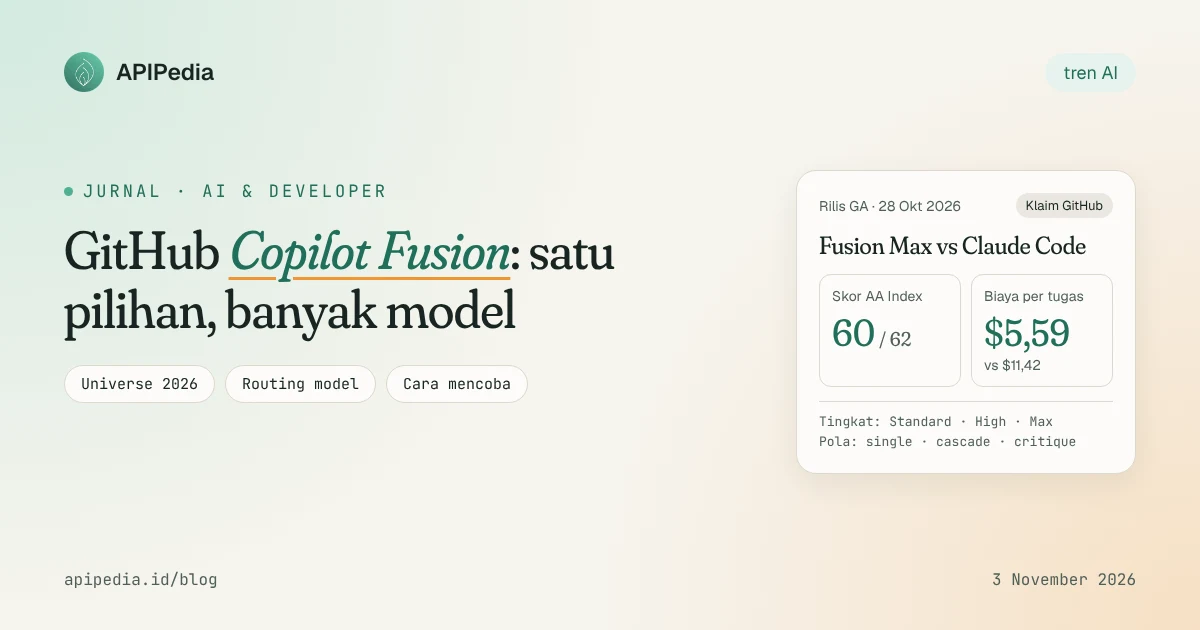
Copilot Fusion is a model orchestration system on GitHub Copilot that automatically selects, or combines, multiple AI models for each step of a coding task. Announced on GitHub Universe October 28, 2026 and immediately available to the general public, Fusion is important because it promises results on par with the best coding agencies at about half the cost per task.
A week after launch, Fusion is still the subject of long discussion among developers. There are those who are enthusiastic because there is no longer a need to change models, there are also those who are skeptical because the main benchmark figures come from evaluations funded by GitHub itself. This article summarizes what's new, how it works, how it compares to alternatives, and how to try it today.
What exactly is Copilot Fusion?
So far, Copilot users choose their own models in the model picker: Claude for refactor, GPT for other tasks, small models for autocomplete. The problem is, many people choose the most powerful model for difficult tasks and then forget to replace it. Hari Pokhrel, principal software engineer at AT&T, called this habit a source of token waste.
Fusion takes over that decision. GitHub's head of product, Mario Rodriguez, sums it up this way: "It's not a model. It's an orchestration engine at runtime." Fusion combines two things that previously ran separately:
- Project HydraFusion, a research orchestration model that opened as a research preview on September 4, 2026.
- Copilot Auto Model Selection, a pre-existing automatic model selection feature.
Users who previously participated in the HydraFusion or Auto preview are automatically moved to the equivalent level of Fusion.
How does Fusion choose models?
For each task, Fusion weighs the needs for reasoning, coding, debugging, and tool usage, then chooses one of three patterns. Fusion can also switch models in the middle of a workflow.
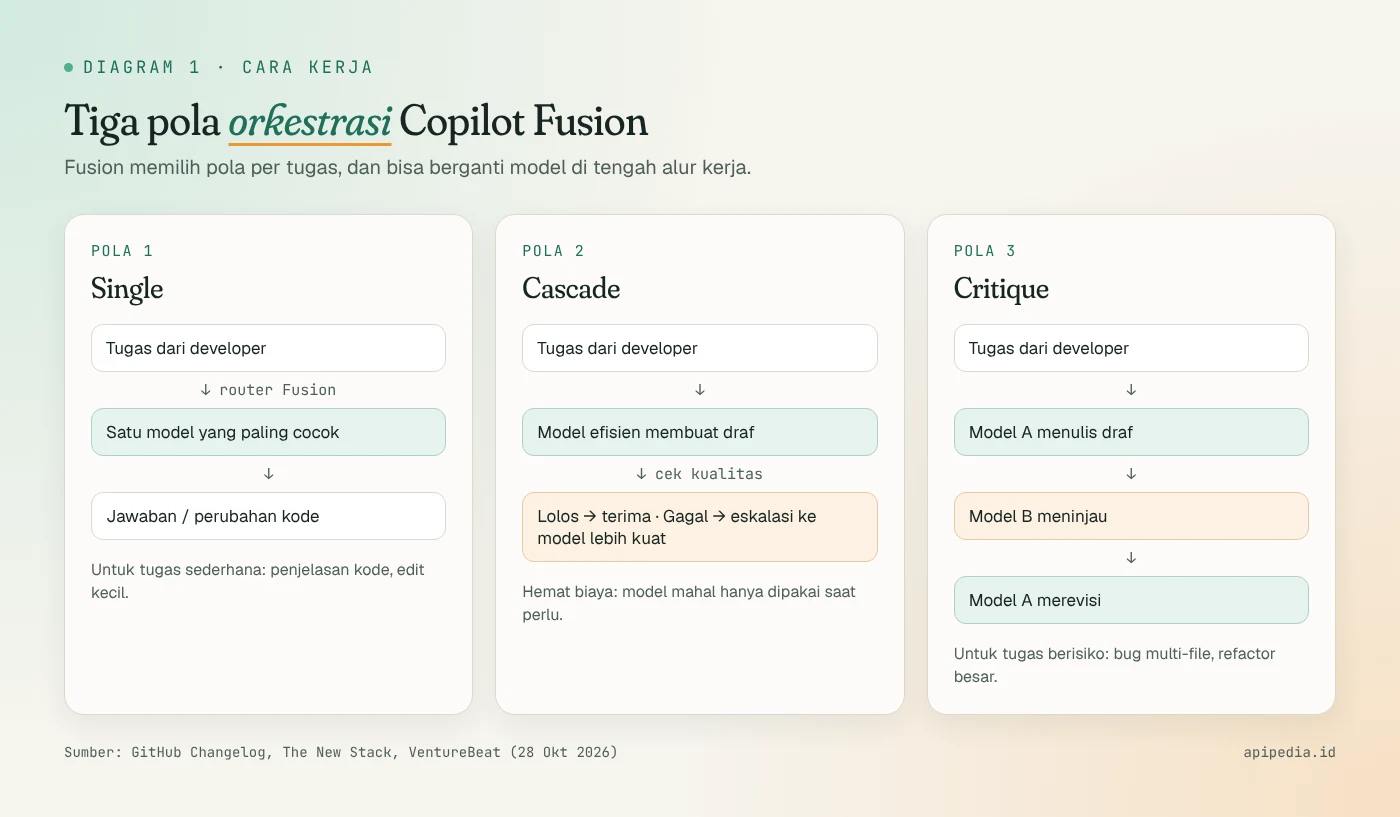
- Single: the task is sent to the single most suitable model. Great for explaining code or small edits.
- Cascade: a more economical model for drafting. If it passes the quality check, the result is accepted; otherwise, the task is escalated to a more powerful model.
- Critique: one model writes a draft, another model reviews it, then the first model revises.
According to Artificial Analysis, the collection of models used by Fusion during testing included Claude Opus 5.5, Claude Sonnet 5.5, GPT-6 Astra, and GPT-6 Sol. This list is subject to change per request and following organizational policy. If you haven't been following the development of these models, also read our GPT-6 summary and Claude Haiku 5.5 review.
What's the difference between Standard, High and Max?
Developers still hold one lever: effort level.
- Fusion Standard: for everyday coding.
- Fusion High: for more challenging tasks that require deeper reasoning.
- Fusion Max: for the heaviest and most complex jobs.
There is also a "Fusion Fast" variant that cannot be selected manually and, according to third party guides, is only used in VS Code inline chat.
How good are the results compared to alternatives?
GitHub's main claim rests on the Artificial Analysis Coding Agent Index v2.0, with Fusion Max running via the Copilot CLI. Important to note: Artificial Analysis states this evaluation was commissioned and funded by GitHub.
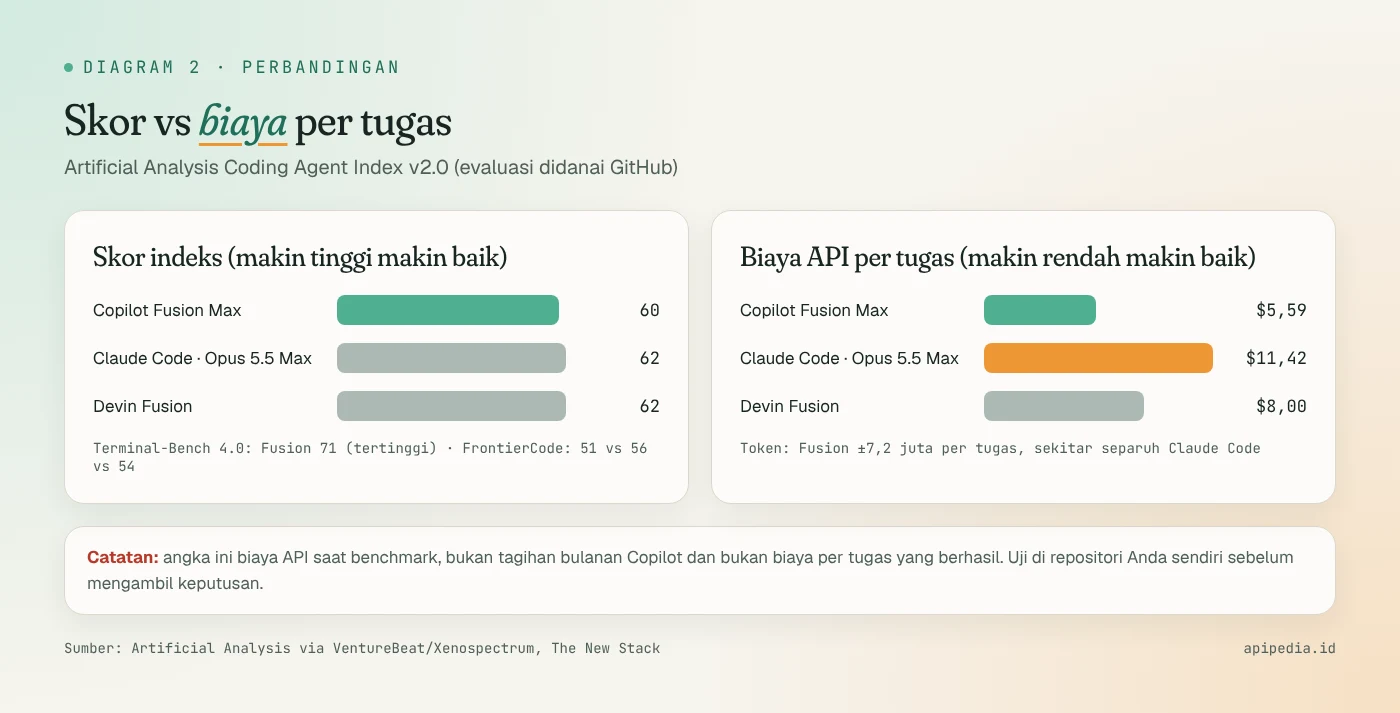
| Metric | Copilot Fusion Max | Claude Code (Opus 5.5 Max) | Devin Fusion |
|---|---|---|---|
| Coding Agent Index Score | 60 | 62 | 62 |
| Average API cost per task | $5.59 | $11.42 | $8.00 |
| Terminal-Bench 4.0 | 71 (highest) | - | - |
| FrontierCode | 51 | 56 | 54 |
| Tokens per task | ±7.2 million | about 2× Fusion | ±30% more than Fusion |
From that table, the picture is pretty clear: the Fusion Max doesn't win on raw quality, but the margin is only 2 points while costing about 51% less. Jay Parikh (Microsoft's EVP CoreAI) also called Fusion Max about 40% faster per task.
Satya Nadella had uploaded a savings figure of "up to 77%". These numbers come from different internal evaluations, not Artificial Analysis averages, so don't mix them up. The headlines of several media also wrote that Fusion "beats" Claude Code, even though the content of the article itself stated that the scores were comparable.
Is this a new trend?
Not completely. Replit made intelligent model routing the default for all accounts since the summer, and Ramp moved model selection to its open source coding agent, Open SWE, last month. Devin also has his own "Fusion" approach. The difference is, GitHub brings this pattern to a very large user base. The Octoverse 2026 report released simultaneously recorded more than 225 million developers, and 61% of Copilot users who chose their own model in September turned out to use more than one model.
Who can use it and how much does it cost?
| Aspect | Information |
|---|---|
| Status | Generally available (GA) from October 28, 2026 |
| Fusion Standard | All packages, including Free and Student |
| Fusion High & Max | Pro+, Max, Business, and Enterprise (not Free, Student, Pro) |
| Orchestration costs | There are no additional fees; Each model used is billed according to its standard rate |
| Promotion | 30% discount on model fees for paid plans until November 30, 2026 |
| Client | VS Code, Copilot CLI, Copilot app; JetBrains support is said to be available by some sources, "coming soon" by others |
One thing to be aware of: because a single task can go through multiple models (draft, critique, revision), the High and Max levels can use up more AI credits than a single request to a single model. There is no fixed rate per Fusion task.
For Enterprise customers, admins can limit which models Fusion is allowed to select without turning off that model for the entire team, while setting Fusion as the default. Starting October 28, GitHub Enterprise customers can also use all Copilot features without a separate Copilot subscription and simply pay for used AI credits; This scheme is currently being sold through the sales team.
How to try Copilot Fusion?
Via VS Code
- Update VS Code and the Copilot extension to the latest version.
- Open Settings and make sure
chat.copilot.dynamicAutoTiers.enabledare active. - Start a new chat, open the model picker, then select Copilot Fusion and the available effort level.
If the picker still displays "Auto", it's likely that your package doesn't have a qualifying Fusion tier.
Via Copilot CLI
# Pasang atau perbarui Copilot CLI (butuh Node.js)
npm install -g @github/copilot

# Masuk ke folder proyek lalu jalankan sesi interaktif
cd ~/proyek-saya
copilot

# Di dalam sesi, ketik perintah ini lalu pilih Fusion + tingkatnya
/model
For non-interactive mode, third-party guides provide examples of the following flags. Start with a read-only task, and check the flag names in your version with copilot --help because the CLI changes quickly:
copilot --model fusion --fusion-tier standard \
  -p "Jelaskan cara repositori ini menjalankan test. Jangan ubah file apa pun."
When to choose which level?
- Standard: explains foreign code, small edits with clear boundaries. Start here.
- High: cross-file bugs that can be reproduced, so that the review stage has a clear target.
- Max: difficult failure with several possible causes. Avoid vague prompts like “repair the entire application,” because you can't judge whether the extra effort is worth it.
What are the notes and risks?
- The benchmark figure is the cost of the API while testing, not your monthly Copilot bill, and not the cost per successful task. The cost of human review is also not calculated.
- Results may vary per workload. Fusion leads on Terminal-Bench but lags on FrontierCode. Test in own repository.
- Discarded drafts can leave behind file changes. Always check
git diffcomplete before commit. - Not suitable for controlled experiments. If you need reproducible results or a fair comparison of models, turn off Fusion and select fixed models.
- Local model routing is still in preview. Fusion Standard can use on-device models (e.g. MAI Code 1.1 Flash on Windows, or Qwen3.8 Flash Next via a local OpenAI-compatible server), but routing decisions remain in the cloud, so sessions cannot be offline.
Because coding agents are now increasingly autonomous, make it a habit to also maintain a clean work environment. The case of a fake coding agent extension that installed an SSH backdoor is a reminder that strong AI tools need equally strong security discipline.
What does this mean for Indonesian developers?
For small teams on tight budgets, the biggest appeal is cost control. Start at Fusion Standard (free on all plans) for daily work, then move up to High or Max for hard problems only. Take advantage of the 30% discount until November 30 to measure for yourself how many credits are used per real task in your repository.
If you are building an application that needs local Indonesian data, such as regions, holidays, or exchange rates, a coding agent like Copilot can also directly call a ready-to-use API. For example, connect to APIPedia via MCP or retrieve the API key at console.apipedia.id.
FAQs
Is Copilot Fusion a new AI model?
No. Fusion is an orchestration engine that selects and combines existing models, such as Claude Opus 5.5, Claude Sonnet 5.5, and variants of GPT-6, according to the needs of each task.
Is Fusion free?
Fusion Standard is available on all plans including Free and Student. There is no separate orchestration fee, but each model used is still calculated according to its standard rate. High and Max require the Pro+ package and above.
Is Fusion really better than Claude Code?
Not necessarily. On the Coding Agent Index, Fusion Max gets 60, while Claude Code with Opus 5.5 Max gets 62. Fusion's advantages are in cost (about half that) and speed, not raw quality. This evaluation was also funded by GitHub.
Can Fusion be used offline with local models?
Not completely. There is a preview of routing to the local model, but routing decisions are still made in the cloud, so an internet connection is still required.
How do enterprise admins control Fusion?
Enterprise admins can limit the models Fusion can select, disable certain models specifically for Fusion, and set the Fusion tier as default via managed settings.
Source
- The New Stack: GitHub debuts Copilot Fusion (Oct 28, 2026)
- The Next Web: GitHub launches Copilot Fusion as agent starting 40% of pull requests
- Let's Data Science: GitHub Launches Copilot Fusion to Route Coding Tasks Across Models (encompassing VentureBeat, Xenospectrum, Artificial Analysis)
- SmartScope: Copilot Fusion GA, supported changes and packages
- AI TLDR: GitHub Copilot Fusion GA
- Omid Saffari: GitHub Copilot Fusion, How It Works and When to Use It
- GitHub Changelog: Route and orchestrate models with GitHub Copilot Fusion
Topics: #github copilot #ai coding #agen ai #developer tools #model ai
${c.about}
Tim APIPedia — Tim Engineering APIPedia
Tim engineering di balik APIPedia yang membangun dan memelihara API data Indonesia - ongkir, OCR KTP, data wilayah, BMKG, hingga server MCP - dan menulis panduan integrasinya dari pengalaman langsung.