Gemini Computer Use Official GA: AI Agent Can Click on Browser, Desktop, and Android
By Tim APIPedia, Tim Engineering APIPedia · Published · Updated · 8 min read
Google released the Computer Use in Gemini API to GA. Here's how it works, the price, how it differs from Claude and OpenAI, and how to try it.
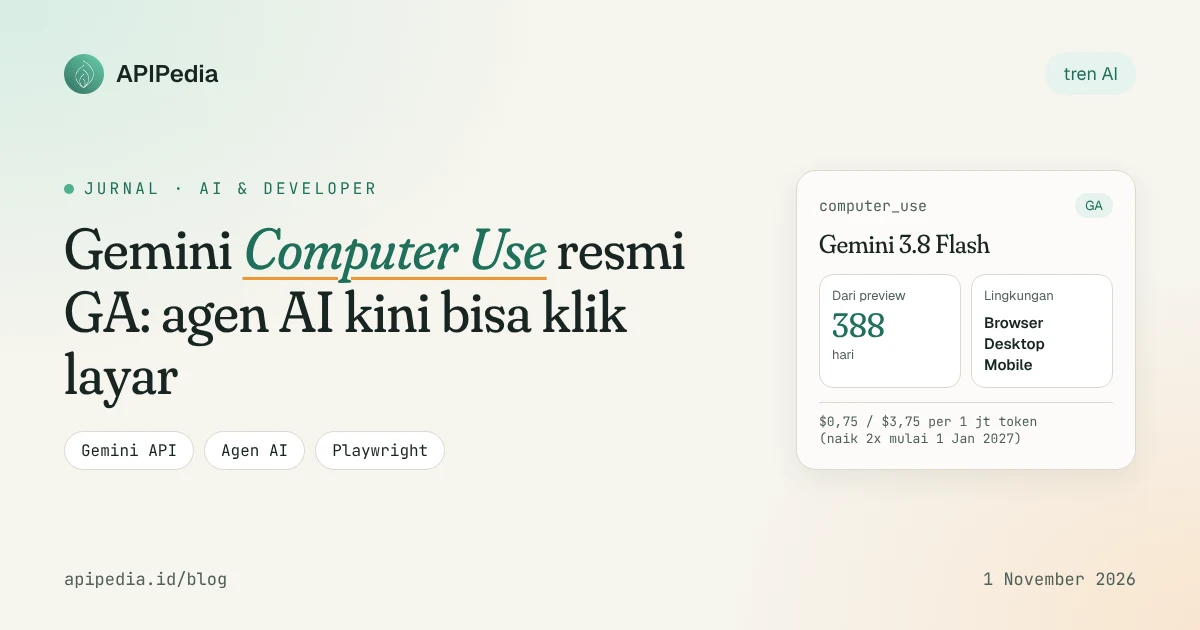
Gemini Computer Use is a tool in the Gemini API that allows AI models to "see" screenshots and then suggest clicks, typing, and scrolling like humans. On October 30, 2026 Google raised its status to general availability (GA). This means that developers can now build agents that operate browser, desktop, and mobile applications on top of APIs that are declared ready to use.
This news was widely discussed because it took 388 days from the first preview to GA. In addition, the prices of some of its supporting models are scheduled to double in the next two months. This article summarizes what's new, how it works, how it compares to Claude and OpenAI, and how to try it out.
What did Google actually announce?
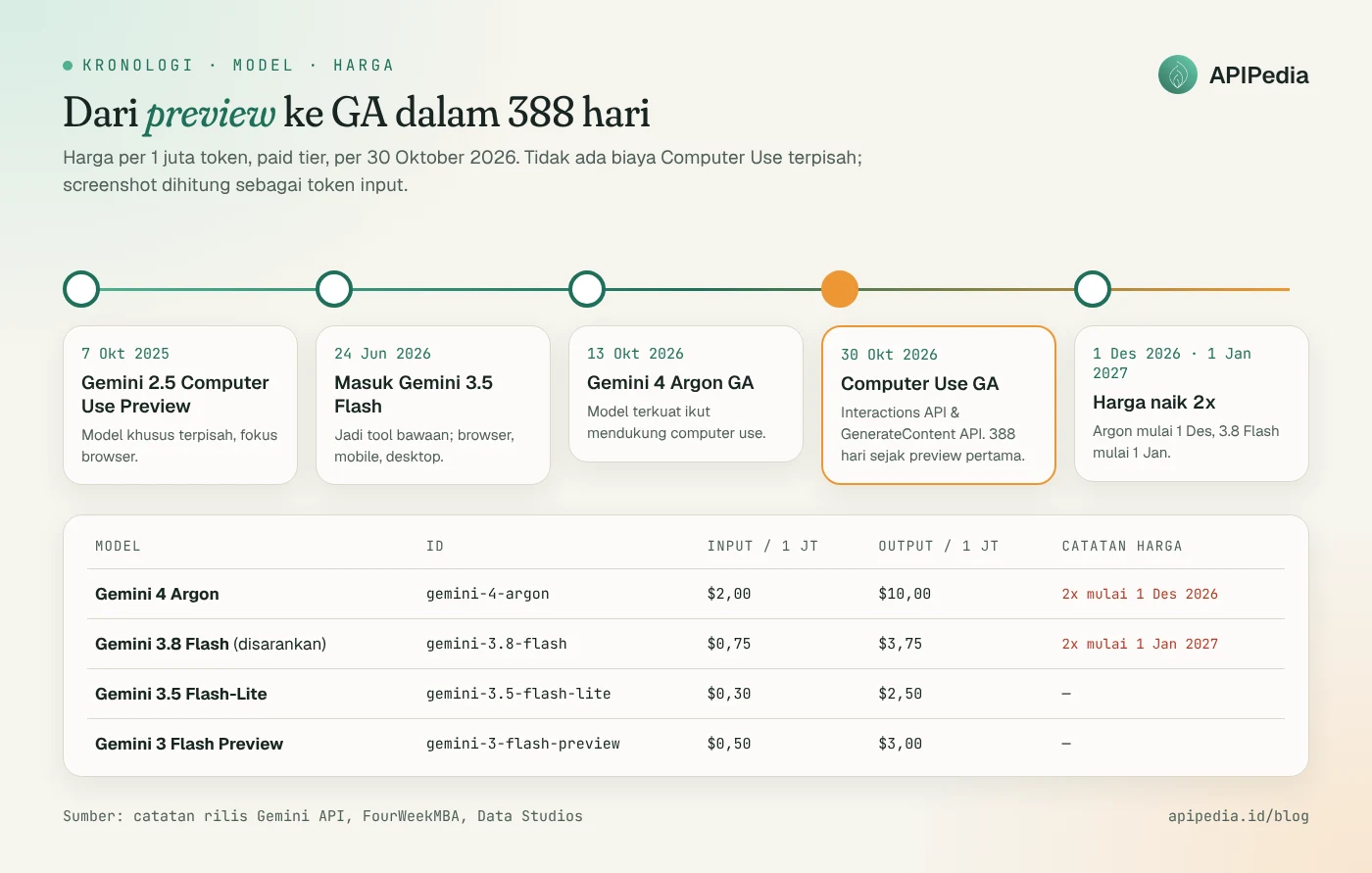
The October 30, 2026 Gemini API release notes are just one line: the Computer Use tool is released to GA in the Interactions API and GenerateContent API. More details are in the tech media documentation and roundup:
- Three environments: browser, desktop, and mobile (optimized for Android).
- Four models support: Gemini 4 Argon, Gemini 3.8 Flash (recommended model for computer use), Gemini 3.5 Flash-Lite, and Gemini 3 Flash Preview.
- No additional fees: Computer Use is billed at the regular token rate. Each screenshot counts as an input token. This feature is only for the paid tier, not available on the free tier.
- Field
intent: for Gemini 4 and 3.x models, each action is accompanied by a brief reason from the model. This makes auditing and debugging easier. - Security controls: each action can be assigned
safety_decision(allowed, requires confirmation, or blocked), plus prompt injection detection can be enabled.
One important note: according to Data Studios, the feature's documentation page still contains the typical preview warning that Computer Use may contain errors and security holes. So the GA label does not mean the agent can be released without supervision.
How does Computer Use work?
The model never touches your computer directly. He just read the screenshot and then proposed action. Your code that performs the action, for example via Playwright, then sends a new screenshot. Continue like this until the task is completed.
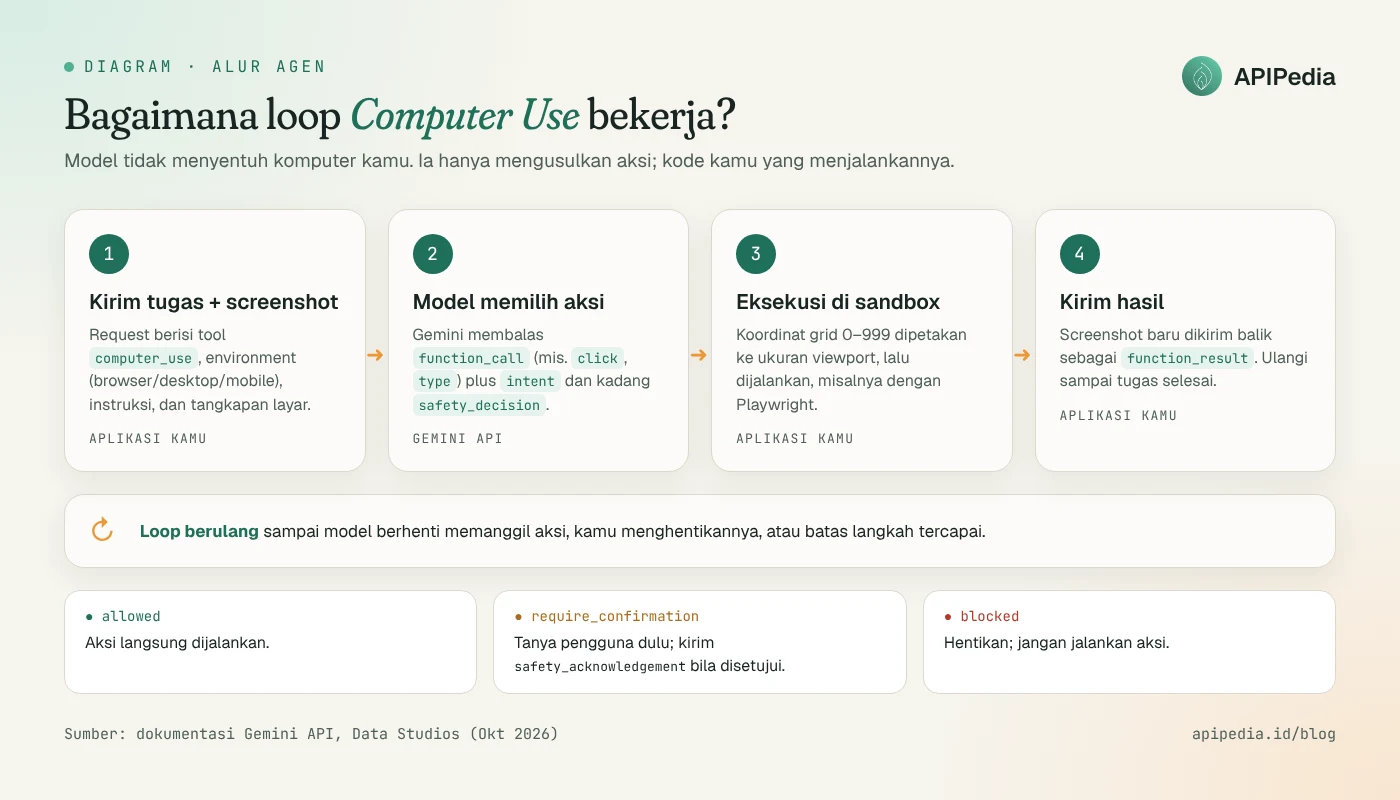
Some technical details you need to know:
- Coordinates are normalized. The model predicts positions on a 1000×1000 grid (integers 0–999). You do not need to send the screen resolution, but must scale the coordinates to the viewport size before executing. The official example uses a 1440×900 viewport, although that is not a requirement.
- Built-in action list. For browsers and desktops available include
click,double_click,right_click,type,scroll,drag_and_drop,hotkey,navigate,go_back, andtake_screenshot. For mobile there areopen_app,list_apps,long_press, and others. - Actions can be limited or added. Parameter
excluded_predefined_functionsremoves default actions that you don't want. You can also register your own functions, for exampleyield_to_userto return control to the human.
When is an agent required to ask for permission?
Google mapped out seven policy categories: financial transactions, modification of sensitive data, communication tools (sending messages or emails), account creation, data modification, user consent management, and legal terms and agreements. If an action falls into this category, the model can return require_confirmation. Your app should ask the user, then send safety_acknowledgement if approved. If the status is blocked, stop the loop.
Prompt injection detection via enable_prompt_injection_detection checks screenshots of hidden instructions, for example text on a web page that tells an agent to transfer money. This feature is off by default and requires Gemini 3.5 Flash-Lite or later.
How much does it cost and which model to choose?
Since there are no separate fees, agent fees depend on the number of steps and the size of the screenshot. Rates as of October 30, 2026 (paid tier, USD per 1 million tokens):
| Model | ID | Inputs | Outputs | Scheduled changes |
|---|---|---|---|---|
| Gemini 4 Argon | gemini-4-argon | $2.00 | $10.00 | Increase 2x starting 1 Dec 2026 |
| Gemini 3.8 Flash (recommended) | gemini-3.8-flash | $0.75 | $3.75 | Increases to $1.50 / $7.50 starting Jan 1, 2027 |
| Gemini 3.5 Flash-Lite | gemini-3.5-flash-lite | $0.30 | $2.50 | There isn't any yet |
| Gemini 3 Flash Preview | gemini-3-flash-preview | $0.50 | $3.00 | There isn't any yet |
Data Studios created a simulation: one session of 25 steps, each about 15,000 input tokens and 400 output tokens. That works out to approximately $0.32 per session with Gemini 3.8 Flash (approximately $0.64 after January 2027), $0.85 with Gemini 4 Argon, and $0.14 with Flash-Lite. This figure is the author's assumption, not Google's official figure, so measure it yourself based on your workload.
How does it compare to Claude and OpenAI?
Google wasn't the first. Anthropic released computer-use in beta with Claude 3.5 Sonnet in October 2024, and OpenAI introduced the computer-use model (which also powers Operator) in March 2025. The difference is that Google is now the most explicit in calling its features GA.
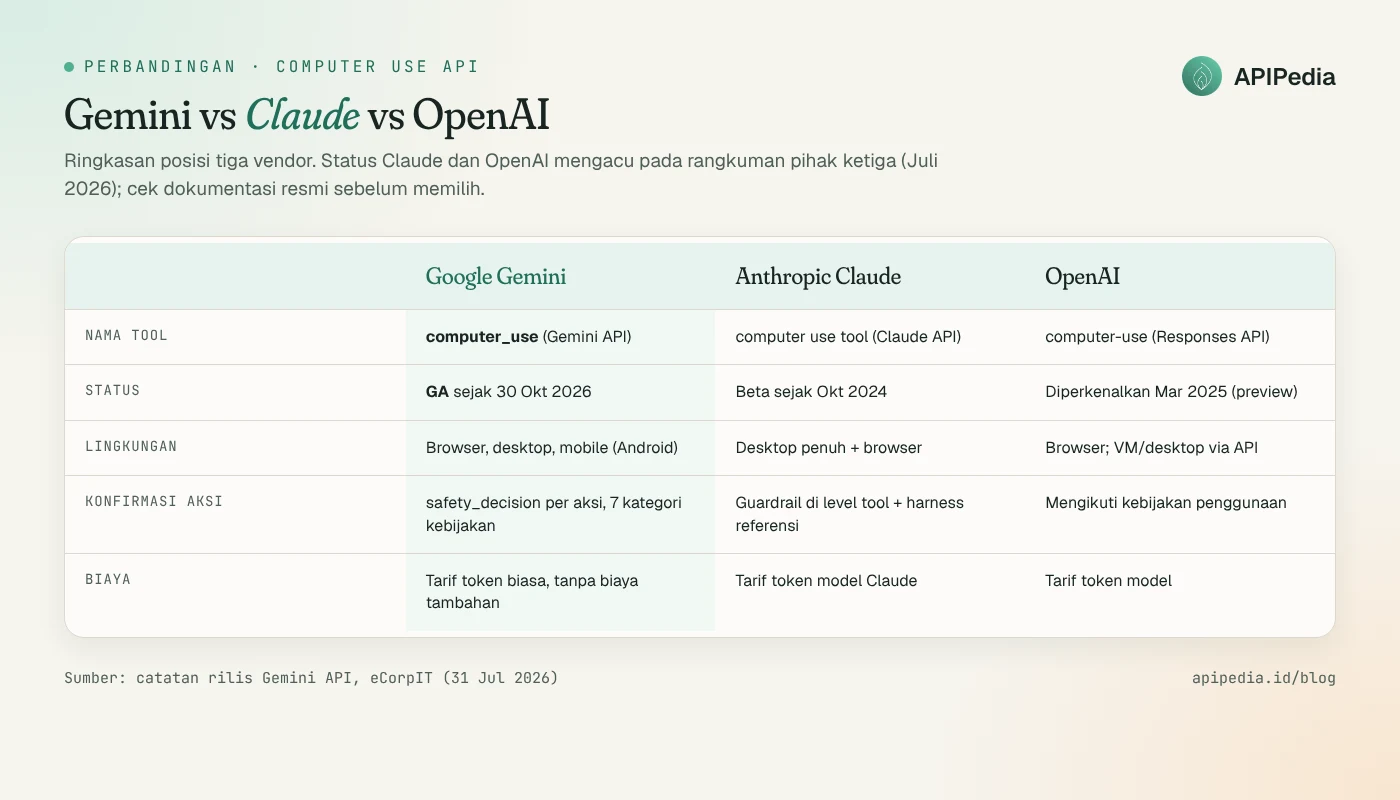
Regarding benchmarks, be careful comparing. The eCorpIT roundup (July 2026) notes Claude Sonnet 4.6 achieved a 72.7% in OSWorld according to Anthropic, while Gemini 2.5 Computer Use was reported as ahead in Online-Mind2Web, WebVoyager, and AndroidWorld. Each vendor uses different harnesses, dates, and retry rules, and most numbers are self-reported. For this GA release, FourWeekMBA and Data Studios both found no new benchmarks from Google.
Choose Gemini if you need Android mobile support and already use the Google Cloud ecosystem. Select Claude if the workload is full desktop control. Choose OpenAI if your stack is already in the Responses API. If you're comparing frontier models in general, also check out our GPT-6 and Mistral Large 4 reviews.
How to try it?
Prepare the Gemini API key from the paid tier project. The first request to the Interactions API looks like this (the structure follows the example in the official documentation; check the Computer Use page for the latest field names):
curl -X POST \
  "https://generativelanguage.googleapis.com/v1beta/interactions" \
  -H "x-goog-api-key: $GEMINI_API_KEY" \
  -H "Content-Type: application/json" \
  -d '{
    "model": "gemini-3.8-flash",
    "input": "Buka https://example.com lalu laporkan judul halamannya.",
    "tools": [{
      "type": "computer_use",
      "environment": "browser",
      "enable_prompt_injection_detection": true
    }]
  }'
The response contains function_call, for example a click at a specific coordinate. The part that goes wrong most often is precisely on the client side: scaling coordinates and handling safety_decision. Here's a Python framework with Playwright for those two things:
from playwright.sync_api import sync_playwright

VIEWPORT_W, VIEWPORT_H = 1440, 900

def denorm(x: int, y: int) -> tuple[int, int]:
    """Ubah koordinat grid 0-999 dari model ke piksel viewport."""
    return int(x / 1000 * VIEWPORT_W), int(y / 1000 * VIEWPORT_H)

def boleh_jalan(safety_decision: dict | None) -> bool:
    if not safety_decision:
        return True
    keputusan = safety_decision.get("decision")
    if keputusan == "blocked":
        return False
    if keputusan == "require_confirmation":
        jawab = input(f"Agen minta izin: {safety_decision.get('explanation')} [y/N] ")
        return jawab.strip().lower() == "y"
    return True

def jalankan(page, nama: str, args: dict) -> None:
    if nama == "click":
        page.mouse.click(*denorm(args["x"], args["y"]))
    elif nama == "type":
        page.keyboard.type(args["text"])
    elif nama == "navigate":
        page.goto(args["url"])
    elif nama == "scroll":
        page.mouse.wheel(0, args.get("delta_y", 400))
    # tambahkan aksi lain sesuai kebutuhan

with sync_playwright() as p:
    browser = p.chromium.launch()
    page = browser.new_page(viewport={"width": VIEWPORT_W, "height": VIEWPORT_H})
    page.goto("https://example.com")
    screenshot = page.screenshot(type="png")  # kirim ke model, ulangi per langkah
    browser.close()
Argument names such as x, y, and text above are illustrative. Adjust it to the function_call shape that you actually receive. For a complete implementation, Google provides a google-gemini/computer-use-preview reference repository on GitHub.
Checklist before entering production
- Run the browser in a VM or isolated container, not on a laptop logged into an important account.
- Activate
enable_prompt_injection_detectionand use the domain allowlist. - Limit the number of steps per session so costs don't increase.
- Save
intentlogs and screenshots for auditing. - For data available via an API, call the API directly. Clicking on the UI is slower and more expensive than a single JSON request, for example checking shipping or regional data via APIPedia. Agents can also call the API as a tool via MCP.
FAQs
Is Gemini Computer Use free?
No. This feature is only for the paid tier and is billed at the model token rate used. There is no separate Computer Use fee, but each screenshot counts as an input token.
What model is best to start with?
Google suggests Gemini 3.8 Flash. For more complex reasoning tasks there is the Gemini 4 Argon, while the Gemini 3.5 Flash-Lite is suitable when latency and cost are most important.
Can agents make payments themselves?
Financial transactions are included in the categories that can trigger require_confirmation. Your application decides whether the action is executed. Best practice, always ask for human approval for actions like this.
What is the difference between the Interactions API and the GenerateContent API?
Both support Computer Use. The Interactions API is a new stateful interface with endpoint /v1beta/interactions, while GenerateContent is an old API using types.Tool(computer_use=...) in the Python 2.7.0 SDK and above.
Does the GA label mean it is completely safe?
Not necessarily. The documentation still warns of potential errors and security gaps, and recommends sandboxing and human oversight for critical tasks.
Source
- Gemini API Release Notes (Google AI for Developers)
- Data Studios: Gemini API Computer Use is generally available
- FourWeekMBA: Gemini Computer Use Reaches GA 388 Days After First Preview
- Google Blog: Introducing computer use in Gemini 3.5 Flash
- eCorpIT: Gemini vs Claude vs OpenAI computer use (July 2026)
Topics: #gemini #agen ai #computer use #google #playwright
${c.about}
Tim APIPedia — Tim Engineering APIPedia
Tim engineering di balik APIPedia yang membangun dan memelihara API data Indonesia - ongkir, OCR KTP, data wilayah, BMKG, hingga server MCP - dan menulis panduan integrasinya dari pengalaman langsung.