Jev in the Cloud, Jev Local, and Qev: AI Models that Answer with Decisions, Not Text
By Tim APIPedia, Tim Engineering APIPedia · Published · 14 min read
Jev from TypeSafe AI answers yes/no, choices, and scores with probabilities. Here's how to use it in the cloud, on-premises options, and Qwen-based Qev.
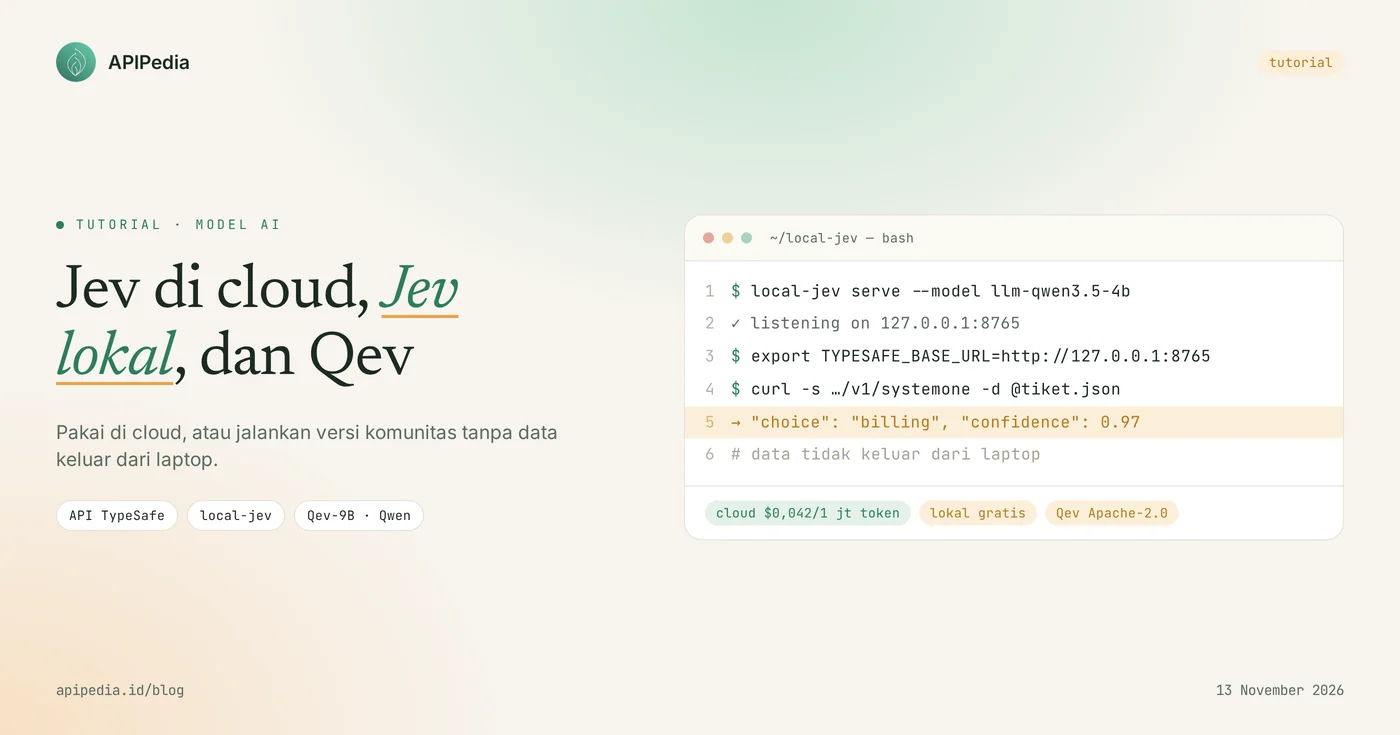
Jev is a "System One" AI model made by TypeSafe AI that does not write text, but instead answers type questions (yes/no, choose one, or score) complete with probabilities. Jev was released in early access on September 15, 2026, available only as a cloud API, with an input rate of $0.042 per 1 million tokens and output is free. The model weights are not released, so the "local Jevs" floating around are actually community projects that copy how it works, and Qev is one of them: a Qwen model retrained to answer in a Jev-style decision format.
A model like this is important because most LLM calls in the app are really just asking for decisions: which team does this ticket belong to, this comment needs to be moderated or not, this prompt can be answered with a small model or needs a large model. This article discusses how Jev works, how to use it in the cloud, options for running it on your own laptop, what Qev is, and when you should choose each.
Quick summary: What is cloud Jev, local Jev, and Qev?
Jev cloud is the official TypeSafe AI service, while local Jev and Qev are community projects that emulate Jev's decision format and can be run on one's own computer.
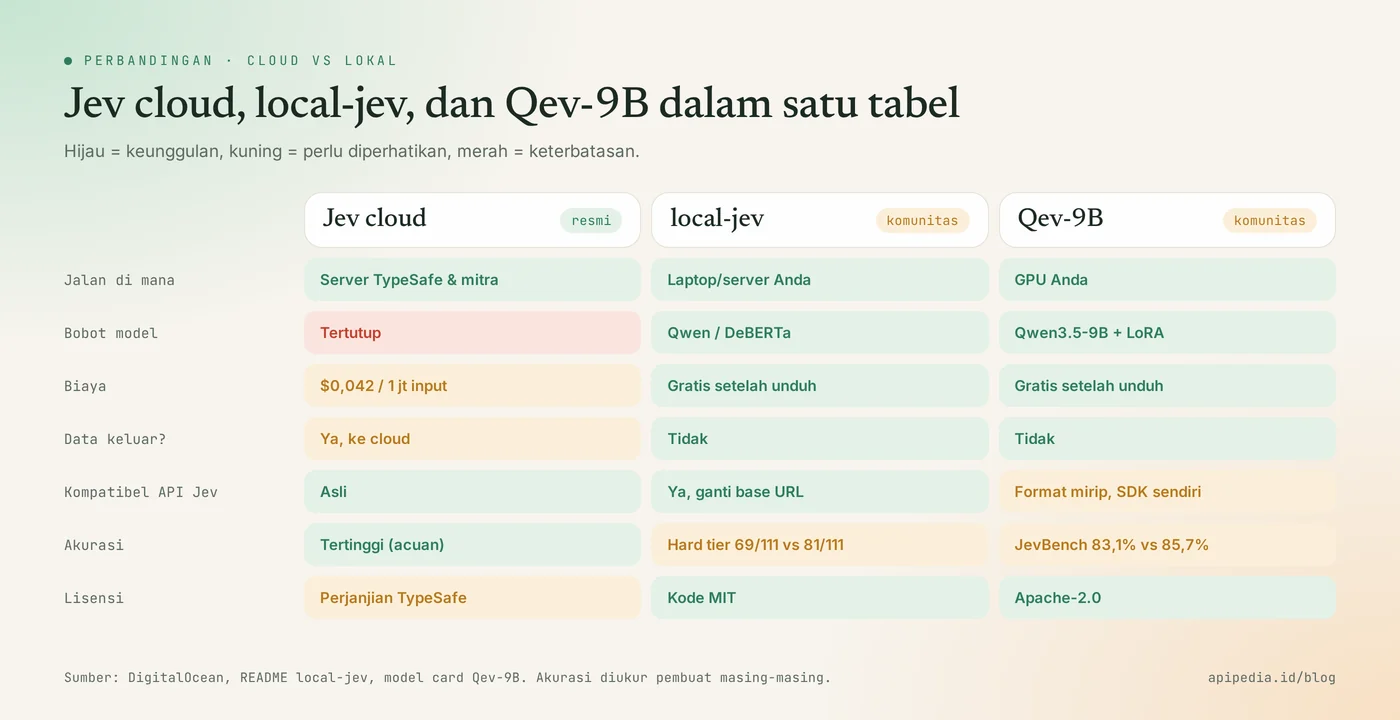
| Items | Jev (cloud) | Local Jev (local-jev) | Qev-9B |
|---|---|---|---|
| Maker | TypeSafe AI (official) | Community project, not affiliated with TypeSafe | Community project, not affiliated with TypeSafe |
| Where to go? | TypeSafe servers and partners (DigitalOcean, Vercel AI Gateway, etc.) | Your computer, 127.0.0.1:8765 | Your computer (GPU recommended) |
| Basic model | Not disclosed | The Qwen or DeBERTa model is used as an assessor | Qwen3.5-9B-Base + LoRA + decision head |
| Cost | Input $0.042 per 1 million tokens, output free | Free after model download | Free after model download |
| Answer format | noul, choice, score + probability | Same as Jev (identical wire format) | Choice, Noul, Score + probability |
| License | Sealed, following the TypeSafe agreement | MIT code, models subject to respective licenses | Apache-2.0 |
What is Jev and why is it called the System One model?
Jev is called the System One model because it is designed for quick decisions, taking the term System 1 (fast and intuitive thinking) from the book Thinking, Fast and Slow by Daniel Kahneman. LLM used to work like System 2: writing long answers token by token. Jev just judged, without writing a long answer.
TypeSafe itself calls Jev a "frontier-intelligence function call": unstructured state in, typed decision with probability out.
The way to use it is also different. You don't send a conversation ( messages), but rather two things: state containing the text you want to rate (ticket, transaction, comment), and questions containing one or more type questions. Because the answer choices are determined before the call, the results always match the schema and can be directly used by your code to branch.
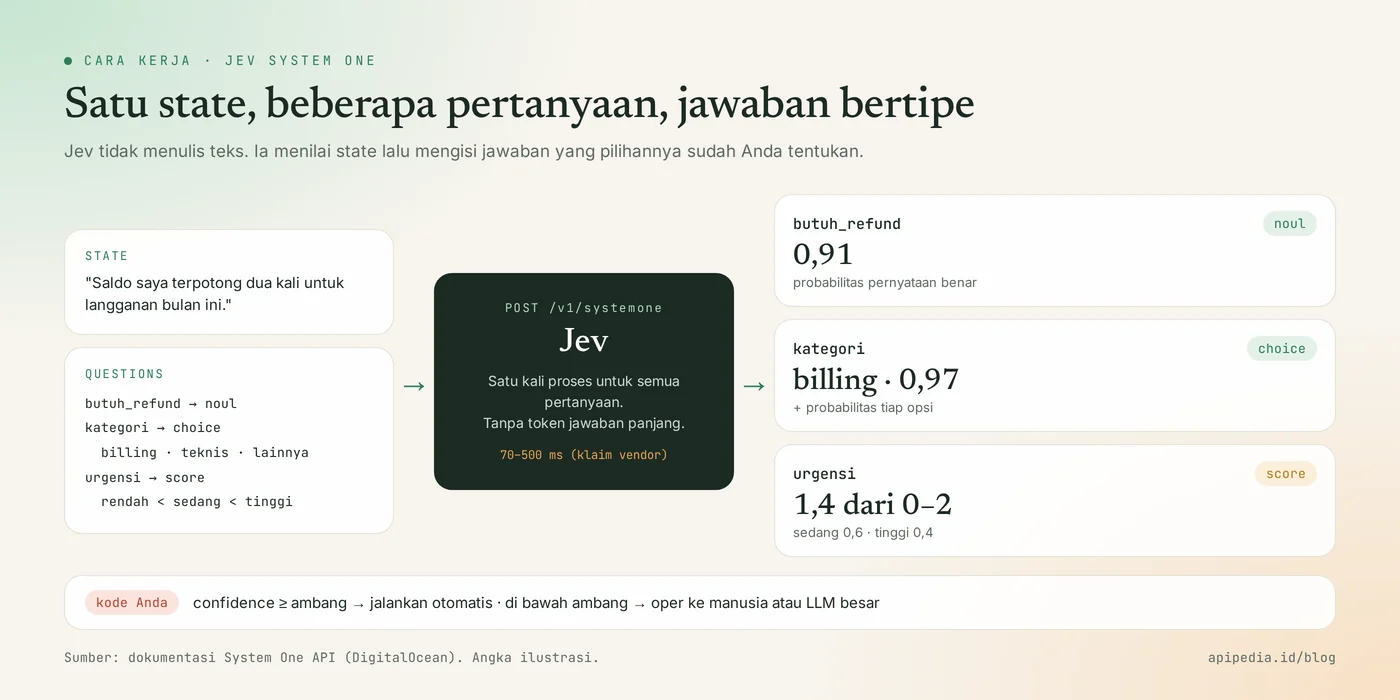
Three types of questions in Jev
noul(yes/no). Jev returns the probability that the statement ininstructionsis true, for example 0.91 for "Customer needs a refund?". This type does not usecriteria.choice(choose one). You give a list of options along with their descriptions, Jev chooses one and gives a probability for each option.score(consecutive scores). You grade them from lowest to highest, for example low–medium–high. Jev returns the weighted average score of the tier positions, the probability of each tier, and the valueconfidence.
One request may contain several questions at once, and all of them are answered in one process. One name note: the TypeSafe AI that Jev created has nothing to do with a Scala company called Typesafe (now Lightbend).
How to use Jev in the cloud?
Jev in the cloud is called via POST https://api.typesafe.ai/v1/systemone with header Authorization: Bearer, using the key from the TypeSafe console. The jev-latest model is currently leading to jev-1.13.0. If you set the threshold based on test results, pin the version, because alias jev-latest can move when there is a new release.
The following example evaluates one ticket with three question types in one call:
curl -sS -X POST https://api.typesafe.ai/v1/systemone \
  -H "Authorization: Bearer $TYPESAFE_API_KEY" \
  -H "Content-Type: application/json" \
  -d '{
    "model": "jev-1.13.0",
    "state": "Tiket: Saldo saya terpotong dua kali untuk langganan bulan ini.",
    "questions": {
      "butuh_refund": {
        "type": "noul",
        "instructions": "Apakah pelanggan butuh refund?"
      },
      "kategori": {
        "type": "choice",
        "instructions": "Kategori mana yang paling cocok untuk tiket ini?",
        "criteria": {
          "billing": "Masalah tagihan, potongan saldo, atau pembayaran",
          "teknis": "Error atau gangguan produk",
          "lainnya": "Selain dua kategori di atas"
        }
      },
      "urgensi": {
        "type": "score",
        "instructions": "Seberapa mendesak tiket ini?",
        "criteria": [{"label": "rendah"}, {"label": "sedang"}, {"label": "tinggi"}]
      }
    }
  }'
Form the answer (the numbers below are just illustrations, not test results):
{
  "model": "jev-1.13.0",
  "answers": {
    "butuh_refund": { "type": "noul", "noul": 0.91 },
    "kategori": {
      "type": "choice",
      "choice": "billing",
      "probabilities": { "billing": 0.97, "teknis": 0.02, "lainnya": 0.01 },
      "confidence": 0.97
    },
    "urgensi": {
      "type": "score",
      "score": 1.4,
      "legend": { "0": "rendah", "1": "sedang", "2": "tinggi" },
      "probabilities": { "0": 0.0, "1": 0.6, "2": 0.4 },
      "confidence": 0.6
    }
  },
  "usage": { "input_tokens": 160, "output_tokens": 20 }
}
Use probability as a gate, not as truth
Jev's main strength is in its probabilities: your code can decide for itself when a result is certain enough to execute automatically, and when it should be passed to a human or to a larger LLM. The simple pattern in Python:
import os, requests

def nilai_tiket(teks):
    r = requests.post(
        "https://api.typesafe.ai/v1/systemone",
        headers={"Authorization": f"Bearer {os.environ['TYPESAFE_API_KEY']}"},
        json={
            "model": "jev-1.13.0",
            "state": teks,
            "questions": {
                "kategori": {
                    "type": "choice",
                    "instructions": "Tim mana yang harus menangani tiket ini?",
                    "criteria": {"billing": "Tagihan dan refund", "teknis": "Error produk"},
                }
            },
        },
        timeout=10,
    )
    r.raise_for_status()
    return r.json()["answers"]["kategori"]

hasil = nilai_tiket("Saldo saya terpotong dua kali bulan ini.")
if hasil["confidence"] >= 0.85:      # ambang hasil uji Anda sendiri
    print("Kirim otomatis ke tim", hasil["choice"])
else:
    print("Ragu-ragu, oper ke agen manusia")
Where can Jev be accessed?
- Direct TypeSafe API in
api.typesafe.ai, key generated inconsole.typesafe.ai. - DigitalOcean Serverless Inference at
https://inference.do-ai.run/v1/systemonewith model IDtypesafe-jev-1.13.0. - Vercel AI Gateway with model
typesafe-ai/jev. In the AI SDK, the yes/no type is calledboolean, notnoul. - Other API aggregators that follow the System One format, with their own rates (can differ slightly from TypeSafe rates).
Limits noted in the DigitalOcean documentation: maximum total requests of 64K tokens, state plus longest questions maximum of 32K tokens, and does not yet support image, audio, video or streaming input.
How fast and cheap is Jev?
TypeSafe claims 70–500 milliseconds end-to-end latency, with $0.042 input per 1 million tokens and free output. This latency figure is measured by TypeSafe itself on their infrastructure, so retest it on your network, especially from Indonesia to overseas servers. Since only input is charged, the cost depends on the length of state you send, not on the answer. If you are not familiar with token counting, first read the explanation of AI tokens such as credit.
Can Jev be run locally?
No, the original Jev cannot be run locally because TypeSafe does not release the weights or architecture of the model. What you can run on a laptop is a server or community model that mimics Jev's API contract: accept the same state and questions, then return a typed answer with probability. The accuracy is different from the original Jev, so treat it as an alternative, not a copy.
local-jev: Jev-compatible server that runs offline
local-jev is a local server that uses the same wire format as the Jev API, so the official SDK typesafe-sdk can be used without code changes, just change the base URL. Once the model is downloaded, no data leaves your computer. Requires Python 3.10+ and runs on macOS Apple Silicon, Linux, or Windows via WSL2.
git clone https://github.com/amithgc/local-jev && cd local-jev
uv venv --python 3.12 .venv
uv pip install --python .venv/bin/python -e .

# daftar model yang tersedia, lalu jalankan dengan model pilihan
.venv/bin/local-jev models
.venv/bin/local-jev serve --model llm-qwen3.5-4b

# arahkan SDK TypeSafe ke server lokal
export TYPESAFE_BASE_URL=http://127.0.0.1:8765
export TYPESAFE_API_KEY=local

# uji satu pertanyaan ya/tidak
curl -s http://127.0.0.1:8765/v1/systemone \
  -H "Content-Type: application/json" \
  -d '{"state": "Kartu saya ditagih dua kali bulan ini.",
       "questions": {"refund": {"type": "noul", "instructions": "Pelanggan ingin uangnya kembali"}}}'
Model choices noted by the creators, along with scores in the JevBench public set (a Jev-style decision task benchmark):
| Model | JevBench public | Download size | Notes |
|---|---|---|---|
llm-qwen3.5-4b | 80.5% | 9.32GB | By default, if it is on disk, it requires around 8.5 GB of memory |
llm-qwen3-4b | 70.1% | 8.04GB | Faster |
llm-qwen3.5-2b | 66.2% | 4.55GB | Size compromise |
llm-qwen2.5-1.5b | 58.9% | 3.09GB | The smallest memory in the Qwen family |
nli-deberta-large | 54.1% | 0.87GB | Smallest, downloaded on first run |
The author is open about its limitations: it's a research project, the numbers were measured on an Apple M4 Max (running on the CPU alone is fine but slow), and at the hard question level JevBench the default model got 69 out of 111 questions correct, while the original Jev got 81 out of 111. The local API key only protects /v1/*, so leave the server at localhost or behind your own proxy.
Another local alternative in circulation
- OpenJev, reimplementation of the Jev decision contract in TypeScript (
npm run dev, later openlocalhost:3001). It uses any chat model as an evaluator via an OpenAI-compatible endpoint, including local model servers. As of review, the repository doesn't have a license file yet, so read the code and don't use it commercially yet. - JEV-9B GGUF, LoRA System-1 coupled Qwen3.5-9B quantization (Q8_0 about 8.86 GiB). You can load llama.cpp or Ollama, but regular llama.cpp only runs text chat. The decision head requires a separate runtime that is accessed via author permission.
What is Qev, a "combination" of Jev and Qwen?
Qev is a Qwen model retrained into a decision model with a Jev-style answer format: given a context, a question, and answer options, it then returns a decision along with the probability of each option. So Qev is not the result of combining the weights of Jev with Qwen (closed Jev weights), but rather combines the workings of Jev with the open weights of Qwen. The results can be downloaded and run yourself.
The version with the most complete documentation is Qev-9B (v0.2.0) licensed Apache-2.0. The structure:
- Base:
Qwen/Qwen3.5-9B-Base, downloaded separately by the loader according to the version locked in the configuration. - Adaptation: LoRA rank 64 (alpha 128), plus decision head (4096→256 projections, two 4-head Transformer layers, and a scalar evaluator) and interaction gate.
- Task type: Choice, Noul (yes/no), and Score (sequential rating), same as Jev.
- Adaptation download package: about 690 MiB, beyond the weight of Qwen.
How to try Qev-9B
The author recommends Python 3.12 and PyTorch 2.8.0 to match your hardware:
git clone https://github.com/QiqianFu/Qev.git
cd Qev
python -m pip install -e .
from qev import Qev
model = Qev.from_pretrained("AustinFu/Qev-9B", revision="main", device="cuda")
hasil = model.predict({
"state": "Pelanggan melapor saldo terpotong dua kali dan minta bantuan segera.",
"questions": {
"tim": {
"type": "choice",
"instructions": "Tim mana yang harus menangani kasus ini?",
"criteria": {"billing": "Tagihan dan refund", "pengiriman": "Masalah kiriman"},
}
},
})
print(hasil["tim"]["choice"])
print(hasil["tim"]["probabilities"])How better is Qev compared to regular Qwen and Jev?
In the maker's own tests, the Qev-9B outperformed the base Qwen3.5-9B in all seven benchmarks, but still trailed the Jev in six of the seven tests, with the largest gap in the MMLU-Pro (common knowledge).
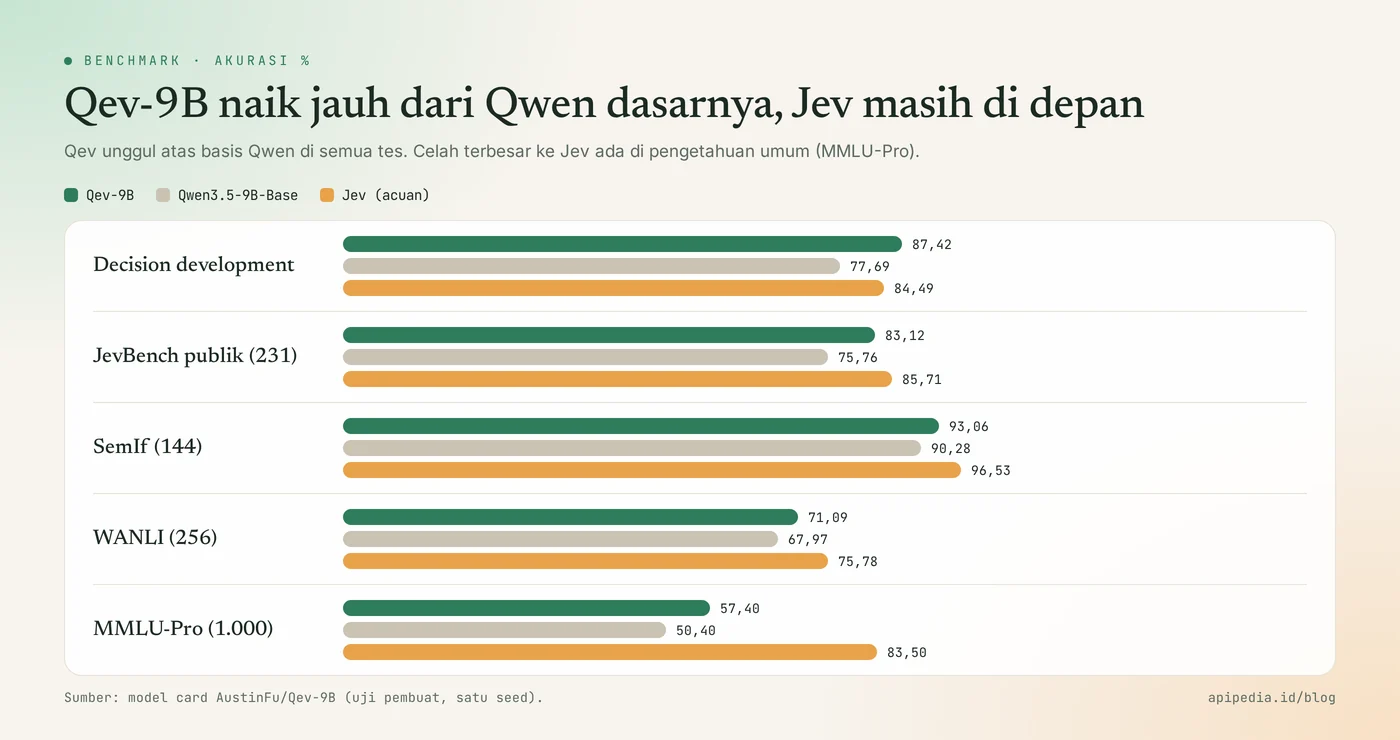
| Benchmark (accuracy %) | Jev (reference) | Qwen3.5-9B-Base | Qev-9B |
|---|---|---|---|
| Decision development (clean) | 84.49 | 77.69 | 87.42 |
| Transfer development (clean) | 85.67 | 74.39 | 83.99 |
| JevBench public (231 questions) | 85.71 | 75.76 | 83.12 |
| SemIf (144 handwritten questions) | 96.53 | 90.28 | 93.06 |
| WANLI (256) | 75.78 | 67.97 | 71.09 |
| MMLU-Pro (1,000) | 83.50 | 50.40 | 57.40 |
Read these numbers carefully. The creators noted the model released came from a single seed, public benchmarks were visible during research iterations, and calibration and production reliability have not been proven. Test it on your own data before determining a threshold.
Why are there several "QEV" in Hugging Face?
The name Qev or QEV is used by several community projects with the same idea: Qwen plus Jev-style adapters and decision heads. Examples include QueryPie's QEV-9B (Qwen3.5 with LoRA bundled, own research license), QEV-2B (multimodal text and image on top of Qwen3.5-2B), and qev-0.8b (on top of Qwen3.5-0.8B, with local HTTP server). All of them are not official releases of TypeSafe or Qwen. Check each license before using it for paid products.
When to choose Jev cloud, Jev on-premises, or Qev?
Choose Jev cloud if you need the best accuracy and speed without taking care of the GPU, choose local-jev or Qev if the data cannot leave your server or the volume is very large.
| your needs | A great choice | Reason |
|---|---|---|
| Routing tickets or moderation for products that are already running | Jev cloud | Most accurate in JevBench, low latency, no infrastructure |
| Sensitive data (customer tickets, internal documents) | local-jev or Qev | No data leaves your machine |
| Want the code to remain compatible with Jev | local-jev | Wire format is the same, just change the base URL |
| Want to fine-tune it again for your own case | Qev-9B | The weight of adaptation and open code, Apache-2.0 |
| Laptop without GPU | Jev cloud, or local-jev with a small model | Model 9B is too heavy on the CPU |
The most frequently used pattern: router in front of LLM
The pattern that many communities exemplify is installing a decision model as a "security guard" in front of the LLM. Each prompt is assessed first: just answer a small local model, need a large model in the cloud, or must be rejected. Since a single decision only takes hundreds of milliseconds and little token input, this pattern can save a lot of LLM fees. Also remember the limits: Jev only gives numbers, not reasons, so keep a decision log for auditing, and break down complex questions into simple questions.
Frequently asked questions
Can Jev be used to chat or write code?
No. Jev doesn't generate free text, so it's not suitable for chat, explanation, or coding. Jev also doesn't call his own tools. It works as a decision layer alongside the agency or LLM you already have.
Is Jev's answer necessarily correct because it always fits the scheme?
No. The answer format is guaranteed to be valid, but the content can still be wrong with certainty. Therefore use probability and confidence as a threshold, then pass the doubtful cases to humans or a larger model.
Is Qev the same as the open source version of Jev?
No. Qev is a community project that trains Qwen to imitate Jev's decision format. Jev's weights were never released, so Qev does not contain parts of Jev's model and their accuracy is different.
How much does it cost to deploy Jev in the cloud?
In the TypeSafe API, input is charged $0.042 per 1 million tokens and output is free (as of November 2026). Intermediary providers may charge slightly different rates, so check the pricing page of the provider you use.
What hardware do you need to run the local version?
For local-jev with default model llm-qwen3.5-4b, prepare about 8.5 GB memory and 9.32 GB download. The Model nli-deberta-large is much lighter (0.87 GB). The Qev-9B and JEV-9B GGUF are based on the 9B model, so GPUs with VRAM around 12 GB and above are more convenient.
If you're building an application that calls many AI APIs at once, also read what rate limits and error 429s mean so your router doesn't crash when traffic increases, as well as how webhooks work to connect decision results to other systems.
Source
- DigitalOcean Docs: How to Send Requests to a Model Using the System One API
- DigitalOcean: What is Jev, TypeSafe AI's System One model
- Vercel: What is Jev, TypeSafe AI's System One model?
- GitHub: amithgc/local-jev, local and offline System One servers
- Hugging Face: AustinFu/Qev-9B, decisions grounded in Qwen
- Hugging Face: querypieai/QEV-9B
- Hugging Face: VrKnight/JEV-9B-GGUF
Topics: #ai #jev #typesafe #qwen #model keputusan #llm lokal
About the author
Tim APIPedia — Tim Engineering APIPedia
Tim engineering di balik APIPedia yang membangun dan memelihara API data Indonesia - ongkir, OCR KTP, data wilayah, BMKG, hingga server MCP - dan menulis panduan integrasinya dari pengalaman langsung.