OpenSSH sshole Flaw (CVE-2026-123158): Passwordless Login on Alpine Linux, Check and Patch Now
By Tim APIPedia, Tim Engineering APIPedia · Published · 8 min read
The sshole vulnerability allows sshd on Alpine Linux to accept logins without the correct password and has been exploited. This is how to check, safe version, and detect it.
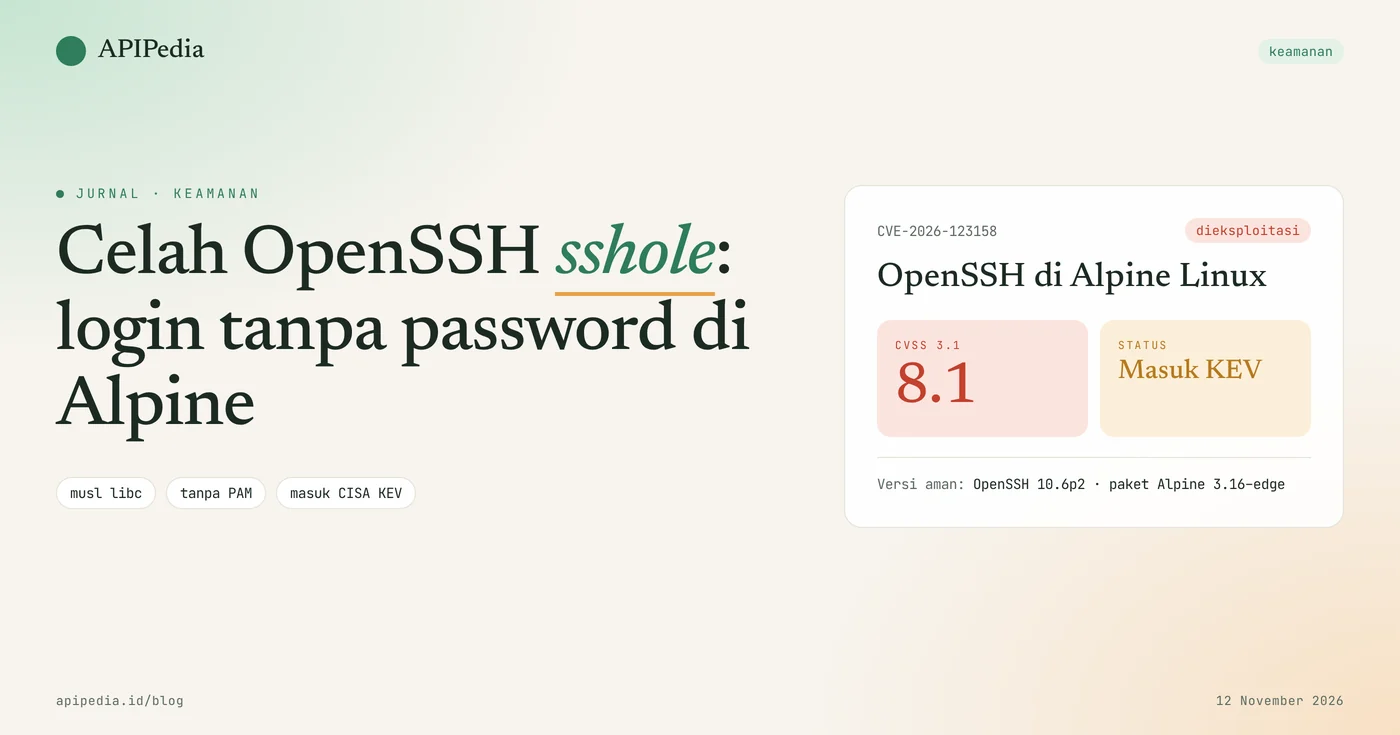
CVE-2026-123158, nicknamed "sshole", is a password authentication bypass vulnerability in OpenSSH that allows Alpine Linux servers to accept logins to accounts without the correct password. Its CVSS 3.1 score was 8.1, the fix was in OpenSSH 10.6p2 (November 5, 2026), and CISA listed it in the Known Exploited Vulnerabilities catalog on November 9, 2026.
This gap is important because Alpine is the basis for many Docker images and lightweight cloud VMs. The good news is that Debian, Ubuntu, and RHEL family servers are not affected. This article explains how it works, the conditions for a server to be attacked, safe package versions, scripts to check, and how to look for signs of a breach.
Quick summary
| Items | Details |
|---|---|
| CVE | CVE-2026-123158 ("sshole") |
| Product | OpenSSH (sshd) built with musl libc without PAM, for example package openssh-server built into Alpine Linux |
| Gap type | Bypass password authentication |
| CVSS score 3.1 | 8.1 (high) |
| Status | Actively exploited, entered CISA KEV November 9, 2026 |
| Safe version | OpenSSH 10.6p2, or updated Alpine package (3.16 branch to edge) |
| Not affected | Glibc distro (Debian, Ubuntu, Fedora), sshd with PAM, Dropbear, OpenBSD |
| Inventor | Özgün Kültekin (Wakefield) |
How does sshole loophole work?
This loophole arises because the failed flag of the password hash function in musl happens to be the same as the "account without password" flag in /etc/shadow. As a result, sshd thinks the password sent matches.
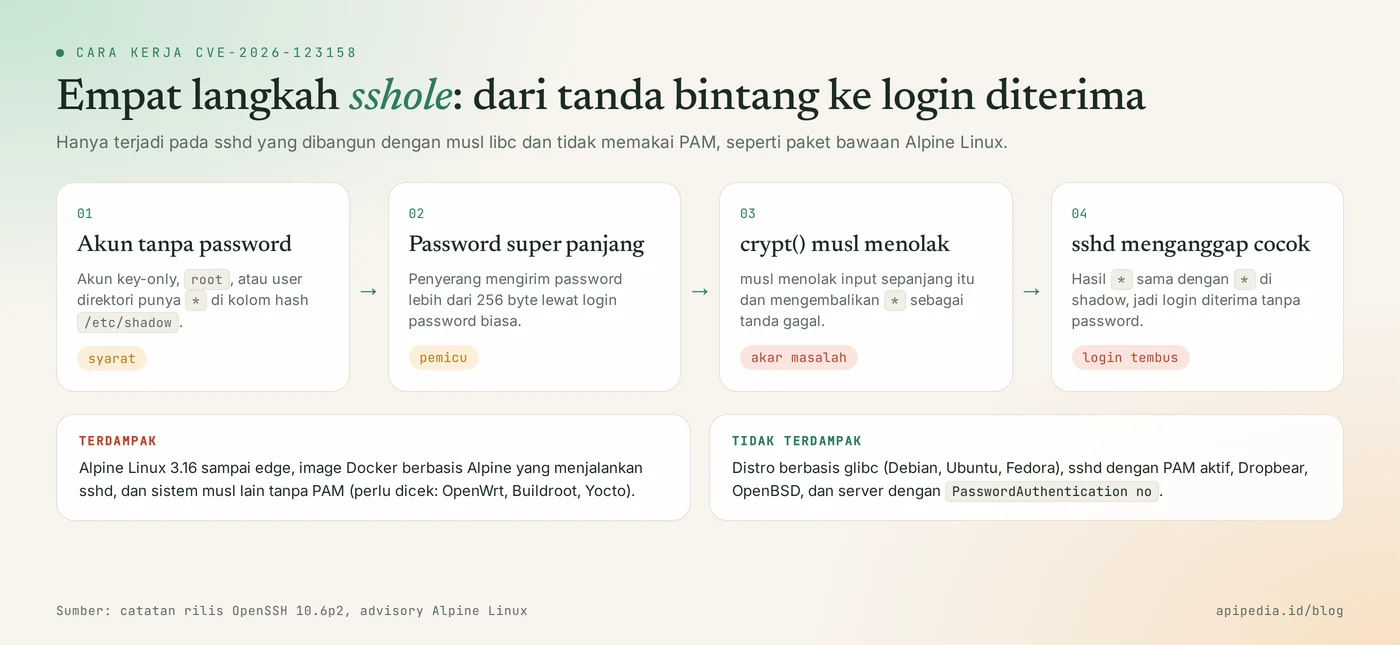
The order is like this:
- Accounts that cannot log in with a password (SSH key-only accounts,
root, or users from directories) store the character*in the hash field/etc/shadow. - The attacker tried to log in to the account with a very long password, more than 256 bytes.
- Function
crypt()in musl rejects input of that length and returns*as a sign of failure. - sshd compares that result with the shadow contents. Both are
*, so login is accepted.
Why does the OpenSSH team keep patching it?
The OpenSSH team thinks the root of the problem is outside of sshd, but because it can be exploited via sshd, a countermeasure was added there. The 10.6p2 release notes say this flaw affects some Linux systems built and running without PAM support.
Who is affected?
The server is affected if all of the following conditions are met at once:
- sshd is built with musl libc and runs without PAM. This is the default condition of the Alpine
openssh-serverpackage, oropenssh-server-pamwithUsePAM no. - Active login password (
PasswordAuthentication yes, OpenSSH default value). - There are accounts whose hash column only contains
*, for example useralpinein the official Alpine cloud image 3.18.11 to 3.24.3. - There are other accounts in the system that have real password hashes.
Account root is generally protected by PermitRootLogin prohibit-password. However, user alpine in the official cloud image can run doas without a password, so an attacker can still ascend to root. Other musl systems such as OpenWrt, Buildroot, and Yocto are also worth checking. Many popular Docker images disable password login by default, so they are not automatically vulnerable.
How serious is this loophole?
It's especially serious for servers that meet the above requirements, as an actual attack was recorded less than nine hours after the CVE was published.
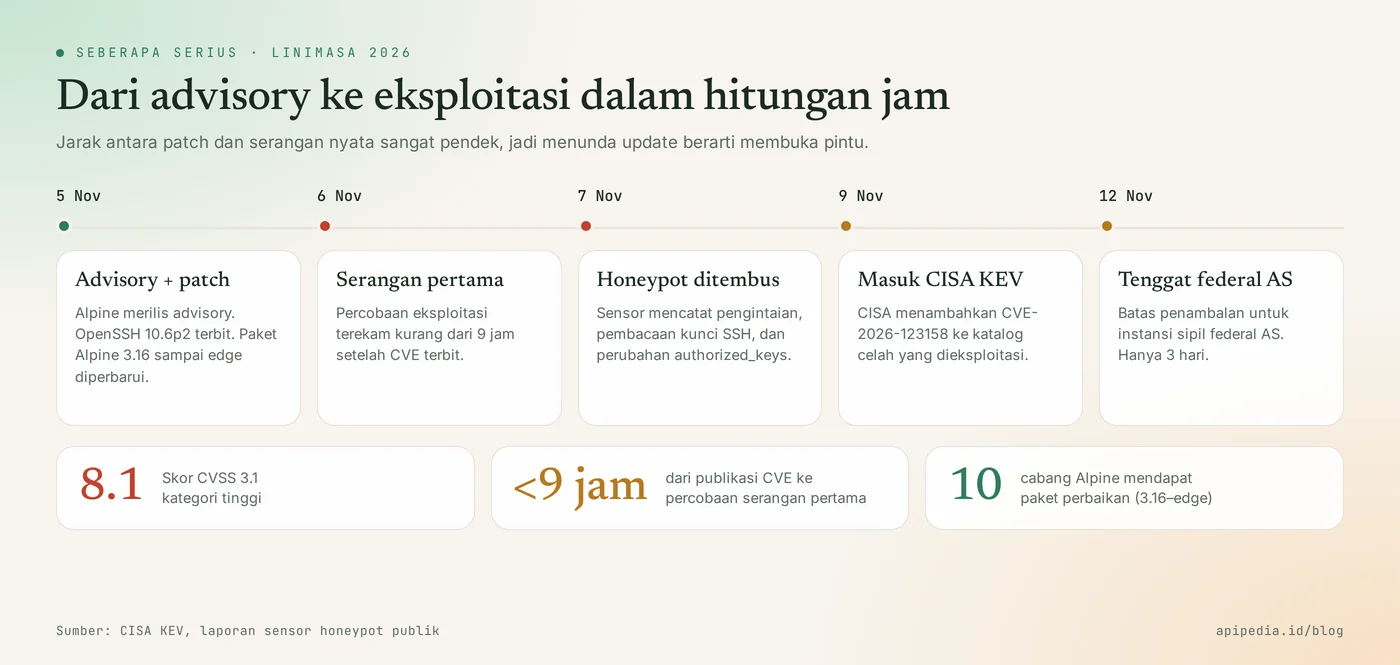
- CVSS 3.1: 8.1 (high).
- November 5, 2026: Alpine releases an advisory and OpenSSH 10.6p2 is released.
- November 6 to 7: honeypot sensors recorded attempted exploitation, then further activity in the form of reconnaissance, reading password hashes and root SSH keys, as well as adding the
authorized_keyskey. There have also been reports of the installation of crypto miners and bots. - November 9: CISA adds it to the KEV with a November 12 deadline for US federal civilian agencies.
- Proof-of-concept code is circulating on GitHub. Some are unverified and may contain malware, so don't run them on your work machine.
Which version is safe?
Safe versions are OpenSSH 10.6p2 and above, or Alpine openssh packages with the following revisions per branch:
| Alpine Branch | Fixed openssh package |
|---|---|
| edges | 10.6_p2-r0 |
| 3.24 | 10.3_p1-r2 |
| 3.23 | 10.2_p1-r1 |
| 3.22 | 10.0_p1-r11 |
| 3.21 | 9.9_p2-r1 |
| 3.20 | 9.7_p1-r6 |
| 3.19 | 9.6_p1-r3 |
| 3.18 | 9.3_p2-r4 |
| 3.17 | 9.1_p1-r7 |
| 3.16 | 9.0_p1-r6 |
Alpines below 3.16 do not get the fix package. For that version, turning off password login is the only way until the system is migrated.
How do I check if my server is affected?
Run the following script as root. The script only reads the configuration and doesn't change anything. The logic has been tested in the sandbox with mock output for vulnerable and non-vulnerable conditions.
#!/bin/sh
# Cek paparan CVE-2026-123158 (sshole). Hanya membaca, tidak mengubah apa pun.
libc="glibc/lainnya"
if ldd --version 2>&1 | grep -qi musl || ls /lib/ld-musl-* >/dev/null 2>&1; then libc="musl"; fi
echo "libc           : $libc"
command -v apk >/dev/null 2>&1 && echo "paket openssh  : $(apk info -v 2>/dev/null | grep -E '^openssh-server(-pam)?-[0-9]' | tr '\n' ' ')"
command -v sshd >/dev/null 2>&1 || { echo "sshd tidak terpasang: tidak terdampak"; exit 0; }
echo "versi sshd     : $(sshd -V 2>&1 | head -n1)"
cfg=$(sshd -T 2>/dev/null | grep -iE '^(passwordauthentication|usepam) ')
echo "$cfg" | sed 's/^/konfigurasi    : /'
pw=$(echo "$cfg" | awk '$1=="passwordauthentication"{print $2}')
pam=$(echo "$cfg" | awk '$1=="usepam"{print $2}')
if [ "$libc" = "musl" ] && [ "$pw" != "no" ] && [ "$pam" != "yes" ]; then
  echo "HASIL: BERISIKO. Update paket openssh lalu restart sshd."
else
  echo "HASIL: kombinasi rentan (musl + tanpa PAM + login password) tidak ditemukan."
fi
For container images, check the package version in the image, then compare it to the table above:
docker run --rm --entrypoint sh NAMA_IMAGE -c 'cat /etc/alpine-release; apk info -v 2>/dev/null | grep openssh'How to update safely?
The safe way: close the login password first, update the package, then restart sshd. Without restarting, the old sshd process continues to serve connections.
Step 1: quick mitigation
Make sure the login with the SSH key is working, then turn off the login password. Keep one SSH session open until you are sure you can log in again.
# /etc/ssh/sshd_config
PasswordAuthentication no

# uji konfigurasi, lalu restart
sshd -t && rc-service sshd restart
Step 2: update and verify
apk upgrade -U -a
rc-service sshd restart

# verifikasi versi paket dan konfigurasi aktif
apk info -v | grep openssh
sshd -T | grep -iE 'passwordauthentication|usepam'
For containers, rebuild the image from the latest Alpine base and redeploy. Running apk upgrade on a live container will be lost when the container is rebuilt.
How to detect signs of burglary?
The main sign is a successful password login to an account that should not have a password. Search in system log:
# login password yang diterima (Alpine: /var/log/messages)
grep -h "Accepted password for" /var/log/messages* 2>/dev/null

# akun yang tidak punya hash password (kolom kedua "*" atau "!")
awk -F: '$2 ~ /^[*!]/ {print $1}' /etc/shadow

# perubahan terbaru pada kunci SSH dan pemakaian doas
find / -name authorized_keys -mtime -14 2>/dev/null
grep -h "doas" /var/log/messages* 2>/dev/null | tail -n 50
If an account appears in the first two lists (login password is accepted, even though it doesn't have a hash), assume the server has been compromised.
If you find signs of a burglary?
- Isolate the server from the network, but don't immediately shut it down if you need forensic evidence.
- Check
authorized_keysall users, new users, cron, and unknown processes. - Rotate all SSH keys, tokens, and cloud credentials stored on that server from another trusted machine.
- Rebuild the server from a clean, patched image. Manual cleaning risks leaving backdoors.
Frequently asked questions
Is my Ubuntu or Debian server affected?
No. Glibc-based distros such as Debian, Ubuntu, and Fedora are not affected, as are sshds that use PAM. This vulnerability is specific to the combination of musl libc and sshd without PAM.
I only use Alpine as a base Docker image without sshd. Need to worry?
Not for this gap. The attack requires a running and reachable sshd. Keep the base image up to date so other packages are up to date.
Is it enough to run the upgrade apk?
Not yet. Once the packages are updated, sshd must be restarted. The old process continues to use the vulnerable binary until the service is restarted.
Does changing the SSH port help?
Doesn't close the gap. Changing ports only reduces automatic scanning. The correct fix is to update the package or turn off password login.
Can root be taken over directly?
Usually not directly, because PermitRootLogin prohibit-password is the default value. The biggest risk is in key-only accounts that have doas or sudo access points without a password.
Also read about other vulnerabilities that are being actively attacked: the WordPress update vulnerability CVE-2026-119977, the Git vulnerability CVE-2026-111760, and the case of an SSH backdoor via a fake editor extension.
Source
- OpenSSH: 10.6p2 release notes (November 5, 2026)
- CISA: Adds Four Known Exploited Vulnerabilities to Catalog (9 November 2026)
- Help Net Security: OpenSSH flaw exploited in the wild just hours after disclosure
- The Hacker News: CISA Warns of Active Exploitation of OpenSSH, GPUStack, FreeSWITCH, and IBM Flaws
- Cycode: sshole (CVE-2026-123158), OpenSSH password bypass on Alpine Linux
Topics: #keamanan #cve #openssh #alpine linux #cisa kev #docker
${c.about}
Tim APIPedia — Tim Engineering APIPedia
Tim engineering di balik APIPedia yang membangun dan memelihara API data Indonesia - ongkir, OCR KTP, data wilayah, BMKG, hingga server MCP - dan menulis panduan integrasinya dari pengalaman langsung.