Postman Secretly Installs Plugins in Claude Code & Codex: How to Check and Remove Them
By Tim APIPedia, Tim Engineering APIPedia · Published · Updated · 9 min read
Postman desktop 12.33.4 reportedly installs plugins, hooks, and MCPs into Claude Code and Codex without permission. This is how to audit, delete and verify it.
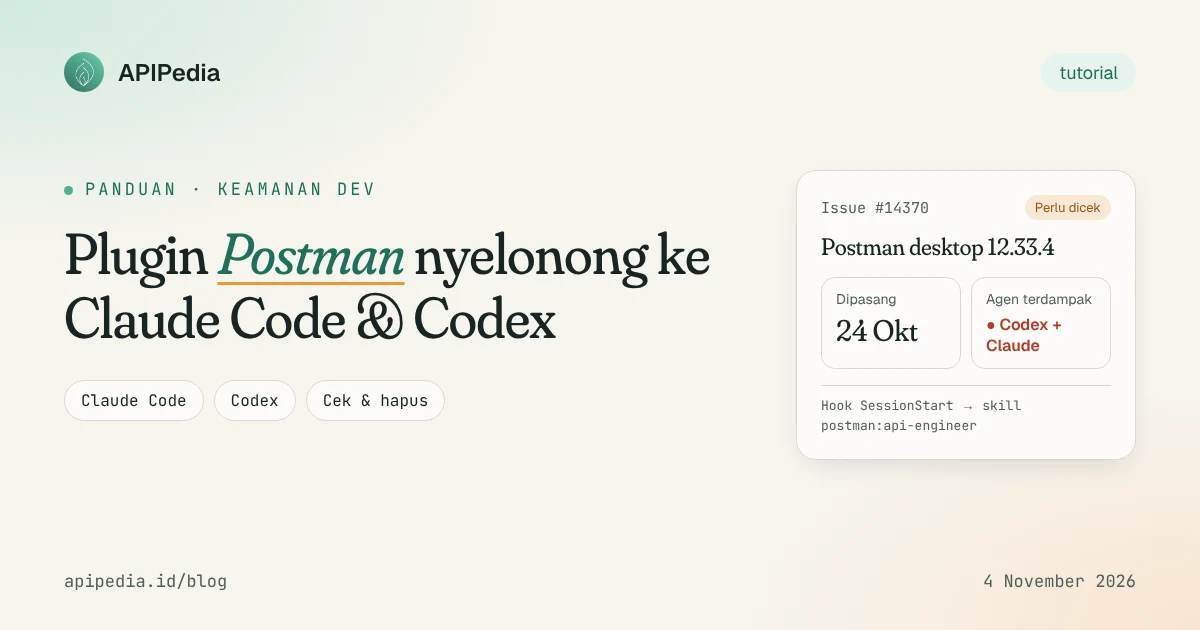
Postman desktop 12.33.4 reportedly installs plugins, hooks, CLI, and MCP connections to Claude Code and Codex automatically, without user consent. The case has been busy since November 3, 2026. If you use Postman and agent coding on the same laptop, this guide shows how to check, delete, and verify it in 10 minutes.
It's worth noting at the outset: the original report is from a single Mac and has not been reproduced on a clean machine. There is no evidence of API data being sent out yet. What is documented is an unauthorized agent configuration change, and that alone is reason enough for an audit.
What really happened?
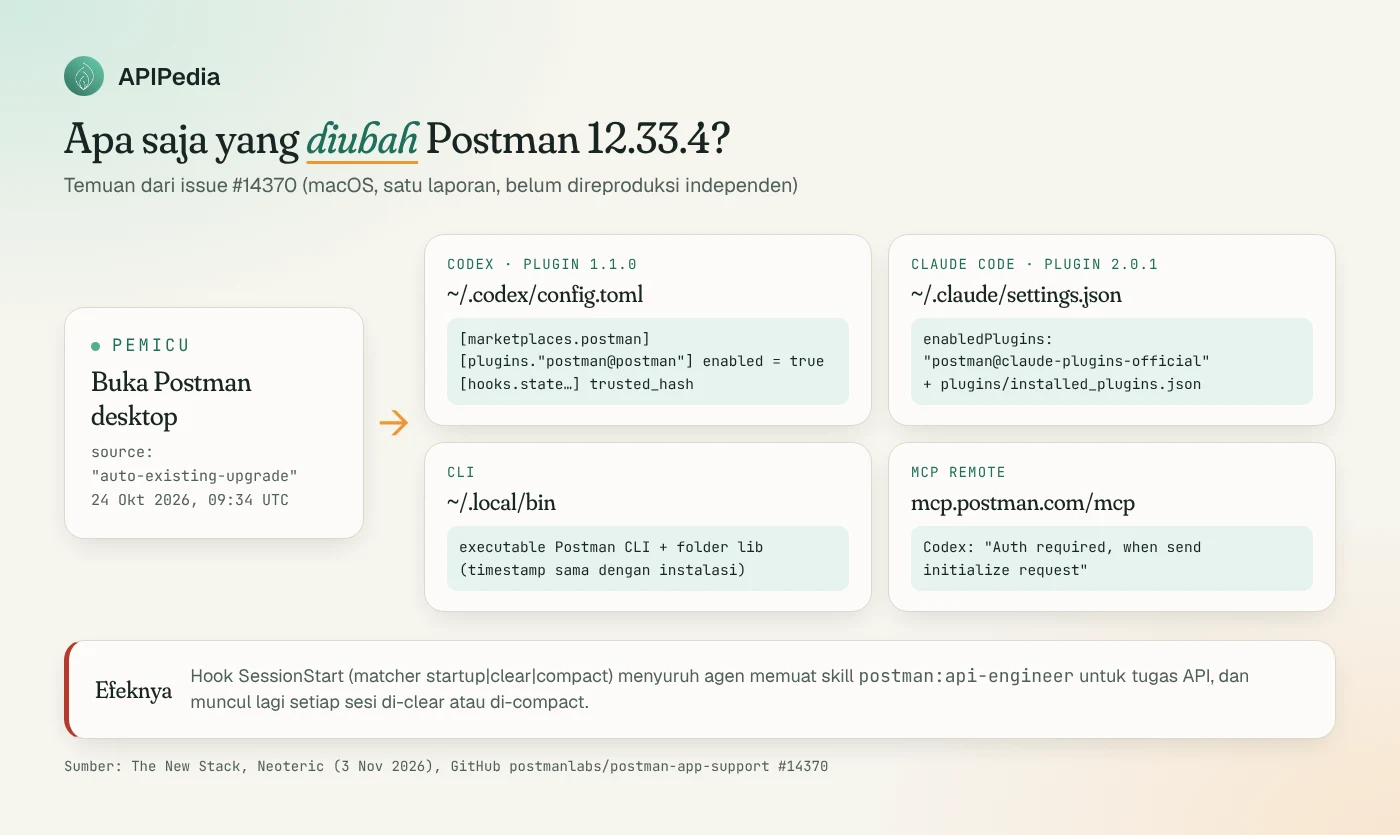
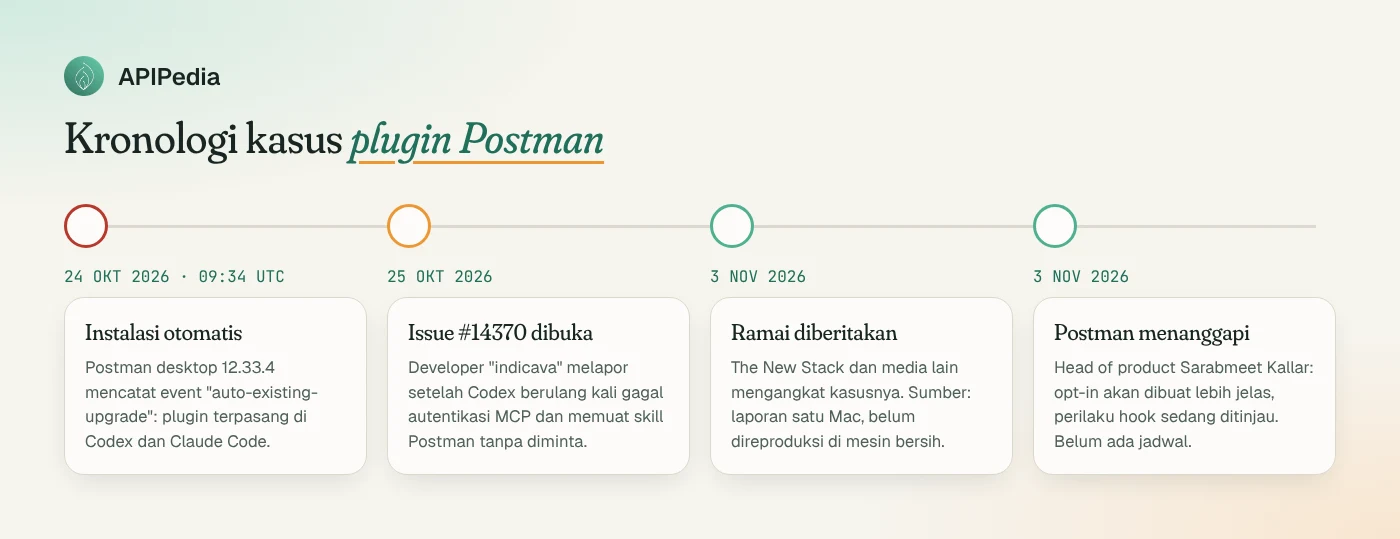
On October 25, 2026, a developer with the username "indicava" opened issue #14370 in the Postman support repo. The codex on his laptop repeatedly failed authentication to the MCP server and loaded the Postman skill without prompting. After tracing, the Postman log records an installation on October 24, 2026 at 09:34 UTC with source "auto-existing-upgrade" and results claude-code:installed, codex:installed.
According to The New Stack and a technical audit from Neoteric, here's what's changed:
- Codex (plugin 1.1.0):
~/.codex/config.tomlgets entry[marketplaces.postman], block[plugins."postman@postman"]withenabled = true, and entryhooks.statecontainstrusted_hash. - Claude Code (plugin 2.0.1, scope user):
~/.claude/settings.jsonactivatespostman@claude-plugins-official, and the plugin is listed in~/.claude/plugins/installed_plugins.json. - CLI: the Postman CLI executable and folder
libappear in~/.local/bin, with the same timestamp as the installation time. - MCP remote: agent connected to
https://mcp.postman.com/mcp, which failed because it was not logged in ("Auth required, when send initialize request").
Why is the hook the most important?
The SessionStart hook uses matcher startup|clear|compact and contains instructions for the agent to "load the postman:api-engineer skill" for a non-trivial API task. This means that the instructions are re-injected every new session, every /clear, and every compact.
The sensitive part is in the Codex. Codex usually asks you to review new hooks ("Hooks need review"). The Postman source installer ( installer/src/hosts/codex-hooks.ts) reads the hook hash via hooks/list, then writes trusted_hash via config/batchWrite. The comments in the code call this function "Approves only Postman's current hook after installation." So the approval step that you should have done yourself has also been skipped.
The “third-party tool changes the AI agent configuration” pattern is not new. We previously covered a much more dangerous case in the article Cursor's fake Claude Code extension that plants an SSH backdoor. The difference is, Postman is a legitimate vendor and the plugin is official, but the method of installation is the question.
Who needs to check?
| Your condition | Need an audit? | Focus |
|---|---|---|
| Use Postman desktop 12.33.x + Codex | Yes, priority | ~/.codex/config.toml, especially trusted_hash |
| Use Postman desktop 12.33.x + Claude Code | Yes | ~/.claude/settings.json, list of plugins |
| Use Cursor, Copilot CLI, OpenCode, and similar + Postman | Should | The official installer supports 9 agents; run status |
| Postman web or Postman CLI only | It's unlikely | The report only mentions the desktop application |
| Office laptop managed by the IT team | Yes | Report findings to the security team before deleting |
Postman's official documentation says the @postman/postman-plugin installer supports the following agents: antigravity, claude-code, codex, copilot, cursor, factory, kimi, opencode, and pi.
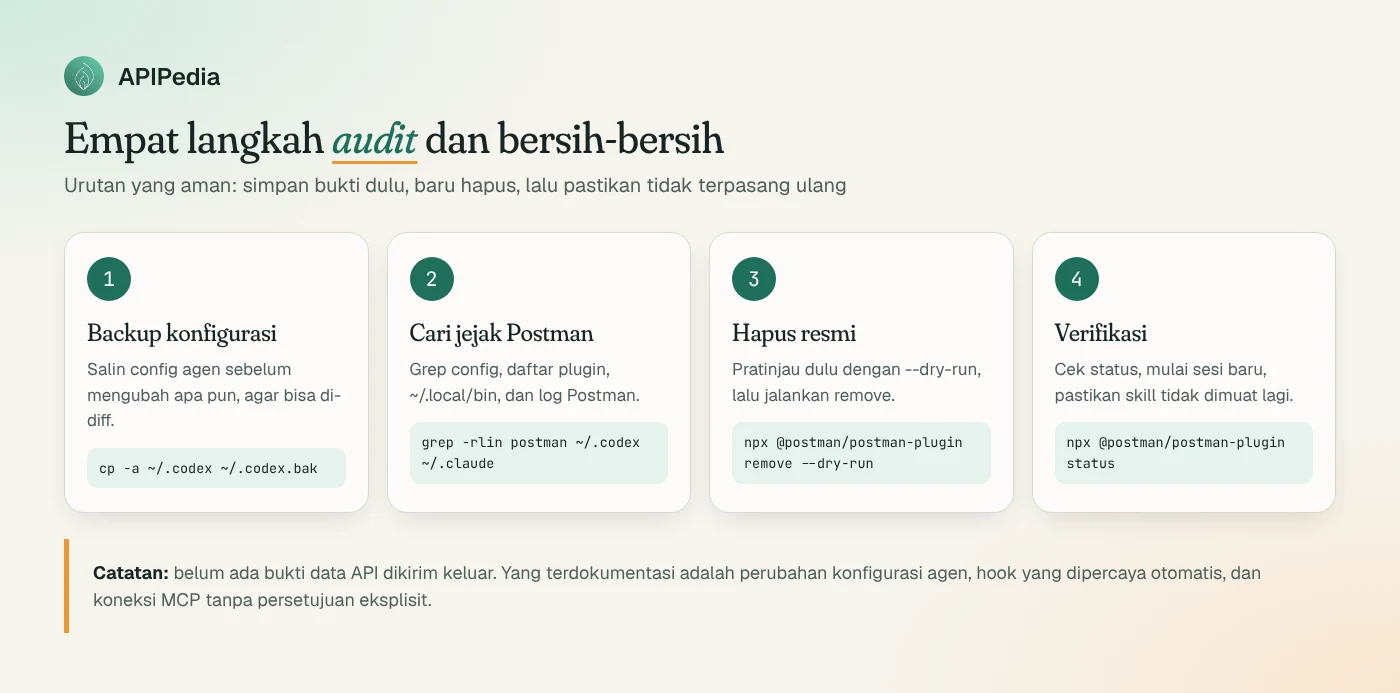
Step 1: How do I backup the configuration first?
Save a copy before changing anything. There are two uses: being able to compare (diff) after cleaning, and having proof if the office security team needs to see it.
# Salin seluruh folder konfigurasi agen (macOS / Linux)
STAMP=$(date +%Y%m%d-%H%M)
[ -d ~/.codex ]  && cp -a ~/.codex  ~/.codex.bak-$STAMP
[ -d ~/.claude ] && cp -a ~/.claude ~/.claude.bak-$STAMP
ls -d ~/.codex.bak-* ~/.claude.bak-* 2>/dev/null
Step 2: How to find traces of Postman?
The following script only reads, does not change anything. Run it in a regular terminal.
#!/usr/bin/env bash
# audit-postman.sh : cari jejak plugin Postman di konfigurasi agen
echo "== Codex config =="
grep -n -i "postman" ~/.codex/config.toml 2>/dev/null || echo "(tidak ada)"

echo "== Claude Code settings =="
grep -n -i "postman" ~/.claude/settings.json 2>/dev/null || echo "(tidak ada)"
grep -n -i "postman" ~/.claude/plugins/installed_plugins.json 2>/dev/null || echo "(tidak ada)"

echo "== Binary di ~/.local/bin =="
ls -la ~/.local/bin 2>/dev/null | grep -i postman || echo "(tidak ada)"

echo "== Log Postman (macOS) =="
LOG="$HOME/Library/Application Support/Postman/logs/main.log"
[ -f "$LOG" ] && grep -n -E "auto-existing-upgrade|PostmanAgentPluginService|autoInstall.plugin" "$LOG" | tail -n 20 \
  || echo "(log tidak ditemukan; di Linux/Windows lokasinya berbeda)"
If you want to see the contents of the TOML Codex in a structured manner, including whether there are hooks that have trusted status, use Python 3.11+ which has tomllib built-in modules:
# cek_codex.py : tampilkan semua kunci config.toml yang menyebut "postman"
import tomllib, pathlib, json

path = pathlib.Path.home() / ".codex" / "config.toml"
data = tomllib.loads(path.read_text())

def cari(node, jalur=""):
    if isinstance(node, dict):
        for k, v in node.items():
            p = f"{jalur}.{k}" if jalur else k
            if "postman" in k.lower() or ("postman" in json.dumps(v, default=str).lower() and not isinstance(v, dict)):
                print(p, "=", v)
            cari(v, p)

cari(data)
Pay particular attention to the rows containing trusted_hash below hooks. That's a sign Codex will run the hook without asking.
Step 3: How to remove it?
Official way: Postman installer
Postman provides commands status and remove in npm package @postman/postman-plugin (requires Node.js). Start with --dry-run so you see what will be changed.
# Lihat agen mana yang terdeteksi dan apakah plugin terpasang
npx @postman/postman-plugin status

# Pratinjau penghapusan tanpa mengubah apa pun
npx @postman/postman-plugin remove --dry-run

# Hapus dari semua agen yang terdeteksi
npx @postman/postman-plugin remove

# Atau hanya dari agen tertentu
npx @postman/postman-plugin remove --agent codex --agent claude-code
Exit codes that need to be known: 0 means success or nothing needs to be done, 2 means confirmation outside the terminal is required (add --yes), and 3 means success but there is still a manual step marked next: in the output.
Manual method: if you don't want to run packages from the same vendor
Neoteric recommends manual removal plus diff, instead of running a script you haven't reviewed. This makes sense for office machines.
# Claude Code: copot plugin lewat CLI bawaannya
claude plugin uninstall postman@claude-plugins-official

# Pastikan tidak ada lagi entri postman di enabledPlugins (butuh jq)
jq '.enabledPlugins' ~/.claude/settings.json

# Codex: buka config lalu hapus blok [marketplaces.postman],
# [plugins."postman@postman"], dan entri hooks.state milik Postman
${EDITOR:-nano} ~/.codex/config.toml

# Bandingkan dengan backup tadi
diff ~/.codex.bak-*/config.toml ~/.codex/config.toml
After that, check the file in ~/.local/bin that was found earlier. Only delete it if you are sure it is from Postman and not installed yourself.
Step 4: How to ensure it is clean?
- Run again
bash audit-postman.sh. All sections should display "(none)", except the old log. - Run
npx @postman/postman-plugin statusand make sure the plugin is no longer installed. - Open a new session in Codex and Claude Code. Request a simple API task, then make sure skill
postman:api-engineeris not loaded. - Close and reopen Postman desktop, then repeat the audit. This ensures the app doesn't reinstall the plugin when opened.
What was the Postman's response?
On November 3, 2026, Postman's head of product, Sarabmeet Kallar, told RuntimeWire that Postman would make the AI agent plugin opt-in clearer, especially for existing users. Postman is also reviewing reported hook and session-start approval behavior. Reason mentioned: CLI and agent plugin bundled for easier setup. There is no timetable or implementation details yet.
Reporters on GitHub are asking for three things: not install plugins to existing users without permission, submit hook approvals to Codex, and provide a complete undo that clears agent settings, trusted hooks, MCP connections, as well as the CLI.
Lessons for development teams
- Consider the agent configuration folder as a sensitive area.
~/.codexand~/.claudedetermine what instructions the agent reads and what commands it may execute. - Monitor changes. Store the agent configuration in a dotfiles repo or run periodic audits, so that changes are quietly visible through
git diff. - Limit auto-updates for apps that touch the toolchain. On office machines, IT team-managed updates are safer than auto-upgrades.
- Distinguish "authorized plugins" from "approved". You still have to install the official plugin yourself.
If you're building your own API integration and want your API keys and usage per endpoint monitored in one place, you can manage it in the APIPedia console.
FAQs
Was my API data stolen by Postman?
There is no evidence yet. Existing reports and analytics document configuration changes, trusted hooks, and MCP connections, not data delivery. The claim that the hook intercepts API data has not been supported by evidence.
Which versions of Postman are affected?
The report calls for Postman desktop 12.33.4 on macOS, with Codex plugin 1.1.0 and Claude Code plugin 2.0.1. Other versions have not been confirmed, so keep running the audit if you are using 12.33.x.
Should I delete Postman?
Do not have to. Simply remove the plugins you don't want, then verify that they aren't reinstalled when you open the app. If it installs again, consider delaying the update until Postman releases an opt-in fix.
I actually want to use the Postman plugin. How to do it correctly?
Install it consciously via official channels, for example claude plugin install postman@claude-plugins-official for Claude Code, or the Plugins menu in Codex, then approve the hook yourself when the prompt "Hooks need review" appears.
Does the above command apply on Windows?
Bash scripts are written for macOS and Linux. On Windows, the equivalent folders are usually at %USERPROFILE%\.codex and %USERPROFILE%\.claude; commands npx @postman/postman-plugin status and remove can still be used because they are based on Node.js.
Source
- The New Stack: A developer opened Postman. Then two AI coding agents changed without their permission
- Neoteric: Audit ~/.codex/config.toml, Postman 12.33.4 Added Its Own Hook
- RuntimeWire: Postman's head of product says it will make AI agent plugin opt-in clearer
- Postman Docs: Install into detected agents
- Postman Docs: Install per agent
- GitHub: postmanlabs/postman-app-support issue #14370
Topics: #postman #claude code #codex #keamanan #tutorial #agen ai
${c.about}
Tim APIPedia — Tim Engineering APIPedia
Tim engineering di balik APIPedia yang membangun dan memelihara API data Indonesia - ongkir, OCR KTP, data wilayah, BMKG, hingga server MCP - dan menulis panduan integrasinya dari pengalaman langsung.