Prompt Caching Is Like Basic Seasoning for Fried Rice: How It Works, Economical Counts, and When It Can Actually Lose Money
By Tim APIPedia, Tim Engineering APIPedia · Published · Updated · 12 min read
Prompt caching is like basic fried rice seasoning: the prompt prefix is processed once, then reused at a rate starting from 0.1x. This is how it works and is calculated.
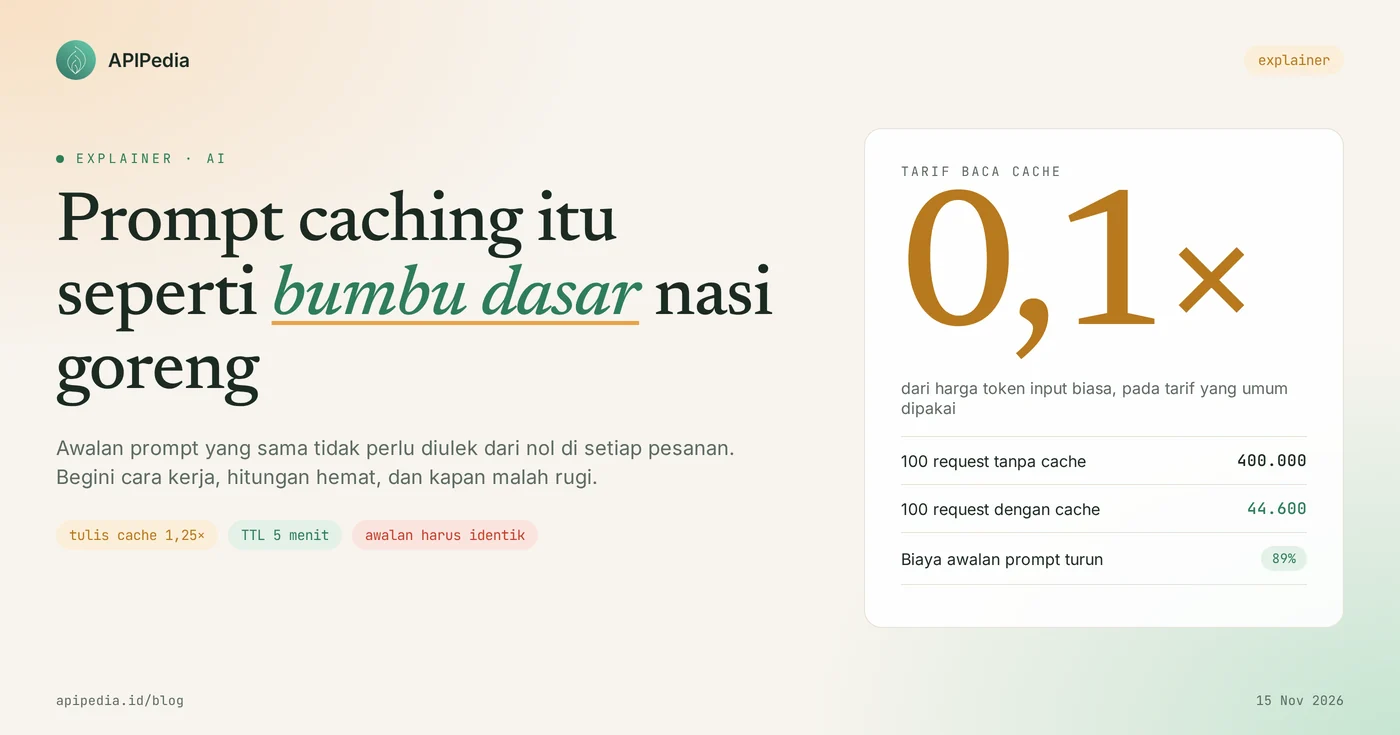
Prompt caching is a feature of AI model providers that stores the processed results of the initial part of a prompt, so that when the same part is sent again, that token is charged much cheaper, generally starting from 0.1 times the usual input price. The easiest way to understand it: prompt caching is like the basic ingredients on the fried rice cart. His brother doesn't grind onions and chilies from scratch for every order. The basic spices are prepared once, then just spooned on for the next order.
For developers and business owners using AI via APIs, this feature is important because most invoices often come from the same, repetitive text: system instructions, SOPs, product catalogs, or tool definitions. This article discusses how prompt caching works, how efficient it is with real numbers, when this feature actually causes losses, and the errors that most often cause cache misses.
Quick summary: what do you need to know?
| Term | It means |
|---|---|
| Prompt caching | Saves the processed results of the prompt prefix on the model provider side so that they are not reprocessed from scratch |
| Prefix | The prompt portion from the first character to the cache boundary point. Must match exactly for cache to be used |
| Cache write | The first request to write the deposit. Some providers charge 1.25 times the usual input |
| Cache read or cache hit | The next request uses the savings. Rates are generally 0.1 times the usual input |
| Cache miss | The savings are unused because the prefix changed, is too short, or has expired |
| TTL (shelf life) | How long savings last, from 5 minutes to several hours depending on the provider and settings |
| Minimum limit | The prefix should be quite long, from 512 to 4,096 tokens depending on the model |
What is prompt caching?
Prompt caching is a way for the model provider to avoid rework for text it has already read. Each time you call the model, the entire prompt is read from the beginning: system instructions, conversation history, then recent questions. The model has no memory between requests, so your application resubmits everything every time.
Imagine an online store's customer service chatbot. The system instructions contain the return SOP, operating hours, and product list, 4,000 tokens long. Customers just type "how much shipping to Malang?", around 10 tokens. Without caching, you pay 4,010 input tokens for such a short question, and pay it again for subsequent questions.
This is where the basic seasoning analogy comes into play. The system instructions are basic: the same for all orders. The customer's question is the additions per plate: egg, sausage, or spice level. With caching, the base seasoning is processed once, then subsequent orders only pay a much cheaper "spooning fee."
If the term token still feels unfamiliar, first read the explanation that AI tokens are like credit, because the caching prompt is basically a discount for "credit" that is used repeatedly.
How does prompt caching work?
Prompt caching works by matching prompt prefixes: if the beginning of a new request exactly matches one previously stored, the model provider uses that cache and simply processes the rest. What is stored is not the answer text, but the results of the internal model processing of these prefixes.
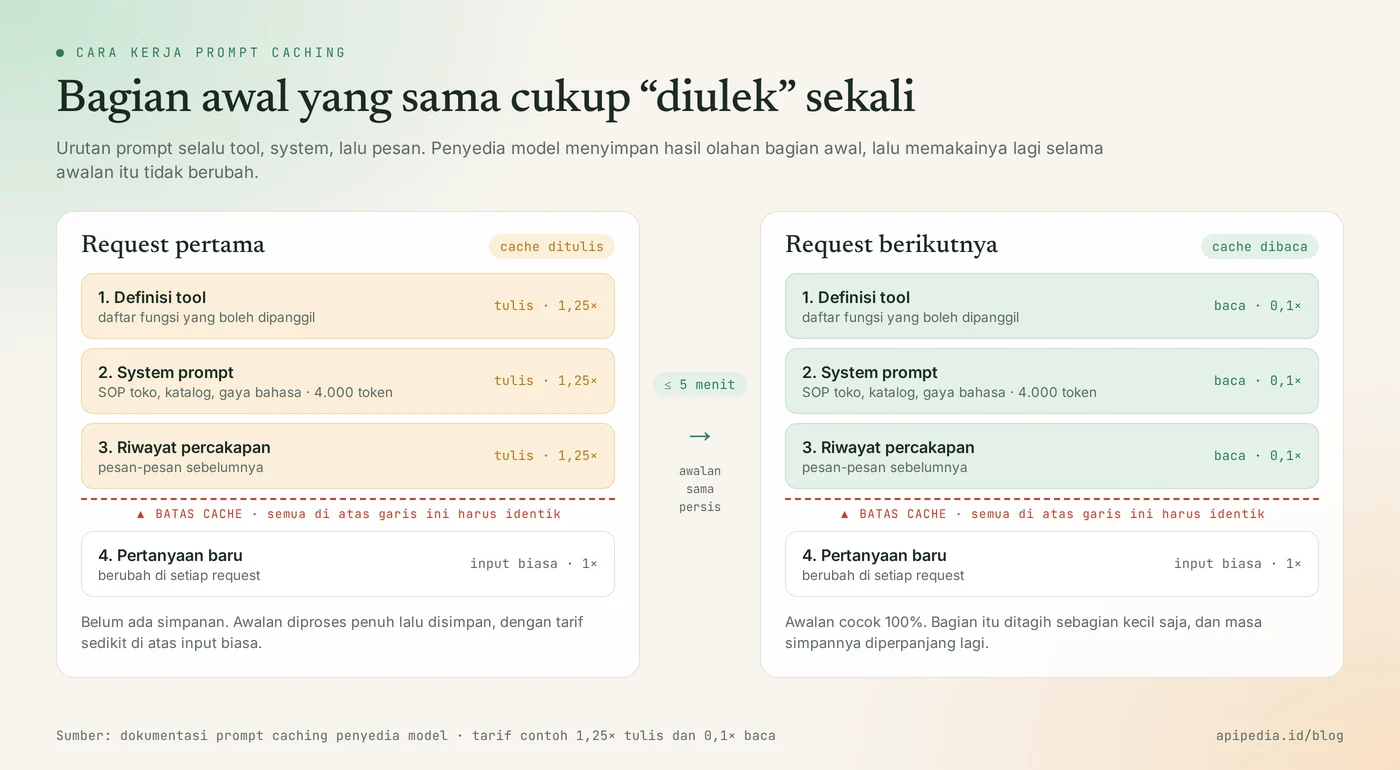
- First request: cache written. There are no deposits yet, so all prefixes are fully processed and then saved. With some providers, this step is charged slightly more than the usual input, for example 1.25 times.
- Next request: cache read. If the initials are identical and the deposit has not expired, the share is charged a read rate, generally 0.1 times the input price.
- The portion after the cache limit is processed as usual with normal input rates. Output tokens also remain billed in full.
Why is the order of prompts important?
The order of the prompts is important because matching always starts from the first character. The model provider's official documentation states that the requirements are 100 percent identical up to the cache threshold point. The order used is tool definition, then system instructions, then messages. If one word changes in front, all the savings behind it also fall.
In the fried rice cart analogy: if the basic spice recipe is changed just a little, the existing stock cannot be used and you have to re-mix it. Therefore, put the fixed parts at the front and the variable parts at the back.
How long do savings last?
Cache stores only last a short time, from 5 minutes to several hours depending on the provider. With one provider, the default storage period is 5 minutes and is renewed for free each time the deposit is used. There is also a 1 hour retention option with a higher write rate, which is 2 times the input price. Basic ingredients are the same: as long as the cart is busy, the stock continues to be used and refilled. Once it's been quiet for too long, the spices are thrown away.
How much does it save?
With a write rate of 1.25 times and a read rate of 0.1 times, the initial prompt cost can decrease by around 89 percent for 100 requests, and the upper limit is 90 percent. This figure only applies to the cached prefix portion, not the total bill.
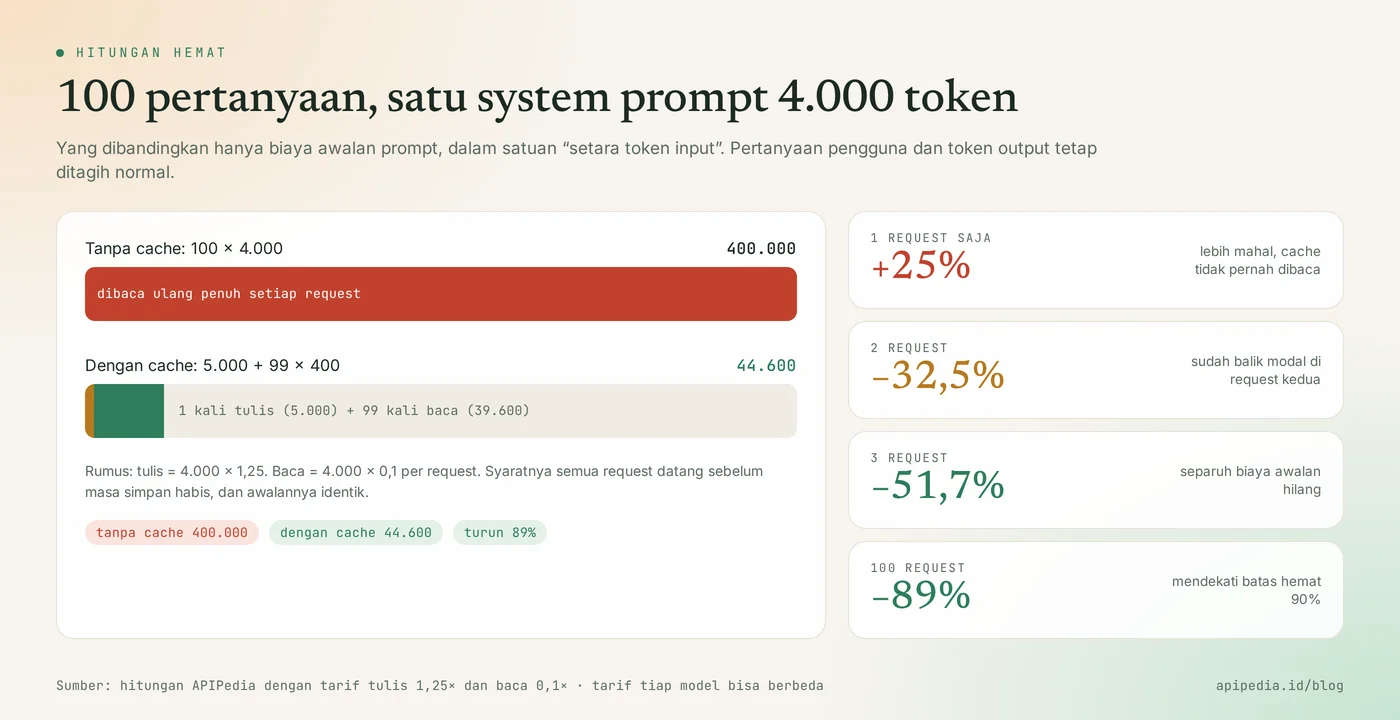
We calculate it with the following little Python script. The units are "input token equivalent", so just multiply the price per token of the model you are using.
def biaya_awalan(token_awalan, jumlah_request, tulis=1.25, baca=0.1):
    tanpa = token_awalan * jumlah_request
    dengan = token_awalan * tulis + token_awalan * baca * (jumlah_request - 1)
    return tanpa, dengan, 1 - dengan / tanpa

for n in (1, 2, 3, 100):
    tanpa, dengan, hemat = biaya_awalan(4000, n)
    print(f"{n:>3} request | tanpa cache {tanpa:>7,.0f} | dengan cache {dengan:>7,.0f} | hemat {hemat:+.2%}")
Results when run:
  1 request | tanpa cache   4,000 | dengan cache   5,000 | hemat -25.00%
  2 request | tanpa cache   8,000 | dengan cache   5,400 | hemat +32.50%
  3 request | tanpa cache  12,000 | dengan cache   5,800 | hemat +51.67%
100 request | tanpa cache 400,000 | dengan cache  44,600 | hemat +88.85%
When does prompt caching actually cause loss?
Prompt caching loses if the cache is written but never read. From the results above, just one request means you pay 25 percent more. Return on investment only occurs at the second request, as long as the request comes before the savings period expires.
With a shelf life of 1 hour (2 write rates), the count shifts. Two requests still had a loss of 5 percent, and only made a profit on the third request with savings of around 27 percent. So for features that are rarely used, for example reports that are generated once a day, caching with write rates is of no benefit.
What are the prompt caching rules in each model provider?
Prompt caching rules vary by provider: some are automatic, some require markers, and the rates are not always the same. The following table summarizes the official documentation of the three major providers as of November 15, 2026. Figures may change, so check the official pages again before calculating the budget.
| Aspect | Anthropic (Claude) | OpenAI (GPT) | Google (Gemini) |
|---|---|---|---|
| Active way | Add marker cache_control, can be automatic with one marker at the top level | Auto-on for supported models | Implicit caching auto-enables for Gemini 2.5 and later |
| Minimum prefix limit | 512 to 4,096 tokens, depending on model | 1,024 tokens for the latest model | 2,048 to 4,096 tokens, depending on model |
| Write rate | 1.25 times (5 minutes) or 2 times (1 hour) | 1.25 times (30 minutes) or 2.5 times (12 hours) on the latest models | There is no mention of separate write rates |
| Reading rates | 0.1 times, lower in some newer models | 0.1 times on the latest model, the discount is said to be up to 95 percent | Savings continue automatically when the cache is hit, without a percent number on the documentation page |
| How to check the response | cache_creation_input_tokens and cache_read_input_tokens | cached_tokens in input_tokens_details | total_cached_tokens in usage data |
What is often misunderstood about prompt caching?
The most common misconception is thinking that caching prompts store answers. Here are some assumptions that need to be cleared up.
- "Cache means the answer is taken from the cache." No. What is saved is the processed result of the prompt prefix. The model still writes a new answer each time, and the official documentation says caching does not change the output. Storing answers is another technique, namely response caching, that you create yourself on the application side.
- "The cache is AI's long-term memory." No. Deposits expire in minutes to hours, and don't allow the model to "remember" your customers. To make AI answer from its own documents, the techniques are RAG and embedding.
- "If there is a cache, it will definitely save money." Not always. As calculated above, deposits that are written but never read actually increase costs.
- "All tokens are cheap." Only the prefix matches. New queries keep normal input rates, and output tokens get no cache discount at all.
- "Short prompts are also cached." No. Below the minimum limit, requests are processed normally without cache and without error messages, so you may not realize that the cache is never active.
- "The cache definitely makes the response faster." Often, but not guaranteed. One of the official documentation states that cache read does not guarantee lower latency.
Why do cache errors often occur?
The cache misses most often because there is arbitrary text at the front of the prompt. The classic cause is the time, date, or customer name inserted into the system instructions.
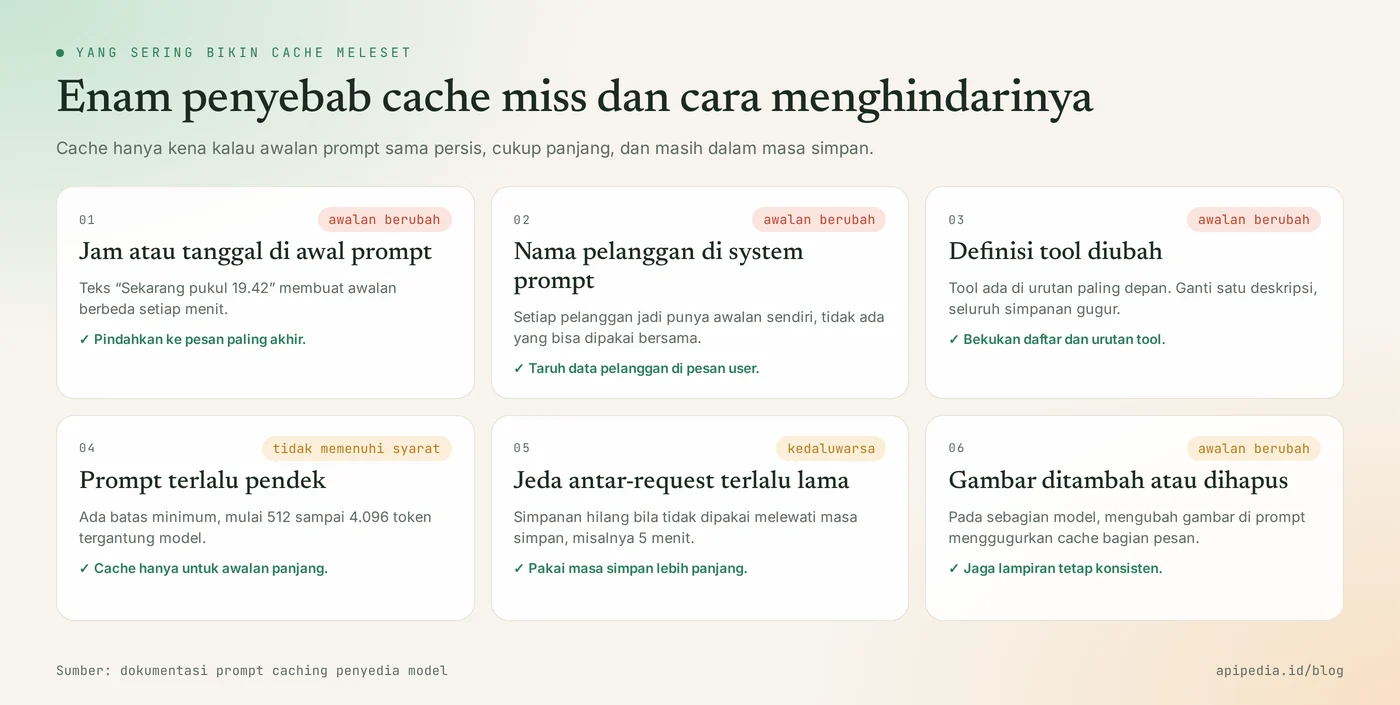
A simple comparison like this. In the first arrangement, the prefix changes every minute so the cache is never hit. In the second arrangement, the fixed part is at the front and the changing part is at the back.
# Meleset terus: bagian yang berubah ada di depan
system : "Sekarang 15 Nov 2026 19.42. Pelanggan: Bu Rina. [SOP toko 4.000 token]"
user   : "Ongkir ke Malang berapa?"

# Kena cache: bagian tetap di depan, yang berubah di belakang
system : "[SOP toko 4.000 token]"
user   : "Waktu: 15 Nov 2026 19.42. Pelanggan: Bu Rina. Ongkir ke Malang berapa?"
How to use prompt caching correctly?
The way to use prompt caching correctly is to organize the prompts from the least frequently changed to the most frequently changed, then check the cache number in the response. Practical steps:
- Sort from most stable. Tool definitions, system instructions, reference documents, then chat history and recent questions.
- Extract the changed data from the prefix. The time, date, username and order ID are placed in the last message.
- Freeze tool definitions. Don't randomize the order or rearrange the tool descriptions in each request.
- Check your model's minimum limits. The 300 token prefix will never be cached in any of the models in the table above.
- Choose the shelf life according to traffic patterns. A busy chat is enough with a short shelf life. For traffic that comes every 10 to 30 minutes, consider a longer holding period and recalculate the break-even point.
- Monitor the cache numbers in the response. If the number of cache tokens read is always zero, it means something has changed in the prefix.
Example of cache flags on requests to Claude models with the official Python SDK, following the format in the documentation. Replace the model name with the model you are using.
import anthropic

client = anthropic.Anthropic()
SOP_TOKO = open("sop_toko.txt").read()   # teks panjang yang sama untuk semua pelanggan

resp = client.messages.create(
    model="claude-haiku-5-5",
    max_tokens=300,
    system=[{
        "type": "text",
        "text": SOP_TOKO,
        "cache_control": {"type": "ephemeral"},   # batas cache: semua sampai blok ini disimpan
    }],
    messages=[{"role": "user", "content": "Ongkir ke Malang berapa?"}],
)

u = resp.usage
print("ditulis ke cache :", u.cache_creation_input_tokens)
print("dibaca dari cache:", u.cache_read_input_tokens)
print("input biasa      :", u.input_tokens)
On the first call, the numbers "written to cache" are populated. On the second call in the shelf life, the number moves to "read from cache". If it doesn't move, check again the six causes above.
How about using APIPedia's AI Gateway?
In APIPedia's AI Gateway, you call models from multiple providers via one base URL and one token, using the official SDKs of OpenAI or Anthropic. The principle of arranging the prompt above remains the same: fixed parts in front, changing parts in back. The list of models and prices is at GET /models. Whether a model reports and rates cache depends on the model and provider, so check section usage of the response to be sure, don't assume.
Frequently asked questions
Does prompt caching change the AI's answers?
No. The official documentation says caching has no effect on output generation. The resulting answer is the same as without cache, only the prefix part is not reprocessed from zero.
What is the difference between prompt caching and RAG?
Prompt caching saves the cost of reading the same text over and over again. RAG selects relevant document chunks so that less text is sent. Both can be used simultaneously: the instructions remain cached, the search result document fragments are placed after them.
Can my cached data be read by other users?
Caches are matched based on exact prefix contents, and the model provider separates caches between organizations. Isolation details vary per provider, so for sensitive data read the data retention policy of the provider you use. Keeping API keys secret is still the primary defense.
Does prompt caching need to be activated manually?
Depends on the provider. Some activate it automatically for prompts that are quite long, others ask for a cache limit marker in the request. See the table of rules for each provider above.
Does cache help when hit by rate limits?
Can be helpful for some providers, as tokens read from cache are counted differently in usage limits. The rules are not uniform, so don't make it your only strategy. The basics are in the rate limit and error 429 articles.
To continue learning, also read how tokens and tokenizers work, how RAG and embedding work, and what MCP is and how it differs from regular APIs. Tool definitions from the MCP server are also included in the prompt prefix, so keeping them stable helps cache usage.
Source
Topics: #prompt caching #ai #explainer #llm #token #ai gateway
About the author
Tim APIPedia — Tim Engineering APIPedia
Tim engineering di balik APIPedia yang membangun dan memelihara API data Indonesia - ongkir, OCR KTP, data wilayah, BMKG, hingga server MCP - dan menulis panduan integrasinya dari pengalaman langsung.