Apache Shiro Vulnerability CVE-2026-129349: LDAP Login Escapes with Any Password
By Tim APIPedia, Tim Engineering APIPedia · Published · 9 min read
Apache Shiro vulnerability CVE-2026-129349 allows LDAP logins to pass with any password when the authentication cache is active. This is how to check and repair it.
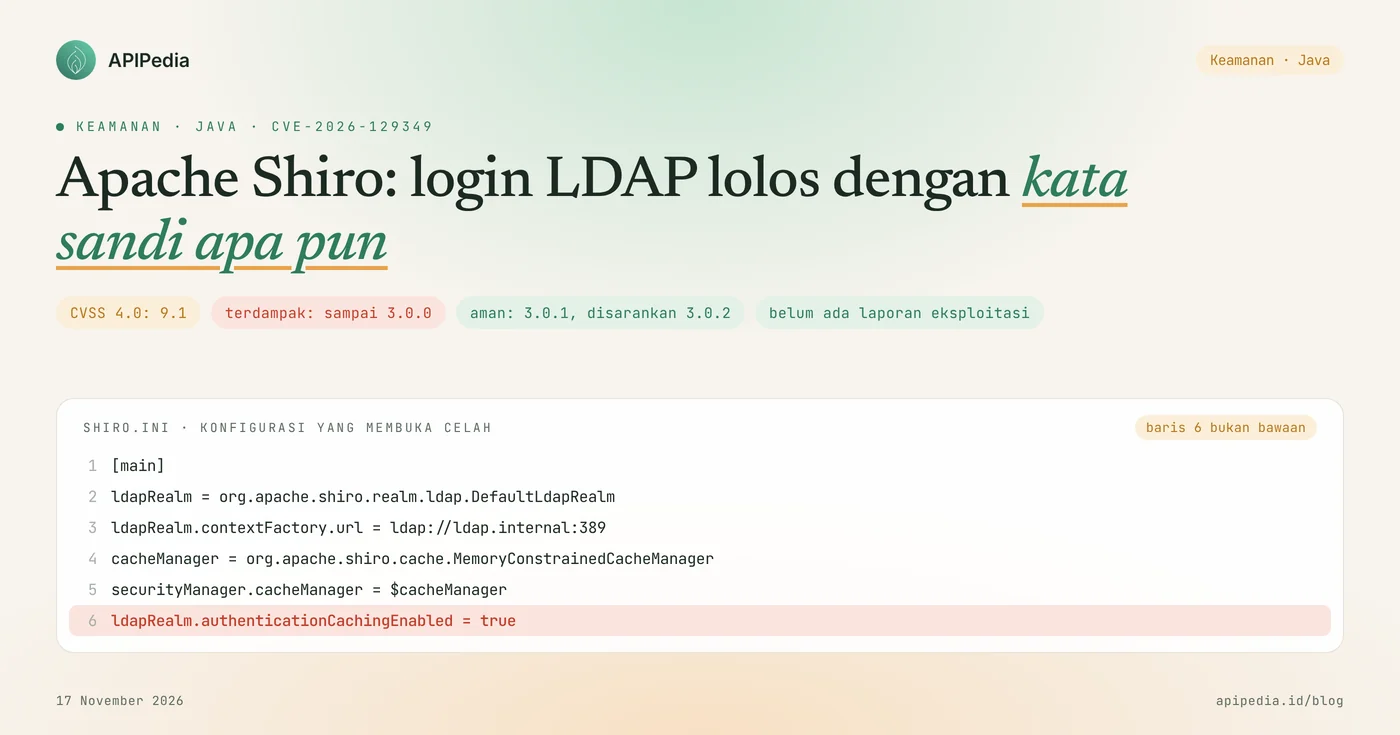
CVE-2026-129349 is an authentication bypass vulnerability in Apache Shiro that allows LDAP logins to be accepted with any password after the account has logged in once, with a CVSS 4.0 score of 9.1. All versions up to 3.0.0 are affected if using DefaultLdapRealm or JndiLdapRealm with authentication cache enabled. The fix is in 3.0.1, and Apache suggests 3.0.2. The advisory was published on November 14 2026.
Apache Shiro is a Java security framework that is widely used for logins, sessions, and access rights in internal corporate applications, including those connected to Active Directory or OpenLDAP. This article explains how the vulnerability works, the conditions under which applications are exposed, safe versions, check scripts, how to update, and how to look for signs of abuse.
Quick summary
| Items | Details |
|---|---|
| CVE | CVE-2026-129349 |
| Product | Apache Shiro ( org.apache.shiro:shiro-core), grades DefaultLdapRealm and JndiLdapRealm |
| Gap type | Improper authentication (CWE-287): password is not checked when login data is retrieved from cache |
| CVSS score 4.0 | 9.1 (critical), over the network, without access rights, without user interaction, with attack prerequisites |
| Impacted version | All versions up to 3.0.0, including 1.x and 2.x series |
| Safe version | 3.0.1 and above. 3.0.2 is recommended because it closes another gap in the same set of advisories |
| Condition | authenticationCachingEnabled = true in the LDAP realm. This is not a default setting |
| Status | There have been no reports of exploitation and it is not listed in the CISA KEV catalog (as of 16 November 2026) |
How does this Apache Shiro loophole work?
This loophole works because Shiro's LDAP realm leaves password checking entirely to the LDAP server, then bypasses that LDAP server when the login data is already in the cache. On subsequent logins, neither party checks the password.
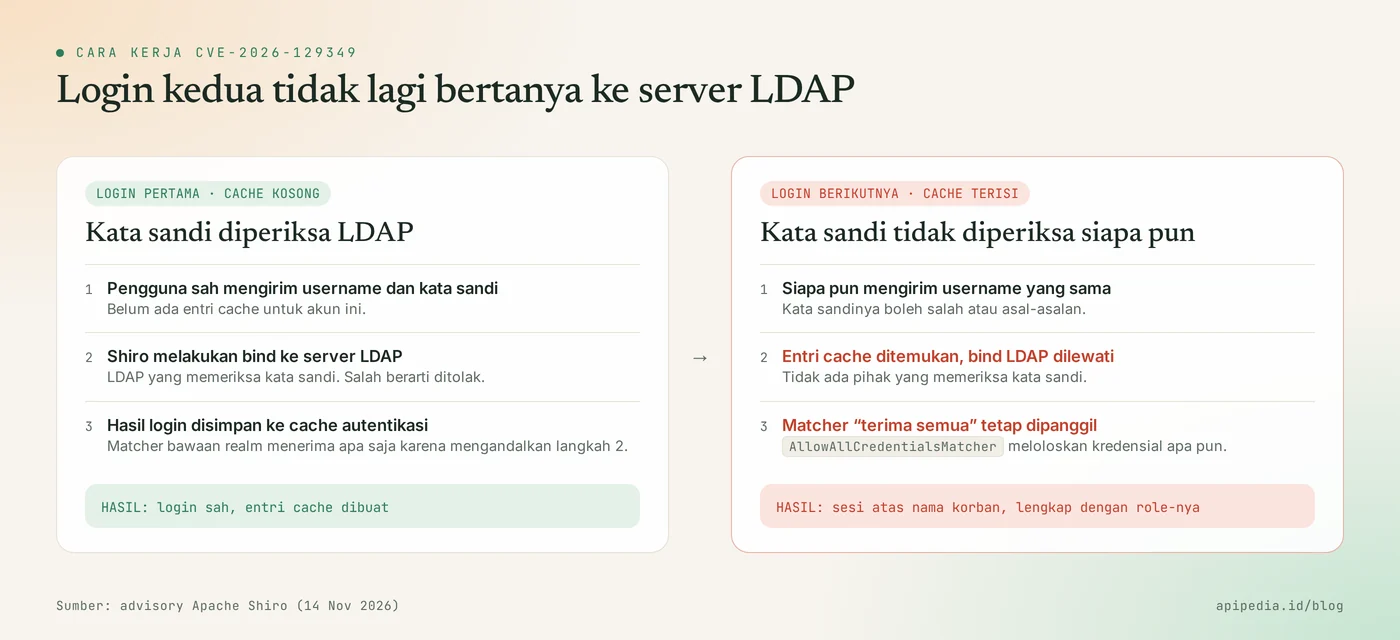
The order is like this:
- When logging in for the first time, Shiro binds to the LDAP server with the user's username and password. LDAP decides right or wrong.
- Because it relies on that bind, the LDAP realm installs a built-in credential matcher called
AllowAllCredentialsMatcher, which accepts any credential. - When authentication cache is active, successful login results are stored in the cache.
- On the next login for the same username, Shiro found the cache entry and no longer binds it to LDAP.
- The credential matcher is still called, but due to its accept-all nature, any password passes.
What does the attacker gain?
The attacker gets an application session in the name of the victim's account, complete with its role and permissions. This is account takeover at the application level, not code execution on the server and not read access to the LDAP directory. If the account taken over is an application admin, the impact follows whatever the admin can do.
Who is affected?
Affected are Java applications that meet all of the following conditions at once:
- Using Apache Shiro version 3.0.0 or earlier, including 1.x and 2.x series.
- Authentication is via
DefaultLdapRealmor its derivative,JndiLdapRealm. Other realms such as JDBC or self-made realms are not covered by this advisory. - Authentication cache is turned on (
authenticationCachingEnabled = true) and there is a cache manager installed. - The target account has logged in successfully since the cache was last emptied.
- Attackers know valid usernames and can reach the login page.
Authentication cache is off by default. This setting is usually turned on intentionally to reduce the load on the LDAP server, so applications with many users or slow LDAP are more likely to use it.
How serious is this loophole?
Serious if the conditions are met, because the password is not checked at all. However, the number of applications exposed is limited, because they require non-default configuration.
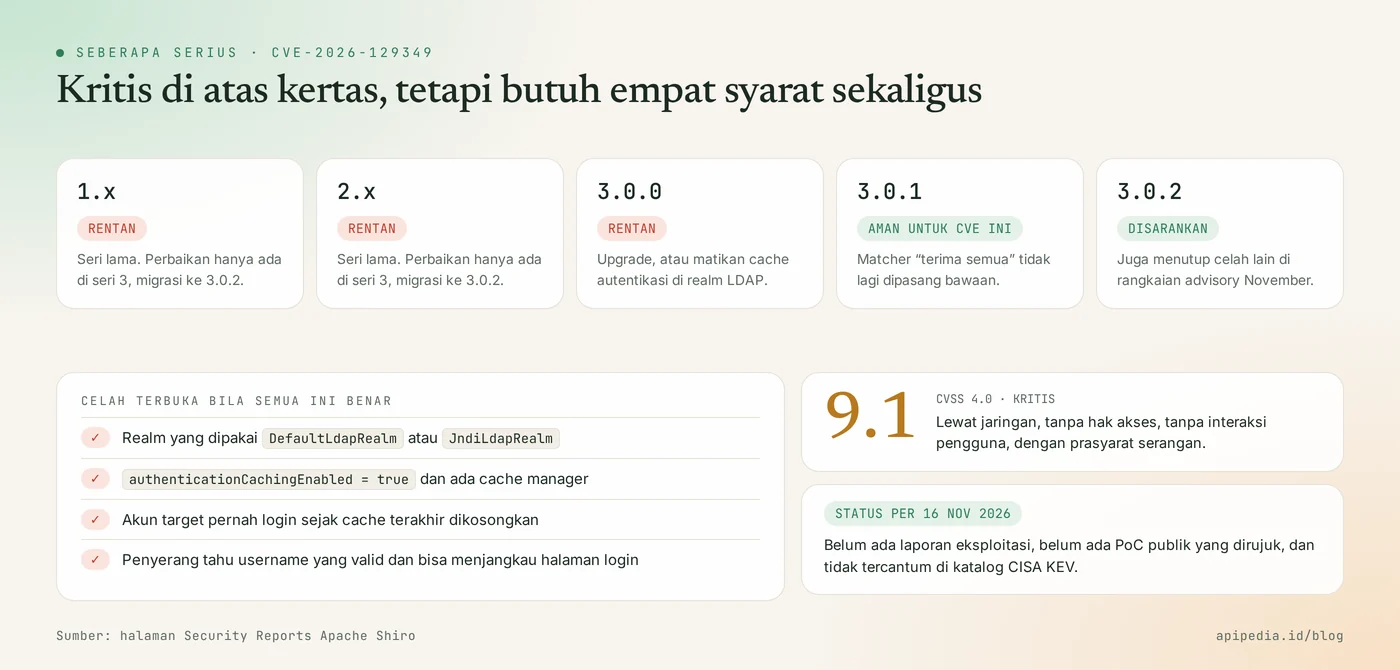
- Score: CVSS 4.0 of 9.1. The vector records the presence of attack prerequisites, namely an active cache and cache entries for the target account.
- Exploit: as of November 16, 2026 there have been no real attacks reported, no public proof code has been referenced by the advisory, and this CVE is not listed in the CISA KEV catalog.
- Convenience: no special tools required. Just the usual login form and correct username.
- Advisory series: in the same week Apache announced several other Shiro gaps of a lower level. Everything closes in 3.0.2.
Which version is safe?
The safe version for this CVE is Apache Shiro 3.0.1 and above, and the recommended version is 3.0.2.
| Shiro's version | Status for CVE-2026-129349 | Action |
|---|---|---|
| 3.0.2 and above | Safe | There isn't any. This version also closes another gap in the November advisory series |
| 3.0.1 | Safe | Upgrade to 3.0.2 for more fixes |
| 3.0.0 | Vulnerable when LDAP authentication cache is active | Upgrade to 3.0.2, or turn off authentication cache |
| 2.x and 1.x | Vulnerable when LDAP authentication cache is active | Turn off authentication cache now, then migrate to 3.0.2 |
A fix in 3.0.1 changes the default behavior: LDAP realms no longer install AllowAllCredentialsMatcher. If your Shiro comes from a third-party product, wait and follow updates from that product vendor.
How do I check if my application is affected?
Check two things: what version shiro-core is being used, and whether there is a configuration that turns on the authentication cache. The following script is read only. The logic has been tested in the sandbox with mock files of versions 1.13.0, 2.0.5, 3.0.0, 3.0.1, 3.0.2, and 3.1.0, as well as one shiro.ini samples.
#!/bin/sh
# Cek paparan CVE-2026-129349 di Apache Shiro. Hanya membaca, tidak mengubah apa pun.
# Pemakaian: sh cek-shiro.sh /opt/aplikasi-saya   (bawaan: direktori saat ini)
dir=${1:-.}
n=0
for f in $(find "$dir" -type f -name 'shiro-core-*.jar' 2>/dev/null); do
  n=$((n+1))
  ver=$(basename "$f" .jar | sed 's/^shiro-core-//' | grep -oE '^[0-9]+\.[0-9]+\.[0-9]+')
  [ -z "$ver" ] && { echo "TIDAK TERBACA : $f"; continue; }
  lowest=$(printf '%s\n%s\n' "$ver" "3.0.1" | sort -V | head -n1)
  if [ "$lowest" = "3.0.1" ]; then
    if [ "$ver" = "3.0.1" ]; then s="aman untuk CVE ini, naikkan ke 3.0.2"; else s="aman"; fi
  else
    s="RENTAN bila cache autentikasi LDAP aktif"
  fi
  echo "shiro-core $ver : $s ($f)"
done
[ "$n" -eq 0 ] && echo "Tidak ada shiro-core-*.jar di $dir (JAR di dalam .war/.jar gabungan belum ikut terperiksa)."
echo "--- konfigurasi yang menyalakan cache autentikasi ---"
grep -rnIE 'authenticationCachingEnabled|setAuthenticationCachingEnabled' "$dir" 2>/dev/null \
  --include='*.ini' --include='*.xml' --include='*.properties' --include='*.yml' --include='*.yaml' --include='*.java' --include='*.kt' \
  || echo "Tidak ditemukan pengaturan authenticationCachingEnabled (nilai bawaannya mati)."
For projects built with Maven or Gradle, the versions actually used can be seen from the dependency tree:
# Maven
mvn dependency:tree -Dincludes=org.apache.shiro

# Gradle
./gradlew dependencies --configuration runtimeClasspath | grep -i shiro
The application is exposed if the version is 3.0.0 or earlier, the realm used is Shiro's default LDAP realm, and the search above finds an authentication cache value of true.
How to update safely?
The quickest way is to turn off authentication caching in the LDAP realm, then upgrade all Shiro artifacts to 3.0.2.
Step 1: quick mitigation
Turn off the authentication cache in the LDAP realm, then restart the application so that the cache that has been filled is also empty. Example for THIS configuration:
# shiro.ini
[main]
ldapRealm = org.apache.shiro.realm.ldap.DefaultLdapRealm
ldapRealm.authenticationCachingEnabled = false
As a result, every login re-binds to the LDAP server, so that the LDAP load and response time can increase. The Apache Advisory also mentions the option of installing a credential matcher such as SimpleCredentialsMatcher which compares passwords with cached data. That option is easier to misconfigure, so turning off the cache or upgrading is recommended.
Step 2: update and verify
Upgrade all org.apache.shiro artifacts to the same version, for example via the version property in Maven:
<!-- pom.xml -->
<properties>
  <shiro.version>3.0.2</shiro.version>
</properties>

<dependency>
  <groupId>org.apache.shiro</groupId>
  <artifactId>shiro-core</artifactId>
  <version>${shiro.version}</version>
</dependency>
After rebuilding and deploying, verify in a test environment with your own test account: log in with the correct password, then try logging in again with the incorrect password. The second attempt must be rejected. Migration from 1.x or 2.x series to 3 series may bring API changes, so run regression tests before moving to production.
How to detect signs of abuse?
Detection is done by comparing successful logins in the application with bind records in the LDAP server. A successful login that does not have a bind pair is suspect. There are no official attack indicators yet, so check the following patterns:
- Successful login to a high-privileged account from an unusual IP address, device, or time.
- One account logged in from two different locations at the same time.
- Successful login in the application log without a corresponding bind record in the LDAP or Active Directory log.
To see when Shiro retrieves login data from the cache, temporarily raise the following log class level to DEBUG:
# contoh log4j2.properties (sesuaikan dengan framework log Anda)
logger.shiroauth.name = org.apache.shiro.realm.AuthenticatingRealm
logger.shiroauth.level = debug

# lalu cari jejak pengambilan dari cache di log aplikasi
grep -i "cache" /var/log/aplikasi-saya/app.log | grep -i "authenticat" | tail -n 50
If you find signs of abuse?
- Turn off authentication cache and restart the application so that all cache entries are removed.
- End all active sessions, especially admin account sessions.
- Review the actions the affected account took during the suspect period, then undo any unauthorized changes.
- Change the password of the affected account in the directory. Keep in mind, new passwords don't close the gap as long as the cache is still active.
- Upgrade to 3.0.2 before cache restart.
Frequently asked questions
What is Apache Shiro?
Apache Shiro is an open source security framework for Java that handles authentication, authorization, sessions, and cryptography. Many internal web applications use it as a login and access rights layer.
My application uses Shiro but not LDAP. Is it affected?
Not by this CVE. Advisory only covers DefaultLdapRealm and JndiLdapRealm. Upgrading to 3.0.2 remains worthwhile as that release closes several other loopholes.
Is changing the account password enough to close the gap?
No. As long as the account's cache entry exists, any password is still accepted. What closes the gap is upgrading or turning off the authentication cache.
Does an attacker need to know the old password?
No. Attackers only need a valid username and access to the login page. Other requirements are on the application side: the cache is active and the account has been logged in.
Has there been a real attack?
As of November 16, 2026 there have been no reports of exploitation and this CVE is not listed in the CISA KEV catalog. Because the method is simple, don't wait for an attack report to fix the configuration.
Also read about other vulnerabilities in login and server services: SonicWall MFA bypass CVE-2026-19868, admin access without login in GPUStack CVE-2026-102895, and Apache HTTP Server vulnerability CVE-2026-119618.
Source
Topics: #keamanan #cve #apache shiro #java #ldap #autentikasi
About the author
Tim APIPedia — Tim Engineering APIPedia
Tim engineering di balik APIPedia yang membangun dan memelihara API data Indonesia - ongkir, OCR KTP, data wilayah, BMKG, hingga server MCP - dan menulis panduan integrasinya dari pengalaman langsung.