AI Recommendations According to Needs: Gemini, Claude, Leonardo AI, ElevenLabs, and Claude Code
By Tim APIPedia, Tim Engineering APIPedia · Published · 8 min read
Choose AI based on need, not level: Gemini for general, Claude for professional, Leonardo AI, ElevenLabs, and Claude Code.
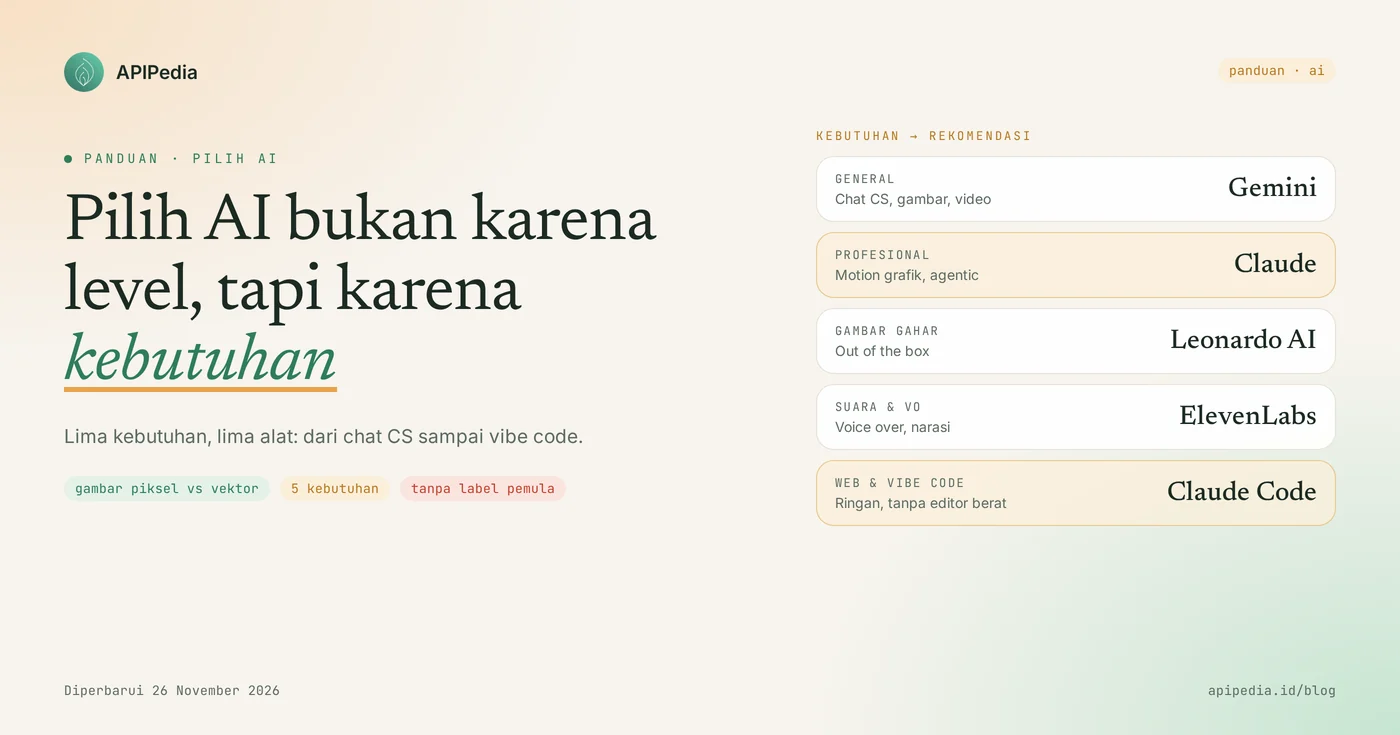
Tailored AI recommendations are a way of selecting AI tools based on the job to be completed, not based on beginner or advanced level. For general needs such as fast CS chat, pictures and videos, use Gemini. For professional work such as motion graphics, vibe code, and agentic AI, use Claude. For artistic images, use Leonardo AI, for sound, use ElevenLabs, and for creating websites, use Claude Code.
This mapping comes from our team's daily usage: Gemini for replying to customer chats, Claude for creating motion graphics and writing code, Leonardo AI for visual exploration, ElevenLabs for voice over, and Claude Code for building the web. Many people are confused because every AI claims to be able to do everything. In fact, each tool has a main skill. This article maps the five most frequently occurring needs in small teams and MSMEs, then explains why one tool is better suited than another for each need.
Quick summary: What AI for what needs?
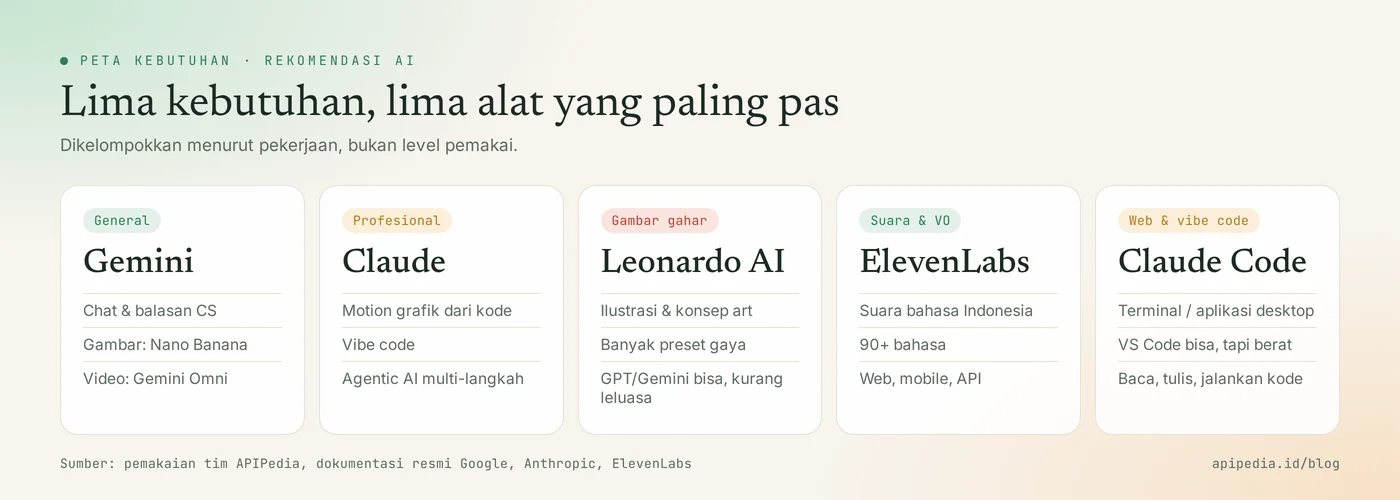
The short answer: there are five needs and five tools. Gemini for general, Claude for professional, Leonardo AI for artistic images, ElevenLabs for sound, and Claude Code for web. A complete explanation of each line is below.
| Need | Recommendation | Why |
|---|---|---|
| General: chat, CS, pictures, fast video | Gemini | One app for text, images (Nano Banana), and video (Gemini Omni) |
| Professional: motion graphics, vibe code, agentic AI | Claude | Strong on code, editable vector visuals, and multi-step tasks |
| The image is fierce and out of the box | Leonardo A.I | Focus on artistic image generation with many style options |
| Voice and voice over | ElevenLabs | Audio specialist, supports Indonesian voices |
| Create web and vibe code | Claude Code | A coding agent that is easy to use, without having to open a heavy editor |
Why is Gemini suitable for general needs?
Gemini is suitable for general needs because one application includes chat, image creation and video creation. For teams that need to be versatile and fast, this saves time switching tools.
- Chat and customer service. Gemini is easy to use for composing customer replies, summarizing complaints, and creating CS response templates.
- Picture. The Gemini image model is known as the Nano Banana. Google released Nano Banana 2 in February 2026 with improved accuracy of text within images, making it suitable for simple promo posters.
- Videos. In the Gemini application, video creation now uses Gemini Omni which replaces Veo. You can create videos from text, photos, or other videos, then edit them via conversation. This feature requires a paid Google AI subscription and age 18 or over.
The downside: the resulting Gemini images and videos are pixelated. If there is one letter or shape that is wrong, you have to regenerate it, you cannot correct one element precisely.
Why is Claude suitable for professional needs?
Claude is suitable for professional needs because it works through code, so the results are precise, editable and repeatable. This is important for motion graphics, vibe code, and advanced agentic AI.
Claude's way of creating images is different from Gemini
Claude does not create photos or pixel illustrations like image generator tools. Claude draws by writing vector code, namely SVG or HTML containing shapes, lines, colors and text. The code is then rendered and converted to JPG or PNG as needed.
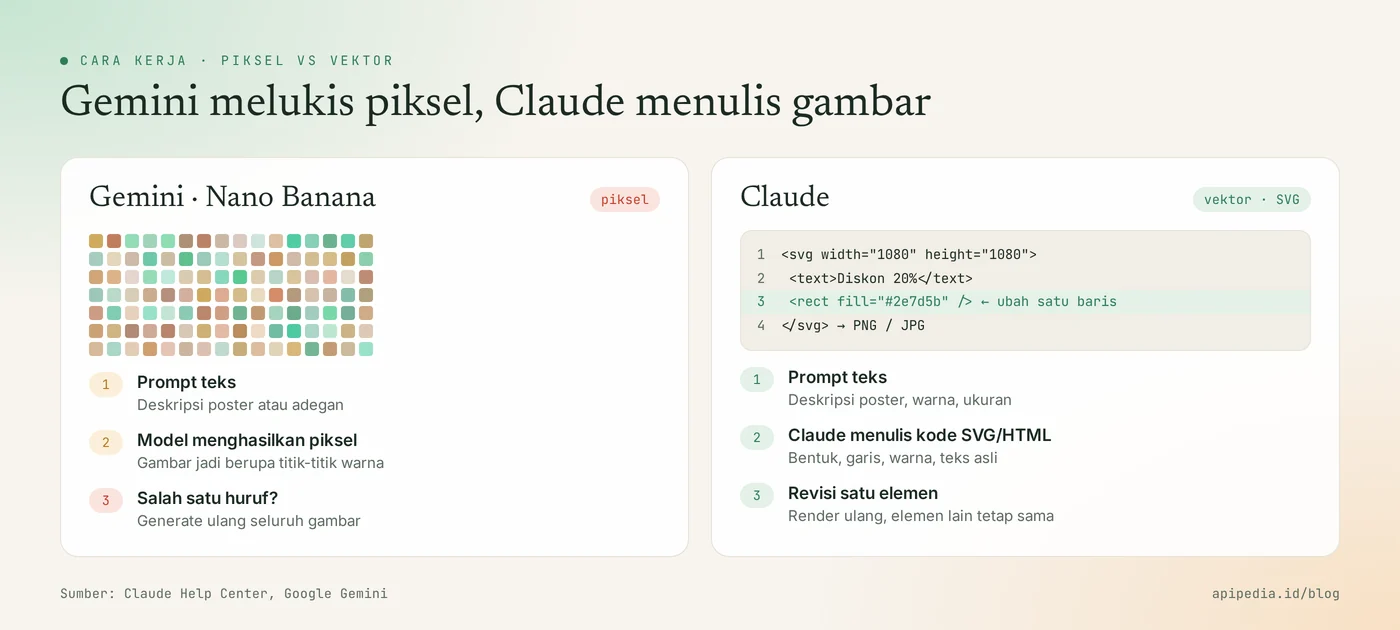
"Claude doesn't have the ability to make blurry and dot images like Gemini video or Nano Banana. Claude draws vectors and SVGs, then converts them to JPG or PNG as needed." — APIPedia Team
The difference is felt during revision. Pixel generators tend to repeat the entire image. Claude simply changes one line of code, for example the color of a button or the spelling of a title, and other elements remain exactly the same. The text in Claude's images is also always sharp because it is real text, not pixel guesswork.
What is Claude used for professionally?
- Motion graphics. Claude can write code-based animations (HTML, CSS, JavaScript, or Remotion) and then render them as MP4. The results are consistent with brand colors and fonts.
- Vibe code. You simply describe the desired application in everyday language, Claude writes the code.
- Agentic AI. Claude can perform multi-step tasks: research, write, create files, and connect to other applications via connectors.
Note: if you need realistic photos or painting illustrations, Claude is not the right choice. Use an image generator as in the next section.
What AI for fierce and out of the box images?
For images that are fierce and out of the box, our recommendation is Leonardo AI. This platform was built specifically for image generation, with many models and style presets such as illustration, concept art, cinematic, to 3D.
GPT and Gemini can also create images, and the results are good for daily needs. However, for wilder and more artistic visual exploration, Leonardo AI is more flexible because the style control and model options are richer.
What AI for voice and voice over?
For voices and voice overs, use ElevenLabs. This tool specializes in audio: text to speech, voice cloning, and long audio project editor.
- Supports more than 90 languages, including Indonesian voice options.
- Can be used on the web, mobile applications, or via API and SDK.
- Suitable for voice over promo videos, educational content, audiobooks and podcast narration.
If you need a simple and cheap Indonesian voice for the system, for example queue calls, the Text to Speech API on APIPedia could also be an option.
What AI to create web and vibe code?
To create web and vibe code, use Claude Code. Claude Code is a coding agent that can read projects, write and change files, run commands, and even prepare deploys.
Claude Code can also be used via the VS Code extension. From our experience, it runs fine, but VS Code itself is quite heavy, especially on laptops with limited RAM. If you like it light, run Claude Code directly from the terminal or the Claude desktop application. The code results are the same, the load on the laptop is much smaller.
How do I start using these five AI?
The quickest way is to try one real task per tool, with a specific prompt. Here's an example that you can immediately imitate.
- Gemini for CS. Paste one customer complaint chat, then ask: "Create 3 versions of a reply with a maximum of 2 sentences, friendly tone, offer a solution to exchange goods within 3 days."
- Claude for vector poster. Request: "Create a 1080x1080 promo poster in SVG, title '20% Off', green color #2e7d5b, then export to PNG." For revisions, simply ask to change certain colors or text.
- Leonardo AI for artistic visuals. Write the subject, style, lighting and ratio, for example "astronaut cat at the Surabaya night market, neon illustration style, 16:9 ratio". Create 4 variations, select one, then zoom in.
- ElevenLabs for voice over. Select the Indonesian voice, paste a 30 second script (around 70 to 80 words), listen, then adjust the stability and speed before downloading.
- Claude Code for the web. Install it via terminal, open the project folder, then write: "Create a one-page landing page for a cake shop, HTML and CSS only, light on mobile."
An example of why the revision in Claude is more precise: the button color on the SVG poster is only one attribute. Changing the line below doesn't touch any other elements at all.
<rect x="80" y="860" width="420" height="120" rx="24" fill="#2e7d5b" />
<!-- ganti fill="#2e7d5b" menjadi fill="#c2412d" untuk tombol merah -->
Frequently asked questions
Do you have to subscribe to all this AI?
No. Start with one tool that best suits your main job. Many small teams get by with Gemini for day-to-day operations, then add Claude when they start building professional products or content.
Can Claude make pictures?
Claude doesn't create pixelated images like Nano Banana or Leonardo AI. Claude creates visuals via SVG or HTML code, which can then be converted to PNG or JPG. Suitable for diagrams, infographics, icons, typography-based posters, and motion graphics.
Why not just use GPT for images?
GPT can create images and the results are good for general needs. But for truly artistic and experimental drawings, Leonardo AI is more focused and has more style options.
Does ElevenLabs support Indonesian?
Yes. ElevenLabs provides Indonesian voices for text to speech and also supports Indonesian transcription.
Claude Code is better in terminal or in VS Code?
The function is the same. Choose a terminal or desktop application if you want it to be lightweight, and choose VS Code if you are used to working in that editor and your laptop is powerful.
Want to try Indonesian AI voices for your app? Read the Text to Speech API tutorial for voice calling queues. Want to know how machines read text from photos? Read how OCR works.
Source
Topics: #ai #gemini #claude #claude code #elevenlabs #panduan
About the author
Tim APIPedia — Tim Engineering APIPedia
Tim engineering di balik APIPedia yang membangun dan memelihara API data Indonesia - ongkir, OCR KTP, data wilayah, BMKG, hingga server MCP - dan menulis panduan integrasinya dari pengalaman langsung.