SonicWall Vulnerability CVE-2026-19868: SSL-VPN Login Can Bypass MFA SAML, Has Been Exploited
By Tim APIPedia, Tim Engineering APIPedia · Published · Updated · 9 min read
The SonicOS vulnerability CVE-2026-19868 allows SSL-VPN logins to pass without SAML MFA and has been exploited. This is the safe version, how to check, upgrade and detect it.
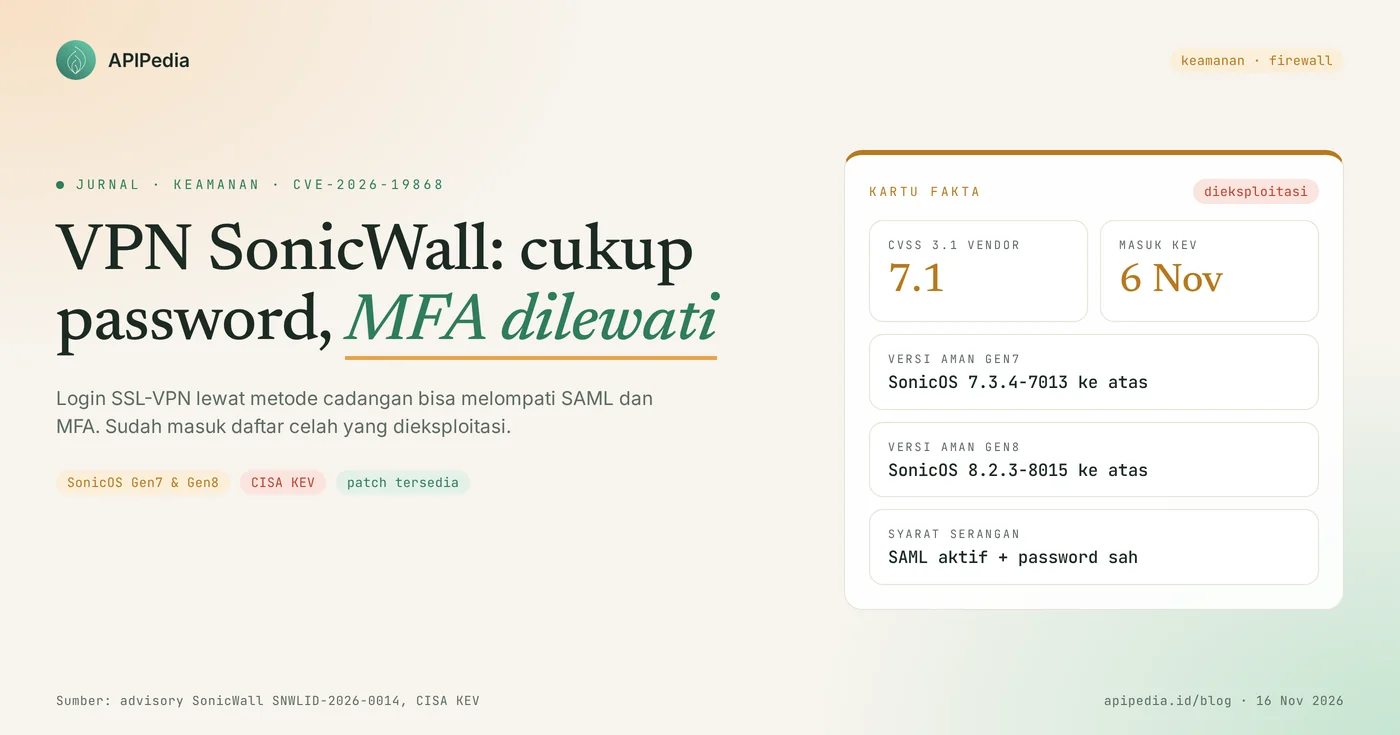
CVE-2026-19868 is a vulnerability in the SonicWall SonicOS SSL-VPN service that allows users with valid usernames and passwords to log in without bypassing SAML, including MFA embedded in SAML. SonicWall's CVSS 3.1 score is 7.1, the fix is in SonicOS 7.3.4-7013 (Gen7) and 8.2.3-8015 (Gen8), and CISA included it in the Known Exploited Vulnerabilities (KEV) catalog on November 6, 2026.
This loophole is important because many offices rely on MFA as a last resort when employee passwords are leaked. In a vulnerable firewall, those safeguards can be bypassed. This article discusses how it works, the conditions for a firewall to be attacked, safe versions, scripts to match firmware versions, upgrade steps, and how to check login logs.
Quick summary
| Items | Details |
|---|---|
| CVE | CVE-2026-19868 (advisory SonicWall SNWLID-2026-0014) |
| Product | SonicOS on SonicWall Gen7 and Gen8 firewalls, physical or virtual (NSv) |
| Gap type | SAML authentication obligations are not enforced in SSL-VPN (CWE-308) |
| CVSS score 3.1 | 7.1 (high) according to SonicWall; 7.5 according to CISA additional assessment |
| Impacted version | Gen7: 7.3.3-7015 and earlier. Gen8: 8.2.2-8015 and earlier |
| Safe version | Gen7: 7.3.4-7013 and above. Gen8: 8.2.3-8015 and above |
| Status | Enter CISA KEV November 6 2026, US federal agency deadline November 20 2026 |
| Workaround | There isn't any. The only official fix is a firmware upgrade |
How does the CVE-2026-19868 vulnerability work?
This vulnerability works through a backup login path: the vulnerable firewall continues to accept SSL-VPN logins from authentication methods other than SAML, even though the admin already requires SAML. Because MFA is typically checked by the identity provider (IdP) in the SAML flow, login via the backup path is completed without an MFA code.
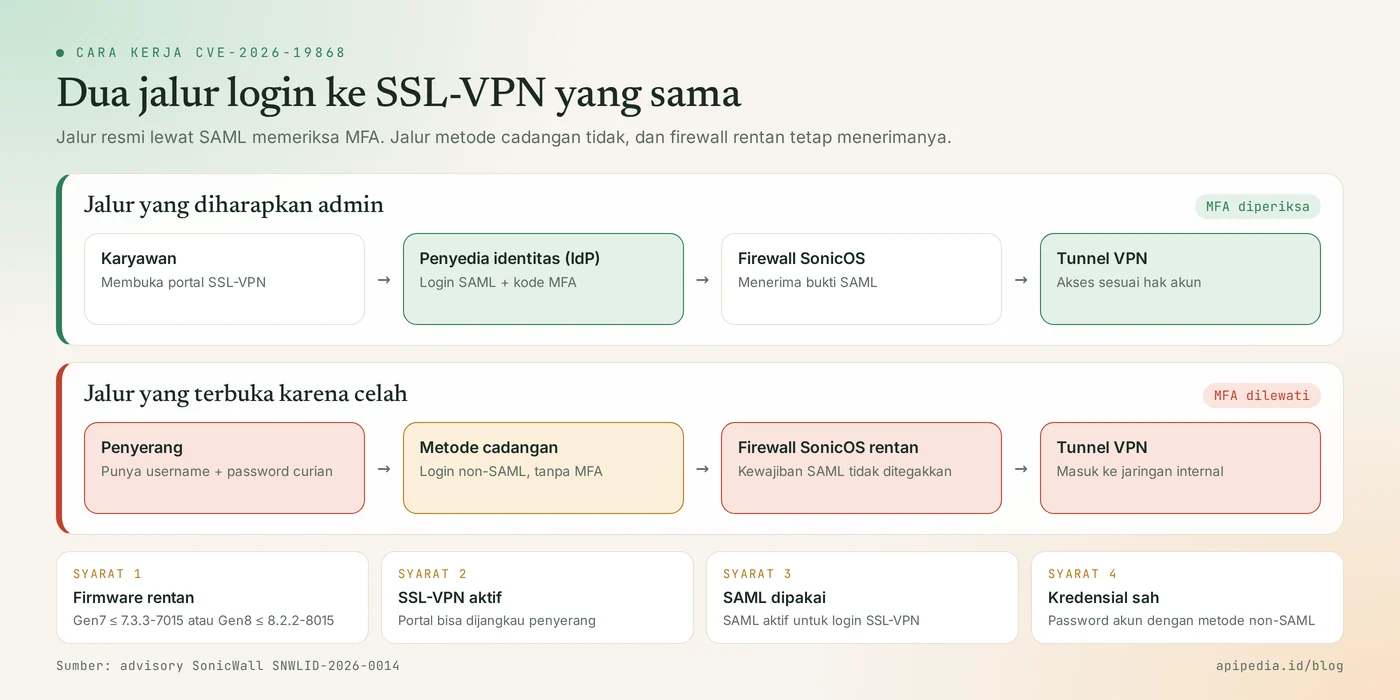
There are two things that need to be straightened out. First, this is not a no-login loophole. Attackers still need a valid username and password, for example the result of phishing, data-stealing malware, or a reused password. Second, this is not a code execution loophole in the firewall. The result of the attack is a VPN session with the victim's account privileges.
What is a backup authentication method?
The backup method is an SSL-VPN login method other than SAML which is still active on the firewall. SonicWall did not specify which methods were involved. Therefore, consider any non-SAML method that is still active for SSL-VPN users as a possible path.
Who is affected?
Your firewall is affected if the following four conditions are met at once:
- SonicOS Gen7 firmware version 7.3.3-7015 or earlier, or Gen8 version 8.2.2-8015 or earlier.
- The SSL-VPN service is active and can be reached by attackers, generally from the internet.
- SAML is enabled for SSL-VPN login. SonicWall insists this loophole only impacts those configurations.
- There are accounts that can log in via non-SAML methods, and the attacker holds their credentials.
Models on the affected list: Gen7 TZ270 to TZ670, NSa 2700 to 6700, NSsp 10700 to 15700, and NSv 270/470/870. For Gen8: TZ80 to TZ680, NSa 2800 to 5800, and NSv. Gen6 firewalls and earlier are out of support and are not accepting new firmware, so SonicWall recommends device replacement.
If your SSL-VPN does not use SAML, this CVE does not apply to your configuration. Upgrading is still recommended as the same firmware patches six other loopholes.
How serious is this loophole?
Serious enough to prioritize this week: the score is 7.1, but this gap has been recorded as being used in attack and has no workaround.
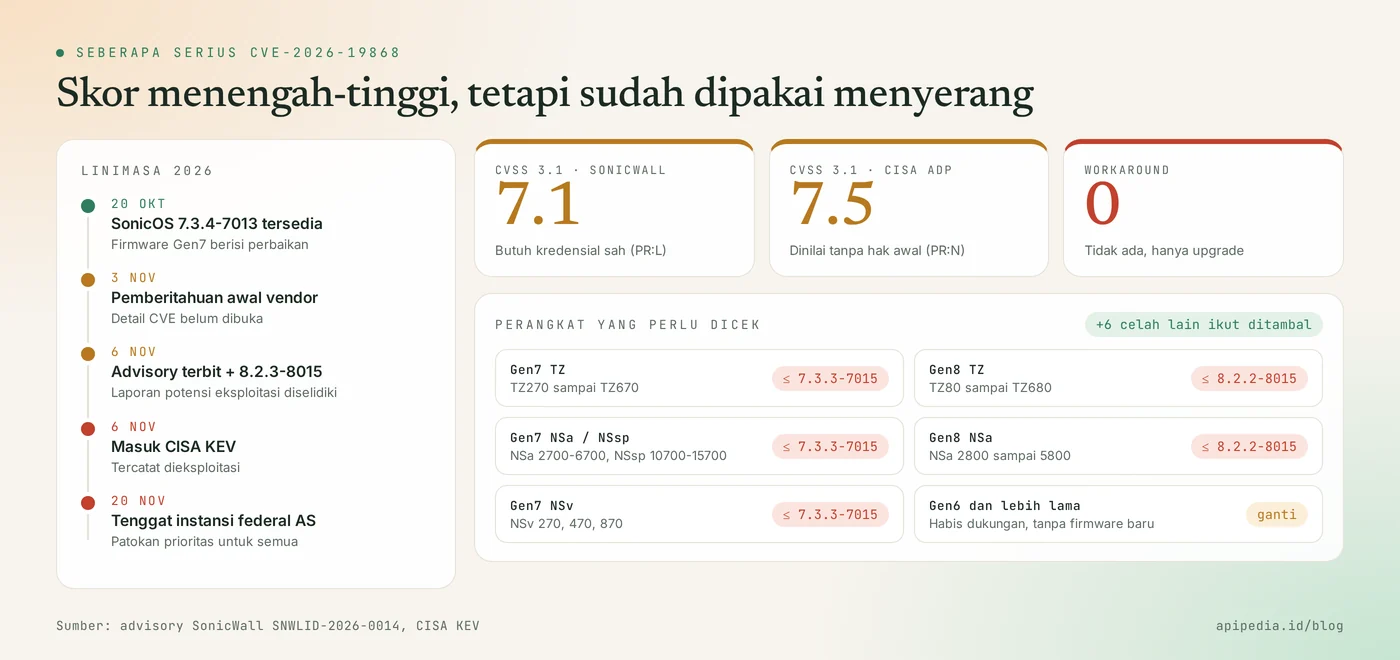
- CVSS 3.1: 7.1 from SonicWall, assuming the attacker already has credentials. The CISA supplemental assessment gave it a 7.5.
- November 6, 2026: SonicWall issues an advisory and states the PSIRT team is investigating reports of potential exploitation. On the same day CISA admitted him to KEV.
- November 20, 2026: patching deadline for US federal civil agencies. This deadline is not binding on organizations in Indonesia, but is worthy of being used as a priority benchmark.
- No indicators of attack (IOC), names of perpetrators, or number of victims have been published.
- The same firmware fix also closes six other SonicOS loopholes. There have been no reports of the six being exploited.
Which version is safe?
Safe versions are SonicOS 7.3.4-7013 and above for Gen7 and 8.2.3-8015 and above for Gen8.
| Product line | Impacted version | Safe version |
|---|---|---|
| Gen7 (TZ, NSa, NSsp, NSv) | 7.3.3-7015 and earlier | 7.3.4-7013 and above |
| Gen8 (TZ, NSa, NSv) | 8.2.2-8015 and earlier | 8.2.3-8015 and above |
| Gen6 and older | End of support period | No new firmware, replace device |
Note that 8.2.2-8015 is a vulnerable version, although its build number is similar to the secure version 8.2.3-8015.
How do I check if my firewall is affected?
Check two things: the firmware version and whether SAML is used for SSL-VPN login. The firmware version is visible on the system status page on the SonicOS web interface, or via command show version in the CLI.
If you manage multiple devices, copy the version number and then match it with the following script from your laptop. The script only compares the version text and does not touch the firewall. The logic has been tested in the sandbox with nine sample versions.
#!/usr/bin/env bash
# Cek versi SonicOS terhadap CVE-2026-19868 (hanya membandingkan teks versi, tidak menyentuh firewall)
# Pakai: bash cek-sonicos.sh 7.3.3-7015 8.2.3-8015
lt() { [ "$1" != "$2" ] && [ "$(printf '%s\n%s\n' "$1" "$2" | sort -V | head -n1)" = "$1" ]; }

cek() {
  v=$(echo "$1" | grep -oE '[0-9]+\.[0-9]+\.[0-9]+-[0-9]+' | head -n1)
  [ -z "$v" ] && { echo "format tidak dikenali (contoh: 7.3.3-7015)"; return; }
  case "$v" in
    7.*) lt "$v" 7.3.4-7013 && echo "RENTAN, upgrade ke 7.3.4-7013 atau lebih baru" || echo "AMAN" ;;
    8.*) lt "$v" 8.2.3-8015 && echo "RENTAN, upgrade ke 8.2.3-8015 atau lebih baru" || echo "AMAN" ;;
    *)   echo "DI LUAR GEN7/GEN8, Gen6 ke bawah sudah habis dukungan" ;;
  esac
}

[ $# -eq 0 ] && { echo "Pakai: bash $0 VERSI [VERSI...]"; exit 1; }
for a in "$@"; do printf '%-14s %s\n' "$a" "$(cek "$a")"; done
Example results:
$ bash cek-sonicos.sh 7.3.3-7015 7.3.4-7013 8.2.2-8015 8.2.3-8015
7.3.3-7015     RENTAN, upgrade ke 7.3.4-7013 atau lebih baru
7.3.4-7013     AMAN
8.2.2-8015     RENTAN, upgrade ke 8.2.3-8015 atau lebih baru
8.2.3-8015     AMAN
After that, open the SSL-VPN authentication settings and note two things: whether SAML is enabled for VPN login, and which accounts can still log in using other methods.
How to update safely?
Safe order: narrow the login path first, upgrade the firmware, then make sure SAML is truly mandatory. Since there is no official workaround, the first step is simply to reduce exposure until the scheduled upgrade arrives.
Step 1: temporary mitigation
- Deactivate or delete SSL-VPN accounts that can still log in via non-SAML methods. Leave an administration path that doesn't rely on SSL-VPN so you don't get locked out.
- Limit access to the SSL-VPN portal to only known IP ranges, when teamwork patterns allow.
- Change the VPN account password that is suspected to have been leaked or reused on another service.
Step 2: upgrade and verify
- Export configuration backup and note the current firmware version for rollback purposes.
- Download SonicOS 7.3.4-7013 or later (Gen7), or 8.2.3-8015 or later (Gen8), from the MySonicWall portal.
- Install the firmware during quiet hours, then check the version again after the device reboots.
- For NSv, upgrade or redeploy with a repaired image. Restoring a configuration backup to an old image will bring the gap back to life.
- Test SSL-VPN login with a test account: login should pass through SAML and require MFA, and other methods should be rejected.
How to detect signs of burglary?
The main sign is a successful SSL-VPN login without a login and MFA record pairing at the identity provider. There is no official IOC yet, so the check relies on a comparison of two logs.
- Export successful SSL-VPN login logs from the firewall, since at least October 20, 2026.
- Export sign-in logs from an IdP (e.g. Microsoft Entra ID, Okta, or Google Workspace) for the same period.
- Look for unmatched VPN logins in IdP logs, especially from accounts that should only use SAML.
- Check for unusual origin IP addresses, times, and countries, as well as new local accounts or newly activated login methods.
If both logs can be exported to CSV, the following script helps search for unmatched VPN logins in the IdP on the same day. Match the column numbers to your export format.
# vpn.csv : tanggal,user,ip   (login SSL-VPN yang berhasil)
# idp.csv : tanggal,user      (sign-in SAML + MFA yang berhasil di IdP)
awk -F, 'NR==FNR { ok[$1","tolower($2)]=1; next }
         !(($1","tolower($2)) in ok) { print "PERIKSA: " $0 }' idp.csv vpn.csv
The results of this script are initial clues, not evidence of a break-in. A valid login may appear if there is a difference in the time zone or username format in the two logs.
If you find signs of a burglary?
- Disconnect the account's VPN session and reset its password from a trusted device.
- Browse the servers and internal services accessed during that session.
- Rotate other credentials that the account can reach, such as service accounts and API keys.
- Save firewall and IdP logs as evidence before being overwritten by log rotation.
- If the integrity of the device is in doubt, rebuild the configuration from a known clean backup on top of the repaired firmware.
Frequently asked questions
Can an attacker log in without a password at all?
No. Attackers still need a valid username and password. What is bypassed is the SAML and MFA obligations in it, not the password.
My SSL-VPN doesn't use SAML. Is it necessary to upgrade?
CVE-2026-19868 does not apply to configurations without SAML. Upgrading is still recommended as the same firmware patches six other SonicOS vulnerabilities.
Is turning off SAML a shortcut?
Not recommended. SonicWall doesn't list it as an official mitigation, and turning off SAML means removing MFA for all users. A firmware upgrade is the correct fix.
My firewall is still Gen6. What to do?
Gen6 and earlier are out of support and do not receive new firmware. Plan to replace the device, and in the meantime limit access to its VPN service.
Does the November 20 deadline apply to companies in Indonesia?
Not legally. The deadline applies to US federal civilian agencies. KEV status means this vulnerability has already been used to attack, so all organizations should patch it as soon as possible.
VPN devices and other firewalls are also being targeted. Also see Ivanti Connect Secure zero-day CVE-2026-111357, Check Point Gaia flaw CVE-2026-123039, and FortiManager flaw CVE-2026-126261. To understand how MFA codes work, see our TOTP and 2FA guide.
Source
Topics: #keamanan #cve #sonicwall #vpn #cisa kev #firewall
About the author
Tim APIPedia — Tim Engineering APIPedia
Tim engineering di balik APIPedia yang membangun dan memelihara API data Indonesia - ongkir, OCR KTP, data wilayah, BMKG, hingga server MCP - dan menulis panduan integrasinya dari pengalaman langsung.