Java4Shell (CVE-2026-114938): OpenJDK Base64 Flaw in Java 17, 21, 25, and 27, How to Check and Patch
By Tim APIPedia, Tim Engineering APIPedia · Published · 11 min read
Java4Shell (CVE-2026-114938) overwrites JVM memory via Base64 text in Java 17.0.6+, 21, 25, 27. Here's how to check CPU, mitigate flags, and build safely.
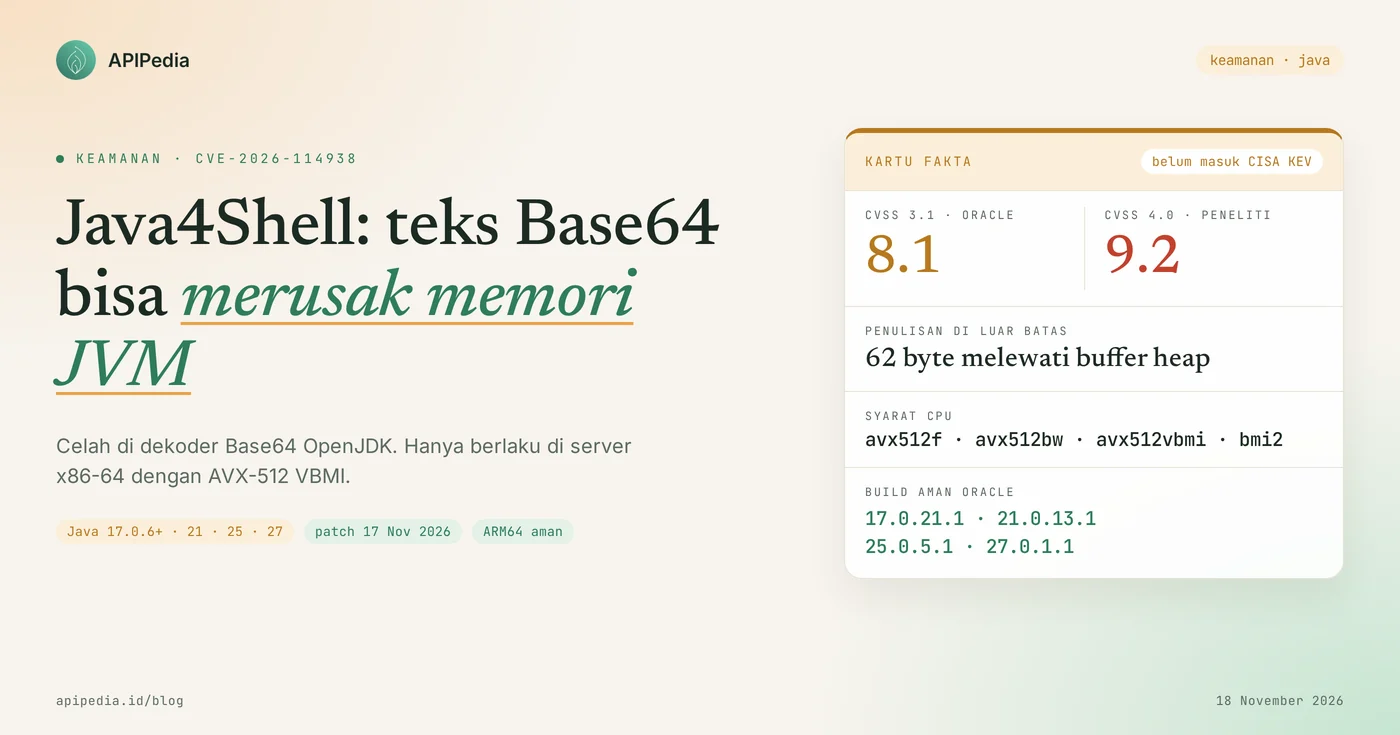
CVE-2026-114938, dubbed Java4Shell, is an out-of-bounds memory write vulnerability in the HotSpot JVM (OpenJDK) fast Base64 decoder, which can be triggered from the network without login. This flaw exists in Java 17.0.6 and above, 21, 25, and 27, but is only active on x86-64 servers whose CPUs support AVX-512 VBMI. Oracle rated it 8.1 (CVSS 3.1) and released a fix build on November 17, 2026.
This loophole is important because almost all Java applications decode Base64 from the outside, for example login headers and tokens. Java is also often sneakily embedded in products like Jenkins, Keycloak, Jira, and Confluence. This article discusses how it works, three exposure requirements, secure versions, check scripts, mitigation via JVM flags, update steps, and how to look for signs in the logs.
Quick summary
| Items | Details |
|---|---|
| CVE | CVE-2026-114938 (Java4Shell) |
| Product | JVM HotSpot on OpenJDK and derivatives: Oracle Java SE, Oracle GraalVM, Eclipse Temurin, Amazon Corretto, Azul Zulu, Microsoft Build of OpenJDK, Red Hat OpenJDK, distro packages |
| Gap type | Writes outside buffer heap limits on AVX-512 accelerated Base64 decoder. Oracle lists its components as Compiler |
| Score | CVSS 3.1: 8.1 according to Oracle (over the network, no login, high attack complexity). CVSS 4.0: 9.2 according to researchers |
| Impacted version | Java 17.0.6 and above, 21, 25, 27, as well as Oracle Java 8 Enterprise Performance Pack (8u511-perf) |
| Hardware requirements | x86-64 with flags avx512f, avx512bw, avx512vbmi, and bmi2. ARM64 is not affected |
| Safe version | Oracle: 17.0.21.1, 21.0.13.1, 25.0.5.1, 27.0.1.1, and 8u513-perf. Other distributions: vendor build containing the November 17, 2026 fix |
| Announced | November 17, 2026, along with the Oracle Critical Security Patch Update November 2026 |
| Status | There have been no reports of actual attacks and it has not been listed in CISA KEV as of November 17, 2026 |
How Java4Shell loophole works?
This flaw works because the fast Base64 decoder in HotSpot incorrectly calculates the output size when it receives short, malformed Base64 text, then writes 62 bytes past the end of the buffer. The decoder is written in assembly and uses AVX-512 instructions to make it faster. It entered Java 18, then was brought back to Java 17 starting 17.0.6 which was released in January 2023.
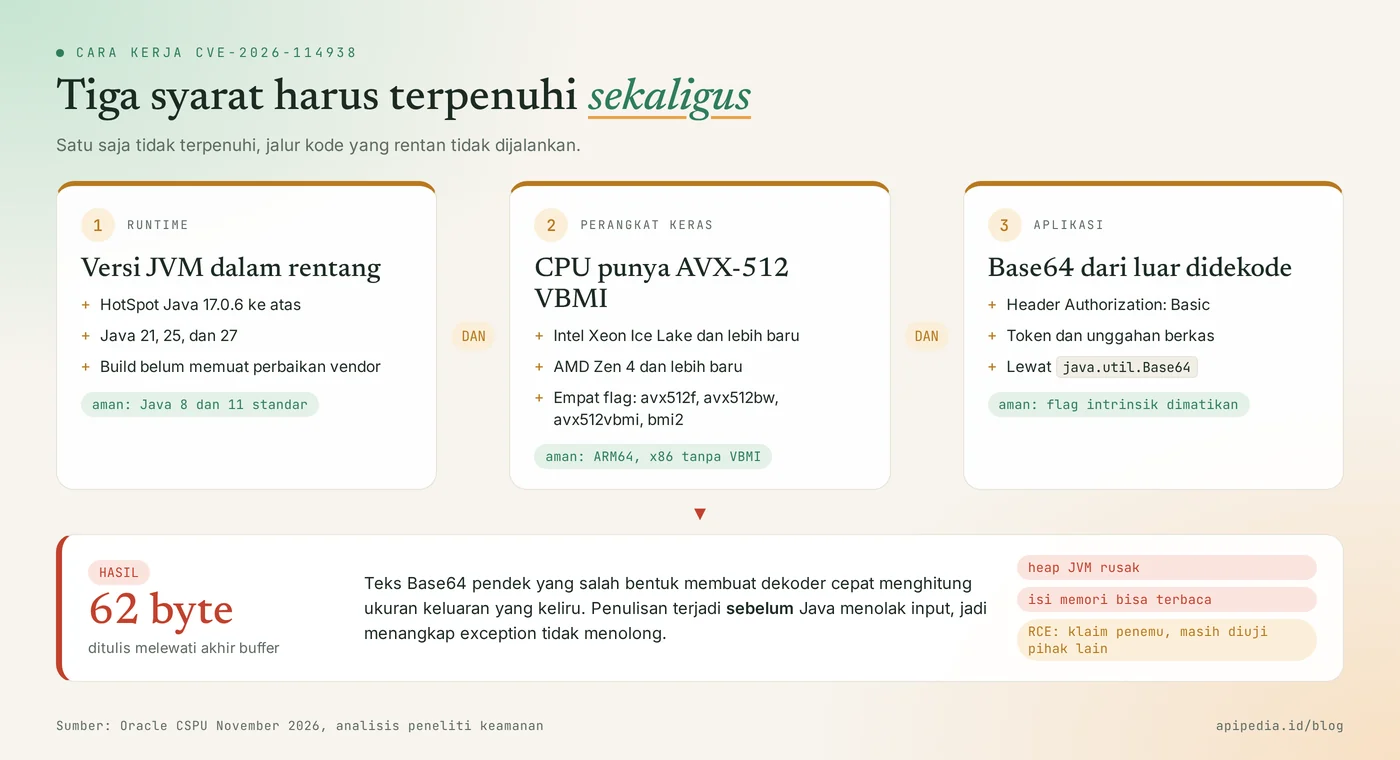
Three conditions must be met at once:
- Runtime: The HotSpot JVM is in the affected version range and does not contain a fix yet.
- Hardware: x86-64 CPU with AVX-512 VBMI, for example Intel Xeon Ice Lake generation and above or AMD Zen 4 and above. Many new generation cloud instances use this CPU.
- Application: data from outside to decoder
java.util.Base64. Common examples are headersAuthorization: Basic, tokens, and file uploads.
Why doesn't catching exceptions help?
Because the write to memory happens first, only then does Java throw IllegalArgumentException to reject the input. The application appears to handle errors correctly and replies 401, even though the memory behind the buffer has been overwritten. Fast decoders are also only used after the code has been JIT compiled, so servers that have been running for a long time are more likely to be vulnerable. This article intentionally does not include examples of trigger input.
Who is affected?
Affected are Java services on x86-64 servers with AVX-512 VBMI that run Java 17.0.6 or later, 21, 25, or 27 and receive Base64 from external sources. Groups that need to check immediately:
- Spring Boot, Tomcat, and Jetty applications that are exposed to the internet, especially those that use HTTP Basic Auth or decode tokens before verifying them.
- Java-based product that carries its own JDK. The inventors claim to have successfully demonstrated no-login attacks on Keycloak, Jira, Confluence, Jenkins, JFrog Artifactory, and PingFederate in native configurations, as well as login-only attacks on Kafka, Solr, Elasticsearch, and Gerrit.
- Container image with a Java base image that has not been rebuilt. The version of Java on the host is irrelevant, what counts is the version in the image.
- Java client connecting to an untrusted server. Researchers say there is a client-side variant via the TLS server with malicious intent.
Not affected: standard Java 8 and 11, Java 17.0.5 and below, ARM64 servers such as AWS Graviton, and x86-64 CPUs without AVX-512 VBMI.
How serious is this loophole?
Seriously, but not all Java servers were exposed: Oracle gave it a score of 8.1, researchers gave it a 9.2, and as of November 17, 2026 there have been no real attacks reported.
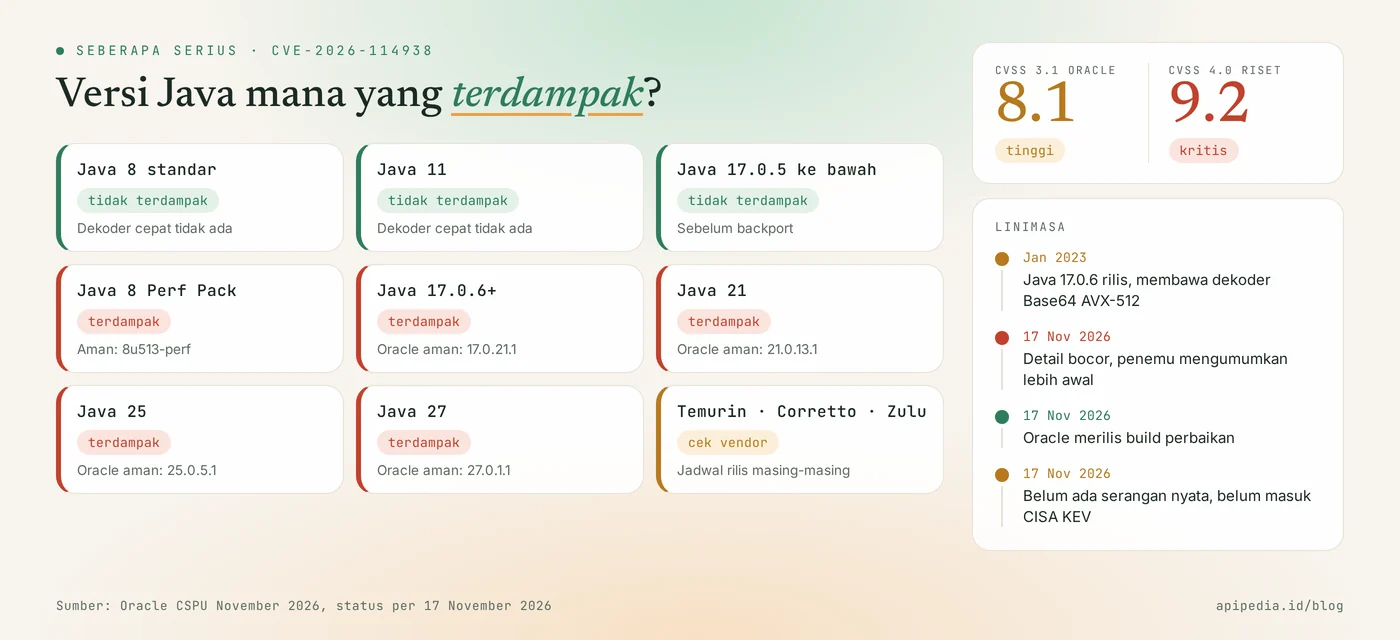
- Two different scores. Oracle rated 8.1 on CVSS 3.1 with high attack complexity. The researchers said 9.2 in CVSS 4.0.
- Can be triggered without logging in. Oracle's risk matrix notes that this vulnerability can be exploited from the network without authentication, via data sent to an API, for example via a web service.
- RCE's claim has not yet been agreed. The inventor claims to have a chain of exploits for several products and is withholding details. Independent lab testing confirmed writing 62 bytes out of bounds, but did not prove code execution. There is no universal exploit, each product needs its own chain.
- Details of the root cause are public. The inventor announced it early because the loophole information leaked before the patch release. The distance to the attempted attack can be short.
- Not yet included in CISA KEV and there have been no reports of exploitation in the wild as of 17 November 2026.
Which version is safe?
For the Oracle JDK, the safe version is the build ending in .1 released November 17, 2026. For other distributions, use the vendor build that explicitly mentions the CVE-2026-114938 fix.
| Runtime | Affected | Safe or action version |
|---|---|---|
| Oracle Java SE 17 | 17.0.6 to 17.0.21 | 17.0.21.1 |
| Oracle Java SE 21 | until 21.0.13 | 21.0.13.1 |
| Oracle Java SE 25 | to 25.0.5 | 25.0.5.1 |
| Oracle Java SE 27 | 27.0.1 | 27.0.1.1 |
| Oracle Java 8 Enterprise Performance Pack | 8u511-perf | 8u513-perf |
| Temurin, Corretto, Zulu, Microsoft, Red Hat, distro packages | Same range (17.0.6+, 21, 25, 27) | Check vendor advisories. As of November 17, 2026 not all have released a fix build. Install the mitigation flag first |
| Standard Java 8 and Java 11 | Not affected by this gap | Keep updating regularly for other improvements |
| Java on ARM64 | Not affected | No special mitigation required |
How do I check if my server is affected?
Check three things: CPU flags, the version of each Java installed, and the status of flag UseBASE64Intrinsics. The following script is read only and has been tested in a Linux x86-64 sandbox with OpenJDK 21.
#!/bin/sh
# Cek paparan CVE-2026-114938 (Java4Shell). Hanya membaca, tidak mengubah apa pun.
need="avx512f avx512bw avx512vbmi bmi2"; cpu=ya
for f in $need; do grep -qw "$f" /proc/cpuinfo 2>/dev/null || cpu=tidak; done
echo "CPU x86-64 dengan AVX-512 VBMI : $cpu"

for j in $(command -v java) /usr/lib/jvm/*/bin/java /opt/*/bin/java /opt/*/jre/bin/java; do
  [ -x "$j" ] || continue
  v=$("$j" -version 2>&1 | sed -n 's/.*version "\([^"]*\)".*/\1/p' | head -n1)
  major=${v%%.*}; rest=${v#*.}; minor=${rest%%.*}; rest=${rest#*.}; patch=${rest%%[!0-9]*}
  case "$major" in
    17) if [ "${minor:-0}" -eq 0 ] && [ "${patch:-0}" -lt 6 ]; then s="di luar rentang (sebelum 17.0.6)"; else s="DALAM RENTANG"; fi ;;
    21|25|27) s="DALAM RENTANG" ;;
    1|8|11) s="di luar rentang (kecuali Oracle Java 8 Enterprise Performance Pack)" ;;
    *) s="rilis non-LTS, cek ke vendor" ;;
  esac
  b64=$("$j" -XX:+PrintFlagsFinal -version 2>/dev/null | awk '$2=="UseBASE64Intrinsics"{print $4}')
  echo "$j | versi ${v:-?} | $s | UseBASE64Intrinsics=${b64:-?}"
done
echo "Terpapar bila: CPU = ya, versi DALAM RENTANG, build belum memuat perbaikan vendor, dan UseBASE64Intrinsics=true."
Example output on the exposed server:
CPU x86-64 dengan AVX-512 VBMI : ya
/usr/bin/java | versi 21.0.12.1 | DALAM RENTANG | UseBASE64Intrinsics=true
That script only finds Java in a general location. For the running JVM and container image, check directly:
# JVM yang sedang berjalan beserta versinya
jcmd -l
jcmd <pid> VM.version

# Java bawaan aplikasi di luar lokasi umum
find / -xdev -type f -name release -path '*j*' 2>/dev/null | xargs grep -H '^JAVA_VERSION=' 2>/dev/null

# Versi Java di dalam image container
docker run --rm --entrypoint java <image> -version
How to update safely?
Safe order: turn off the fast decoder via the JVM flag as mitigation, install a repair build from the vendor, then restart every Java process and rebuild the image.
Step 1: mitigate by turning off Base64 intrinsics
Flag -XX:-UseBASE64Intrinsics makes the JVM use a regular Base64 decoder, so the vulnerable code path is not executed. This is a recommendation from researchers and not an official Oracle workaround. In independent lab testing, this flag stopped out-of-bounds writes in all affected versions tested. As a result, Base64 decoding is slightly slower.
# Layanan systemd: tambahkan lewat override, lalu restart
sudo systemctl edit nama-layanan
#   [Service]
#   Environment="JAVA_TOOL_OPTIONS=-XX:-UseBASE64Intrinsics"
sudo systemctl restart nama-layanan

# Container: set variabel lingkungan
docker run -e JAVA_TOOL_OPTIONS="-XX:-UseBASE64Intrinsics" <image>

# Verifikasi pada proses yang berjalan: harus tampil -XX:-UseBASE64Intrinsics
jcmd <pid> VM.flags | tr ' ' '\n' | grep BASE64
If the service already has JAVA_TOOL_OPTIONS, combine the values and do not overwrite them. There is alternative -XX:UseAVX=2, but that flag turns off more optimizations and makes the JVM on ARM fail to start. Avoid -XX:DisableIntrinsic through JAVA_TOOL_OPTIONS, as without the diagnostic option the JVM will refuse to start. Buffering in the reverse proxy does not close this gap.
Step 2: update and verify
# Paket distro (setelah vendor merilis perbaikan CVE-2026-114938)
sudo apt update && sudo apt install --only-upgrade 'openjdk-*-jre-headless'
sudo dnf upgrade 'java-*-openjdk*'

# Pastikan versi baru, lalu restart SEMUA proses Java
java -version
sudo systemctl restart nama-layanan

# Image container: tarik base image terbaru dan bangun ulang tanpa cache
docker build --pull --no-cache -t aplikasi:patched .
Package updates do not replace the running JVM, so a restart is mandatory. For products that carry their own JDK, wait for a release from the vendor or point the product to a patched system JDK if supported. Once the fix build is installed and verified, the mitigation flag can be removed.
How to detect attempted attacks?
There are no official indicators of attack (IOC) yet, so detection relies on two symptoms: Base64 denial messages in the application log and JVM crashes.
# 1) Penolakan Base64 salah bentuk di log aplikasi (sesuaikan path)
grep -rh "Input byte array has wrong 4-byte ending unit" /var/log/nama-aplikasi/ 2>/dev/null | tail -n 20

# 2) Berkas crash JVM dalam 7 hari terakhir
find / -xdev -name 'hs_err_pid*.log' -mtime -7 2>/dev/null

# 3) Crash JVM yang tercatat sistem
journalctl --since "2026-11-17" | grep -E "fatal error has been detected by the Java Runtime|SIGSEGV.*(libjvm|java)"

# 4) Shell atau alat unduh yang dijalankan proses Java
ps -eo pid,ppid,comm --no-headers | awk '{c[$1]=$3; p[$1]=$2} END{for(i in c)
  if (c[i] ~ /^(sh|bash|dash|curl|wget|nc|python3?|perl)$/ && c[p[i]] == "java")
    print "PERIKSA: PID " i " " c[i] " <- java PID " p[i]}'
The message at number 1 also appears on regular broken input. What is suspicious is a spike in messages from one source, accompanied by repeated 401 responses or crashes with Base64 or StubRoutines frames in file hs_err.
If you find signs of a burglary?
- Restrict access to that service, set mitigation flags, and keep logs and files
hs_erras evidence. - Check for child processes belonging to the Java service user, new files in the application directory and
/tmp, and unusual outgoing connections. - Rotate secrets that exist in memory or application configuration: database passwords, API keys, token signing keys, and login sessions.
- Rebuild the server or container from a clean image with a patched Java build before reopening.
Frequently asked questions
Are Java 8 and Java 11 affected?
Not for standard builds. The AVX-512 Base64 decoder has only been around since Java 17.0.6. The exception is Oracle Java 8 Enterprise Performance Pack 8u511-perf, which is listed as impacted and patched in 8u513-perf.
My server uses an ARM CPU. Need to worry?
Not for this gap. The vulnerable code path only runs on x86-64 with AVX-512 VBMI. ARM64 servers like AWS Graviton are not affected, nor are legacy x86-64s without the flag.
I use Temurin or Corretto, not Oracle JDK. How?
The vulnerable code is the same because it comes from OpenJDK, so assume it's impacted until the vendor releases a build citing CVE-2026-114938. Each vendor's build number may differ from Oracle. While waiting, install -XX:-UseBASE64Intrinsics.
Is the WAF enough to withstand attacks?
Not enough. WAF can help filter out known patterns, but Base64 appears in many places in a single request. A reliable mitigation is JVM flag, then update.
Has Java4Shell been exploited?
As of November 17, 2026 there have been no reports of exploitation in the wild and this loophole has not yet entered CISA KEV. But the root of the problem is public, so Java services exposed to the internet should be mitigated today.
Other server vulnerabilities you need to check this week: Apache Axis vulnerability CVE-2026-90436 in Confluence, Apache Shiro vulnerability CVE-2026-129349, and Apache mod_http2 vulnerability CVE-2026-119618.
Source
- Oracle Critical Security Patch Update Advisory, November 2026
- OpenJDK Vulnerability Advisory, November 17, 2026
- Qualys: How to Find, Mitigate, and Patch the Critical Java4Shell Flaw
- Upwind: Java4Shell, What We Know Now and What Comes Next
- Cycode: Java4Shell (CVE-2026-114938)
- ThreatDefence: Java4Shell CVE-2026-114938, Patching and Hunting
Topics: #keamanan #cve #java #openjdk #java4shell #server
About the author
Tim APIPedia — Tim Engineering APIPedia
Tim engineering di balik APIPedia yang membangun dan memelihara API data Indonesia - ongkir, OCR KTP, data wilayah, BMKG, hingga server MCP - dan menulis panduan integrasinya dari pengalaman langsung.